
leaf-logger
v1.3.0
Published
A minimal logging package with icons
Downloads
21


Readme
LeafLogger
A lightweight, customizable logger with colorful output and emoji icons for Node.js applications.
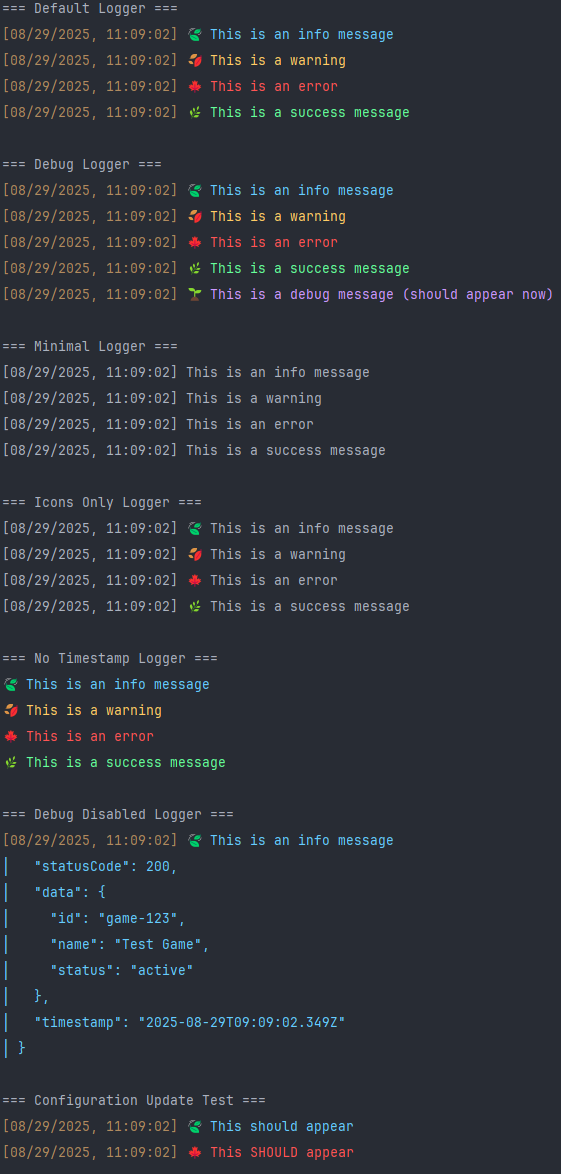
Features
- Colorful log messages with RGB precision
- Emoji icons for visual distinction
- Timestamp support with date and time
- Multiple log levels (error, warn, info, success, debug)
- Configurable debug mode
- Object logging support with clear borders
- Automatic Promise resolution in logged data
- Runtime configuration updates
- Zero dependencies
Installation
npm install leaf-loggerUsage
Basic Usage
const LeafLogger = require('leaf-logger');

const logger = LeafLogger();

logger.info('This is an info message');
logger.warn('This is a warning');
logger.error('This is an error');
logger.success('This is a success message');
logger.debug('This is a debug message'); // Only visible if `debug` option is true
Object Logging
LeafLogger supports logging objects as additional data. It will automatically format and border the JSON output.
const logger = LeafLogger({ level: 'debug' });

// Log an object with your message
logger.info('User login', {
    userId: 12345,
    username: 'john_doe',
    timestamp: new Date().toISOString()
});
// Output will include:
// [YYYY-MM-DD, HH:MM:SS] 🍃 User login
// │ {
// │   "userId": 12345,
// │   "username": "john_doe",
// │   "timestamp": "YYYY-MM-DDTHH:MM:SS.sssZ"
// │ }

logger.error('Database connection failed', {
    host: 'localhost',
    port: 5432,
    error: 'Connection timeout'
});
Configuration
You can customize the logger behavior by passing a configuration object during initialization:
const logger = LeafLogger({
    level: 'debug',     // Minimum log level to display
    timestamp: true,    // Show timestamps
    colors: true,       // Enable colored output
    icons: true,        // Show emoji icons
    debug: false        // Enable/disable debug messages independently
});
Runtime Configuration Updates
The logger's configuration can be updated after it has been initialized using the updateConfig method.
const logger = LeafLogger({ level: 'info', colors: true });

logger.info('This message is colorful.'); // Output with colors

logger.updateConfig({ colors: false, timestamp: false }); // Update configuration

logger.warn('This message is not colorful and has no timestamp.'); // Output without colors or timestamp
Log Levels
Available log levels (in order of priority, from lowest to highest numerical value):
0. error - Critical issues
warn- Warning messagesinfo/success- Informational messagesdebug- Debugging information
When you set a level in the configuration, all messages at that level and higher priority will be displayed:
const infoLogger = LeafLogger({ level: 'info' }); // Shows info, success, warn, error
infoLogger.info('Visible info');
infoLogger.warn('Visible warning');
infoLogger.debug('Hidden debug'); // level: info (2), debug: 3. debug will not be shown
                                // unless `debug: true` in config.

const debugLogger = LeafLogger({ level: 'debug', debug: true }); // Shows all messages
debugLogger.debug('Visible debug');
Debug Configuration
The debug option allows you to control debug messages independently of the main level setting.
- If
debug: true, debug messages will always be shown. - If
debug: false, debug messages will never be shown, even iflevelis set to'debug'.
// Enable debug messages even if the general level is higher
const debugOnLogger = LeafLogger({
    level: 'info', // Info and above are visible
    debug: true    // Debug messages will *also* show
});
debugOnLogger.info('Info message (visible)');
debugOnLogger.debug('Debug message (visible due to debug: true)', { var: 1 });

// Disable debug messages completely, even if log level is debug
const debugOffLogger = LeafLogger({
    level: 'debug', // Debug level is set
    debug: false    // But debug messages are explicitly disabled
});
debugOffLogger.info('Info message (visible)');
debugOffLogger.debug('Debug message (hidden due to debug: false)');
Promise Handling
LeafLogger automatically detects if your logged data contains Promise values (either directly, in an array, or nested within an object). It will then asynchronously resolve these promises before serializing and logging the data, ensuring your logs always show the final resolved state.
const logger = LeafLogger({ level: 'debug' });

// Logging a Promise directly
const userDataPromise = Promise.resolve({ id: 123, name: 'John Doe' });
logger.info('User data fetched', userDataPromise);
// Output will show the resolved user data

// Logging an object containing Promises
const apiResponsePromise = Promise.resolve({
    status: 'success',
    detail: 'Operation completed'
});
logger.info('API response received', {
    statusCode: 200,
    timestamp: new Date().toISOString(),
    result: apiResponsePromise,
    nested: {
        info: 'some more data',
        anotherPromise: Promise.resolve('resolved nested promise')
    }
});
// Output will show the resolved status and data after promises are settled.
Configuration Options
| Option | Type | Default | Description |
|-------------|-----------|-----------|------------------------------------------------------------------------------|
| level | string | 'info' | Minimum log level to display (error, warn, info, success, debug) |
| timestamp | boolean | true | Show/hide timestamps with date and time |
| colors | boolean | true | Enable/disable colored output |
| icons | boolean | true | Show/hide emoji icons |
| debug | boolean | false | Enable/disable debug messages. If true, debug messages are always shown. If false, they are never shown, overriding level. |
Examples
Minimal Output
const minimalLogger = LeafLogger({
    timestamp: false,
    colors: false,
    icons: false
});

minimalLogger.info('Simple message');
// Output: Simple message
Timestamp Only
const timeLogger = LeafLogger({
    colors: false,
    icons: false
});

timeLogger.info('Timestamped message');
// Output: [YYYY-MM-DD, HH:MM:SS] Timestamped message
Colorful with Icons
const visualLogger = LeafLogger();

visualLogger.error('Critical error!');
// Example Output: [2025-08-28, 16:30:25] 🍁 Critical error!
Object Logging
const logger = LeafLogger({ level: 'debug' });

logger.info('User action', {
    userId: 12345,
    action: 'file_upload',
    fileName: 'document.pdf',
    fileSize: '2.3MB'
});
// Example Output:
// [2025-08-28, 16:30:25] 🍃 User action
// │ {
// │   "userId": 12345,
// │   "action": "file_upload",
// │   "fileName": "document.pdf",
// │   "fileSize": "2.3MB"
// │ }
Debug Control
const logger = LeafLogger({
    level: 'info',
    debug: true
});

logger.info('Info message');
logger.debug('Debug message', { variable: 'value' });
// Example Output:
// [2025-08-28, 16:30:25] 🍃 Info message
// [2025-08-28, 16:30:25] 🌱 Debug message
// │ {
// │   "variable": "value"
// │ }
Log Levels Reference
| Level | Color | Icon | Use Case |
|-----------|-----------|------|------------------------------|
| error | Red | 🍁 | Critical errors and failures |
| warn | Amber | 🍂 | Warnings and non-critical issues |
| info | Sky Blue | 🍃 | General informational messages |
| success | Mint Green| 🌿 | Successful operations and positive confirmations |
| debug | Lavender | 🌱 | Detailed debugging information |
License
MIT © 2025