
leaflet.magnifyingglass
v1.0.0
Published
Leaflet Magnifying Glass ========================

Maintainers
 raomaiping
Readme
Leaflet Magnifying Glass
This plugin allows you to add a "magnifying glass" effect to a Leaflet map, able to display a portion of the map in a different zoom (and actually display different content).
See it in action:
- Default behavior, following mouse movement
- Activated with a control button
- Multiple fixed glasses, with different map looks
Support
The development version of the plugin (on the master branch) is targeted at the 1.* version of Leaflet.
For a version of the plugin compatible with the 0.7.* Leaflet releases, use the leaflet-0.7.2 branch.
Not tested on mobile browsers.
Screenshot
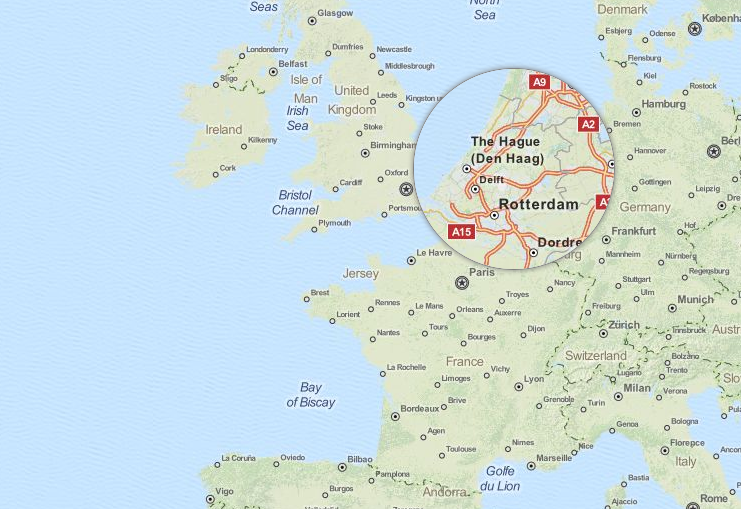
Default look of the magnifying glass, using the same tile background as the main map and a zoom level offset set to 3.
Usage
- Add the style sheet and script file to your page;
- Instantiate a magnifying glass and add it to the map like any other layer:
var magnifyingGlass = L.magnifyingGlass({
    layers: [ ... ]
});

map.addLayer(magnifyingGlass);
Inner layers
For it to display something, you need to pass layers to the constructor. You can simply give a L.TileLayer, but any other type of layers too.
Leaflet layer objets can't be shared between maps. So, don't re-use layer objects already in use by the main map. For example, if you want to use the same tile background on your main map and in the magnifying glass, you need to instantiate two different L.TileLayer objects:
// Share the same tile url...
var tileUrl = 'http://{s}.tile.openstreetmap.org/{z}/{x}/{y}.png';
// but use two independant TileLayer objects
var mapTiles = L.tileLayer(tileUrl),
    magnifiedTiles = L.tileLayer(tileUrl);

var map = L.map('map', {
    center: [0, 0],
    zoom: 5,
    layers: [ mapTiles ]
});

var magnifyingGlass = L.magnifyingGlass({
    layers: [ magnifiedTiles ]
}).addTo(map);
Options
| Option | Type | Default | Description |
| --- | --- | --- | --- |
| radius | Integer | 100 | The radius of the magnifying glass, in pixels. |
| zoomOffset | Integer | 3 | The zoom level offset between the main map zoom and the magnifying glass. |
| fixedZoom | Integer | -1 | If different than -1, defines a fixed zoom level to always use in the magnifying glass, ignoring the main map zoom and the zoomOffet value. |
| fixedPosition | Boolean | false | If true, the magnifying glass will stay at the same position on the map, not following the mouse cursor. |
| latLng | LatLng | [0, 0] | The initial position of the magnifying glass, both on the main map and as the center of the magnified view. If fixedPosition is true, it will always keep this position. |
| layers | ILayer[] | [] | Set of layers to display in the magnified view. These layers shouldn't be already added to a map instance (see note above). |
Methods
| Method | Description |
| --- | --- |
| getMap() | Returns the L.Map instance used by the magnifying glass. You can use it for example to add/remove magnified layers on the fly. |
License
MIT.