
leaflet.styledlayercontrol
v1.0.0
Published
A Leaflet plugin that implements the management and control of layers by organization into categories or groups. The StyledLayerControl class extends the original L.control.layers control. The plugin uses HTML5 and CSS3 to style the presentation in a mode

Maintainers
 alexander9306
Readme
Leaflet.StyledLayerControl
What is Leaflet.StyledLayerControl?
A Leaflet plugin that implements the management and control of layers by organization into categories or groups. The StyledLayerControl class extends the original L.control.layers control. The plugin uses HTML5 and CSS3 to style the presentation in a modern way. The initial ideas were based in the plugin: Leaflet.Groupedlayercontrol
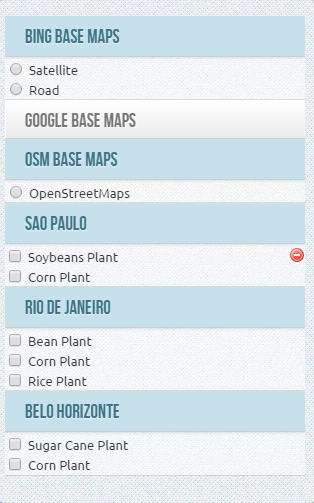
Tested with Leaflet 0.7.3
Main features
- Organization of the layers into groups or categories. The layers can be an overlay or basemap
- Groups may appear initially expanded or not
- Groups can be opened exclusively
- A layer can be defined as removable
- The main container control behaves responsively, automatically adjusting the vertical resizing the map and the screen
Live Demos
- A map using StyledLeafletControl - not exclusive group select
- A map using StyledLeafletControl with exclusive group select
How to use?
1 - Create the reference to Leaflet
	<link rel="stylesheet" href="http://cdn.leafletjs.com/leaflet-0.7.3/leaflet.css" />
	<script src="http://cdn.leafletjs.com/leaflet-0.7.3/leaflet.js"></script>
2 - Insert references to styledLayerControl.css and styledLayerControl.js
	<link rel="stylesheet" href="../css/styledLayerControl.css" />
	<script src="../src/styledLayerControl.js"></script>
3 - Define your layers (base maps and overlays)
	// Google layers
	var g_roadmap   = new L.Google('ROADMAP');
	var g_satellite = new L.Google('SATELLITE');
	var g_terrain   = new L.Google('TERRAIN');

	// OSM layers
	var osmUrl='http://{s}.tile.osm.org/{z}/{x}/{y}.png';
	var osmAttrib='Map data © <a href="http://openstreetmap.org">OpenStreetMap</a> contributors';
	var osm = new L.TileLayer(osmUrl, {attribution: osmAttrib});

	// ... more Base Maps

	// Sao Paulo Soybeans Plant
	var soybeans_sp = new L.LayerGroup();
	L.marker([-22, -49.80]).addTo(soybeans_sp),
	L.marker([-23, -49.10]).addTo(soybeans_sp),
	L.marker([-21, -49.50]).addTo(soybeans_sp);

	// Rio de Janeiro Corn Plant
	var corn_rj = new L.LayerGroup();
	L.marker([-22, -43.20]).addTo(corn_rj),
	L.marker([-23, -43.50]).addTo(corn_rj);

	// ... more Overlays
4 - Create the Leaflet Map Object and add the layer that will be default basemap
	var map = L.map('map', {
		center: [-16, -54],
		zoom: 4
	});

	map.addLayer(g_roadmap);
5 - Define structure of groups and layers of basemap
	var baseMaps = [
					{
						groupName : "Google Base Maps",
						expanded : true,
						layers    : {
							"Satellite" :  g_satellite,
							"Road Map"  :  g_roadmap,
							"Terreno"   :  g_terrain
						}
					}, {
						groupName : "OSM Base Maps",
						layers    : {
							"OpenStreetMaps" : osm
						}
					}, {
						groupName : "Bing Base Maps",
						layers    : {
							"Satellite" : bing1,
							"Road"      : bing2
						}
					}
	];
5 - Define structure of groups and layers of overlays
	var overlays = [
					 {
						groupName : "Sao Paulo",
						expanded  : true,
						layers    : {
							"Soybeans Plant" : soybeans_sp,
							"Corn Plant" 	 : corn_sp
						}
					 }, {
						groupName : "Rio de Janeiro",
						expanded  : true,
						layers    : {
							"Bean Plant"     : bean_rj,
							"Corn Plant" 	 : corn_rj,
							"Rice Plant"	 : rice_rj
						}
					 }, {
						groupName : "Belo Horizonte",
						layers    : {
							"Sugar Cane Plant"	: sugar_bh,
							"Corn Plant" 	 	: corn_bh
						}
					 }
	];
6 - Declare which layers can be deleted and visible (create the removable property with true in the options StyledLayerControl that can be created in the layer object). Each layer declared as removable = true will show an icon to delete the user to remove the layer
    soybeans_sp.StyledLayerControl = {
		removable : true,
		visible : false
	}
	// ... more layers
7 - Define the options for StyledLayerControl
container_width - define the main container width - the default is automatic width
container_maxHeight - define the max height to the main container - the default is automatic depending of map and screen height
group_maxHeight - define the max height space of group container - the default is 100px
exclusive - define that the opened group is exclusive
All the properties are optional
You can also include all properties available under "Options" of control L.control.layers in the same list
	var options = {
		container_width 	: "300px",
		container_maxHeight : "350px",
		group_maxHeight     : "80px",
		exclusive       	: false
	};
8 - Create the StyledLayerControl
	var control = L.Control.styledLayerControl(baseMaps, overlays, options);
	map.addControl(control);
How to add and remove layers and groups dynamically ?
- To add a new base layer dynamically, simply use addBaseLayer and declare that the group layer will belong. Also note that to add a new group, simply specify a group name that does not exist yet, and a new group will be created.
	control.addBaseLayer( bing1, "Bing Satellite", {groupName : "Bing Maps", expanded: true} );
control.addBaseLayer( bing2, "Bing Road", {groupName : "Bing Maps"} );- To add a new overlay layer dynamically, simply declare the group that de layer will belong.
control.addOverlay( corn_bh, "Corn Plant", {groupName : "Belo Horizonte"} );- To remove a layer dynamically, specify the instance variable of the layer using the method removeLayer. (the method ignore the removable property of layers )
control.removeLayer( corn_sp );- To remove a group, specify the name of the group in the removeGroup method. By doing so all layers belonging to the group will also be excluded
control.removeGroup( "Rio de Janeiro");How to select and unSelect layers dynamically ?
- To force select a layer dynamically, simply use selectLayer function like this :
control.selectLayer( corn_sp );- So.. to un-select the layer :
control.unSelectLayer( corn_sp );How to select and unSelect group layers dynamically ?
- To force select all layer of a group, use like this :
control.selectGroup( "Rio de Janeiro" );- So.. to un-select the all layer of group :
control.unSelectGroup( "Rio de Janeiro" );License
This work is licensed under a Creative Commons Attribution 3.0 Unported License.