
leaflet.tilelayer.colorfilter
v2.0.0
Published
A simple and lightweight Leaflet plugin to apply CSS filters on map tiles.

Maintainers
 xtk93x
Readme
Leaflet.TileLayer.ColorFilter
A simple and lightweight Leaflet plugin to apply CSS color filter on map tiles.
Important: Breaking Changes in ColorFilter v2.x
- For existing projects on Leaflet 1.x, you can continue using v1.2.5 (release, readme) of this plugin without any changes.
- With the release of Leaflet 2.0, this plugin has been updated to v2.x. This version introduces breaking changes to simplify usage and ensure compatibility. For details, please see the Upgrading section.
Demos
Installation
NPM:
npm install --save leaflet.tilelayer.colorfilterOr download a release from the repository.
Usage
This plugin can be used with Leaflet 2 and it's legacy versions.
Leaflet 1.x (and older)
For legacy versions of Leaflet, you need to include the leaflet-tilelayer-colorfilter-global.min.js file after Leaflet.
<script src="https://unpkg.com/[email protected]/dist/leaflet.js"></script>
<script src="leaflet-tilelayer-colorfilter-global.min.js"></script>
<script>
const map = L.map('map').setView([51.505, -0.09], 13);
const tilelayer = L.tileLayer('https://tile.openstreetmap.org/{z}/{x}/{y}.png', {
attribution: '© <a href="http://www.openstreetmap.org/copyright">OpenStreetMap</a>',
colorFilter: ['invert:100%', 'grayscale:50%']
}).addTo(map);
</script>A complete, working example can be found in example/using-leaflet-legacy-1.9.4.html, and example/using-leaflet-legacy-0.7.0.html.
Leaflet 2.x (Global)
For Leaflet 2 using global scripts, include leaflet-tilelayer-colorfilter-global.min.js.
<script src="https://unpkg.com/[email protected]/dist/leaflet-global.js"></script>
<script src="leaflet-tilelayer-colorfilter-global.min.js"></script>
<script>
const map = new L.Map('map').setView([51.505, -0.09], 13);
const tilelayer = new L.TileLayer('https://tile.openstreetmap.org/{z}/{x}/{y}.png', {
attribution: '© <a href="http://www.openstreetmap.org/copyright">OpenStreetMap</a>',
colorFilter: ['invert:100%', 'grayscale:50%']
}).addTo(map);
</script>A complete, working example can be found in example/using-leaflet-2.0.0-global.html.
Leaflet 2.x (Module)
When using Leaflet 2 as an ES module, you can import the plugin directly.
<script type="importmap">
{
"imports": {
"leaflet": "https://unpkg.com/[email protected]/dist/leaflet.js"
}
}
</script>
<script type="module">
import { Map, TileLayer } from 'leaflet';
import 'leaflet-tilelayer-colorfilter';
const map = new Map('map').setView([51.505, -0.09], 13);
const tilelayer = new TileLayer('https://tile.openstreetmap.org/{z}/{x}/{y}.png', {
attribution: '© <a href="http://www.openstreetmap.org/copyright">OpenStreetMap</a>',
colorFilter: ['invert:100%', 'grayscale:50%']
}).addTo(map);
</script>A complete, working example can be found in example/using-leaflet-2.0.0-module.html. To run this example, you need to serve it through a local web server. This is because browsers restrict the use of ES modules (import/export) from local file paths for security reasons. A simple way to do this is to run python3 -m http.server in the project's root directory and then navigate to http://localhost:8000/example/using-leaflet-2.0.0-module.html in your browser.
Technical Note. The plugin is designed to be imported for its side effects, which means it modifies Leaflet's
TileLayerdirectly rather than exporting a new class. This is why the import isimport 'leaflet-tilelayer-colorfilter';. This design prevents conflicts with other plugins; if this plugin exported its ownTileLayersubclass, you couldn't use it with other plugins that do the same. By augmenting the originalTileLayer, features from multiple plugins can be used together on the same layer.
Reference
TileLayer(url, options)
After succesfully importing the plugin, TileLayer will have the new option colorFilter inside options parameter.
colorFilter accepts an array of string filters with the following format:
| Filter | Aliases | Description | Example | Default |
| --- | --- | --- | --- | --- |
| Blur | blur | Applies a Gaussian blur filtering measured in pixels | ['blur:2px'] | 0px |
| Brightness | brightness, bright, bri | Controls the brightness of tile image | ['brightness:150%'] | 100% |
| Contrast | contrast, con | Changes the color contrast of tiles | ['contrast:150%'] | 100% |
| Grayscale | grayscale, gray | Changes the color of tiles to a grayscale | ['grayscale:100%'] | 0% |
| Hue-Rotate | hue-rotate, hue-rotation, hue | Applies a hue rotation in degrees on tile colors | ['hue:180deg'] | 0deg |
| Opacity | opacity, op | Defines the opacity of the tiles | ['opacity:60%'] | 100% |
| Invert | invert, inv | Invert the tile colors | ['invert:100%'] | 0% |
| Saturate | saturate, saturation, sat | Saturates the tile colors | ['saturate:150%'] | 100% |
| Sepia | sepia, sep | Converts the tile colors to sepia | ['sepia:0%'] | 0% |
For CSS Filter Browser Compatibility please, refer to Browser Compatibility.
myTileLayer.updateColorFilter(newFilter)
On the fly changes on filter is supported with the updateColorFilter function (demo):
let map = L.map('map').setView([51.505, -0.09], 14);
let oldFilter = [
'grayscale:100%',
'invert:100%',
]
let myTileLayer = L.tileLayer('https://tile.openstreetmap.org/{z}/{x}/{y}.png', {
attribution: '© <a href="http://www.openstreetmap.org/copyright">OpenStreetMap</a>',
colorFilter: oldFilter,
}).addTo(map);
myTileLayer.updateColorFilter(['brightness:110%', 'hue:90deg', 'saturate:120%']);Useful Tips
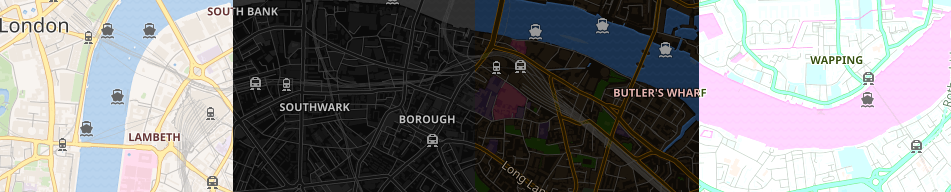
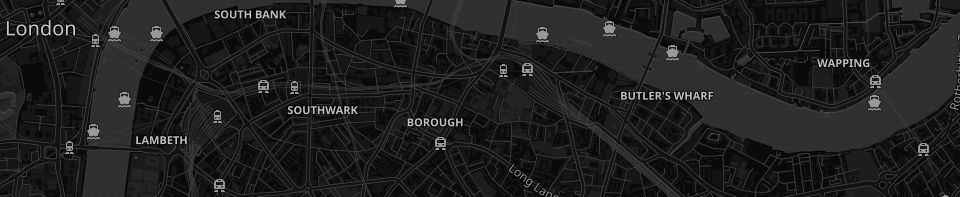
The following settings is enough to make most of the light maps to become dark:
let myFilter = [
     'grayscale:100%',
     'invert:100%',
]
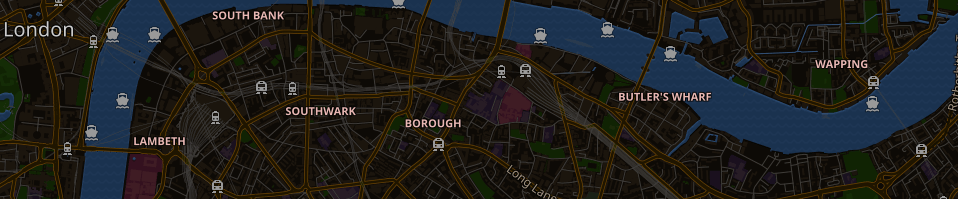
To keep water and street colors, a hue rotation around 180deg is very helpful to correct the color inversion:
let myFilter = [
     'hue:180deg',
     'invert:100%',
]
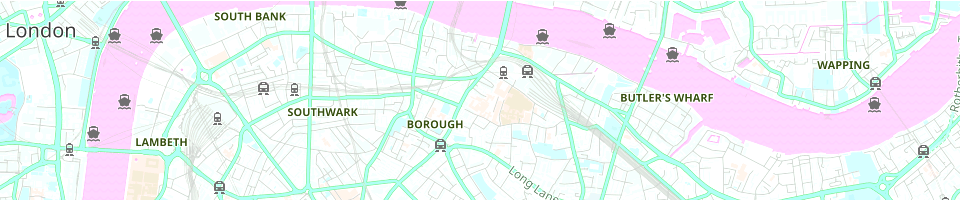
Light maps may also look good:
let myFilter = [
     'brightness:110%',
     'hue:90deg',
     'saturate:120%',
]
The filter order matters:
let leftColoFilter = [
    'invert:100%',
    'brightness:115%',
    'hue:186deg',
]

let rightColorFilter = [
    'hue:186deg',
    'brightness:115%',
    'invert:100%',
]
Upgrading to Leaflet.TileLayer.ColorFilter v2.x
If you are using Leaflet 1.x, you can either continue using v1.2.5 of this plugin without any changes (see the v1.2.5) or upgrade to v2.x by following the steps below. To use Leaflet 2, you must use v2.x of this plugin.
When upgrading this plugin to v2.x, you will need to:
Update the imports according to the Leaflet version you are using.
- For Leaflet 2 in Global Script mode (or Leaflet 1.x and older), use
leaflet-tilelayer-colorfilter-global.min.js. - For Leaflet 2 in Module mode, use
leaflet-tilelayer-colorfilter.min.js.
- For Leaflet 2 in Global Script mode (or Leaflet 1.x and older), use
Update your code to use the new syntax. For the correct syntax, refer to the example that matches your Leaflet version: Leaflet 1.x and older, Leaflet 2.x Global, or Leaflet 2.x Module. In summary:
- The plugin now extends
TileLayerdirectly. - The
filteroption has been renamed tocolorFilter. - The
updateFilter()method has been renamed toupdateColorFilter().
- The plugin now extends
For a full list of changes, see the CHANGELOG.md.
MIT License
This project is licensed under the MIT License. (c) 2018-2025, Cláudio T. Kawakani.