
leagueofagents-cli
v0.1.3
Published
Point your coding agent at any file or block of code, then see every change on a map of your repo. Works with Claude Code, Codex, Cursor and more.

Maintainers
 jeeb
jeebReadme
What is League of Agents?
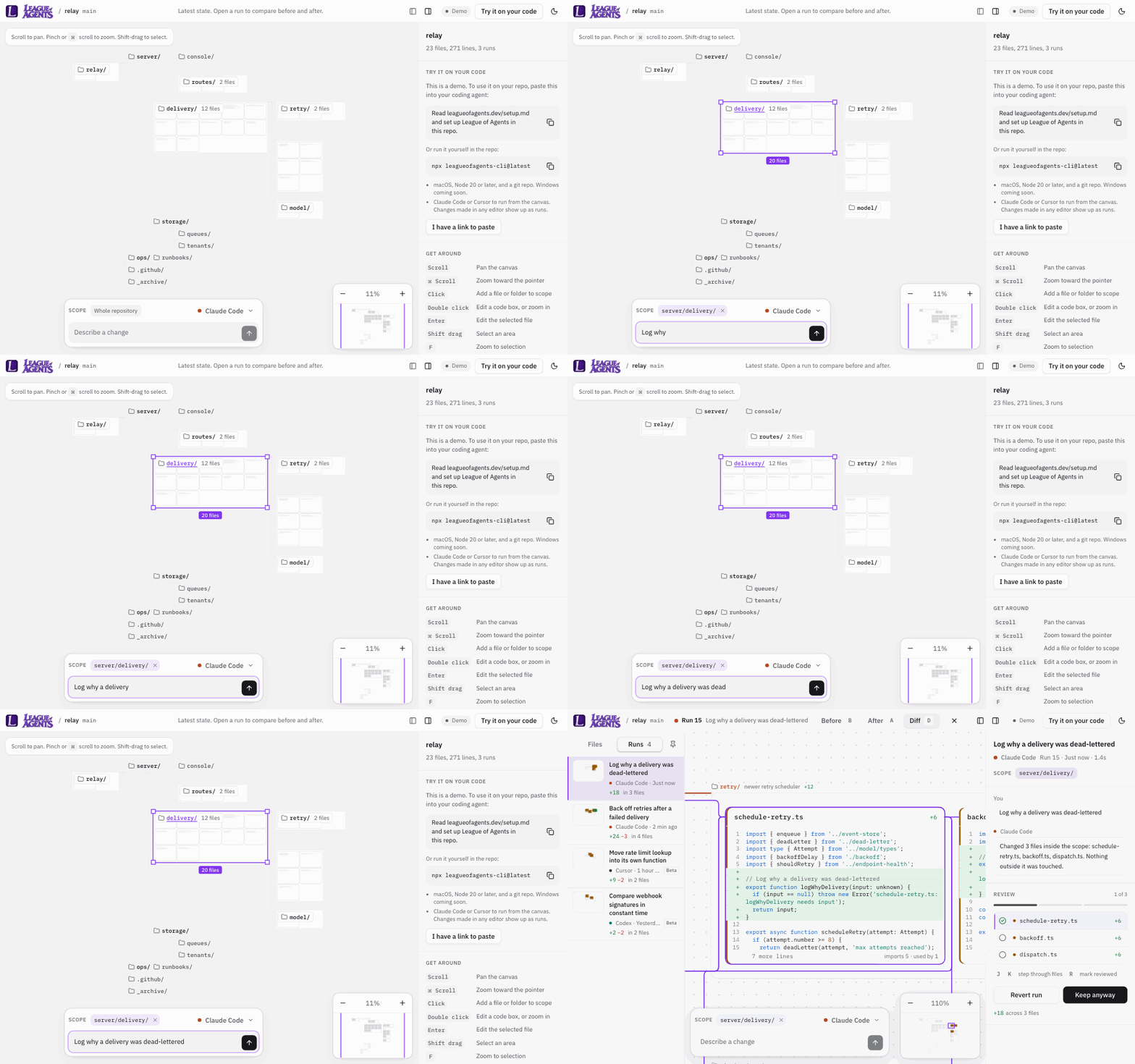
See every change your agents make. League of Agents is a map of your codebase where you direct coding agents and review their work.
Coding agents change more code than anyone can review line by line. League of Agents shows your project as a map, and every change an agent makes lands on it. You see what changed, where, and whether it still works, then keep it or undo it.
It runs on your computer, works with the agents you already use, and is open source.
What you can do
- See your project at once. Its folders and code files on one map. Zoom out for the shape, zoom in to read the code.
- Point an agent at exact lines. Select a file, a folder, or a few lines, and describe the change. With the hooks on, Claude Code is blocked from editing outside your selection with its edit tools. The hooks are off until you say yes: the first
npx leagueofagents-cli@latestin a terminal asks once and remembers, and without a terminal they stay off unless you pass--hooks. To check, look for"hooks": truein.loa/bridge.json. Codex and Cursor edits outside your selection are flagged after the run, and so are Claude Code's when the hooks are off or it uses a shell command. - Edit files yourself. Double-click a file's code to open it in the editor. Saved edits are recorded and can be undone like any agent run.
- Update what depends on a change. Rename a function, then ask the agent to update every file that uses it. The diff of your change goes into the agent's prompt. The map shows each file it touched.
- Review before you keep. Switch between Before, After and Diff, step through changed files, then keep the run or undo it in one click.
- Run your checks automatically. Tests and type checks run after each run that changes files, so you know if it still works.
Quick start
Open a terminal in any project folder that is a git repo, then pick one:
Let your agent set it up. Paste this into Claude Code, Codex or Cursor:
Read leagueofagents.dev/setup.md and set up League of Agents in this repo.Or run it yourself:
npx leagueofagents-cli@latestWhat happens next:
- League of Agents starts in the background and opens your repo as a map in your browser.
- In Chrome, Edge, Brave and Arc, it opens on leagueofagents.dev. The browser asks once to let the site reach your computer: choose Allow. In Safari and Firefox, it opens the local app, which needs no permission.
- Select a file, describe a change, and press Enter.
Requirements
- macOS. Linux may work but is untested; Windows isn't supported yet.
- git. On a Mac, this comes with Apple's command line developer tools:
xcode-select --install - Node 20 or later
- A git repository
- Claude Code installed and logged in, to run agents from the map. Without it, changes from any editor still show up.
Works with
Claude Code, from the map or your terminal. Codex and Cursor are in beta. Changes from any other editor or agent show up through watch mode.
Built and tested with Claude Code. Codex and Cursor support follows their published formats and passes tests against them, but hasn't been fully verified with real runs yet.
Using it
From the map. Select files, folders or lines, pick an agent, describe the change and press Enter. When the run finishes, review it and keep it or undo it. With a finished run selected, your next prompt continues the same session. Remove the "Follow-up" chip to start fresh.
Selected lines are held by their text and the lines around them, not by their numbers. If edits, a branch switch or a rebase move the code, the selection follows it. If the code changed, was removed, or can't be told apart from an identical copy, the selection says so and nothing runs until you select again. When an agent edits inside your selection, the selection takes the new lines.
Edits made during an agent's run are counted in that run, including your own. One run happens at a time.
From your terminal. Use Claude Code, Codex or Cursor as usual. With the hooks on, each prompt you send becomes a run on the map, titled by the prompt.
From any editor. Just work. When files you changed go quiet for a few seconds, League of Agents records them as one run, such as "Edited main.py". Files git ignores and new files that usually hold secrets (listed below) are never recorded, and branch switches and pulls never make a run.
A rename is recorded as the old file deleted and a new file created, so the file gets a new place on the map.
Checks
If your repo has none set up, League of Agents looks for test and typecheck scripts and pytest, and offers to turn them on. They're kept in your home folder, outside your repo, unless you choose to share them with your team in loa.config.json. Checks a repo commits in its loa.config.json are offered with their commands, and run only once you turn them on in your copy; if the list changes, they wait for you again. A check that can't run on your machine, because something it needs isn't installed, shows as "Couldn't run" instead of failing, and can be turned off in one click. See loa.config.example.json to write your own.
What it writes on your machine
In your repo:
.loa/: run records, the bridge's port and token, a private snapshot index, a copy of the bridge the hooks run, and a log. It's kept out of git through.git/info/exclude, and the bridge won't start in a repo that commits it.- Snapshots: git commits under private
refs/loa/refs, stored in.git/objects. They never touch your branch or staging area. loa.config.json, only if you choose to share your checks with your team.
In your home folder:
~/.config/league-of-agents/repos/: one file per repo with the checks you turned on or approved there. It's outside the repo, so nothing a repo contains can allow its own commands.
In agent settings, only after you say yes to the hooks:
- Claude Code:
.claude/settings.local.jsonin the repo, kept out of git. - Codex:
.codex/hooks.jsonin the repo, kept out of git if League of Agents created it. - Cursor:
~/.cursor/hooks.jsonin your home folder. Cursor reads project hooks only from the folder it opened, which is often above the repo.
Your own hooks in these files are never changed. Your browser also keeps the bridge's port and token, and your panel and theme choices, in its own storage.
To remove it:
| What | How |
|---|---|
| Hooks, in all three files | npx leagueofagents-cli@latest hooks remove. A file League of Agents created is deleted; a file you had is put back as it was. |
| Everything in the repo: hooks, refs/loa/, .loa/ and its lines in .git/info/exclude, and the checks you allowed for it | npx leagueofagents-cli@latest uninstall |
| Snapshot objects in .git/objects | Unreferenced after uninstall. Git prunes them on its own after two weeks, or right away with git gc --prune=now. |
| loa.config.json | Delete it, if you created it. |
| What your browser keeps | Click Disconnect, or clear the site's data for leagueofagents.dev. |
What it sends
League of Agents never uploads your code anywhere. Your code goes only to the agent you authorized.
- The bridge talks to 127.0.0.1 only: the app in your browser, and the hooks of your agents. It makes no other network requests. It runs git locally and never fetches or pushes. When it starts, it opens your browser on leagueofagents.dev or on the local app, and it runs
claude auth statusto see whether Claude Code is logged in. - leagueofagents.dev serves static files: the page, its scripts, fonts and images. It talks to the bridge straight from your browser, so your code, prompts and runs go between your browser and your computer only. It counts page views with Vercel Web Analytics: the page's path, without anything after
?or#; the site that linked to it; country, region and city, worked out from the request; and the operating system, browser and kind of device. No cookies. The app the bridge serves on your computer counts nothing. Details are on the privacy page. - Installing downloads the package from the npm registry.
- Your agent gets your prompt and a list of the selected files or lines, as paths and line numbers. "Update what depends on this" also puts the diff of your change in the prompt. The agent sends what it reads and is given to its own provider, under that provider's terms.
- Your checks run the commands you turned on. What they do is up to them.
How it starts your agent
When you run an agent from the map, the bridge starts it in your repo with these commands. <prompt> is your prompt with the scope written above it.
| Agent | Command |
|---|---|
| Claude Code | claude -p <prompt> --output-format stream-json --verbose --permission-mode acceptEdits |
| Cursor | cursor-agent -p --force --output-format stream-json <prompt> |
| Codex | codex exec --json --sandbox workspace-write <prompt> |
A follow-up adds --resume <session> for Claude Code and Cursor, and resume <session> for Codex. What each permission flag allows:
- Claude Code,
--permission-mode acceptEdits: it creates and edits files in the repo without asking, and runsmkdir,touch,rm,rmdir,mv,cpandsedthere without asking. Other shell commands and network requests need a rule you set in Claude Code; with-pthere is no one to ask, so they're denied. (permission modes, non-interactive runs) The scope lock is one of the hooks, so it works only when you've said yes to the hooks. It checks Claude Code's edit tools only. A change made with one of those shell commands isn't blocked; it's flagged after the run if it's outside your selection. - Cursor,
-p --force: it runs shell commands without asking.-pgives it every tool, including write and shell, and--forceallows commands unless you've explicitly denied them. (CLI parameters) - Codex,
exec --sandbox workspace-write: it runs commands in the repo without asking. It reads and edits files and runs commands inside the repo. Network access is off, and it can't go beyond the repo. (non-interactive mode, approvals and security)
Privacy and security
League of Agents never uploads your code anywhere. Your code goes only to the agent you authorized. What it sends, and to where, is above. Who can reach League of Agents on your computer, and how it's protected, is in docs/THREAT-MODEL.md. Report security issues privately, as SECURITY.md explains.
Snapshots leave out files git ignores, and any file not yet committed with one of these names, in any folder: .env, .env.*, *.pem, *.key, *.p12, *.pfx, *.jks, *.keystore, *.kdbx, id_rsa, id_dsa, id_ecdsa, id_ed25519, .npmrc, .pypirc, .netrc, .git-credentials, .htpasswd, credentials.json, secrets.json, secrets.yaml, secrets.yml, service-account*.json, *.tfvars. This list is not complete: a secret with any other name is snapshotted like any file, so keep secrets in files git ignores. A file already committed is in your repo's history, and snapshots include it.
Snapshots stay on your computer unless you send them: git push, git push --all and git push --tags never include refs/loa/, but git push --mirror sends every ref, refs/loa/ included, and so does copying the .git folder. Run uninstall first if you mirror a repo.
Limits
- macOS. Linux may work but is untested. Windows isn't supported yet.
- Remote machines, SSH and dev containers aren't supported. League of Agents must run on the same computer as your browser.
- The map shows up to 1,500 code files, and the first 400 lines of each. Files over 400 KB aren't on the map. Diffs keep a file's first 4,000 lines.
- Non-code files, such as images, are in snapshots and undo, but not on the map.
- Files git ignores and new files that usually hold secrets are never recorded.
- One run at a time in a repo.
- The website needs Chrome, Edge, Brave or Arc. Safari and Firefox use the local app instead.
Commands and options
| Command | What it does |
|---|---|
| npx leagueofagents-cli@latest | Starts League of Agents in the background and opens your browser |
| ... status | Shows whether it's running, and its link |
| ... stop | Stops it |
| ... uninstall | Removes everything it added to the repo |
| ... hooks remove | Removes only its hooks |
| Option | Default | What it does |
|---|---|---|
| --port, LOA_PORT | First free port from 43210 | Port League of Agents listens on |
| --web, LOA_WEB_URL | https://leagueofagents.dev | Website to open in Chrome-family browsers |
| --hooks, --no-hooks | Asks once | Add or skip the agent hooks without asking |
| LOA_CLAUDE_BIN | claude | Claude Code command |
| LOA_CODEX_BIN | codex | Codex command |
| LOA_CURSOR_BIN | cursor-agent | Cursor command (newer installs may call it agent) |
How it works
League of Agents has two parts:
- The bridge (
bridge/loa.mjs) runs on your computer, inside your repo. Node 20 or later, no dependencies. Before and after each run, it snapshots your files into a git commit using a private index, so your branch and staging area are never touched. Diffs come from comparing the two snapshots. Undo restores the "before" snapshot, and asks first if a file changed again since. - The app (
web/, built with Vite, React and TypeScript) is the map you use. It's served at leagueofagents.dev and by the bridge itself.
More detail is in docs/ARCHITECTURE.md.
Development
npm --prefix web ci
npm --prefix web run build
cd ~/code/your-project
node ~/code/league-of-agents/bridge/loa.mjs
To host your own copy of the app, deploy the repo to Vercel (vercel.json sets the build), add your domain, and start the bridge with --web https://your-domain.
| Variable | Default | What it does |
|---|---|---|
| LOA_WEB_DIR | web/dist | Built app the bridge serves |
| LOA_WEB_FILE | none | Serve a single HTML file instead |
Contributing
See CONTRIBUTING.md. Contributions are accepted under the Apache License 2.0, and everyone follows the code of conduct.