
leejr-grapesjs-tui-image-editor
v0.1.9
Published
Fork of GrapesJS TOAST UI Image Editor


Readme
IMPORTANT!
this package is a FORK of the https://classic.yarnpkg.com/en/package/grapesjs-tui-image-editor
these are very likely not the droids you're looking for
GrapesJS TOAST UI Image Editor
Add the TOAST UI Image Editor on Image Components in GrapesJS
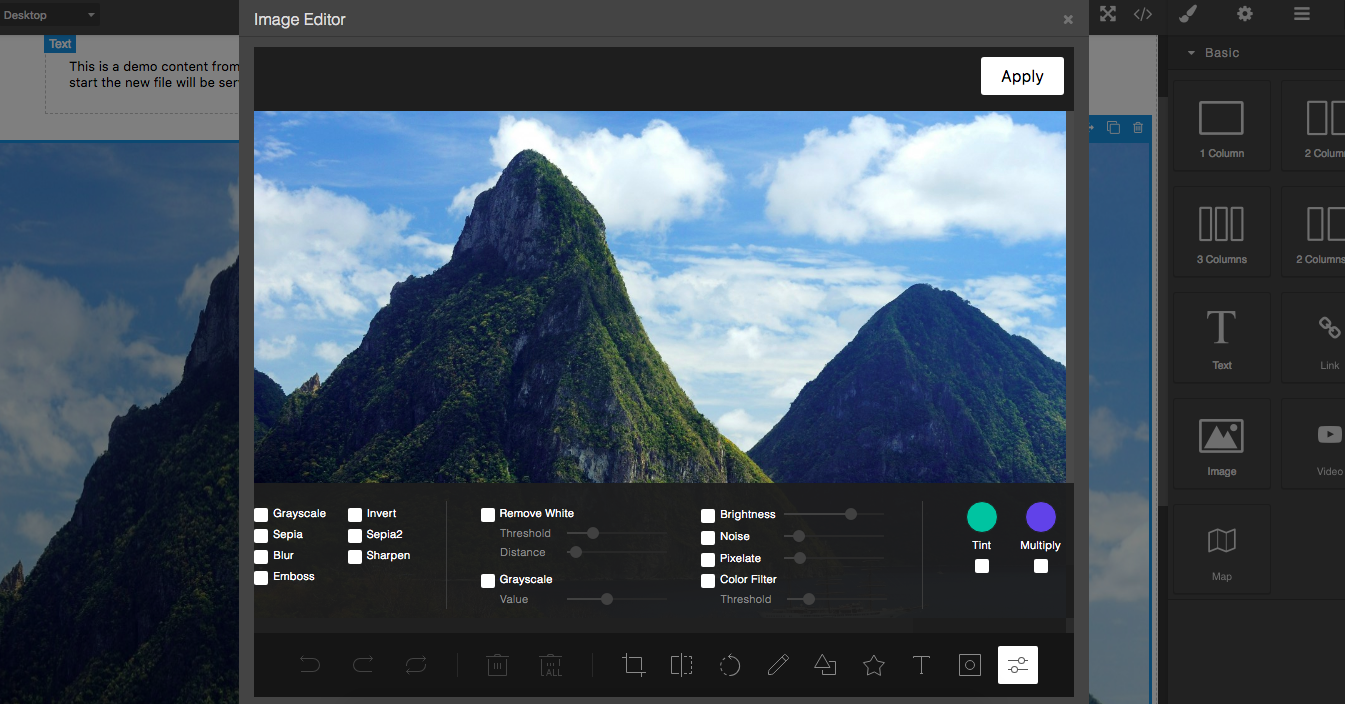
Summary
- Plugin name:
grapesjs-tui-image-editor - Commands
tui-image-editor- Open the modal with the image editor Options:target- component on which to get and update the image
Options
|Option|Description|Default|
|-|-|-
|config|TOAST UI's configuration object|{}|
|constructor|Pass the editor constructor. By default, the tui.ImageEditor will be called|``|
|labelImageEditor|Label for the image editor (used in the modal)|Image Editor|
|labelApply|Label used on the apply button|Apply|
|height|Default editor height|650px|
|width|Default editor width|100%|
|commandId|Id to use to create the image editor command|tui-image-editor|
|toolbarIcon|Icon used in the component toolbar|<svg ....|
|hideHeader|Hide the default editor header|true|
|onApply|By default, GrapesJS takes the modified image, adds it to the Asset Manager and update the target. If you need some custom logic you can use this custom 'onApply' function. onApply: (imageEditor, imageModel) => {...}|null|
|addToAssets|If no custom onApply is passed and this option is true, the result image will be added to assets|true|
|getImageURL| By default, the URL of the image to be edited will be taken from the imageModel's src value. If you need some custom logic you can use this custom 'getImageURL' function. It must return either a standard URL, or a data URL. getImageURL: (imageModel) => {...}| null|
|upload|If no custom onApply is passed, on confirm, the edited image, will be passed to the AssetManager's uploader and the result (eg. instead of having the dataURL you'll have the URL) will be passed to the default onApply process (update target, etc.)|false|
|onApplyButton|The apply button (HTMLElement) will be passed as an argument to this function, once created. This will allow you a higher customization.|null|
|icons| The TOAST UI editor isn't compiled with icons, so generally, you should download them and indicate the local path in the includeUI.theme configurations. Use this option to change them or set it to false to keep what is come in includeUI.theme. By default, the plugin will try to use the editor's remote icons (which involves a cross-origin async request, indicated as unsafe by most of the browsers) |{'menu.normalIcon.path': ...|
|script|Scripts to load dynamically in case no TOAST UI editor constructor is found|['...fabric.js', '...tui-code-snippet.js', '...tui-color-picker.js', '...tui-image-editor.min.js']|
|style|In case the script is loaded this style will be loaded too|['...tui-color-picker.css', '...tui-image-editor.css']|
Download
- CDN
https://unpkg.com/grapesjs-tui-image-editor
- NPM
npm i grapesjs-tui-image-editor
- GIT
git clone https://github.com/artf/grapesjs-tui-image-editor.git
Usage
Directly in the browser
<link href="https://unpkg.com/grapesjs/dist/css/grapes.min.css" rel="stylesheet"/>
<script src="https://unpkg.com/grapesjs"></script>
<script src="path/to/grapesjs-tui-image-editor.min.js"></script>

<div id="gjs"></div>

<script type="text/javascript">
  var editor = grapesjs.init({
      container : '#gjs',
      // ...
      plugins: ['grapesjs-tui-image-editor'],
      pluginsOpts: {
        'grapesjs-tui-image-editor': {
          config: {
            includeUI: {
              initMenu: 'filter',
            },
          },
          icons: {
            'menu.normalIcon.path': '../icon-d.svg',
            'menu.activeIcon.path': '../icon-b.svg',
            'menu.disabledIcon.path': '../icon-a.svg',
            'menu.hoverIcon.path': '../icon-c.svg',
            'submenu.normalIcon.path': '../icon-d.svg',
            'submenu.activeIcon.path': '../icon-c.svg',
          },
        }
      }
  });
</script>
Modern javascript
import grapesjs from 'grapesjs';
import tUIImageEditor from 'grapesjs-tui-image-editor';

const editor = grapesjs.init({
  container : '#gjs',
  // ...
  plugins: [tUIImageEditor],
  pluginsOpts: {
    [tUIImageEditor]: { /* options */ }
  }
  // or
  plugins: [
    editor => tUIImageEditor(editor, { /* options */ }),
  ],
});
Development
Clone the repository
$ git clone https://github.com/artf/grapesjs-tui-image-editor.git
$ cd grapesjs-tui-image-editor
Install dependencies
$ npm iStart the dev server
$ npm startLicense
BSD 3-Clause