lerna-monorepo-loki
v3.0.0-monorepo
Published
lerna dog-fooding lerna


Readme
About
Splitting up large codebases into separate independently versioned packages is extremely useful for code sharing. However, making changes across many repositories is messy and difficult to track, and testing across repositories gets complicated really fast.
To solve these (and many other) problems, some projects will organize their codebases into multi-package repositories (sometimes called monorepos). Projects like Babel, React, Angular, Ember, Meteor, Jest, and many others develop all of their packages within a single repository.
Lerna is a tool that optimizes the workflow around managing multi-package repositories with git and npm.
Lerna can also reduce the time and space requirements for numerous copies of packages in development and build environments - normally a downside of dividing a project into many separate NPM packages. See the hoist documentation for details.
What does a Lerna repo look like?
There's actually very little to it. You have a file structure that looks like this:
my-lerna-repo/
  package.json
  packages/
    package-1/
      package.json
    package-2/
      package.json
What can Lerna do?
The two primary commands in Lerna are lerna bootstrap and lerna publish.
bootstrap will link dependencies in the repo together.
publish will help publish any updated packages.
What can't Lerna do?
Lerna is not a deployment tool for serverless monorepos. Hoisting might be incompatible with traditional serverless monorepo deployment techniques.
Getting Started
The instructions below are for Lerna 3.x. We recommend using it instead of 2.x for a new Lerna project.
Let's start by installing Lerna as a dev dependency of your project with npm.
$ mkdir lerna-repo && cd $_
$ npx lerna init
This will create a lerna.json configuration file as well as a packages folder, so your folder should now look like this:
lerna-repo/
  packages/
  package.json
  lerna.json
How It Works
Lerna allows you to manage your project using one of two modes: Fixed or Independent.
Fixed/Locked mode (default)
Fixed mode Lerna projects operate on a single version line. The version is kept in the lerna.json file at the root of your project under the version key. When you run lerna publish, if a module has been updated since the last time a release was made, it will be updated to the new version you're releasing. This means that you only publish a new version of a package when you need to.
This is the mode that Babel is currently using. Use this if you want to automatically tie all package versions together. One issue with this approach is that a major change in any package will result in all packages having a new major version.
Independent mode
lerna init --independent
Independent mode Lerna projects allows maintainers to increment package versions independently of each other. Each time you publish, you will get a prompt for each package that has changed to specify if it's a patch, minor, major or custom change.
Independent mode allows you to more specifically update versions for each package and makes sense for a group of components. Combining this mode with something like semantic-release would make it less painful. (There is work on this already at atlassian/lerna-semantic-release).
Set the
versionkey inlerna.jsontoindependentto run in independent mode.
Troubleshooting
If you encounter any issues while using Lerna please check out our Troubleshooting document where you might find the answer to your problem.
Frequently asked questions
See FAQ.md.
Concepts
Lerna will log to a lerna-debug.log file (same as npm-debug.log) when it encounters an error running a command.
Lerna also has support for scoped packages.
Run lerna --help to see all available commands and options.
lerna.json
{
  "version": "1.1.3",
  "npmClient": "npm",
  "command": {
    "publish": {
      "ignoreChanges": ["ignored-file", "*.md"],
      "message": "chore(release): publish",
      "registry": "https://npm.pkg.github.com"
    },
    "bootstrap": {
      "ignore": "component-*",
      "npmClientArgs": ["--no-package-lock"]
    }
  },
  "packages": ["packages/*"]
}version: the current version of the repository.npmClient: an option to specify a specific client to run commands with (this can also be specified on a per command basis). Change to"yarn"to run all commands with yarn. Defaults to "npm".command.publish.ignoreChanges: an array of globs that won't be included inlerna changed/publish. Use this to prevent publishing a new version unnecessarily for changes, such as fixing aREADME.mdtypo.command.publish.message: a custom commit message when performing version updates for publication. See @lerna/version for more details.command.publish.registry: use it to set a custom registry url to publish to instead of npmjs.org, you must already be authenticated if required.command.bootstrap.ignore: an array of globs that won't be bootstrapped when running thelerna bootstrapcommand.command.bootstrap.npmClientArgs: array of strings that will be passed as arguments directly tonpm installduring thelerna bootstrapcommand.command.bootstrap.scope: an array of globs that restricts which packages will be bootstrapped when running thelerna bootstrapcommand.packages: Array of globs to use as package locations.
The packages config in lerna.json is a list of globs that match directories containing a package.json, which is how lerna recognizes "leaf" packages (vs the "root" package.json, which is intended to manage the dev dependencies and scripts for the entire repo).
By default, lerna initializes the packages list as ["packages/*"], but you can also use another directory such as ["modules/*"], or ["package1", "package2"]. The globs defined are relative to the directory that lerna.json lives in, which is usually the repository root. The only restriction is that you can't directly nest package locations, but this is a restriction shared by "normal" npm packages as well.
For example, ["packages/*", "src/**"] matches this tree:
packages/
├── foo-pkg
│   └── package.json
├── bar-pkg
│   └── package.json
├── baz-pkg
│   └── package.json
└── qux-pkg
    └── package.json
src/
├── admin
│   ├── my-app
│   │   └── package.json
│   ├── stuff
│   │   └── package.json
│   └── things
│       └── package.json
├── profile
│   └── more-things
│       └── package.json
├── property
│   ├── more-stuff
│   │   └── package.json
│   └── other-things
│       └── package.json
└── upload
    └── other-stuff
        └── package.json
Locating leaf packages under packages/* is considered a "best-practice", but is not a requirement for using Lerna.
Legacy Fields
Some lerna.json fields are no longer in use. Those of note include:
lerna: originally used to indicate the current version of Lerna. Made obsolete and removed in v3
Common devDependencies
Most devDependencies can be pulled up to the root of a Lerna repo with lerna link convert
The above command will automatically hoist things and use relative file: specifiers.
Hoisting has a few benefits:
- All packages use the same version of a given dependency
- Can keep dependencies at the root up-to-date with an automated tool such as GreenKeeper
- Dependency installation time is reduced
- Less storage is needed
Note that devDependencies providing "binary" executables that are used by
npm scripts still need to be installed directly in each package where they're
used.
For example the nsp dependency is necessary in this case for lerna run nsp
(and npm run nsp within the package's directory) to work correctly:
{
  "scripts": {
    "nsp": "nsp"
  },
  "devDependencies": {
    "nsp": "^2.3.3"
  }
}
Git Hosted Dependencies
Lerna allows target versions of local dependent packages to be written as a git remote url with a committish (e.g., #v1.0.0 or #semver:^1.0.0) instead of the normal numeric version range.
This allows packages to be distributed via git repositories when packages must be private and a private npm registry is not desired.
Please note that lerna does not perform the actual splitting of git history into the separate read-only repositories. This is the responsibility of the user. (See this comment for implementation details)
// packages/pkg-1/package.json
{
  name: "pkg-1",
  version: "1.0.0",
  dependencies: {
    "pkg-2": "github:example-user/pkg-2#v1.0.0"
  }
}

// packages/pkg-2/package.json
{
  name: "pkg-2",
  version: "1.0.0"
}
In the example above,
lerna bootstrapwill properly symlinkpkg-2intopkg-1.lerna publishwill update the committish (#v1.0.0) inpkg-1whenpkg-2changes.
README Badge
Using Lerna? Add a README badge to show it off: 
[](https://lerna.js.org/)Wizard
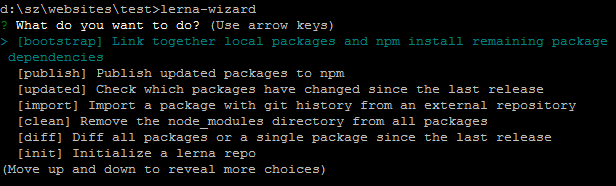
If you prefer some guidance for cli (in case you're about to start using lerna or introducing it to a new team), you might like lerna-wizard. It will lead you through a series of well-defined steps: