
light-mvvm
v1.0.2
Published
它是仅有9KB大小的轻量MVVM插件,你可以采用vue语法构建应用。

Maintainers
 wangjiabinweb
Readme
light-mvvm
你可以把 light-mvvm 看作是 Vue 框架中抽离出来的双向数据绑定解决方案,虽然这并不权威与完整,但确最简单易懂的描述方式。
它是一个仅有 9KB(未压缩) 的迷你 MVVM 架构思想的轻量级插件,light-mvvm 仅仅提供了视图(View)与数据(Model)的双向绑定,让 View 与 Model 通过 VM 进行实时通讯,语法借鉴并设计为前端开发者熟悉的 Vue 语法。
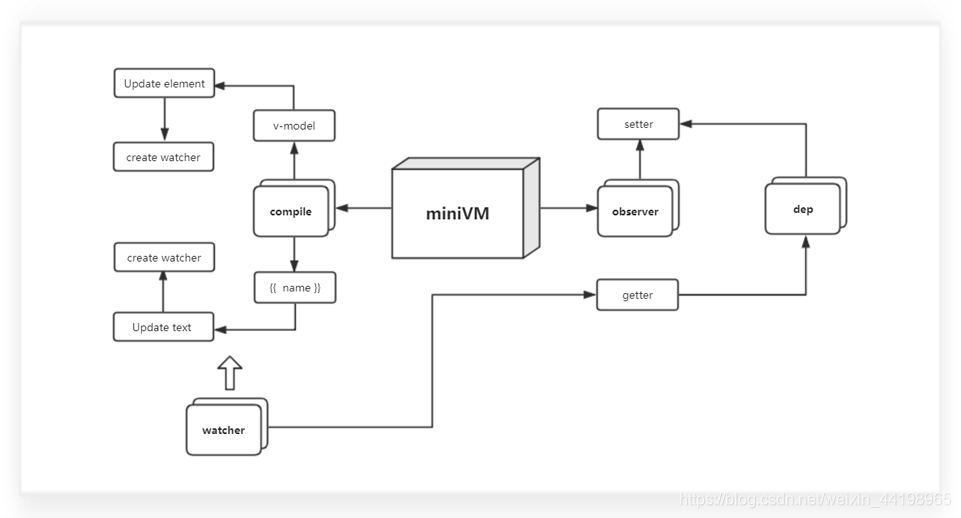
什么时候用?
项目未达到使用重框架级别,但却又依赖双向数据绑定需求。
前端项目一般基于 Angular/React/Vue 构建,但有些项目所用技术栈无需基于完整的框架解决方案而是仅仅需要不操作 DOM 或双向数据绑定,再或者应用于简单的 from 表单也是非常适合,因为 light-mvvm 非常小,不会让你陷入引入大框架后造成大材小用局面,不引入又不能优雅构建应用的问题。
怎么安装?
推荐使用 npm 直接安装,也可以下载仓库源码。
npm install light-mvvm注意:请务必先创建 node_modules 文件夹(否则无法安装),然后再以 npm 命令安装 light-mvvm。
你会获得源码包,目录结构如下:
┌─@compile
│  └─compile.js
├─@errorPrompt
│  └─errorPrompt.js
├─@observer
│  └─observer.js
├─@vm
│  └─vm.js
├─@watcher
│  └─watcher.js
├─main.js
├─package.json
└─README.md
怎么使用?
引入 light-mvvm 源码包下 main.js,然后以 Vue 语法构建应用。
<script src="node_modules/light-mvvm/main.js"></script>😊 成功引入后,你将使用以下语法来构建你的应用:
# HTML

<div id="app">
    <input type="text" v-model="test">
    <h3>{{test}}</h3>
    <div>{{obj.name}}</div>
</div>
# JavaScript
let vm = new miniVM({
el: '#app',
data: {
test: 'hello, light-mvvm',
obj: {
name: true
}
}
})😊 Come on!让我们完成一个麻雀虽小五脏俱全的应用吧!
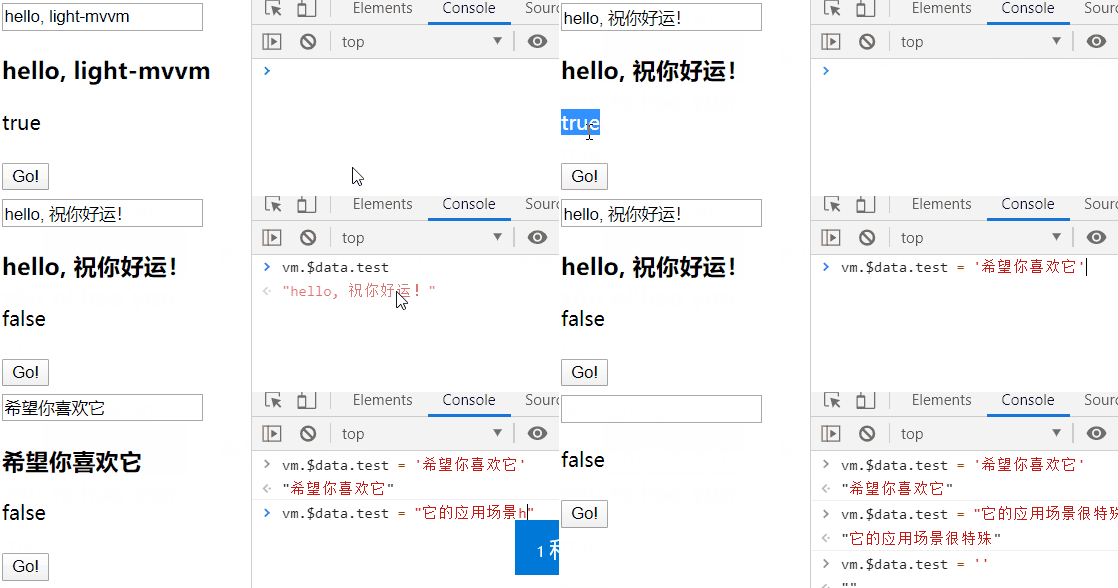
<!DOCTYPE html>
<html>
<head>
    <meta charset="UTF-8">
    <title>Document</title>
    <!-- 引入 light-mvvm => main.js -->
    <script src="node_modules/light-mvvm/main.js"></script>
</head>
<body>

    <!-- 注意:插值表达式{{ a }}请不要包裹空格,也不支持计算{{a+1}} -->
    <div id="app">
        <input type="text" v-model="test">
        <h3>{{test}}</h3>
        <div>{{obj.name}}</div>
        <button onclick="demo()">Go!</button>
    </div>

<script>

// 初始化 vm 实例
let vm = new miniVM({
    // 允许通过 document.getElementById() 获取根
    el: '#app',
    data: {
        test: 'hello, light-mvvm',
        obj: {
            name: true
        }
    }
    // light-mvvm 提倡把方法挂载到实例外面(这样更轻/更符合场景)
})

// 通过 vm.$data.x.x 访问数据
function demo(){
    vm.$data.obj.name = false
}

</script>
</body>
</html>
注意事项
- 键入插值表达式时,请不要包裹空格,否则无法识别。正确:
{{message}},错误:{{ message }}。——【light-mvvm v1.0】
- 由于 light-mvvm 基于 ES6 构建且没做 Babel 转换为 ES5,故不支持 IE browser,可在浏览器按下
F12打开控制台查看 light-mvvm 是否报错。——【light-mvvm v1.0】