
limitcast
v0.20.4
Published
Claude Code usage limits: forecast Codex and Grok too.

Maintainers
 jolly2591
Readme
Follow Limitcast: select Watch → Custom → Releases for updates. Enable email delivery in your GitHub notification settings to get release emails. How to subscribe · Join Discussions
Less overhead. More room to build.
Forecast your windows. See what's likely to run out first and pace your weekly allowance.
limitcast statusKeep agents in check. Hold new subagents when capacity is tight, with receipts and optional budgets. The guard also holds a second subagent of the same type and prompt while the first is still running.
limitcast install --guardStart lighter. Inspect unused skills and MCP servers, then trim with backups and undo. Apply turns off only MCP servers quiet for 30 days.
limitcast trimLearn from repository evidence. Opt into repeated-failure detection, safe check-command learning, reversible built-in capability pruning and a bounded source map.
limitcast install --optimize— see the optimizer guide for scope, safeguards and verification limits. Optional model-backed judging/learning and Copilot/Pi adapters are available; model calls consume your Codex plan.
Free and open source. All features are included. No Limitcast account, license key, or subscription required. Runs locally on macOS and Linux with Node.js 22+.
Quick start
npm install -g limitcast
limitcast onboard              # Read-only setup checks and a first useful result
limitcast install              # Add the status-line recorder
limitcast doctor               # Check the integration
Restart Claude Code after installing. Your existing status line stays in place, with the Limitcast line underneath. Installation backs up your settings; limitcast uninstall restores them.
Want protection as well as visibility? Enable the optional guard:
limitcast install --guardThe guard holds new subagents when a usage window is on pace to run out; existing agents continue. LIMITCAST_ALLOW=1 overrides a hold. Guard behavior and thresholds →
Install with Homebrew:
brew trust samstull9007/limitcast
brew install samstull9007/limitcast/limitcast
Or add the Claude Code plugin for /limitcast:status, /limitcast:results, /limitcast:trim, /limitcast:memory-audit, and /limitcast:memory-split:
/plugin marketplace add SamStull9007/limitcast
/plugin install limitcast@limitcast
The status-line recorder still comes from limitcast install.
See it in action
Take the illustrated tour → Forecast your windows, give subagents a budget, and inspect what you load.

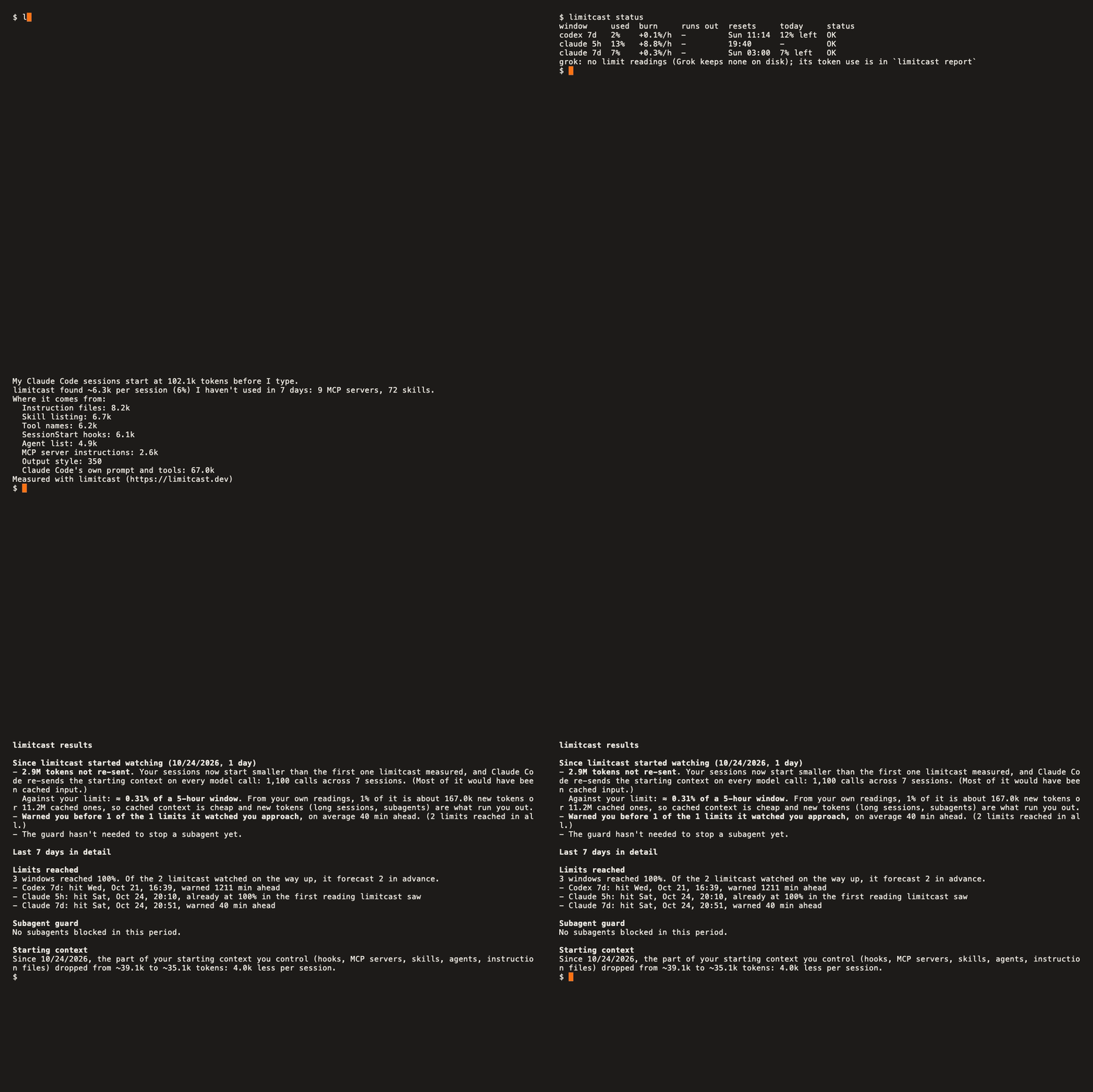
Find the context you carry into every session
Run limitcast trim to inspect what your sessions load. It names unused skills and servers and estimates their starting-context cost.
Your findings depend on your local sessions. trim inspects first. Use trim keep <name> to protect essentials, trim --apply to make the changes, and trim --undo to reverse them.
Three tools. One place to understand usage.
| Capability | Claude Code | Codex | Grok |
| --- | --- | --- | --- |
| Usage forecast | Status-line readings | Session logs | Dollar budget or opt-in weekly readings |
| Subagent guard | Task / Agent | spawn_agent | spawn_subagent |
| Token report | Supported | Supported | Per-turn ledger |
| Context trim | trim | trim --codex | trim --grok |
Codex: forecasts and reports read your existing logs without setup. install --guard adds the hook; approve it in Codex before it runs.
Grok: reports read local spend. Set a dollar cap with limitcast budget grok <usd> for forecasts and guarding, or opt into real weekly usage with limitcast grok-usage on. Provider setup and qualifications →
Pick your next move
| I want to… | Run |
| --- | --- |
| See usage, burn rate, and reset times | limitcast status |
| Find what's consuming tokens | limitcast report --why |
| Limit subagent spend to 15% of a window | limitcast budget subagents 15 |
| Pace the weekly allowance day by day | limitcast budget today on |
| Get a desktop alert | limitcast notify on |
| Review activity and protection decisions | limitcast results |
| Check the project's memory index | limitcast memory |
All commands, notification options, model controls, and setup details →
Your data stays yours
Limitcast reads usage readings and session logs already on your machine. Reports remain local, sharing totals is voluntary, and no billing-service connection is required.
Three optional features make network requests, all off by default:
- Phone or webhook notifications send notification text to the service you choose.
- Grok weekly usage reads Grok's existing login and sends it only to grok.com to retrieve your usage. Redirects are refused; the login is never stored or logged by Limitcast.
- Optimizer model learning/judging uses your authenticated Codex CLI and its configured model service. It sends allowlisted check commands, counts and hashed identities; it excludes raw prompts, source text, transcripts and tool output. Calls consume your Codex allowance. Scope and controls →
Context reductions are estimates against a recorded baseline, not measured causal savings or a lower subscription bill. Forecasts depend on observed usage. How forecasting and measurement work →
Subagent guard: Thresholds, overrides, receipts, and cold-cache behavior.
How the forecast works: Sampling, burn rates, weekly pacing, and account separation.
Measuring recurring value: Baselines, time windows, and what the evidence can establish.
Upgrading from before 0.15.0: All features are free. Previously preview-only guards enforce after upgrading. Behavior changes and opt-out.
Build with us
Found a rough edge? Report a bug. Ask questions in Q&A, propose improvements in Ideas, or try it for a week and share a reviewed check-in. Contributions are welcome.
git clone https://github.com/SamStull9007/limitcast.git
cd limitcast
npm test
Created by Sam Stull · MIT License · Release history