
lindsvg
v2.0.0
Published
Lindenmayer System [Scalable] Vector Graphics


Readme
lindsvg
lindsvg (pronounced /ˈlɪnds ˈviː ˈdʒiː/), Lindenmayer System [Scalable] Vector Graphics
Simple dependency-free module used to generate SVG images of deterministic L-systems.
Installation
In Node.js environment
Installing the package:
npm install lindsvgOnce installed, it can be imported as an ES module:
import * as lindsvg from "lindsvg";In a browser
You may get the module sources from such CDNs as unpkg or jsDelivr:
<script type="module">
  import * as lindsvg from "https://unpkg.com/lindsvg@2/";
  // ...
</script>
Supported commands
The following turtle commands are currently supported by lindsvg:
| Command | Description |
| ------------------- | ----------------------------------------------------- |
| F | Move forward one step with drawing a line |
| B | Move forward one step without drawing a line |
| + | Turn left by turning angle (theta) |
| - | Turn right by turning angle (theta) |
| \| | Reverse direction (turn by 180 degrees) |
| ! | Reverse the meaning of + and - |
| [ | Push current state of the turtle onto the stack |
| ] | Pop a state from the stack and apply it to the turtle |
| A,C–E,G–Z | Auxiliary user-defined rules |
API & examples
getSVGCode()
This method generates ready-to-render L-system’s SVG code as an HTML string.
Syntax
getSVGCode(lsParamsMap)
getSVGCode(lsParamsMap, svgParams)
Parameters
lsParamsMapMapping of L-system key (user-defined name or identifier) to the L-system parameters. You can either specify one key-value pair if you’re creating an image of a single L-system, or provide multiple key-value pairs if you want to combine several independent L-systems in a single image. The values in this mapping are objects, each containing the parameters of one L-system:
axiomA string containing the initial codeword (axiom).
rulesAn object representing L-system production rules. The keys are the alphabet letters
A–Z, and corresponding values are the production successors (rewriting rules). Two symbols of the alphabet (FandB) have special meaning as explained in the “Supported commands” section.x(optional)Turtle’s initial horizontal coordinate. Its default value is
0.y(optional)Turtle’s initial vertical coordinate. Its default value is
0.alpha(optional)Initial angle in radians. Its default value is
0.thetaAngle increment in radians.
stepThe length of the turtle’s step, a finite positive number.
iterationsTotal number of iterations used to generate the resulting L-system.
svgParams(optional)An object containing parameters that can be used to modify the appearance of the resulting SVG image. All of these parameters are optional.
width(optional)Desired width of the SVG image. If not specified, defaults to the image’s intrinsic width.
height(optional)Desired height of the SVG image. If not specified, defaults to the image’s intrinsic height.
padding(optional)Additional space to extend the
viewBox. If the image content is drawn too close to the edges, you can add padding by setting the desired numeric value to this property. Its default value is0.pathAttributesMap(optional)Mapping of L-system key to the
<path>element attributes. Keys in this mapping are the same as in thelsParamsMapargument. Values are objects mapping attribute names to attribute values. You can use this option to change such things as stroke color, line width, etc. The default attribute mapping is{fill: "none", stroke: "#000"}. For branched L-systems, attribute values can be specified as arrays, so that different values will be applied at different branching levels (see the dedicated section on advanced styling of branched L-systems).templateFn(optional)Function producing the resulting SVG code from raw data. You can provide your own template with additional markup to customize the appearance of the final image. Using this option is explained in the dedicated section on SVG template customization.
Return value
A string containing the complete HTML code for the resulting SVG image.
Example: single L-system
The following example demonstrates the use of the method getSVGCode() to generate the L-system “Mango-tree foliage”.
import {getSVGCode} from "lindsvg";

// L-system parameters
let lsParamsMap = {
  "Mango-tree foliage": {
    axiom: "A---A",    // The initial codeword (axiom)
    rules: {           // L-system production rules
      F: "F",          // Move forward a step with drawing a line
      B: "B",          // Move forward a step without drawing a line
      A: "B-F+Z+F-BA", // Auxiliary rules...
      Z: "F-FF-F--[--Z]F-FF-F--F-FF-F--",
    },
    alpha: 0,           // Initial angle in radians
    theta: Math.PI / 3, // Angle increment in radians
    step: 15,           // The length of the turtle’s step
    iterations: 7,      // Total number of iterations
  },
};

// Output SVG parameters
let svgParams = {
  width: 600,          // Desired width of the SVG image
  height: 600,         // Desired height of the SVG image
  padding: 5,          // Additional space to extend the viewBox
  pathAttributesMap: { // Name to value maps for the <path> element attributes
    "Mango-tree foliage": {
      stroke: "green",
      "stroke-width": "2",
    },
  },
};

// Get L-system’s SVG code as a string and render the image
let svgCode = getSVGCode(lsParamsMap, svgParams);
document.body.insertAdjacentHTML("beforeend", svgCode);
Example: multiple L-systems
The following example demonstrates the use of the method getSVGCode() to generate the “Twindragon” curve containing two Heighway dragon curves placed back to back.
import {getSVGCode} from "lindsvg";

let lsParams = {
  axiom: "FX",
  rules: {
    F: "F",
    X: "X+YF+",
    Y: "-FX-Y",
  },
  theta: Math.PI / 2,
  step: 3.5,
  iterations: 14,
};

let lsParamsMap = {
  "Yellow-green Dragon": {
    ...lsParams,
  },
  "Forest-green Dragon": {
    ...lsParams,
    y: -448, // adjust vertical position of the 2nd dragon
    alpha: Math.PI,
  },
};

let svgParams = {
  padding: 15,
  pathAttributesMap: {
    "Yellow-green Dragon": {
      stroke: "YellowGreen",
    },
    "Forest-green Dragon": {
      stroke: "ForestGreen",
    },
  },
};

let svgCode = getSVGCode(lsParamsMap, svgParams);
document.body.insertAdjacentHTML("beforeend", svgCode);
getSVGData()
This method returns raw data that you can use to assemble the SVG code yourself. It may be handy in cases where full access to path data is required, or you need to fine-tune SVG parameters and content.
Syntax
getSVGData(lsParams)
getSVGData(lsParams, options)
Parameters
lsParamsAn object which contains L-system parameters. See
getSVGCode()for details.options(optional)An object for tuning the method’s behavior. Currently, one option is available:
isMultiPath(optional)This option is only effective for branched L-systems. Its default value is
falsewhich means that the method will always construct path data for a single combined<path>element representing the complete L-system. If the option is set totrue, the method provides separate path data for multiple<path>elements, each representing a specific branching level.
Return value
An object which contains the following fields:
pathDataAn array of path data strings for each
<path>element in the L-system SVG image. If the optionisMultiPathis set tofalseor not specified,pathDatacontains only one element. L-systems without branching always producepathDatawith a sole element.minXA number defining the left drawing boundary. Essential for assembling the
viewBoxattribute.minYA number defining the top drawing boundary. Essential for assembling the
viewBoxattribute.widthA number defining the intrinsic width of the SVG image. Essential for assembling the
viewBoxattribute.heightA number defining the intrinsic height of the SVG image. Essential for assembling the
viewBoxattribute.
Example
The method can be used to generate path data that is passed to the path() CSS function to achieve interesting visual effects. This example demonstrates the using getSVGData() for clipping an image to the Koch snowflake boundary.
import {getSVGData} from "lindsvg";

let lsParams = {
  axiom: "F++F++F",
  rules: {
    F: "F-F++F-F",
  },
  y: 117,
  theta: Math.PI / 3,
  step: 5,
  iterations: 4,
};
let {pathData, width, height} = getSVGData(lsParams);
let img = new Image(width, height);
img.src = "./winter-night.jpg";
img.style.objectFit = "cover";
img.style.clipPath = `path("${pathData[0]}")`;
document.body.appendChild(img);
Advanced styling
Branched L-systems
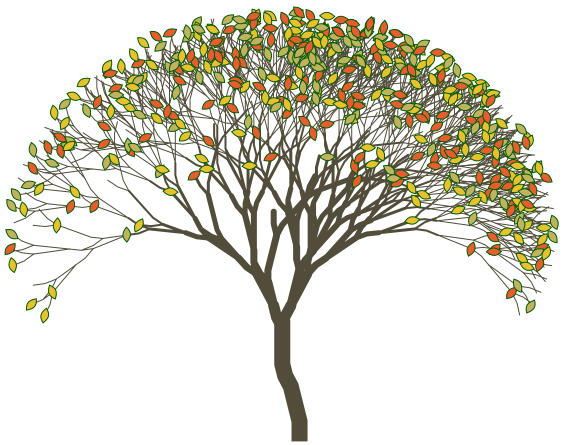
As mentioned earlier, the property pathAttributesMap of the svgParams option allows specifying attribute values in form of arrays. This allows you to provide different attribute values for each <path> element, which may make branched L-systems (like plants) look “more naturally”.
For example, to generate the tree demonstrated above (all but foliage) the following options were used:
import {getSVGCode} from "lindsvg";

let lsParamsMap = {
  "Demo tree": {
    axiom: "F-FFF-F+F+X",
    rules: {
      F: "F",
      X: "FFF-[-F+F[Y]-[X]]+[+F+F[X]-[X]]",
      Y: "FF-[-F+F]+[+F+FY]",
    },
    alpha: 90 * Math.PI / 180,
    theta: 14 * Math.PI / 180,
    step: 12,
    iterations: 6,
  },
};

let svgParams = {
  width: 565,
  height: 445,
  padding: 10,
  pathAttributesMap: {
    "Demo tree": {
      stroke: "#514d3a",
      "stroke-width": ["16", "11", "9", "7", "6", "5", "3", "2", "1"],
      "stroke-linecap": ["square", "round" /* all remaining items use the last specified value */],
    },
  },
};

let svgCode = getSVGCode(lsParamsMap, svgParams);
document.body.insertAdjacentHTML("beforeend", svgCode);
If an attribute array contains fewer elements than the maximum branching depth (see stroke-linecap in the example above), the missing items are implicitly made equal to the last specified one. So you don’t need to repeat the same value in the end of the list.
You may also use the special value "n/a" which prevents an attribute from being added on the corresponding <path> element (e.g. when you need to add an attribute only to one or to a few <path>s: {pathAttributes: {transform: ["skewY(-35)", "n/a"]}}).
SVG template customization
In normal cases, SVG image appearance is customized by providing presentation attributes via the pathAttributesMap option. However, there may be cases where attributes alone are not enough. For example, if you want to apply gradient stroke to your L-system, there will be need in extra-markup with the gradient definition. In such cases the special option templateFn can be handy. By redefining the SVG template, you may add whatever you need in the resulting code.
The example below demonstrates how gradient stroke style can be applied by providing a custom template function.
import {getSVGCode} from "lindsvg";

let lsParamsMap = {
  "L-system “Square”": {
    axiom: "F+F+F+F",
    rules: {
      F: "FF+F+F+F+FF",
    },
    theta: Math.PI / 2,
    step: 5,
    iterations: 4,
  },
};

let svgParams = {
  width: 407,
  height: 407,
  padding: 2,
  pathAttributesMap: {
    "L-system “Square”": {
      stroke: "url(#diagonal-gradient)",
    },
  },
  templateFn: ({viewBox, width, height, content}) => `
    <svg xmlns="http://www.w3.org/2000/svg" viewBox="${viewBox.join(" ")}" height="${height}" width="${width}">
      <defs>
        <linearGradient id="diagonal-gradient" gradientTransform="rotate(45 0.5 0.5)">
          <stop offset="0%" stop-color="red" />
          <stop offset="50%" stop-color="gold" />
          <stop offset="100%" stop-color="red" />
        </linearGradient>
      </defs>
      ${content}
    </svg>`,
};

let svgCode = getSVGCode(lsParamsMap, svgParams);
document.body.insertAdjacentHTML("beforeend", svgCode);
Error handling
In case of invalid input L-system parameters, the methods throw a custom exception. You may use it to analyze which parameter(s) failed to pass validation, and format the error message as you wish.
import {getSVGCode} from "lindsvg";
import {dump} from "js-yaml";

try {
  console.log(getSVGCode(lsParamsMap, svgParams));
} catch (error) {
  // Log the original message
  console.error(error);
  if (error.name === "LSError") {
    // Get a JSON representation of the error list and format it as YAML
    let errorJSON = error.toJSON();
    console.log(dump(errorJSON, {indent: 4}));
  }
}
Demos
Please, visit the project’s demo web app (installable as a PWA and works offline too). You will find a few built-in L-system collections there, and will also be able to experiment with lindsvg while building your own L-systems.
Also, check out this collection on CodePen to get a few advanced examples of using lindsvg.