npm package discovery and stats viewer.

Discover Tips

  • General search

    [free text search, go nuts!]

  • Package details

    pkg:[package-name]

  • User packages

    @[username]

Sponsor

Optimize Toolset

I’ve always been into building performant and accessible sites, but lately I’ve been taking it extremely seriously. So much so that I’ve been building a tool to help me optimize and monitor the sites that I build to make sure that I’m making an attempt to offer the best experience to those who visit them. If you’re into performant, accessible and SEO friendly sites, you might like it too! You can check it out at Optimize Toolset.

About

Hi, 👋, I’m Ryan Hefner  and I built this site for me, and you! The goal of this site was to provide an easy way for me to check the stats on my npm packages, both for prioritizing issues and updates, and to give me a little kick in the pants to keep up on stuff.

As I was building it, I realized that I was actually using the tool to build the tool, and figured I might as well put this out there and hopefully others will find it to be a fast and useful way to search and browse npm packages as I have.

If you’re interested in other things I’m working on, follow me on Twitter or check out the open source projects I’ve been publishing on GitHub.

I am also working on a Twitter bot for this site to tweet the most popular, newest, random packages from npm. Please follow that account now and it will start sending out packages soon–ish.

Open Software & Tools

This site wouldn’t be possible without the immense generosity and tireless efforts from the people who make contributions to the world and share their work via open source initiatives. Thank you 🙏

© 2026 – Pkg Stats / Ryan Hefner

litewindow

v0.0.3

Published

基于LayX库定制修改,支持嵌入vue组件的Window窗体库。

Readme

litewindow

litewindow前端窗体库

基于LayX v3版的定制修改,支持嵌入vue组件的Window窗体库,用于内部项目和产品开发。

特别鸣谢 @百小僧 LayX

  • v0.0.3 增加对外暴露initLiteWindow方法用于创建多个liteWindow对象(非全局一个了);修改Window窗体对象:增加状态变化监听事件支持(onLoad、ondestroy、onmax、onmin、onresize等),增加bindWinEvent方法绑定或更新窗体监听事件。
  • v0.0.2 修改完善版,增加LiteWindowContainer组件。
  • ~~v0.0.1 来源于LayX的初始版本,增加Event事件绑定。~~

使用

pnpm add litewindow

or

npm i litewindow

全局引入库样式:

import 'litewindow/dist/index.css';

import liteWindow from 'litewindow';

import {initLiteWindow,liteWindow,LiteWindowContainer} from 'litewindow';

默认导入的liteWindow 是全局唯一性,即:window.liteWindow或globalThis.liteWindow

可通过initLiteWindow创建新的liteWindow 窗体管理对象

const liteWindow2=initLiteWindow();

示例代码

1、LiteWindowContainer组件使用示例

<template>
  <div style="padding: 50px;">
    <!-- 打开弹窗按钮 -->
    <button class="layui-btn" @click="openModal">打开LiteWindow弹窗(插槽版)</button>
    <!-- 引入插槽组件 -->
    <LiteWindowContainer ref="windowRef" :options="configRef">
      <!-- 默认插槽:弹窗主体内容(支持Vue响应式、组件) -->
      <div>
        <h3>这是插槽传入的内容</h3>
        <p>Vue响应式测试:<input v-model="inputVal" class="layui-input" style="width: 300px;margin: 10px 0;"></p>
        <p>当前输入值:{{ inputVal }}</p>
        <div style="text-align: right; margin-top: 20px;">
          <button class="layui-btn layui-btn-primary" @click="closeModal">取消</button>
          <button class="layui-btn layui-btn-normal" @click="confirmModal">确认1</button>
        </div>
      </div>
    </LiteWindowContainer>
  </div>
</template>

<script setup lang="ts">
import 'litewindow/dist/index.css';
import {LiteWindowContainer} from 'litewindow';
import { onMounted, ref,useTemplateRef } from 'vue'
// 组件引用
const layxRef = useTemplateRef('windowRef')
// Vue响应式数据(插槽内可正常使用)
const inputVal = ref('')
const configRef=ref({
  id:'test',
  title:'自定义标题23', 
  // toolBar:{
  //   titleBar:{
  //     title:'自定义标题22', 
  //   }
  // },
  event:{
    onmove:{
      after:(window)=>{
        console.log('移动窗体结束……')
      }
    },
    onload:{
      after:(window:any)=>
      {
          //自动变最大
        if(window)
        window.max();
        console.log('窗体加载时自动最大化')
      }
    }
  }
})
// 打开弹窗
const openModal = () => {
  layxRef.value?.open();
}
// 关闭弹窗
const closeModal = () => {
  layxRef.value?.close()
}
// 确认逻辑
const confirmModal = () => {
  alert(`你输入的内容是:${inputVal.value}`)
  closeModal()
}
onMounted(()=>{
   openModal();
})
</script>

2、 官方LayX示例代码

<template>
    <div>
    <button id="create">Create</button>
    <button id="create2">Create2</button>
    <button id="create3">Create3</button>
    <button id="create4">Create4</button>
    <button id="create5">Create5</button>
    <button id="create6">Create6</button>
    <button id="notice">Info</button>
    <button id="notice2">Success</button>
    <button id="notice3">Warning</button>
    <button id="notice4">Error</button>
    <div id="about-layx" style="display:none;padding: 10px;line-height: 1.5;">
        <h2>Layx 一个神奇的UI窗口</h2>
        <p>Layx
            诞生于一次C/S架构系统往B/S架构系统迁移项目中。起初,我们想在B/S架构上实现类C/S架构窗口功能,但百度、谷歌过后依然没能找到合适的Javascript插件。于是乎在2018年05月01日五一劳动节期间连夜赶工创造出了
            Layx 。</p>
        <p>目前 Layx 拥有和C/S架构一样灵活的操作方式,支持网页多窗口、多任务协同操作,支持窗口各种事件。</p>
    </div>
    </div>
</template>

<script setup lang="ts">
// 参考:https://gitee.com/monksoul/LayX/tree/dev
import 'litewindow/dist/index.css';

import liteWindow from 'litewindow';
import { onMounted } from 'vue';
    
function bindLisener()
{
    const layx=liteWindow;
        document.getElementById("create").onclick = function () {
          const ttest=  layx.open({
                id: "hello-world",
                content: {
                    type: 'html',
                    value: document.getElementById("about-layx")
                },
                toolBar: {
                    titleBar: {
                        title: "Layx - Create1."
                    }
                },
                topMenu: [
                    {
                        id: 'file',
                        label: '文件(F)',
                        items: [
                            {
                                id: 'new-file',
                                label: '新建文件'
                            },
                            {
                                id: 'new-window',
                                label: '新建窗口'
                            },
                            {
                                id: 'open-file',
                                label: '打开文件'
                            },
                            {
                                id: 'open-window',
                                label: '打开窗口'
                            }
                        ]
                    },
                    {
                        id: 'edit',
                        label: '编辑(E)',
                        items: [
                            {
                                id: 'child-one',
                                label: '点击我',
                                handler: function (ev, win) {
                                    alert("谢谢支持。");
                                },
                                items: [
                                    {
                                        id: 'new-file',
                                        label: '新建文件'
                                    },
                                    {
                                        id: 'new-window',
                                        label: '新建窗口'
                                    },
                                    {
                                        id: 'open-file',
                                        label: '打开文件'
                                    },
                                    {
                                        id: 'open-window',
                                        label: '打开窗口'
                                    }
                                ]
                            },
                            {
                                id: 'child-two',
                                label: '子菜单二'
                            },
                            {
                                id: 'child-three',
                                label: '子菜单三'
                            },
                            {
                                id: 'child-four',
                                label: '子菜单四'
                            },
                            {
                                id: 'child-five',
                                label: '子菜单五'
                            }
                        ]
                    },
                    {
                        id: 'view',
                        label: '查看(V)'
                    },
                    {
                        id: 'other',
                        label: '其他(T)'
                    },
                    {
                        id: 'help',
                        label: '帮助(H)'
                    }
                ],
                contextMenu: [{
                    id: 'create',
                    label: '新增窗口',
                    handler: function (ev, win) {
                        alert("点击了新增,窗口句柄为:" + win.id);
                    },
                    items: [
                        {
                            id: 'child-one',
                            label: '子菜单一'
                        },
                        {
                            id: 'child-two',
                            label: '子菜单二',
                            items: [
                                {
                                    id: 'child-one',
                                    label: '点击我',
                                    handler: function (ev, win) {
                                        alert("谢谢支持。");
                                    }
                                },
                                {
                                    id: 'child-two',
                                    label: '子菜单二'
                                },
                                {
                                    id: 'child-three',
                                    label: '子菜单三'
                                },
                                {
                                    id: 'child-four',
                                    label: '子菜单四'
                                },
                                {
                                    id: 'child-five',
                                    label: '子菜单五'
                                }
                            ]
                        },
                        {
                            id: 'child-three',
                            label: '子菜单三'
                        }
                    ]
                },
                {
                    id: 'edit',
                    label: '编辑窗口',
                    handler: function (ev, win) {
                        alert("点击了编辑,窗口句柄为:" + win.id);
                    }
                },
                {
                    id: 'del',
                    label: '关闭窗口',
                    handler: function (ev, win) {
                        layx.destroy(win.id);
                    }
                },
                {
                    id: 'about',
                    label: '关于...',
                    handler: function (ev, win) {
                        alert("点击了关于,窗口句柄为:" + win.id);
                    }
                }]
            });
            console.log('ttest',ttest);
        }
        document.getElementById("create2").onclick = function () {
            layx.open({
                id: "hello-world2",
                content: {
                    type: 'local-url',
                    value: '../local.html'
                },
                toolBar: {
                    background: "#f5f5f5",
                    titleBar: {
                        title: "Layx - Create2.",
                        useSubTitle: true
                    }
                },
                offset: [100, 50],
                topMenu: [
                    {
                        id: 'file',
                        label: '文件2(F)',
                        items: [
                            {
                                id: 'new-file',
                                label: '新建文件'
                            },
                            {
                                id: 'new-window',
                                label: '新建窗口'
                            },
                            {
                                id: 'open-file',
                                label: '打开文件'
                            },
                            {
                                id: 'open-window',
                                label: '打开窗口'
                            }
                        ]
                    },
                    {
                        id: 'edit',
                        label: '编辑(E)',
                        items: [
                            {
                                id: 'child-one',
                                label: '点击我',
                                handler: function (ev, win) {
                                    alert("谢谢支持。");
                                },
                                items: [
                                    {
                                        id: 'new-file',
                                        label: '新建文件'
                                    },
                                    {
                                        id: 'new-window',
                                        label: '新建窗口'
                                    },
                                    {
                                        id: 'open-file',
                                        label: '打开文件'
                                    },
                                    {
                                        id: 'open-window',
                                        label: '打开窗口'
                                    }
                                ]
                            },
                            {
                                id: 'child-two',
                                label: '子菜单二'
                            },
                            {
                                id: 'child-three',
                                label: '子菜单三'
                            },
                            {
                                id: 'child-four',
                                label: '子菜单四'
                            },
                            {
                                id: 'child-five',
                                label: '子菜单五'
                            }
                        ]
                    },
                    {
                        id: 'view',
                        label: '查看(V)'
                    },
                    {
                        id: 'other',
                        label: '其他(T)'
                    },
                    {
                        id: 'help',
                        label: '帮助(H)'
                    }
                ],
                contextMenu: [
                    {
                        id: 'refresh',
                        label: '刷新IFrame',
                        handler: function (ev, win) {
                            const frameContent = win.getComponent("content-container/content");
                            if (frameContent.contentWindow) {
                                frameContent.contentWindow.location.reload();
                            }
                        }
                    },
                    {
                        id: 'del',
                        label: '关闭窗口',
                        handler: function (ev, win) {
                            layx.destroy(win.id);
                        }
                    },
                    {
                        id: 'about',
                        label: '关于...',
                        handler: function (ev, win) {
                            alert("点击了关于,窗口句柄为:" + win.id);
                        }
                    }]
            });
        }
        document.getElementById("create3").onclick = function () {
            layx.open({
                id: "hello-world3",
                content: {
                    type: 'html',
                    value: '一个神奇的UI窗口'
                },
                parclose: true,
                toolBar: {
                    titleBar: {
                        title: "Layx - Create3."
                    }
                },
                offset: "rightBottom"
            });
        }
        document.getElementById("create4").onclick = function () {
            layx.open({
                id: "hello-world4",
                content: {
                    type: 'html',
                    value: '一个神奇的UI窗口'
                },
                toolBar: {
                    titleBar: {
                        title: "Layx - Create4."
                    }
                },
                offset: "bottomCenter"
            });
        }
        document.getElementById("create5").onclick = function () {
            layx.open({
                id: "hello-world5",
                content: {
                    type: 'html',
                    value: '一个神奇的UI窗口'
                },
                toolBar: {
                    titleBar: {
                        title: "Layx - Create5."
                    }
                },
                offset: "leftTop"
            });
        }
        document.getElementById("create6").onclick = function () {
            layx.open({
                id: "hello-world6",
                content: {
                    type: 'html',
                    value: '一个神奇的UI窗口'
                },
                toolBar: {
                    titleBar: {
                        title: "Layx - Create6."
                    }
                },
                statuBar: {
                    content: '状态栏'
                },
                offset: "rightTop"
            });
        }
        document.getElementById("notice").onclick = function () {
            layx.notice({
                title: '消息提示',
                message: '我是消息提示消息提示消息提示消息提示'
            });
        }
        document.getElementById("notice2").onclick = function () {
            layx.notice({
                title: '成功提示',
                type: 'success',
                message: '我是消息提示消息提示消息提示消息提示'
            });
        }
        document.getElementById("notice3").onclick = function () {
            layx.notice({
                title: '警告提示',
                type: 'warning',
                message: '我是消息提示消息提示消息提示消息提示'
            });
        }
        document.getElementById("notice4").onclick = function () {
            layx.notice({
                title: '错误提示',
                type: 'error',
                message: '我是消息提示消息提示消息提示消息提示'
            });
        }
}
onMounted(()=>{
bindLisener();
});
</script>

应用示例

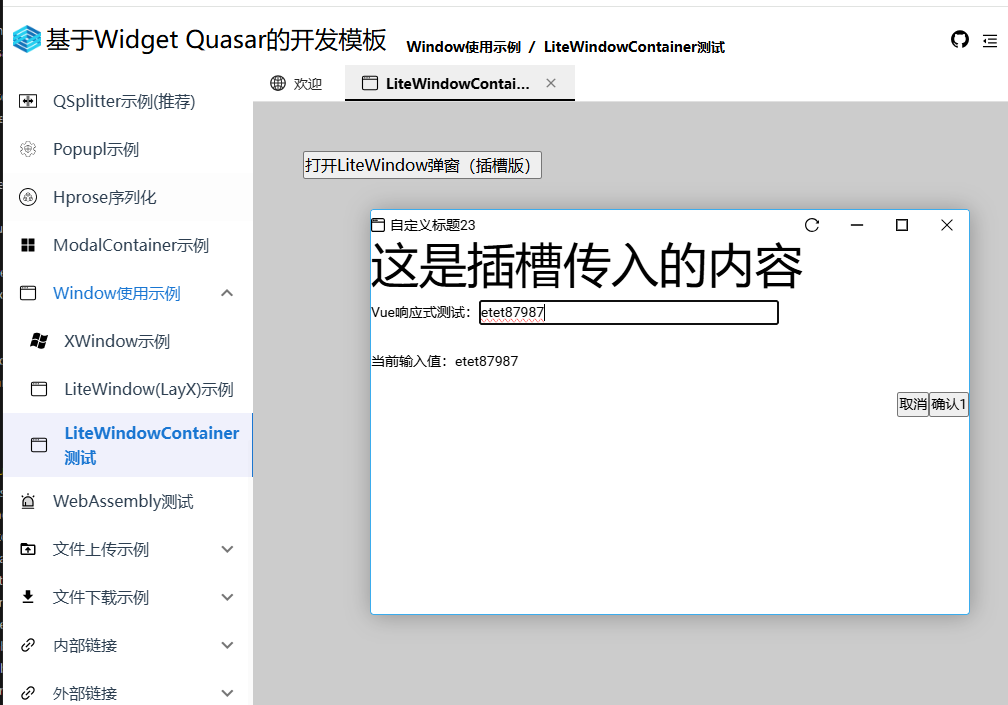
LiteWindowContainer对接VUE组件

关联资源

layx

xframelib

xgis-ol

xgis-cesium