
livearch
v0.3.0
Published
Real-time architecture diagrams that live inside your repo and update automatically as you code.
Downloads
236

Maintainers
 shaallam
Readme
⬡ LiveArch
Your codebase, drawn live. Real-time architecture diagrams that live inside your repo and redraw themselves every time you save.





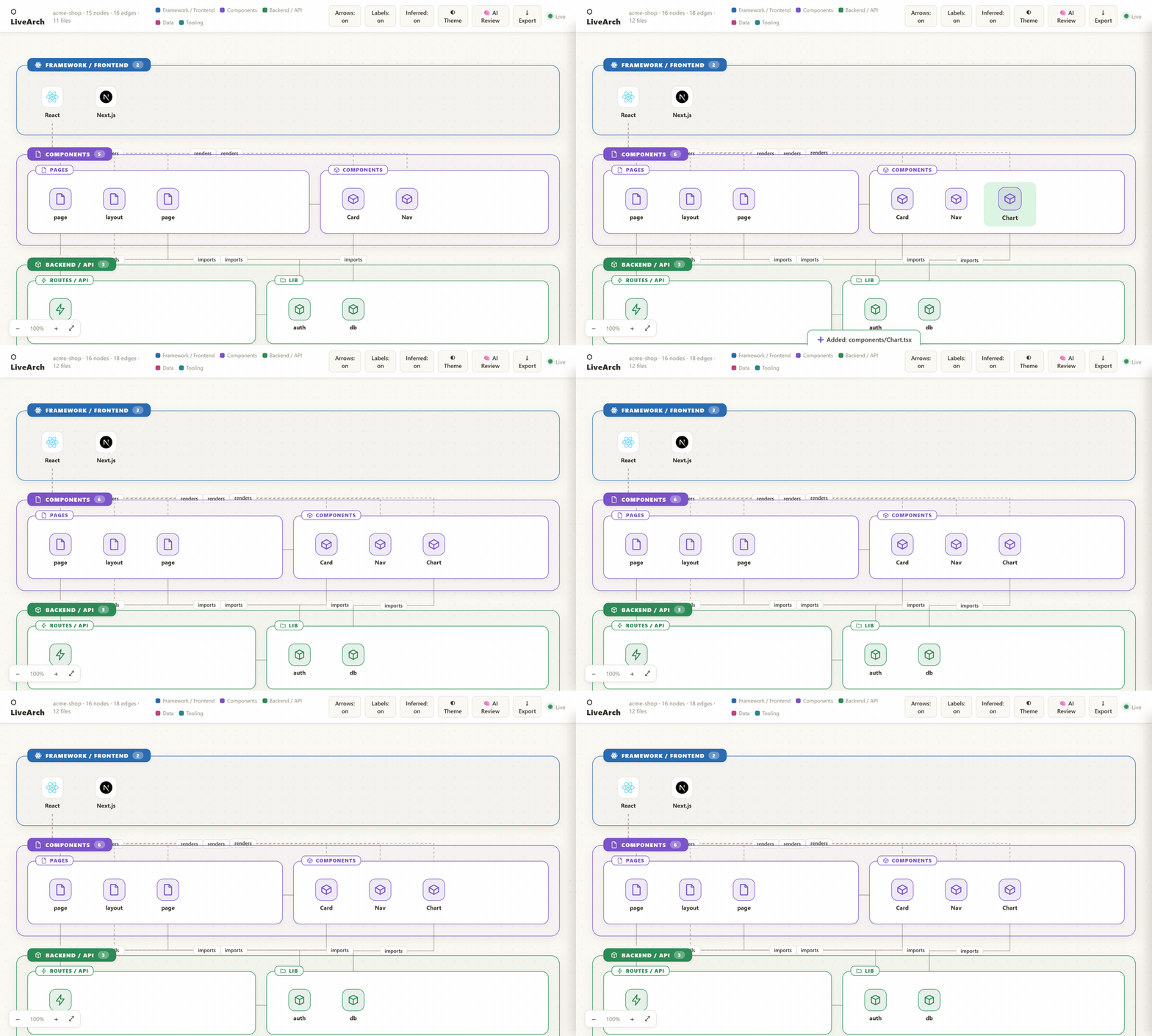
Save a file → the diagram updates itself: a new node appears and flashes in. No manual input.
npx livearch # any JS/TS · Python · Go · Rust project — no config, no signupArchitecture docs go stale the instant you write them. LiveArch doesn't. It watches your files and regenerates an interactive diagram in under half a second every time you save — add a component, install a package, create a route, and the diagram updates itself. No manual input, no "describe your app to an AI," no drawing.
- 🔄 Live — redraws on every save (~350 ms); new nodes flash green
- 🧠 Reads real code — actual imports, routes, and Prisma models, not guesses (real edges are solid, inferred ones dashed)
- 🌍 Polyglot — JS/TS incl. Next.js App Router, Python, Go, Rust, Prisma, and monorepos
- 🔒 Local & private — one self-contained
.visualarch.htmlin your repo; nothing leaves your machine - 🏷️ Shareable — drop a live architecture badge in your README (how ↓)
How it works
LiveArch watches your project files and generates a live, interactive architecture diagram saved as .visualarch.html inside your repo. Every save flows straight to your browser:
You save a file in your editor
        ↓
LiveArch detects the change (350ms debounce)
        ↓
Re-analyses your entire repo
        ↓
Rewrites .visualarch.html on disk
        ↓
Pushes update via WebSocket to your open browser
        ↓
Diagram updates live — new nodes flash green ✅
Demo
See it in action in the demo above ↑ — a Next.js + Prisma app whose diagram jumps from 15 to 16 nodes the instant a new component is saved. Try it yourself in under a minute:
npx livearch            # in any JS/TS project
# open the printed http://localhost:7842 in your browser
# save any file — watch the diagram update instantly
Open .visualarch.html in your browser. Run livearch in your terminal. Now save any file — watch the diagram update instantly: new nodes flash green and a toast shows the changed file.
Add a LiveArch badge to your README
Show your project's shape at a glance — and let visitors discover LiveArch. One command writes a self-contained SVG badge (⬡ architecture · N nodes) you can commit and embed anywhere:
npx livearch badge                            # writes docs/architecture-badge.svg
npx livearch badge . --output docs/arch.svg   # or choose your own path
Then paste the printed snippet into your README:
Regenerate it whenever your architecture changes — or in CI on every push — to keep it current. Every badge points curious developers back here, so you're helping the next person draw their architecture too. 💙
Quick Start
# Install globally (once)
npm install -g livearch

# Go to any project
cd my-project

# Start watching
livearch

# Output:
#   ⬡  LiveArch
#   ─────────────────────────────────────────
#   📁 Watching  : /Users/you/my-project
#   📄 Diagram   : .visualarch.html  ← open this in your browser
#   🌐 Live URL  : http://localhost:7842
#   ─────────────────────────────────────────
#   ✓ 27 nodes detected, 30 files watched
#
#   Diagram auto-updates every time you save a file.
#   Press Ctrl+C to stop.
Open .visualarch.html in your browser. That's it.
How It Works
LiveArch has three parts:
1. File Watcher (bin/livearch.js)
Uses chokidar to watch every file in your project. When any file changes, it triggers a rebuild with a 350ms debounce — so rapid saves don't cause flicker.
2. Analyser (lib/analyser.js)
Reads your project and detects:
- Tech stack from
package.json— React, Vue, Express, Prisma, Redis, Stripe, etc. - Components from
.jsx/.tsxfiles — grouped by folder - Architecture layers — Frontend, Backend, Data, External, Tooling
- Edges — logical connections between nodes (what renders what, what calls what)
3. Diagram Generator (lib/template.js)
Builds a self-contained .visualarch.html file with:
- Grouped layer boxes (like GitDiagram)
- Dashed curved arrows between nodes
- Click-to-inspect panel with file path and connections
- WebSocket client that reconnects to the watcher automatically
What Gets Detected
From package.json
| Dependency | Node shown |
|-----------|-----------|
| react, react-dom | ⚛ React |
| next | ▲ Next.js |
| vue | 💚 Vue |
| express | 🚂 Express |
| fastify | ⚡ Fastify |
| @nestjs/core | 🐈 NestJS |
| mongoose, mongodb | 🍃 MongoDB |
| pg, postgres | 🐘 PostgreSQL |
| prisma | ◈ Prisma |
| redis, ioredis | ⚡ Redis |
| jsonwebtoken, passport | 🔐 Auth/JWT |
| socket.io, ws | 📡 WebSocket |
| stripe | 💳 Stripe |
| nodemailer, @sendgrid/mail | 📧 Email |
| aws-sdk, @aws-sdk/client-s3 | ☁ AWS/S3 |
| jest, vitest | 🧪 Tests |
| @reduxjs/toolkit, redux | 🔄 Redux |
| zustand | 🐻 Zustand |
| vite, @vitejs/plugin-react | ⚡ Vite |
| webpack | 📦 Webpack |
From folder structure
| Folder | Node shown |
|--------|-----------|
| src/components/ | 🧩 Component nodes |
| src/pages/ or src/views/ | 📄 Page nodes |
| src/hooks/ | 🪝 Hook nodes |
| src/context/ or src/store/ | 🔄 State nodes |
| src/routes/ or src/api/ | ⚡ Route nodes |
| src/services/ | ⚙ Service nodes |
| src/middleware/ | 🔀 Middleware nodes |
| src/models/ or src/schema/ | 📐 Model nodes |
| src/data/ | 💾 Data nodes |
| public/ | 🖼 Static assets |
| .github/ | 🤖 CI/CD |
| .env | 🔑 Config |
| prisma/ | ◈ Prisma DB |
From individual files
| File | Node shown |
|------|-----------|
| main.jsx, index.jsx, App.jsx | 🚀 Entry point |
| *.jsx, *.tsx in components/ | 🧩 Component |
| *.jsx, *.tsx in pages/ | 📄 Page |
| *.jsx, *.tsx in hooks/ | 🪝 Hook |
| vite.config.js | ⚡ Vite |
| docker-compose.yml | 🐳 Docker |
| *.test.js, *.spec.ts | 🧪 Test |
Architecture Layers
LiveArch groups nodes into 5 layers displayed top-to-bottom:
┌─────────────────────────────────────┐
│  🚀  Entry Points                   │  main.jsx, App.jsx, i18n.jsx
├─────────────────────────────────────┤
│  ⚛   Framework                     │  React, Vue, Next.js
├─────────────────────────────────────┤
│  🧩  Components                     │  All your UI components
├─────────────────────────────────────┤
│  💾  Data         🖼 Assets         │  wines.js, public/
├─────────────────────────────────────┤
│  ⚡  Tooling                        │  Vite, npm scripts, CI/CD
└─────────────────────────────────────┘
For full-stack projects, the Backend layer sits between Framework and Data:
┌─────────────────────────────────────┐
│  🚀  Entry Points                   │
├─────────────────────────────────────┤
│  ⚛   Framework / Frontend          │
├─────────────────────────────────────┤
│  🚂  Backend / API                  │  Express, routes, middleware
├─────────────────────────────────────┤
│  💾  Data                           │  PostgreSQL, Redis, Prisma
├─────────────────────────────────────┤
│  🌐  External                       │  Stripe, SendGrid, AWS
├─────────────────────────────────────┤
│  ⚙   Tooling                       │  Vite, Jest, CI/CD
└─────────────────────────────────────┘
The .visualarch.html File
This file is generated in your project root and is fully self-contained. It:
- Works offline (no external dependencies after load)
- Connects to the watcher via WebSocket when available
- Falls back gracefully when watcher is not running (shows last known state)
- Can be committed to your repo so teammates see the architecture immediately on clone
- Can be shared as a standalone HTML file — just send the file
Recommended: Add to .gitignore?
Your choice. Two valid approaches:
Commit it — teammates see the architecture diagram when they clone. Great for onboarding.
Ignore it — treat it as a build artifact. Add .visualarch.html to .gitignore.
Interactive Features
| Feature | How | |---------|-----| | Click a node | Opens detail panel — file path, type, connections | | Hover a node | Tooltip with description | | Toggle edges | Show/hide arrows between nodes | | Highlighted edges | Select a node — only its connections light up | | Create GitHub issue | In the AI Review panel, turn any suggestion into a prefilled GitHub issue in one click | | Export PNG / SVG | Download the whole diagram as an image for docs or slides | | New node flash | Green flash when a new node is detected | | Scroll + resize | Arrows redraw to stay accurate |
Supported Project Types
LiveArch works with any JavaScript/TypeScript project. It is especially good with:
- React + Vite apps
- Next.js apps
- Vue / Nuxt apps
- Express / Fastify APIs
- NestJS apps — controllers, services, modules, guards, and
@Controller/@Getroutes - Full-stack monorepos (frontend + backend in one repo)
- Any project with a
package.json - Python (
requirements.txt/pyproject.toml/setup.py) — FastAPI, Django, Flask, SQLAlchemy, … - Go (
go.mod) — Gin, Echo, Fiber, chi, GORM, gRPC, … - Rust (
Cargo.toml) — Actix, Axum, Rocket, Tokio, Diesel, SQLx, …
More languages are planned — see Roadmap.
Roadmap
v0.1 — MVP (current)
- [x] File watcher with chokidar
- [x] package.json tech stack detection
- [x] Folder structure analysis
- [x] Self-contained
.visualarch.html - [x] WebSocket live updates
- [x] Layer-grouped diagram with arrows
- [x] Click-to-inspect panel
v0.2 — Smarter Analysis ✅
- [x] Parse actual
importstatements to build real edges - [x] Detect custom hooks from file content
- [x] Detect API endpoints from Express/Fastify routes and NestJS
@Controller/@Getdecorators (opt-in--routes) - [x] Detect database models from Prisma schema
- [x] Python project support (
requirements.txt/pyproject.toml/setup.py, FastAPI, Django) - [x] Go project support (
go.mod— Gin, Echo, Fiber, chi, GORM, gRPC) - [x] Rust project support (
Cargo.toml— Actix, Axum, Rocket, Tokio, Diesel, SQLx) - [x] Monorepo workspace detection (scans
apps/*,packages/*) - [x] Official brand logos for detected technologies
- [x]
--no-watchCI mode and auto-open browser
v0.3 — VS Code Extension
- [x] Extension implemented (
vscode-extension/) — reuses the same core engine - [x] Auto-starts when you open a project (status bar shows node count)
- [x] Diagram opens in a split panel inside VS Code
- [x] No terminal required
- [x] Double-click a node to open its file in the editor
- [ ] Publish to the VS Code marketplace
v0.4 — AI Layer (Pro)
- [x] Architecture suggestions (oversized components, missing layers, security/scalability gaps)
- [x] Powered by Claude API (
claude-opus-4-8, structured JSON output) - [x]
livearch --review(CLI) and🧠 AI Reviewbutton +/reviewendpoint - [x] Clicking a suggestion highlights the node in the diagram
- [x] One-click auto-generated GitHub issues — each suggestion opens a prefilled GitHub issue (when the repo has a GitHub remote)
v1.0 — Team Features (Pro)
- [x] Architecture diff —
livearch diff <base-ref> [head-ref]compares two git refs - [x] README badge —
livearch badgewrites an SVG architecture badge you can embed - [x] Shareable public diagram URL — self-host the
server/backend for a permanent URL (livearch push/share) - [x] Team collaboration — multiple devs see the same live diagram, synced live via SSE (
livearch share) - [x] Accounts & scoped tokens —
livearch loginclaims a handle; only that account can publish under it, with private projects and snapshot history - [x] Persistent datastore — set
DATABASE_URLto run on Neon Postgres instead of the filesystem (same API; auto-creates tables) - [x] Plan tiers with gating — Free/Pro/Team; private projects, project count, and history depth are enforced server-side (
livearch upgrade) - [x] Stripe billing —
LIVEARCH_BILLING=striperoutes upgrades through Stripe Checkout; a webhook applies the plan (falls back to instant upgrade for self-host) - [x] Team membership & roles — Team-plan owners invite accounts to a project as
member(read+write) orviewer(read private); enforced in push/read (livearch team) - [x] Server-side branch diff — push per branch (
--branch) and compare hosted snapshots (livearch diff <handle>/<repo> --server ... --base main --head feature) - [ ] Managed SaaS — going-live GitHub OAuth (needs an OAuth app) is the last remaining hosted piece
Monetisation Plan
Free Tier (always free)
- Local watcher
.visualarch.htmlin your repo- Basic diagram with layers + arrows
- Unlimited repos
- Unlimited file saves
Pro — €9/month
- AI suggestions ("this component is too large")
- Shareable public URL for your diagram
- Team view — multiple people on same diagram
- Architecture diff between branches
- Priority support
Team — €29/month per team (up to 10 devs)
- Everything in Pro
- Private team workspace
- Diagram history / snapshots
- Slack / GitHub integration
- SSO
Installation
Global (recommended)
npm install -g livearchPer-project (as dev dependency)
npm install --save-dev livearchThen add to package.json:
{
  "scripts": {
    "arch": "livearch"
  }
}
Run with:
npm run archnpx (no install)
npx livearchCommands
LiveArch has one default command (watch) plus a few subcommands:
| Command | What it does |
|---------|--------------|
| livearch [path] | Watch a project, serve the live diagram, and auto-open it in your browser |
| livearch [path] --no-watch | Generate .visualarch.html once and exit (CI mode) |
| livearch [path] --review | Print AI architecture suggestions and exit (needs ANTHROPIC_API_KEY) |
| livearch diff <base-ref> [head-ref] | Compare the architecture between two git refs |
| livearch badge [path] | Write an SVG architecture badge you can embed in your README |
| livearch login --handle <name> | Create a hosted account, claim <name>, and save a token (--server <url>) |
| livearch whoami / livearch logout | Show / clear the saved hosted login (whoami shows your plan) |
| livearch upgrade --plan <pro\|team> | Change your account plan (unlocks private projects + unlimited) |
| livearch team add <handle>/<repo> <user> | Invite a teammate to a project (Team plan; also team, team remove) |
| livearch push <handle>/<repo> | Publish the architecture to a hosted server (permanent URL) |
| livearch share <handle>/<repo> | Watch + publish on every save (viewers update live via SSE) |
| livearch --help | Show help |
Watch (default)
livearch                          # watch current directory, opens the diagram
livearch ./frontend               # watch a subdirectory
livearch --port 8000              # use a different port
livearch --output arch.html       # custom output filename
livearch --no-open                # don't auto-open the browser
livearch --no-watch               # generate once and exit (CI)
AI review (Pro) — with a free Preview
livearch --review                 # free heuristic Preview (no key needed)
livearch --review --demo          # force the Preview even if a key is set

export ANTHROPIC_API_KEY=sk-ant-...
livearch --review                 # full AI review powered by Claude
Without a key you get a free Preview (graph heuristics — over-connected components, missing auth/DB layers, isolated nodes). Set ANTHROPIC_API_KEY to unlock the full Pro review, which sends the graph to Claude for richer, context-aware suggestions. Click 🧠 AI Review in the diagram (or use the VS Code extension). Override the model with LIVEARCH_MODEL (default claude-opus-4-8).
Each suggestion in the review panel has a ⤴ Create GitHub issue button (shown when your repo has a GitHub origin remote). It opens a GitHub new issue form pre-filled with the affected component, the concern, and the suggested fix — you review and submit it yourself, so nothing is posted without your click.
Architecture diff
livearch diff main                # compare main → your working tree
livearch diff main feature/auth   # compare two branches/refs

# hosted: compare snapshots published to a server (by branch or revision)
livearch diff me/app --server http://localhost:3000 --base main --head feature
livearch diff me/app --server http://localhost:3000 --steps 1   # vs the previous push
Prints added/removed nodes and connections — great for reviewing what a branch changes structurally. Publish per-branch snapshots with livearch push me/app --branch <name> (the branch is auto-detected from git when omitted).
README badge
livearch badge writes an embeddable SVG architecture badge — see Add a LiveArch badge to your README.
Options
Options:
  --port <number>       WebSocket/HTTP port (default: 7842)
  --host <addr>         Bind address (default: all interfaces, for team sharing)
  --output <filename>   Output filename (default: .visualarch.html)
  --ignore <glob>       Additional ignore pattern (repeatable)
  --no-open             Don't auto-open the browser
  --no-watch            Generate the diagram once and exit (CI mode)
  --routes              Include individual HTTP endpoints as nodes (off by default)
  --tests               Include test files as nodes (off by default)
  --config              Include config files (.env, …) as nodes (off by default)
  --review              Print AI architecture suggestions and exit
  --help                Show this help
Sharing with your team
LiveArch's watcher already pushes live updates to every connected browser — so multiple people can watch the same diagram update in real time. There are three ways to share, from simplest to most live:
1. Commit the diagram (works on clone, offline)
livearch --no-watch
git add .visualarch.html && git commit -m "architecture snapshot"
Teammates open .visualarch.html after cloning — no install needed. Great for onboarding. Pair it with a badge: livearch badge.
2. Same network — live Run the watcher and share the Network URL it prints:
👥 Network : http://192.168.1.20:7842 ← share this with your teamAnyone on the same Wi-Fi/LAN who opens that URL sees the diagram update live as you code. (The page connects to whichever host served it, so the live link follows the URL.)
3. Anywhere — live, via a tunnel Expose your local port with a tunnel and share the public URL:
livearch                       # in one terminal
ngrok http 7842                # or: cloudflared tunnel --url http://localhost:7842
Remote teammates open the tunnel URL and get real-time updates (works over HTTPS too).
4. Permanent hosted URL (self-host the server)
A minimal Next.js server in server/ gives your diagram a permanent, shareable URL that stays up even when your laptop is off — and updates live for everyone viewing it:
cd server && npm install && npm run dev          # http://localhost:3000

# 1. create an account and claim your handle (token saved to ~/.livearch):
livearch login --handle <you> --server http://localhost:3000
livearch whoami --server http://localhost:3000    # confirm who you are

# 2. publish once (uses your saved login — no --token needed):
livearch push <you>/<repo> --server http://localhost:3000
# …or keep it live — push on every save (viewers update in real time via SSE):
livearch share <you>/<repo> --server http://localhost:3000
# → everyone opens http://localhost:3000/u/<you>/<repo>

# private, account-locked (viewers need a token):
livearch share <you>/<repo> --private --server http://localhost:3000
Once you claim a handle with login, only your account can publish under it — pushes with another account's token are rejected (403). Each push also appends to a rolling snapshot history. Prefer real GitHub sign-in? Set GITHUB_CLIENT_ID/GITHUB_CLIENT_SECRET and visit /api/auth/github — see server/README.md.
Plans. New accounts are Free (up to 3 public projects, 5-snapshot history). Pro adds private projects, unlimited projects, and 20-snapshot history; Team adds team features and 50-snapshot history. These limits are enforced server-side (a gated push returns 402 with an upgrade hint):
livearch whoami --server http://localhost:3000        # shows your plan + limits
livearch upgrade --plan pro --server http://localhost:3000
By default the upgrade is immediate (no payment) — the self-host stand-in. Set LIVEARCH_BILLING=stripe (plus your Stripe keys) and upgrade returns a Stripe Checkout URL instead; after payment a webhook applies the plan. See server/README.md.
By default this stores everything on the filesystem — set DATABASE_URL (e.g. Neon, provisioned via the Vercel Marketplace) and it runs on Postgres instead, with no other changes (tables auto-create; schema in server/db/schema.sql).
This implements Phases 1–3 of docs/BACKEND-DESIGN.md: permanent URL, live sync (SSE), accounts with scoped tokens, private projects, snapshot history, and a Postgres datastore. Team membership/roles are the remaining hosted work.
Contributing
Contributions are welcome! Please read CONTRIBUTING.md first.
# Clone
git clone https://github.com/Shah-in-alam/LiveArch.git
cd LiveArch

# Install deps
npm install

# Test against a project
cd /path/to/your/project
node /path/to/livearch/bin/livearch.js
Areas that need help
- More language support (Java, C#, Ruby, PHP — Python/Go/Rust already supported)
- Better import parsing to build smarter edges
- VS Code extension
- Tests
- Better CSS framework detection (Tailwind, Bootstrap, etc.)
FAQ
Does it send my code anywhere?
The free local tool sends nothing — analysis runs entirely on your machine and the WebSocket connection is local (localhost:7842). Your source code never leaves your computer.
The one exception is the optional AI Review (--review), which you opt into and which requires your own ANTHROPIC_API_KEY. It sends the derived architecture graph (node/edge metadata — file paths, types, and connections), not your source code, to the Claude API. If you never run AI Review, nothing is sent anywhere.
Does it work with monorepos?
Yes. Run livearch from the root. It detects all packages.
What if I have a huge project with thousands of files?
LiveArch ignores node_modules, .git, dist, build, and coverage by default. For very large repos it uses a 350ms debounce so it doesn't rebuild on every keystroke.
Can I commit .visualarch.html?
Yes — this is actually recommended. Teammates who clone your repo can immediately open the diagram without running anything.
Does it work with non-JS projects?
Yes — JavaScript/TypeScript, Python (requirements.txt/pyproject.toml/setup.py), Go (go.mod), and Rust (Cargo.toml) are all detected, including their frameworks and databases. More languages are on the roadmap.
Can I use it in CI?
Yes. Run livearch --no-watch to generate the diagram once and exit (planned for v0.2).
License
MIT — see LICENSE
Author
Built by Shah-in-alam · GitHub
If this saved you time, consider starring the repo ⭐