
llm-json-stream
v1.2.0
Published
Cross-platform streaming JSON parser for TypeScript optimized for LLM responses. Works on Node.js, Deno, Bun, browsers, and edge runtimes.

Maintainers
 coms_indeed
Readme
LLM JSON Stream
The streaming JSON parser for AI applications



Parse JSON reactively as LLM responses stream in. Subscribe to properties and receive values chunk-by-chunk as they're generated—no waiting for the complete response.
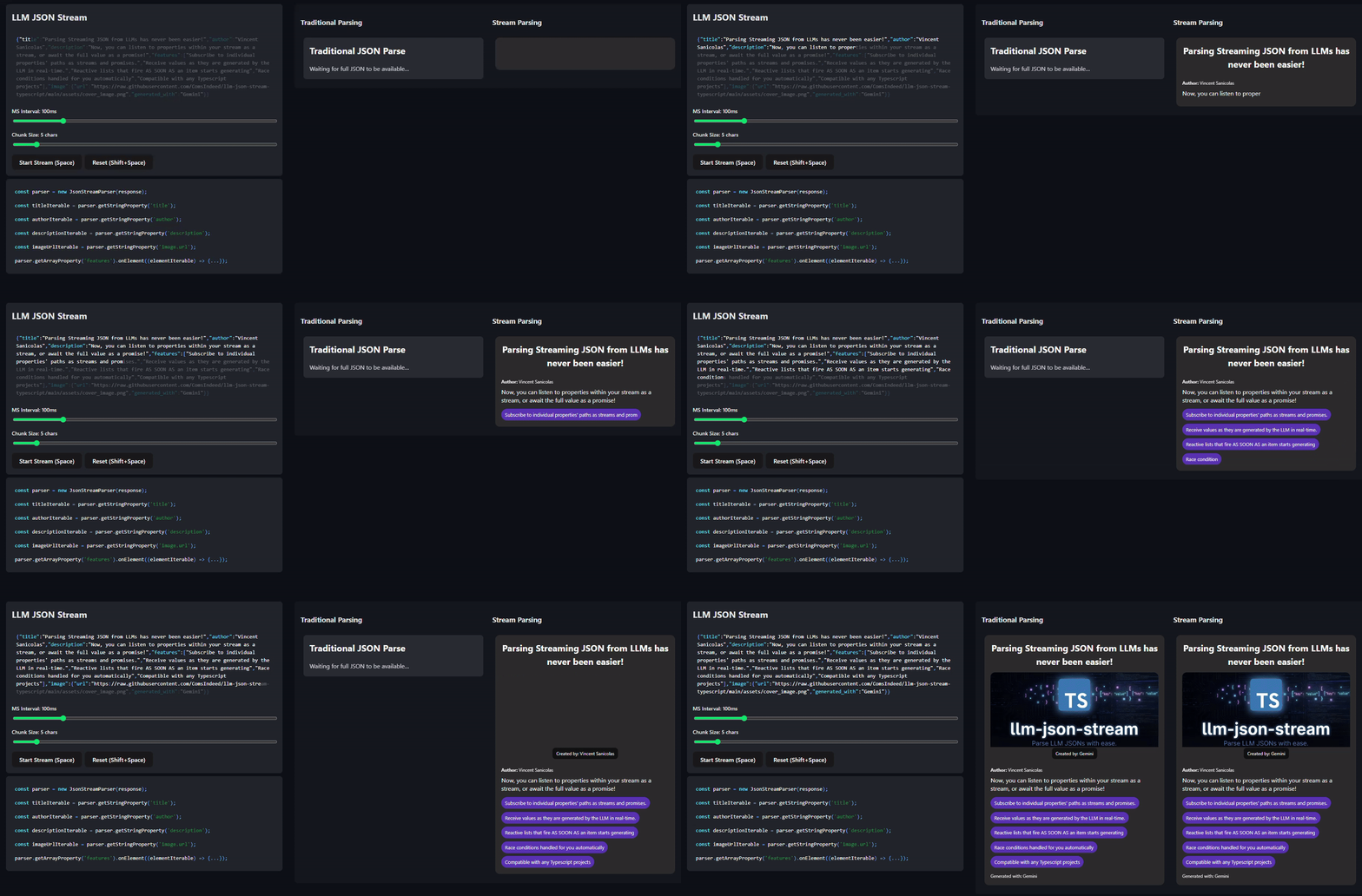
Table of Contents
- The Problem
- The Solution
- Quick Start
- How It Works
- Feature Highlights
- Complete Example
- API Reference
- Robustness
- LLM Provider Setup
- Contributing
- License
The Problem
LLM APIs stream responses token-by-token. When the response is JSON, you get incomplete fragments:
{"title": "My Bl
{"title": "My Blog Po
{"title": "My Blog Post", "content": "This is
JSON.parse() fails on partial JSON. Your options aren't great:
| Approach | Problem | |----------|---------| | Wait for complete response | High latency, defeats streaming | | Display raw chunks | Broken JSON in your UI | | Build a custom parser | Complex, error-prone, weeks of work |
The Solution
LLM JSON Stream parses JSON character-by-character as it arrives, allowing you to subscribe to specific properties and react to their values the moment they're available.
Instead of waiting for the entire JSON response to complete, you can:
- Display text fields progressively as they stream in
- Add list items to your UI the instant they begin parsing
- Await complete values for properties that need them (like IDs or flags)
Quick Start
npm install llm-json-streamimport { JsonStream } from 'llm-json-stream';
// Works with any AsyncIterable<string>
// Compatible with: Node.js, Deno, Bun, browsers, Cloudflare Workers, etc.
const stream = JsonStream.parse(llmResponseStream);
// Stream text as it types using async iteration
for await (const chunk of stream.get<string>('message')) {
displayText += chunk; // Update UI character-by-character
}
// Or get the complete value
const title = await stream.get<string>('title');
// Clean up when done
await stream.dispose();Cross-Platform Compatibility
This library uses only async iterables (AsyncIterable<string>), making it 100% platform-agnostic:
- Node.js - All versions with async iterator support
- Deno - Native compatibility
- Bun - Native compatibility
- Browsers - Works with native Web Streams via adapters
- Cloudflare Workers - Full support
- Edge runtimes - Compatible with all edge computing platforms
No polyfills required! This library uses standard AsyncIterable, which is natively supported everywhere now. Unlike Node.js stream libraries that break in the browser, this works seamlessly across all platforms.
How It Works
Two APIs for Every Property
Every property gives you both an async iterator (incremental updates) and a promise (complete value):
const title = stream.get<string>('title');

// Async iterator - each chunk as it arrives
for await (const chunk of title) {
  console.log(chunk);
}

// Promise - the final value
const complete = await title;
| Use case | API |
|----------|-----|
| Typing effect, live updates | for await...of |
| Atomic values (IDs, flags, counts) | await directly |
Path Syntax
Navigate JSON with dot notation and array indices:
stream.get<string>('title')                    // Root property
stream.get<string>('user.name')                // Nested object
stream.get<string>('items[0].title')           // Array element
stream.get<number>('data.users[2].age')        // Deep nesting
Feature Highlights
Streaming Strings
Display text as the LLM generates it, creating a smooth typing effect:
for await (const chunk of stream.get<string>('response')) {
  displayText += chunk;
  updateUI();
}
Reactive Lists
Add items to your UI as each element begins parsing:
const articles = stream.get<Article[]>('articles');

// Iteration yields AsyncJson<Article> for each element as it's discovered
for await (const articleAsync of articles) {
  // articleAsync is an AsyncJson<Article> - you can await it or stream it
  const article = await articleAsync;
  console.log(`Got article: ${article.title}`);

  // Or stream the title as it arrives
  for await (const chunk of articleAsync.get<string>('title')) {
    displayArticleTitle(chunk);
  }
}
Or use the path-based API for cleaner code:
const paths = stream.paths();

// Iteration yields AsyncJson proxy for each element
for await (const article of paths.articles) {
  // Access properties on each article as they stream
  const title = await article.title;
  console.log(`Article title: ${title}`);
}
Traditional parsers wait for complete objects → jarring UI jumps.
This approach → each item appears instantly and streams its content smoothly.
Reactive Maps
Maps stream their properties as they're discovered. You can iterate over key-value pairs to see properties appear:
const user = stream.get<User>('user');

// Iterate over [key, AsyncJson<V>] tuples as properties arrive
for await (const [key, value] of user) {
  console.log(`Property ${key} discovered`);
  const propertyValue = await value;
  console.log(`${key}: ${propertyValue}`);
}

// Or use the path-based API for direct access
const userPaths = stream.paths().user;
const name = await userPaths.name;
const age = await userPaths.age;
All JSON Types
stream.get<string>('name')      // String → streams chunks
stream.get<number>('age')       // Number → int or double
stream.get<boolean>('active')   // Boolean
stream.get<null>('deleted')     // Null
stream.get<object>('config')    // Object → Record<string, any>
stream.get<any[]>('tags')       // Array → any[]
Or use the type-safe path API:
interface User {
  name: string;
  age: number;
  active: boolean;
}

const stream = JsonStream.parse<User>(response);
const paths = stream.paths();

// Full TypeScript autocomplete!
const name: string = await paths.name;
const age: number = await paths.age;
const active: boolean = await paths.active;
Flexible API
Navigate complex structures with chained access:
// Use .get() with paths
const name = await stream.get<string>('user.name');
const email = await stream.get<string>('user.email');
const city = await stream.get<string>('user.address.city');

// Or use the ergonomic .paths() API
const paths = stream.paths();
const name2 = await paths.user.name;
const email2 = await paths.user.email;
const city2 = await paths.user.address.city;
Type Safety with Schemas
Define your schema once and get full TypeScript support:
interface Item {
  title: string;
  price: number;
}

interface Response {
  items: Item[];
}

const stream = JsonStream.parse<Response>(llmResponse);
const paths = stream.paths();

// TypeScript knows the types!
for await (const items of paths.items) {
  for (const item of items) {
    const title: string = await item.title;  // Inferred as string
    const price: number = await item.price;  // Inferred as number
    updateUI(title, price);
  }
}
Buffered vs Unbuffered Streams
Property streams offer two modes to handle different subscription timing scenarios:
const items = stream.get<Item[]>('items');

// Recommended: Buffered iteration (replays values to new subscribers)
for await (const snapshot of items) {
  // Will receive the LATEST state immediately, then continue with live updates
  // Safe for late subscriptions - no race conditions!
}

// Alternative: Unbuffered iteration (live only, no replay)
for await (const snapshot of items.unbuffered()) {
  // Only receives values emitted AFTER subscription
  // Use when you explicitly want live-only behavior
}
| Stream Type | Behavior | Use Case |
|-------------|----------|----------|
| for await...of | Replays latest value, then live | Recommended — prevents race conditions |
| .unbuffered() | Live values only, no replay | When you need live-only behavior |
Memory efficient: Maps and Lists only buffer the latest state (O(1) memory), not the full history. Strings buffer chunks for accumulation.
Yap Filter (closeOnRootComplete)
Some LLMs "yap" after the JSON—adding explanatory text that can confuse downstream processing. The closeOnRootComplete option stops parsing the moment the root JSON object/array is complete:
const stream = JsonStream.parse(llmStream, {
  closeOnRootComplete: true  // Stop after root JSON completes (default: true)
});

// Input: '{"data": 123} Hope this helps! Let me know if you need anything else.'
// Parser stops after '}' — the trailing text is ignored
This is especially useful when:
- Your LLM tends to add conversational text after JSON
- You want to minimize processing overhead
- You're building a pipeline where only the JSON matters
Complete Example
A realistic scenario: parsing a blog post with streaming title and reactive sections.
import { JsonStream } from 'llm-json-stream';

interface Section {
  heading: string;
  body: string;
}

interface BlogPost {
  title: string;
  sections: Section[];
}

async function main() {
  // Your LLM stream (OpenAI, Claude, Gemini, etc.)
  const llmStream = await llm.streamChat("Generate a blog post as JSON");

  const stream = JsonStream.parse<BlogPost>(llmStream);
  const blog = stream.paths();

  // Title streams character-by-character
  (async () => {
    for await (const chunk of blog.title) {
      process.stdout.write(chunk);  // "H" "e" "l" "l" "o" " " "W" "o" "r" "l" "d"
    }
    console.log();
  })();

  // Sections appear as they stream - each iteration yields a section AsyncJson
  (async () => {
    let sectionIndex = 0;
    for await (const section of blog.sections) {
      console.log(`Processing section ${sectionIndex}`);

      // Stream the heading as it arrives
      for await (const chunk of section.heading) {
        console.log(`  Heading chunk: ${chunk}`);
      }

      // Stream the body as it arrives
      for await (const chunk of section.body) {
        console.log(`  Body chunk: ${chunk}`);
      }

      sectionIndex++;
    }
  })();

  // Wait for completion
  const allSections = await blog.sections;
  console.log(`Done! Got ${allSections.length} sections`);

  await stream.dispose();
}
API Reference
Creating a Stream
// Without schema (dynamic)
const stream = JsonStream.parse(asyncIterableStream);

// With schema (typed)
interface MySchema {
  name: string;
  age: number;
}
const stream = JsonStream.parse<MySchema>(asyncIterableStream);

// With options
const stream = JsonStream.parse(asyncIterableStream, {
  closeOnRootComplete: true  // Stop after root JSON completes
});
Accessing Properties
Manual Access with .get<T>(path)
// Returns AsyncJson<T> - both a Promise and AsyncIterable
const name = stream.get<string>('user.name');

// Use as a promise
const nameValue: string = await name;

// Use as an async iterable
for await (const chunk of name) {
  console.log(chunk);
}

// Access nested properties
const email = stream.get<string>('user.contact.email');
const age = stream.get<number>('users[0].age');
Path-based Access with .paths()
// Get the typed proxy object
const paths = stream.paths();

// Direct property access with TypeScript autocomplete
const name: string = await paths.user.name;

// Stream chunks
for await (const chunk of paths.user.bio) {
  console.log(chunk);
}

// Array access
const firstUser = paths.users[0];
const email = await firstUser.email;

// Chained access
const city = await paths.user.address.city;

// Convert path proxy to AsyncJson for full API access
const userAsyncJson = paths.user.asyncJson();
// or use the $ prefix: paths.user.$asAsyncJson()
AsyncJson Interface
Both .get<T>() and .paths() return AsyncJson<T> values:
// AsyncJson<T> is both a Promise and an AsyncIterable
// - For arrays (T = E[]), iteration yields AsyncJson<E> for each element
// - For objects (T = {k: V}), iteration yields [key, AsyncJson<V>] tuples
// - For primitives, iteration yields the value itself (e.g., string chunks)
interface AsyncJson<T> extends Promise<T>, AsyncIterable<...> {
  get<U>(path: string): AsyncJson<U>;  // Nested access
  unbuffered(): AsyncIterable<...>;     // Live-only iteration
}Important:
- Arrays: iteration yields
AsyncJson<E>for individual elements, NOT array snapshots - Objects: iteration yields
[key, AsyncJson<V>]tuples as properties are discovered - Primitives: iteration yields chunks (e.g., string chunks as they stream)
Supported Types
All JSON types are supported:
| Type | Example |
|------|---------|
| String | stream.get<string>('name') |
| Number | stream.get<number>('age') |
| Boolean | stream.get<boolean>('active') |
| Null | stream.get<null>('deleted') |
| Object | stream.get<User>('user') |
| Array | stream.get<User[]>('users') |
Cleanup
Always dispose the stream when you're done:
await stream.dispose();Robustness
Battle-tested with comprehensive test coverage. Handles real-world edge cases:
| Category | What's Covered |
|----------|----------------|
| Escape sequences | \", \\, \n, \t, \r, \uXXXX |
| Unicode | Emoji 🎉, CJK characters, RTL text |
| Numbers | Scientific notation (1.5e10), negative, decimals |
| Whitespace | Multiline JSON, arbitrary formatting |
| Nesting | 5+ levels deep |
| Scale | 10,000+ element arrays |
| Chunk boundaries | Any size, splitting any token |
| LLM quirks | Trailing commas, markdown wrappers (auto-stripped) |
LLM Provider Setup
import OpenAI from 'openai';
import { JsonStream } from 'llm-json-stream';

const openai = new OpenAI();

const response = await openai.chat.completions.create({
  model: 'gpt-4',
  messages: [{ role: 'user', content: 'Generate a JSON blog post' }],
  stream: true,
});

// Create an async generator that yields text chunks
async function* openaiStream() {
  for await (const chunk of response) {
    const content = chunk.choices[0]?.delta?.content || '';
    if (content) yield content;
  }
}

const stream = JsonStream.parse(openaiStream());
import Anthropic from '@anthropic-ai/sdk';
import { JsonStream } from 'llm-json-stream';
const anthropic = new Anthropic();
const stream = await anthropic.messages.stream({
model: 'claude-3-opus-20240229',
max_tokens: 1024,
messages: [{ role: 'user', content: 'Generate a JSON blog post' }],
});
// Create an async generator from Claude's event emitter
async function* claudeStream() {
for await (const chunk of stream) {
if (chunk.type === 'content_block_delta' && chunk.delta.type === 'text_delta') {
yield chunk.delta.text;
}
}
}
const jsonStream = JsonStream.parse(claudeStream());import { GoogleGenerativeAI } from '@google/generative-ai';
import { JsonStream } from 'llm-json-stream';
const genAI = new GoogleGenerativeAI(process.env.GOOGLE_API_KEY);
const model = genAI.getGenerativeModel({ model: 'gemini-pro' });
const response = await model.generateContentStream('Generate a JSON blog post');
// Create an async generator that yields text chunks
async function* geminiStream() {
for await (const chunk of response.stream) {
const text = chunk.text();
if (text) yield text;
}
}
const stream = JsonStream.parse(geminiStream());Architecture
This package implements a character-by-character JSON state machine with a reactive, streaming API designed specifically for handling LLM streaming responses.
Core Components
1. Parser Core
JsonStream- Main class with.parse()static methodJsonStreamParser- Internal parser implementationJsonStreamParserController- Internal coordinator for parsing operations
2. Unified Property API
AsyncJson<T>- Unified interface that is both Promise and AsyncIterable.get<T>(path)- Manual string-based property access.paths()- Proxy-based ergonomic property access with TypeScript autocomplete
3. Property Delegates (Internal State Machine)
Delegates handle character-by-character parsing for each JSON type:
StringPropertyDelegate- Handles strings with escape sequencesNumberPropertyDelegate- Handles number parsingBooleanPropertyDelegate- Handles true/falseNullPropertyDelegate- Handles nullObjectPropertyDelegate- Handles object parsingArrayPropertyDelegate- Handles array parsing
Design Patterns
- State Machine: Character-by-character parsing with delegates
- Async Iterators: Modern streaming via
for await...of - Thenable Interface: Direct
awaitsupport without.promise - Proxy Pattern: Ergonomic property access via
.paths() - Factory Pattern: Delegate creation based on first character
- Controller Pattern: Separation of public API from internal logic
Project Structure
src/
├── classes/
│   ├── json_stream.ts                  # Main JsonStream class with .parse()
│   ├── property_stream.ts              # AsyncJson implementation
│   ├── property_stream_controller.ts   # Internal controllers
│   ├── mixins.ts                       # Factory functions & helpers
│   └── property_delegates/             # State machine workers
│       ├── property_delegate.ts
│       ├── string_property_delegate.ts
│       ├── number_property_delegate.ts
│       ├── boolean_property_delegate.ts
│       ├── null_property_delegate.ts
│       ├── object_property_delegate.ts
│       └── array_property_delegate.ts
├── utilities/
│   └── stream_text_in_chunks.ts        # Test utility
└── index.ts                             # Public exports

test/
├── properties/                          # Property-type specific tests
│   ├── string_property.test.ts
│   ├── number_property.test.ts
│   ├── boolean_property.test.ts
│   ├── null_property.test.ts
│   ├── map_property.test.ts
│   └── list_property.test.ts
└── [integration tests]                  # Comprehensive test suites
Development
# Install dependencies
npm install

# Build
npm run build

# Run tests
npm test

# Watch mode
npm run test:watch
Contributing
Contributions welcome!
- Check open issues
- Open an issue before major changes
- Run
npm testbefore submitting - Match existing code style
License
MIT — see LICENSE
Made for TypeScript developers building the next generation of AI-powered apps
Credits
This is a TypeScript port of the Dart llm_json_stream package.