
llm-slop-detector
v0.10.1
Published
Highlights invisible Unicode, AI-style punctuation, and telltale LLM phrases in markdown and plain text.

Maintainers
 mandakan
Readme
LLM Slop Detector




A VS Code extension and CLI that flag invisible Unicode, AI-style punctuation, and telltale LLM phrases in markdown and plaintext files. The CLI shares its rule engine with the editor, so local and CI findings stay in sync.
Try it in the browser
No install needed -- paste text into the web playground and get findings instantly. Everything runs in your browser; nothing is uploaded.
Browser extension (Chrome, Arc, Firefox)
A WebExtension that scans <textarea>, text inputs, and contenteditable elements (Gmail compose, vanilla rich-text widgets) as you type on any webpage. Findings are highlighted inline with colour-coded marks -- textarea marks are tinted background, contenteditable marks are wavy underlines so they don't disturb reading of styled content. A small "N slop" badge next to each editor opens a per-finding popover with severity, reason, source pack, per-finding "Fix this" buttons, and a "Fix all chars" button that applies every deterministic character replacement (em dash, curly quotes, zero-width, etc.) at once. For contenteditables the fix goes through execCommand('insertText') so the host editor's undo stack still works (Cmd+Z). Runs entirely in the browser -- no network calls, no telemetry.
Install from a store:
- Chrome / Arc / Edge / Brave: Chrome Web Store listing. Chromium forks accept the same package.
- Firefox: Firefox Add-ons listing.
Install from source (for hacking on the rules):
npm ci
npm run build:browser
# -> extension-browser-dist/ is the unpacked extension- Chrome / Arc / Edge / Brave: visit
chrome://extensions, flip on "Developer mode", click "Load unpacked", pickextension-browser-dist/. - Firefox: visit
about:debugging#/runtime/this-firefox, click "Load Temporary Add-on...", pickextension-browser-dist/manifest.json. The add-on unloads when Firefox quits.
Toggle off globally (or per-site) via the extension's toolbar button. Pick rule packs in the options page.
Read-only page scan
The toolbar popup also has a Scan this page button that highlights slop in any webpage you're reading -- a blog post, a Reddit thread, a LinkedIn update -- not just textareas. Findings are shown with a subtle wavy underline under the flagged word and a floating panel listing them in reading order, with click-to-jump and a clear-highlights button. The scan is a one-shot snapshot; re-click to rescan after the page changes.
Turn this off in the options page if you only want to lint your own writing. The scan is explicit (never auto-runs), local-only (no network), and one-shot per click (no background observers).
Known limitations (v1)
- Rich editors with virtual-DOM reconcilers (Notion/Lexical, Substack/ProseMirror, LinkedIn/Draft.js, Twitter/X) strip our inline marks on their next render cycle. The badge count and popover still work, but inline underlines won't persist. Plain
contenteditable(Gmail compose, vanilla rich-text widgets) is supported. - Google Docs uses a canvas-based renderer with no real DOM text; the extension can't see its contents and won't work there.
- Cross-origin iframes are invisible for the same-origin-policy reason.
- Inline phrase matches that straddle inline formatting (e.g. a word that's partially italicised) appear in the popover list but without an inline mark, because
Range.surroundContentsrejects ranges that cross element boundaries. Workaround: strip the formatting if you want the mark.
Features
- Flags zero-width, BOM, non-breaking spaces, and other invisible Unicode that hides in text and wrecks diffs
- Flags AI-style punctuation: em and en dashes, curly quotes, horizontal ellipsis, angle quotes
- Configurable phrase rules: ~40 built-in core rules plus thirteen opt-in packs (
academic,cliches,puffery,fiction,claudeisms,structural,security,openai,gemini,deepseek,llama,qwen,grok) totalling 500+ curated regex patterns - Markdown-aware: skips fenced and inline code, link URLs, and YAML frontmatter so technical prose doesn't drown in false positives
- Inline-ignore comments (
<!-- slop-disable -->,<!-- slop-disable-next-line -->,<!-- slop-disable-line -->) for one-off exceptions - Hover over any flagged range for the rule selector plus a ready-to-copy
slop-disable-next-linesnippet - Per-workspace overrides via
.llmsloprc.jsonand per-user overrides via settings - One-click quick fixes for deterministic character replacements, plus a "fix all" action
- Status-bar slop counter for the active file, click to toggle
- No bundler, no runtime dependencies, no telemetry
Example
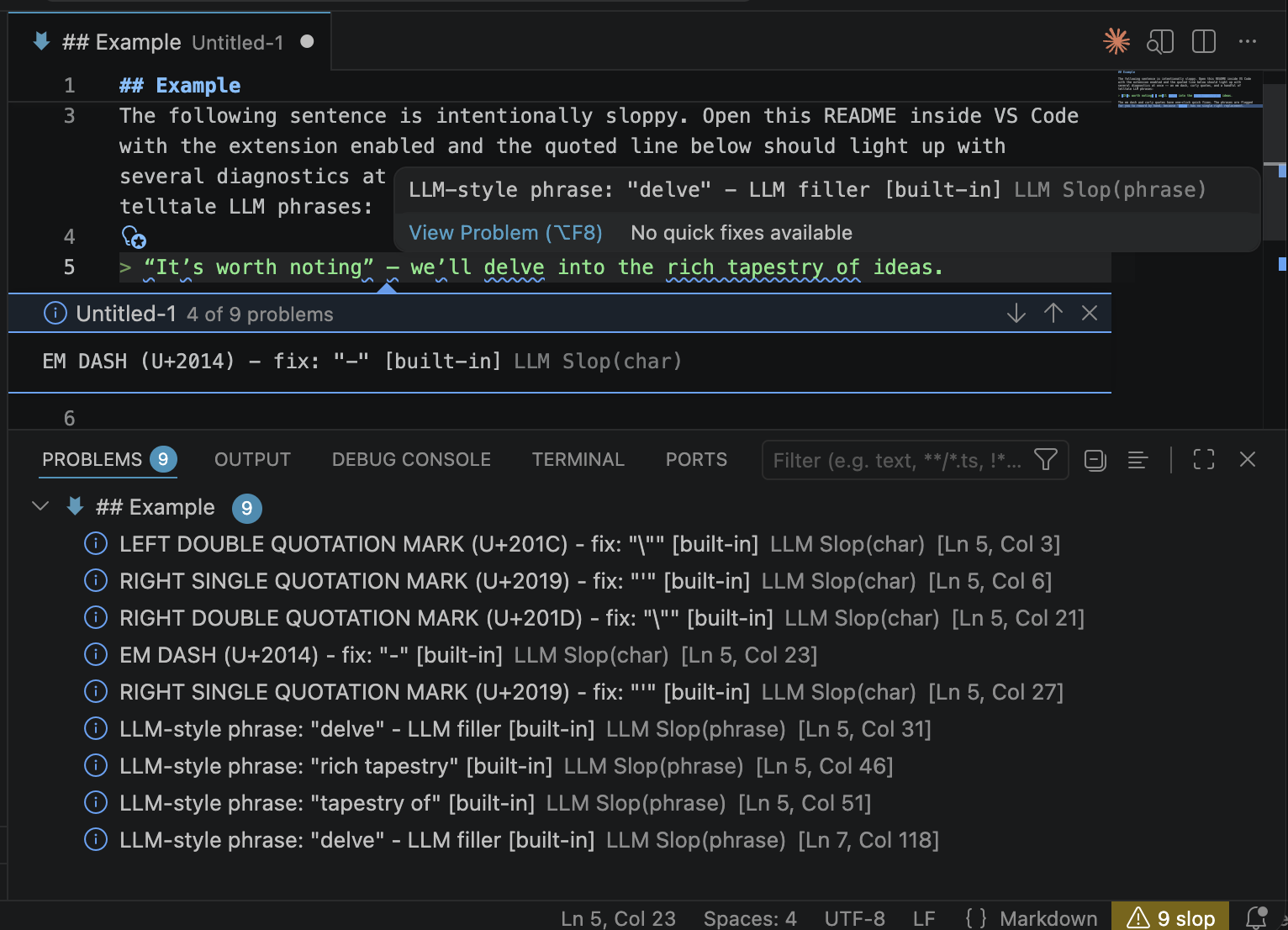
The following sentence is intentionally sloppy. Open this README inside VS Code with the extension enabled and the quoted line below should light up with several diagnostics at once -- an em dash, curly quotes, and a handful of telltale LLM phrases:
“It’s worth noting” — we’ll delve into the rich tapestry of ideas.
The em dash and curly quotes have one-click quick fixes. The phrases are flagged for you to reword by hand, because "delve" has no single right replacement.
What it flags
Warnings (yellow): zero-width characters, non-breaking spaces, BOM, line and paragraph separators. Stuff that hides in the text and wrecks diffs.
Info (blue, non-intrusive): em and en dashes, curly quotes, horizontal ellipsis, angle quotes, and a configurable list of phrase regexes like delve, it's worth noting, tapestry of, leverage, etc.
Diagnostics show which rule source flagged a match ([built-in], [your-list-name]) so you can tell where a rule came from.
Quick fixes
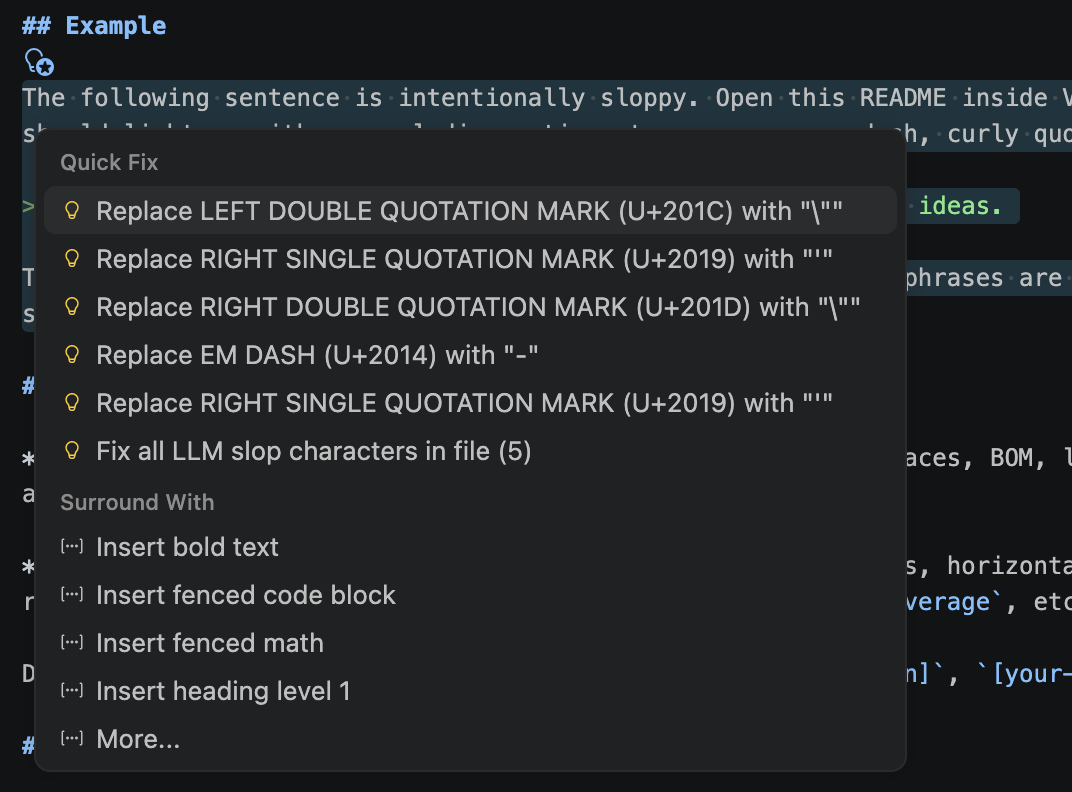
Most flagged characters have deterministic fixes available via the lightbulb menu (Cmd/Ctrl+.):
- zero-width, BOM, joiners: delete
- no-break / narrow no-break space: regular space
- line / paragraph separator: newline
- em dash, en dash: hyphen
- ellipsis: three dots
- curly quotes: straight quotes
No default fix for angle quotes (« »), primes (′ ″), or middle dot (·). These are legitimate punctuation in many locales. You can still force a fix via the llmSlopDetector.charReplacements setting.
Phrases have no quick fix by design. No deterministic replacement exists for "delve".
A Fix all LLM slop characters in file action is offered whenever the cursor is on a fixable character diagnostic.
Status bar
Right-aligned status bar item shows the slop count for the active markdown or plaintext file:
$(warning) N slopwith a warning background when issues exist$(check) No slopwhen the file is clean$(circle-slash) Slop offwhen disabled
Click toggles the detector. Hidden when the active editor is a different language.
Scope and ignores
In markdown files, the scanner skips content where slop rules would only produce noise:
- Fenced code blocks (
```and~~~) and inline code spans (`foo`) - Markdown link URLs (
[text](url)-- the URL part) and autolinks (<https://...>) - YAML frontmatter at the top of the file (
---...---or---......)
Link text, headings, and regular paragraphs are still scanned as before. Plain-text files are scanned in full; they have no markdown structure to skip.
Inline ignore comments
For one-off exceptions in either markdown or plaintext, drop an HTML-style directive:
<!-- slop-disable-next-line -->
This line can delve as much as it wants.

Text before <!-- slop-disable-line --> robust tapestry leverage -- all silenced.

<!-- slop-disable -->
Everything between these two markers is silenced,
including multiple paragraphs.
<!-- slop-enable -->
Three forms:
<!-- slop-disable-line -->-- silence the line the comment is on.<!-- slop-disable-next-line -->-- silence the line after the comment.<!-- slop-disable -->...<!-- slop-enable -->-- silence everything between the two directives.
By default a directive silences every rule on the covered range. To scope it to one rule, append a phrase:<pattern> or char:<literal-or-codepoint> spec:
<!-- slop-disable-next-line phrase:\bdelve(s|d|ing)?\b -->
This delve is fine but leverage still gets flagged.

<!-- slop-disable-next-line char:U+2014 -->
Em dashes allowed on this line -- but curly "quotes" still flag.
The phrase: value must match the rule's pattern field exactly (the literal regex string from the rule file, not the matched text). The char: value can be the literal character or a U+XXXX codepoint. Directives inside fenced or inline code are ignored, so README examples like this one don't accidentally silence the whole file.
Source code comments (opt-in)
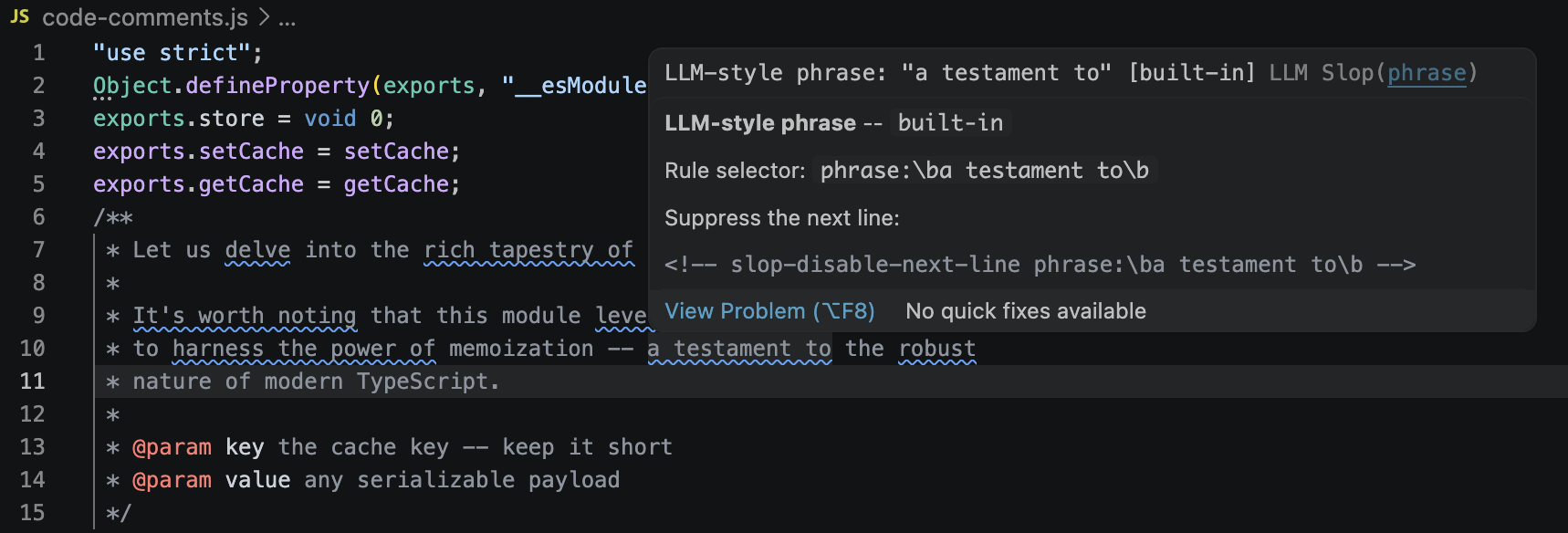
LLM slop frequently turns up in JSDoc, Python docstrings, Rust /// blocks, and // comments. Turn on llmSlopDetector.scanCodeComments to scan those ranges too:
"llmSlopDetector.scanCodeComments": true,
"llmSlopDetector.codeCommentLanguages": [
  "typescript", "javascript", "python", "rust", "go"
]
Only comments and docstrings are scanned -- identifiers, string literals, and regular code are ignored. Supported language IDs: typescript, javascript, typescriptreact, javascriptreact, python, rust, go, java, csharp, cpp, c, ruby, php, shellscript, swift, kotlin, scala, dart, perl, r, yaml. Unknown IDs are silently ignored.
Known limitations
Comment detection is lexical, not AST-based. This means:
- Python triple-quoted strings are scanned whether they are docstrings or data.
x = """some data with delve"""will flag. If that matters, put the data on the same line as an inline ignore directive, or switch to a regular string. - Regex literals in JavaScript (
/foo/) aren't specially recognised; odd edge cases like/** @regex /x/ */can misparse. File an issue if you hit a real false positive. - Indented code blocks in Markdown (four-space) are still scanned -- use fenced blocks instead.
If a comment contains a legitimate flagged word, use an inline ignore directive as usual:
/**
 * <!-- slop-disable-next-line phrase:\bdelve(s|d|ing)?\b -->
 * We intentionally delve into the cache layout here because...
 */
Rule packs
The core list is deliberately conservative: ~40 phrase rules covering the buzzwords everyone agrees on (delve, leverage, seamless, paradigm shift, etc.). For more coverage, opt into one or more packs via llmSlopDetector.enabledPacks:
academic-- words over-represented in LLM-authored academic writing (bolster,elucidate,facilitate,showcase,noteworthy, ~90 entries). Severityhintso the Problems panel stays usable. Derived fromberenslab/llm-excess-vocab(MIT).cliches-- general LLM cliche vocabulary (captivating,pinnacle,galvanize, journey/landscape/symphony metaphors). Derived fromnanxstats/llm-cliches(MIT).puffery-- promotional / editorializing puffery:rich cultural heritage,nestled in the heart of,boasts,enduring legacy,leaves an indelible mark,deeply rooted,diverse array of, copula-avoidance flourishes. Original content.fiction-- fiction and creative-writing tells (breath hitched, heart hammering, shivers down spine, chestnut eyes, LLM-cliche character names). Includes adult-fiction markers. Derived fromSicariusSicariiStuff/SLOP_Detector(Apache-2.0).claudeisms-- Claude-specific mannerisms: sycophantic openers, consent-theater phrasing, "important to note that" hedges. Derived from SLOP_Detector.structural-- structural LLM tells: "not X but Y" negation pivots, sycophantic line openers, "in this section we'll" meta-commentary, "at the end of the day" closers. Original content.security-- LLM-weaponized invisibles above the BMP: tag characters (U+E0020-U+E007F, used in ASCII-smuggler prompt injection) and variation selectors (U+FE00-U+FE0E + U+E0100-U+E01EF, used for arbitrary-data smuggling in emoji and CJK), plus invisible math operators (U+2061-U+2064), deprecated format controls (U+206A-U+206F), the combining grapheme joiner (U+034F), Mongolian free variation selectors (U+180B-U+180D), and the Braille blank (U+2800). Severityerror(warningfor the few code points with rare legitimate use). Skips U+FE0F (emoji presentation selector) to avoid false positives. Opt in if you copy-paste LLM output into files you don't fully trust.
Model-family packs flag mannerisms specific to one vendor's models. Mix and match:
openai-- OpenAI GPT / ChatGPT: citation-markup artifact leaks (oaicite,oai_citation,contentReference,turn0search0-style web-tool tokens), AI-identity and knowledge-cutoff disclaimers (as an AI language model,knowledge cutoff), refusal boilerplate (I cannot fulfill that request), and stock opener/closer/hedge scaffolding (Certainly!,here's a comprehensive overview,I hope this helps). Original content.gemini-- Google Gemini / Bard: breakdown-happy structure (here's a breakdown,let's break it down), analogy openers (think of it as,imagine a),I hope this helpsclosers, and identity / knowledge-cutoff / professional-advice disclaimers.deepseek-- DeepSeek V3 / R1:<think>tag leaks, R1 reasoning tics leaking into final output (Wait,,Hmm,,Let me reconsider,the user is asking), DeepSeek special-token leaks (<|begin_of_thought|>,<|EOT|>).llama-- Meta Llama:as an AIidentity disclaimers, Llama-Guard refusal boilerplate (I cannot provide,it would not be appropriate), and Llama2 / Llama3 chat-template token leaks ([INST],<|eot_id|>,<<SYS>>,<|python_tag|>).qwen-- Alibaba Qwen / QwQ:Sure!/Of course!openers, Alibaba identity disclaimers, ChatML token leaks (<|im_start|>), Qwen-VL tokens (<|vision_start|>), and QwQ reasoning-phase tics.grok-- xAI Grok:Look,/Here's the dealopeners, forced directness (no BS,straight up,real talk), edginess (based,cope,galaxy-brained), Hitchhiker's Guide references (42,Don't panic), and Elon/X name-drops.
Enable one or more in your settings:
"llmSlopDetector.enabledPacks": ["academic", "structural"]Attribution and license texts for each pack's source are in THIRD_PARTY_NOTICES.md.
Tuning a pack
Packs are merged after the core list, so a pack entry wins if it targets the same char as core. Phrase rules accumulate. If a specific pack rule is too noisy for your writing, use llmSlopDetector.severityOverrides (see Severity overrides) to downgrade or disable it from one place, without forking the pack.
If a whole pack is unusable in your workflow, file an issue.
Severity overrides
llmSlopDetector.severityOverrides is a map from a rule selector to a severity level (or off to disable the rule entirely). Use it to downgrade a noisy pack, silence one rule, or promote a source that matters more in your repo -- all from a single setting, no fork needed.
"llmSlopDetector.severityOverrides": {
  "pack:academic": "hint",
  "phrase:\\bdelve(s|d|ing)?\\b": "off",
  "char:U+2014": "information",
  "source:built-in": "warning"
}
Selectors (same shape as the inline-ignore directive specs):
pack:<name>-- every rule from a built-in pack (pack:academic,pack:cliches, etc.)phrase:<pattern>-- matches a phrase rule'spatternfield exactly. Hover over a flagged phrase to copy its pattern.char:<literal>orchar:U+XXXX-- matches a char rule by literal or codepoint.source:<name>-- matchesRuleSource.name(built-in,pack:academic,user settings, or thenamefield from your.llmsloprc.json).
Values: error, warning, information, hint, or off. Invalid values are dropped with a console warning.
Precedence: most-specific wins. phrase: / char: beats pack:, which beats source:. If two selectors of the same specificity both match (for example char:— and char:U+2014), the literal form wins.
The CLI takes the same settings via a repeatable --severity-override key=value:
llm-slop --severity-override pack:academic=hint --severity-override 'phrase:\bdelve(s|d|ing)?\b=off' README.mdThe "Show loaded rule sources" command reports how many rules were affected by overrides on a trailing line.
Configuration
Settings (Cmd/Ctrl+, then search "LLM Slop"):
llmSlopDetector.enabled: toggle on/offllmSlopDetector.useBuiltinRules: load the shipped built-in list (defaulttrue). Turn off to rely only on local rule files and user settings.llmSlopDetector.enabledPacks: opt-in extra rule packs (see Rule packs). Default:[].llmSlopDetector.phrases: additional regex patterns, appended to the built-in list.llmSlopDetector.charReplacements: override quick-fix replacements per character.llmSlopDetector.scanCommitMessages: scan Git commit editor buffers (git-commit) and the VS Code Source Control input box (scminput). Defaulttrue.
Commands
Cmd/Ctrl+Shift+P:
- LLM Slop Detector: Toggle: enable/disable
- LLM Slop Detector: Open settings: jump to this extension's settings filtered by
@ext:query - LLM Slop Detector: Show loaded rule sources: quick pick listing every active source with name, version, and rule counts
- LLM Slop Detector: Show onboarding: re-show the onboarding prompt (useful if you dismissed it too early)
- LLM Slop Detector: Scan selection: list slop findings in the current selection (or the current line if nothing is selected) in a quick pick -- clicking a finding jumps to it. Useful for checking a pasted paragraph without scrolling through every diagnostic in the file.
Rule sources
Rules merge from these layers (later overrides earlier on the same char or pattern):
- Built-in core list shipped with the extension
- Optional built-in packs listed in
llmSlopDetector.enabledPacks - Local
.llmsloprc.jsonin a workspace folder's root (auto-loaded, live-reloaded). Skipped in untrusted workspaces -- see Workspace trust. - User settings
After merging, llmSlopDetector.severityOverrides is applied -- it can downgrade or disable any rule from any layer without editing the source. See Severity overrides.
Workspace trust
Local .llmsloprc.json files contain arbitrary regex patterns compiled and executed by the extension. A catastrophic-backtracking pattern in a repo you opened for the first time could hang the extension host. So:
- In a trusted workspace, all four rule layers load as usual.
- In an untrusted workspace (VS Code's Restricted Mode), local rule files are skipped. Built-in rules, packs, and user-level settings still apply, so the extension remains useful out of the box.
Trust is granted per-workspace via VS Code's "Manage Workspace Trust" command. The extension listens for trust grants and re-scans open documents when you flip a workspace to trusted.
.llmsloprc.json format
{
  "$schema": "https://raw.githubusercontent.com/mandakan/llm-slop-detector/main/schemas/llmsloprc.schema.json",
  "name": "my-project",
  "version": "1.0.0",
  "description": "Extra phrases for this repo",
  "chars": [
    { "char": "--", "name": "EM DASH", "severity": "information", "replacement": " - " }
  ],
  "phrases": [
    { "pattern": "\\bour pet phrase\\b", "reason": "we banned this" }
  ]
}
Each char rule: char required. name, severity (error | warning | information | hint), replacement, suggestion optional.
Each phrase rule: pattern required. reason, severity optional.
Patterns are JavaScript regex, case-insensitive. Use \\b for word boundaries.
The extension ships a JSON Schema and registers it via contributes.jsonValidation, so opening .llmsloprc.json in VS Code gives you key completion, hover docs, severity-enum suggestions, and red squigglies on unknown fields or wrong types. The $schema line above is optional (VS Code matches by filename) but makes the file self-describing for editors and tools outside VS Code.
Quick user overrides (no rule file needed)
"llmSlopDetector.phrases": ["\\byour own pet phrase\\b"],
"llmSlopDetector.charReplacements": { "--": " - " }
CLI
The same rule engine ships as a CLI, useful for pre-commit hooks and CI. It produces identical findings to the extension for the same input and config.
llm-slop [options] <paths...>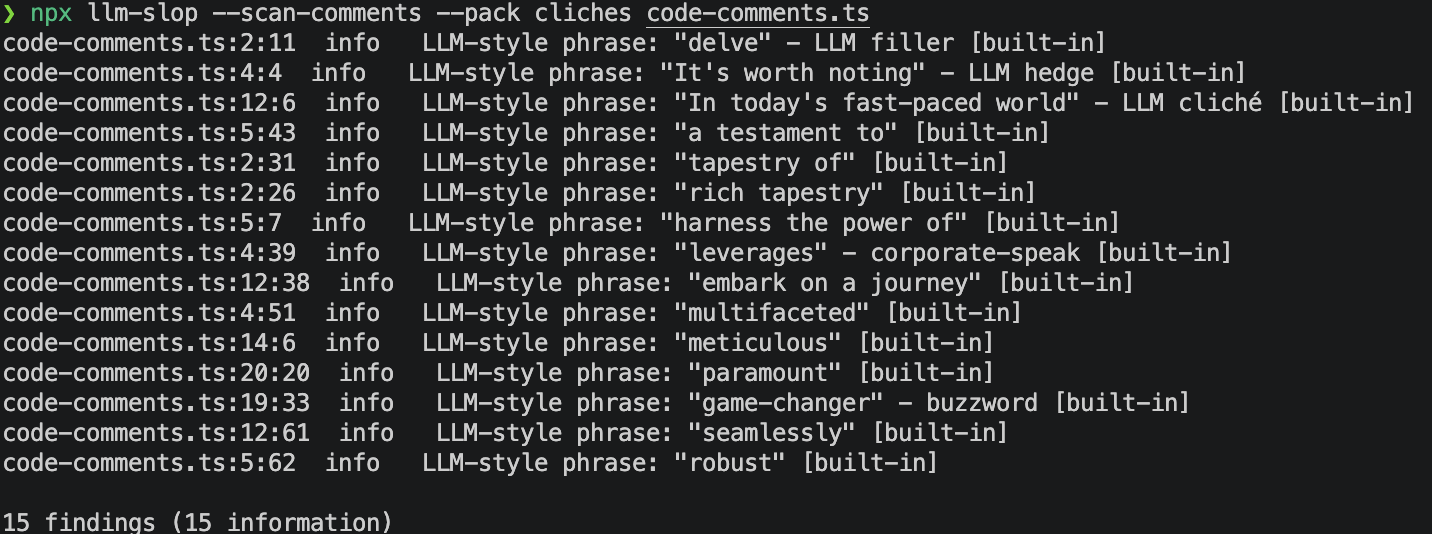
Paths may be files or directories. Directories are walked recursively; files with extensions .md, .markdown, .mdown, .txt, or .text are scanned. node_modules, out, and dot-prefixed entries are skipped.
Options:
-f, --format <pretty|json|sarif>-- output format (defaultpretty)--pack <name,...>-- enable rule packs (comma-separated)--no-builtin-- skip the built-in core rule list--config <path>-- explicit.llmsloprc.jsonpath (default: nearest ancestor of cwd)-s, --severity <level>-- fail threshold:error | warning | information | hint(defaultinformation)--severity-override <selector>=<level>-- override severity for a selector (see Severity overrides). Repeatable. Level may beoffto disable.--scan-comments-- also scan comments and docstrings in source code files (.ts,.py,.rs, etc). Off by default.-q, --quiet-- suppress the summary line-h, --help/-v, --version
Exit code: 0 if no findings at or above the severity threshold, 1 if any, 2 on argument errors.
Install
From npm:
npx llm-slop-detector README.md        # one-shot
npm install -g llm-slop-detector       # or put `llm-slop` on PATH
From a clone (for hacking on the rules):
npm install
npm run compile
./out/cli.js README.md
# or
npm run slop -- README.md
Pre-commit hook
.pre-commit-hooks.yaml ships at the repo root so you can wire it up via pre-commit.com:
repos:
  - repo: https://github.com/mandakan/llm-slop-detector
    rev: v0.4.0
    hooks:
      - id: llm-slop
Pin to a released tag. The hook runs on staged markdown and plaintext files and fails the commit on any finding (override with args: [--severity, error] to only fail on errors).
There's also a commit-msg stage hook that scans the commit message itself before it lands:
repos:
  - repo: https://github.com/mandakan/llm-slop-detector
    rev: v0.5.0
    hooks:
      - id: llm-slop-commit-msg
        stages: [commit-msg]
The CLI recognises COMMIT_EDITMSG, MERGE_MSG, TAG_EDITMSG, and EDIT_DESCRIPTION by basename and treats them as git-commit: # comment lines and the post-scissors (>8) diff block are skipped automatically. Use both hooks together or pick the one that fits your workflow.
To also scan source-code comments, extend the hook:
- id: llm-slop
  args: [--scan-comments]
  types_or: [markdown, plain-text, python, typescript, javascript, rust, go]
GitHub Actions
The SARIF output plugs into code-scanning:
- run: npx llm-slop-detector --format=sarif . > slop.sarif
- uses: github/codeql-action/upload-sarif@v3
  with:
    sarif_file: slop.sarif
Use from Claude / MCP
The same rule engine also ships as a stdio MCP server, so an agent can scan its own output before writing it to disk. Findings are identical to the CLI for the same input and config.
Configure your MCP client (Claude Code, Claude Desktop, etc.):
{
  "mcpServers": {
    "llm-slop": {
      "command": "npx",
      "args": ["-y", "-p", "llm-slop-detector", "llm-slop-mcp"]
    }
  }
}
Pass --pack, --no-builtin, or --config as extra args, or set LLM_SLOP_PACKS, LLM_SLOP_NO_BUILTIN, or LLM_SLOP_CONFIG in env to match your CLI setup.
Tools exposed:
scan_text--{ text, language?, packs? }returns an array of findings withline,col,endLine,endCol,code,severity,message,source,rulePattern.languagedefaults tomarkdown; useplaintextto scan everything, or a code language id (e.g.typescript) to scan only comments.packsoverrides the server's startup packs for one call.list_rules--{ source? }returns loaded sources with rule counts, plus the full char and phrase rule lists, optionally filtered by source name.
Install
From the VS Code Marketplace
Search for LLM Slop Detector in the Extensions view, or:
code --install-extension thias-se.llm-slop-detectorFrom a GitHub Release
Grab the latest .vsix from Releases, then:
code --install-extension llm-slop-detector-<version>.vsixFrom source
git clone https://github.com/mandakan/llm-slop-detector.git
cd llm-slop-detector
npm install
npm run compile
npm run package
code --install-extension llm-slop-detector-*.vsix
Reload VS Code. Open any .md or .txt file. Diagnostics appear in the Problems panel and as squiggles inline.
Alternatives
This extension deliberately overlaps with a few existing tools. If one of these fits your workflow better, use it -- and if you landed here while searching for one of them, what follows is what this adds.
- Gremlins tracker -- the long-standing VS Code option for surfacing invisible and lookalike characters. General-purpose, not AI-specific, no phrase rules.
- Invisible AI Character Detector & Remover -- the closest single alternative on the character side. Targets AI-watermark invisibles (zero-widths, BOM, bidi, special spaces). Character-only, no phrase list.
- Hidden Character Detector -- security framing (ASCII smuggling, prompt-injection payloads) rather than style.
- LanguageTool Linter -- grammar and style for prose in VS Code. Doesn't target LLM tells specifically.
- Sloppy Joe and SlopDetector -- web-based paste-in tools for LLM phrase detection. No editor integration.
What this extension combines that the others don't: invisible Unicode and AI-style punctuation and curated LLM phrase packs, all as inline diagnostics on markdown and plaintext, with workspace- and user-level rule overrides.