
llm-supercli
v1.1.4
Published
A powerful multi-provider LLM command line interface

Maintainers
 alisasasasaasas
Readme
LLM SuperCLI
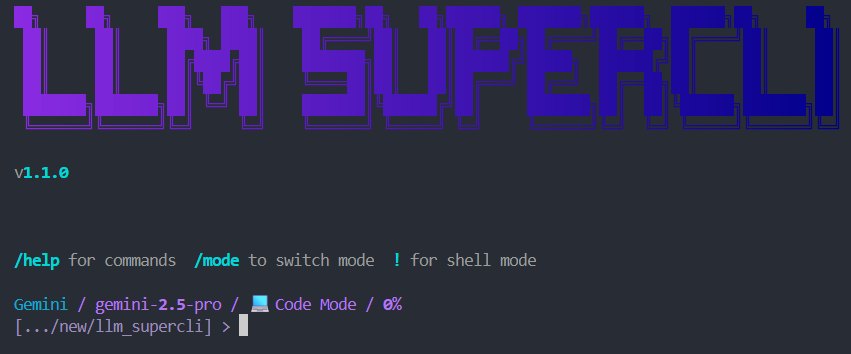
A powerful multi-provider LLM command line interface


Features • Installation • Quick Start • Providers • Commands
Features
- Multi-Provider Support - Groq, OpenRouter, Together AI, HuggingFace, Ollama, Gemini, Qwen
- Free Tiers Available - Gemini, Qwen, and Ollama work without API keys
- Interactive UI - Rich terminal with autocomplete, syntax highlighting, and live streaming
- Streaming Responses - Real-time token streaming with reasoning display
- Session Management - Save, load, and manage conversation sessions
- Tool Support - Built-in file operations, shell commands, and directory navigation
- MCP Integration - Model Context Protocol server connections
- Multiple Modes - Code, chat, and other operational modes
Installation
Via npm (Recommended)
npm install -g llm-supercliVia pip
pip install llm-supercliFrom Source
git clone https://github.com/alisaalisaalisaalisas/LLM_SuperCLI.git
cd LLM_SuperCLI
pip install -e .
Quick Start
# Start the CLI
llm

# Or use the full command
llm-supercli
Providers
| Provider | Models | Auth | Cost | |----------|--------|------|------| | Qwen | coder-model, vision-model | OAuth | Free (2K req/day) | | Gemini | gemini-2.5-pro, gemini-2.5-flash, gemini-2.5-flash-lite | OAuth | Free | | Groq | llama-3.3-70b, llama-3.1-8b, mixtral-8x7b, gemma2-9b | API Key | Free tier | | Ollama | llama3.2, mistral, codellama, phi3 | Local | Free | | OpenRouter | claude-3.5-sonnet, gpt-4o, gemini-pro-1.5, llama-3.1-405b | API Key | Paid | | Together | llama-3.1-405b, llama-3.1-70b, mixtral-8x22b | API Key | Paid | | HuggingFace | llama-3-70b, mixtral-8x7b, gemma-7b | API Key | Paid |
Authentication
Qwen (Free - OAuth)
Uses Qwen Code CLI credentials:
npm install -g @anthropic-ai/qwen-code
qwen  # Follow OAuth flow
Credentials stored in ~/.qwen/oauth_creds.json
Free tier: 2,000 requests/day, 60 requests/minute
Gemini (Free - OAuth)
Uses Gemini CLI credentials:
npm install -g @anthropic-ai/gemini-cli
gemini  # Follow OAuth flow
Credentials stored in ~/.gemini/oauth_creds.json
Ollama (Free - Local)
Run models locally with Ollama:
# Install Ollama from https://ollama.ai
ollama pull llama3.2
API Keys
Set environment variables for API key providers:
export GROQ_API_KEY=your_key
export OPENROUTER_API_KEY=your_key
export TOGETHER_API_KEY=your_key
export HF_API_KEY=your_key
Or set via CLI:
/key groq your_api_keyCommands
| Command | Description |
|---------|-------------|
| /help | Show help message |
| /model | Switch LLM model or provider |
| /settings | View/edit settings |
| /login [provider] | Login with OAuth |
| /logout [provider] | Logout from provider |
| /sessions | Manage chat sessions |
| /new | Start new chat session |
| /clear | Clear the screen |
| /status | Show current status |
| /cost | Show token usage |
| /key [provider] [key] | Set API key |
| /mcp | Manage MCP servers |
| /account | View account information |
| /favorite | Save session as favorite |
| /compress | Compress conversation context |
| /rewind | Rewind to previous message |
| /quit | Exit the CLI |
| /update | Check for updates and install |
Updating
From within the CLI
/updateThis will check for new versions and prompt you to update if available.
Manual update
# npm installation
npm update -g llm-supercli

# pip installation
pip install --upgrade llm-supercli
After updating, restart the CLI to use the new version.
Special Syntax
# Execute shell command
!ls -la
!git status

# Include file contents in prompt
@path/to/file.py
Tell me about @src/main.py

# Multiple files
Explain the difference between @file1.py and @file2.py
Built-in Tools
The LLM can use these tools during conversations:
| Tool | Description |
|------|-------------|
| list_directory(path) | List files and folders |
| read_file(path) | Read file contents |
| write_file(path, content) | Create or write a file |
| create_directory(path) | Create a folder |
| run_command(command) | Run shell command |
| get_current_directory() | Get current working directory |
Configuration
Settings stored in ~/.llm_supercli/config.json
Access interactive settings menu:
/settingsAvailable settings:
- LLM: Provider, model, temperature, max_tokens
- UI: Theme, streaming, syntax highlighting
- MCP: Enable/disable MCP features
Requirements
- Python 3.10+
- Node.js 14+ (for npm installation)
Dependencies:
- rich >= 13.0.0
- httpx >= 0.25.0
- click >= 8.0.0
- prompt_toolkit >= 3.0.0
- packaging >= 21.0
Testing with Allure Reports
The test suite supports Allure for generating interactive HTML test reports with detailed categorization and analytics.
Installing Allure CLI
Windows (Scoop):
scoop install allureWindows (Chocolatey):
choco install alluremacOS (Homebrew):
brew install allureLinux:
# Download from https://github.com/allure-framework/allure2/releases
# Extract and add bin/ to PATH
Running Tests with Allure
Using the PowerShell script (recommended):
# Run all tests and open report
./scripts/run_tests_allure.ps1

# Run tests without opening browser
./scripts/run_tests_allure.ps1 -SkipOpen

# Clean previous results first
./scripts/run_tests_allure.ps1 -CleanResults

# Run specific test file
./scripts/run_tests_allure.ps1 -TestPath "tests/prompts/test_parser_properties.py"
Manual commands:
# Run pytest with Allure output
pytest --alluredir=allure-results

# Generate HTML report
allure generate allure-results -o allure-report --clean

# Open report in browser
allure open allure-report
Viewing Reports
After running tests, the HTML report will be available at allure-report/index.html. The report includes:
- Test categorization by feature and story
- Severity levels for prioritizing test failures
- Execution timeline and duration metrics
- Test history across multiple runs
- Detailed failure information with stack traces
License
MIT License - see LICENSE for details.
Links
- GitHub: https://github.com/alisaalisaalisaalisas/LLM_SuperCLI
- npm: https://www.npmjs.com/package/llm-supercli
- PyPI: https://pypi.org/project/llm-supercli/
Made with love for the CLI community