
llm-witch-hunt
v1.5.1
Published
LLM Witch-Hunt: Detect and audit AI/LLM-generated code and API usage in your codebase

Maintainers
 incrediblecrab
Readme
LLM Witch-Hunt 🔍


Detect and audit AI/LLM-generated code and API usage in your codebase.
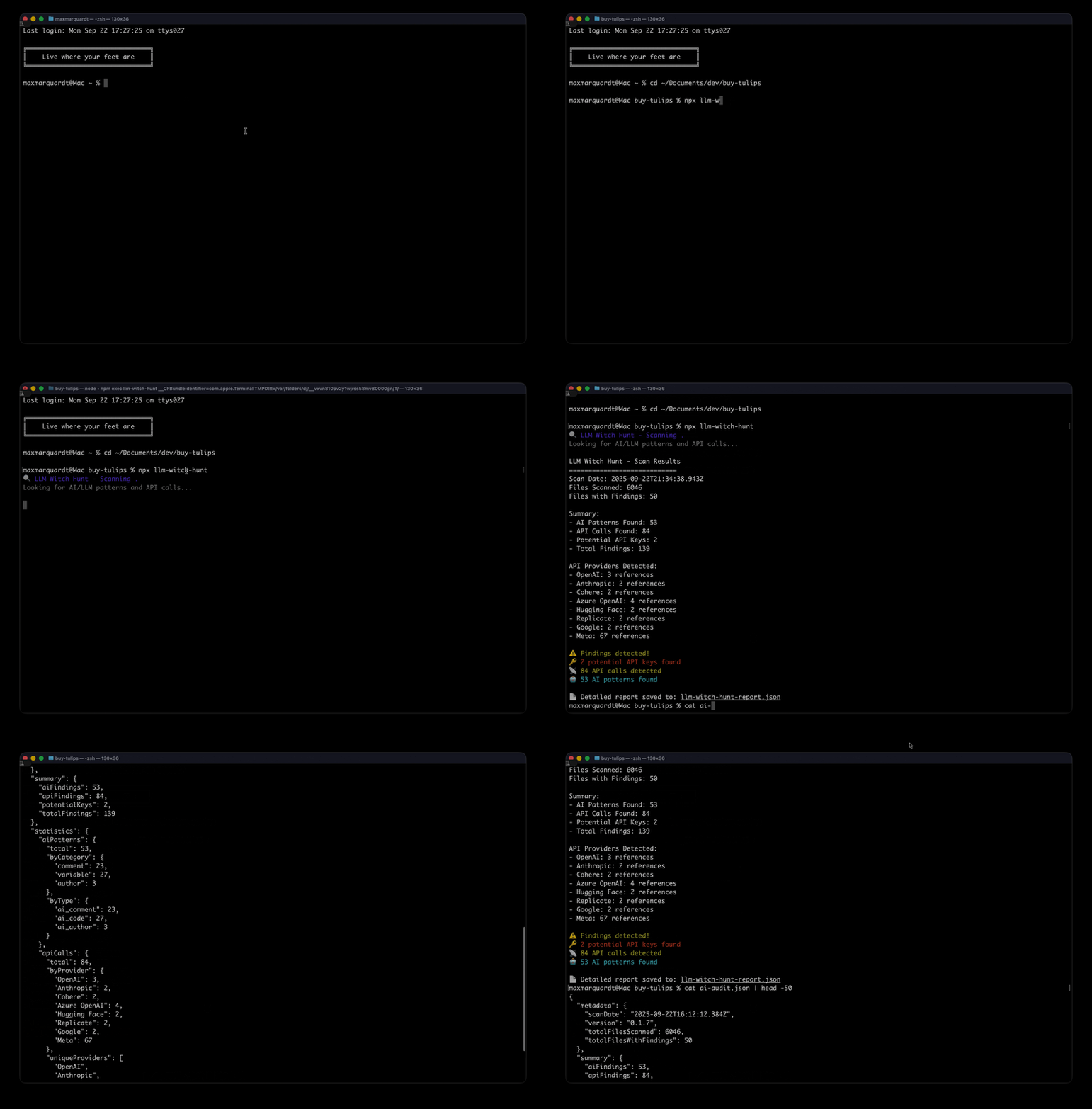
Overview
LLM Witch-Hunt is a lightweight npm package that scans your codebase to identify:
- AI-generated code markers (comments, authors, variable names)
- LLM API calls to major providers (OpenAI, Anthropic, Google, etc.)
- Potential API keys for security auditing
- Comprehensive reporting for compliance and governance
Perfect for security teams, compliance officers, and engineering managers who need visibility into AI usage across their projects.
Installation
# Global installation
npm install -g llm-witch-hunt

# Local installation
npm install --save-dev llm-witch-hunt

# Run without installation
npx llm-witch-hunt
Quick Start
# Scan current directory
llm-witch-hunt

# Scan specific directory
llm-witch-hunt ./src

# Generate detailed report
llm-witch-hunt --output report.json

# Use in CI/CD (fails if AI patterns detected)
llm-witch-hunt --fail-on-detect --quiet
Usage
Command Line Interface
llm-witch-hunt [path] [options]

Arguments:
  path                    Path to scan (default: current directory)

Options:
  -o, --output <file>     Output file path (default: llm-witch-hunt-report.json)
  -f, --format <format>   Output format: json (default: json)
  --include <patterns>    Include file patterns (glob)
  --exclude <patterns>    Exclude file patterns (glob)
  --no-context           Exclude code context from output
  --no-keys              Skip API key detection
  --fail-on-detect       Exit with code 1 if findings detected
  -q, --quiet            Suppress console output except errors
  --json-only            Output only JSON to stdout
  -h, --help             Display help information
  -V, --version          Display version number
Examples
# Basic scan with custom output
llm-witch-hunt --output ./reports/ai-audit.json

# Scan only JavaScript/TypeScript files
llm-witch-hunt --include "**/*.{js,ts,jsx,tsx}"

# Exclude test files and node_modules
llm-witch-hunt --exclude "**/*.test.js" --exclude "node_modules/**"

# Silent scan for CI/CD
llm-witch-hunt --fail-on-detect --quiet --no-context

# Get machine-readable output
llm-witch-hunt --json-only | jq '.summary'
Programmatic Usage
const LLMWitchHunt = require('llm-witch-hunt');

// Initialize scanner
const scanner = new LLMWitchHunt({
  rootPath: './src',
  include: ['**/*.js', '**/*.ts'],
  exclude: ['node_modules/**'],
  includeContext: true,
  detectKeys: true
});

// Perform scan
const scanResults = await scanner.scan();
console.log(`Found ${scanResults.aiSummary.total} AI patterns`);

// Generate report
const { report, savedPath } = await scanner.generateReport('audit.json');
console.log(`Report saved to ${savedPath}`);
What It Detects
AI-Generated Code Patterns
- Comments:
// AI-generated,/* Created by ChatGPT */,@ai-assisted - Author Tags:
Co-authored-by: GitHub Copilot,Generated-by: AI - Variable Names:
aiResponse,llmOutput,gptResult,promptTemplate - Import Statements:
import OpenAI from 'openai',require('@anthropic-ai/sdk')
LLM API Providers
- OpenAI:
api.openai.com,openai.createCompletion() - Anthropic:
api.anthropic.com,anthropic.messages.create() - Google:
generativelanguage.googleapis.com,gemini.generateContent() - Cohere:
api.cohere.ai,cohere.generate() - Hugging Face:
api-inference.huggingface.co - Azure OpenAI:
*.openai.azure.com - Replicate:
api.replicate.com
Security Features
- API Key Detection: Identifies potential API keys with pattern matching
- Key Masking: Automatically masks detected keys in output for security
- Severity Levels: Categorizes findings by risk level (high/medium/low/info)
Output Format
The tool generates comprehensive JSON reports:
{
  "metadata": {
    "scanDate": "2024-01-15T10:30:00.000Z",
    "version": "0.1.0",
    "totalFilesScanned": 156,
    "totalFilesWithFindings": 23
  },
  "summary": {
    "aiFindings": 47,
    "apiFindings": 12,
    "potentialKeys": 3,
    "totalFindings": 62
  },
  "findings": [
    {
      "file": "src/utils/helper.js",
      "type": "ai_comment",
      "category": "comment",
      "line": 42,
      "pattern": "AI[- ]generated",
      "match": "AI-generated",
      "context": "// This function was AI-generated",
      "severity": "info"
    }
  ],
  "statistics": {
    "aiPatterns": { "total": 47, "byCategory": {...} },
    "apiCalls": { "total": 12, "byProvider": {...} },
    "fileTypes": { ".js": {"count": 89, "withFindings": 12} }
  }
}
Supported File Types
JavaScript, TypeScript, Python, Java, C#, C++, Go, Rust, PHP, Ruby, Swift, Kotlin, Scala, R, Objective-C, Vue, Svelte
CI/CD Integration
GitHub Actions
name: AI Code Audit
on: [push, pull_request]

jobs:
  audit:
    runs-on: ubuntu-latest
    steps:
      - uses: actions/checkout@v4
      - uses: actions/setup-node@v4
        with:
          node-version: '18'
      - run: npx llm-witch-hunt --fail-on-detect --output ai-audit.json
      - uses: actions/upload-artifact@v4
        if: always()
        with:
          name: ai-audit-report
          path: ai-audit.json
Pre-commit Hook
#!/bin/sh
npx llm-witch-hunt --fail-on-detect --quiet
Configuration
Create a .llmwitchhuntrc.json file for persistent configuration:
{
  "include": ["src/**/*", "lib/**/*"],
  "exclude": ["node_modules/**", "dist/**", "**/*.test.js"],
  "includeContext": true,
  "detectKeys": true,
  "failOnDetect": false
}
Roadmap
- [ ] HTML report generation
- [ ] IDE plugins (VS Code, IntelliJ)
- [ ] Custom rule configuration
- [ ] Cost estimation for API usage
- [ ] Integration with SAST tools
- [ ] AI code quality scoring
Resources
Publisher
Max's Lab of Things Visit mlot.ai
License
MIT