
loading-request
v2.21.0
Published
Loading Request es un paquete npm moderno, intuitivo, liviano y flexible, diseñado para mejorar la experiencia del usuario mostrando indicadores de carga durante solicitudes y procesos asincrónicos en aplicaciones web. Compatible con frameworks populares

Maintainers
 urian-viera
Keywords
Readme
Loading Request




Loading Request es la librería más potente para mostrar indicadores de carga modernos en aplicaciones web. Compatible con React, Vue, Svelte, Next.js, Astro y proyectos vanilla JavaScript a través de CDN.
Mejora la experiencia de usuario con indicadores de carga elegantes y personalizables. Reduce la ansiedad durante procesos asincrónicos y aumenta la percepción de rendimiento de tu aplicación.
Instalación
npm install loading-request --save
yarn add loading-request
Uso Básico
1. React con Hooks
Integración perfecta con React usando hooks personalizados y componentes funcionales. Ideal para aplicaciones SPA modernas.
import { useState } from 'react';
import { showLoading, hideLoading, updateLoading } from 'loading-request';

const ContactForm = () => {
  const [formData, setFormData] = useState({ name: '', email: ''});

  const handleSubmit = async (e) => {
    e.preventDefault();

    showLoading({
      message: 'Enviando mensaje...',
      spinnerColor: '#3b82f6',
      minDuration: 1000
    });

    try {
      const response = await fetch('/api/contact', {
        method: 'POST',
        headers: { 'Content-Type': 'application/json' },
        body: JSON.stringify(formData)
      });

      if (response.ok) {
        updateLoading({
          message: '¡Mensaje enviado exitosamente!',
          spinnerColor: '#10b981'
        });

        setTimeout(async () => {
          await hideLoading();
          setFormData({ name: '', email: '' });
        }, 2000);
      }
    } catch {
      updateLoading({
        message: 'Error al enviar mensaje',
        spinnerColor: '#ef4444'
      });
      setTimeout(() => hideLoading(), 2000);
    } finally {
      await hideLoading();
    }
  };

  return (
    <form onSubmit={handleSubmit}>
      <input
        type="text"
        placeholder="Nombre"
        value={formData.name}
        onChange={(e) => setFormData({...formData, name: e.target.value})}
        required
      />
      <input
        type="email"
        placeholder="Email"
        value={formData.email}
        onChange={(e) => setFormData({...formData, email: e.target.value})}
        required
      />
      <button type="submit">Enviar</button>
    </form>
  );
};

export default ContactForm;
2. Next.js con App Router
Consumiendo la API de Usuarios de Devs API Hub y optimizando actualizaciones con useTransition.
'use client';

import { useState } from 'react';
import { showLoading, hideLoading, updateLoading } from 'loading-request';

export default function Users() {
  const [users, setUsers] = useState([]);

  const fetchUsers = async () => {
    showLoading({
      message: 'Cargando usuarios...',
      spinnerColor: '#8b5cf6',
    });

    try {
      const res = await fetch('https://devsapihub.com/api-users', { cache: 'no-store' });
      if (!res.ok) throw new Error('Error al obtener usuarios');
      const data = await res.json();

      updateLoading({
        message: `Usuarios cargados (${data?.length || 0})`,
        spinnerColor: '#10b981'
      });

      setUsers(data);
    } catch {
      updateLoading({
        message: 'Error al cargar usuarios',
        spinnerColor: '#ef4444'
      });
    } finally {
    setTimeout(hideLoading, 1000);
    }
  };

  return (
    <>
      <button onClick={fetchUsers}>
        {users.length ? 'Recargar Usuarios' : 'Cargar Usuarios'}
      </button>

      {!!users.length && (
        <ul>
          {users.map(user => (
            <li key={user.id}>
              <img src={user.avatar_url} alt={user.name} width={40} height={40} />
              <div>
                <strong>{user.name}</strong>
                <span>{user.email}</span>
                <small>
                  {user.online ? '🟢 Online' : '⚪ Offline'}
                </small>
              </div>
            </li>
          ))}
        </ul>
      )}
    </>
  );
}
3. React: Consumo de API Fast Food
Ejemplo corto con React que consume la API pública y muestra un listado de productos.
import { useEffect, useState } from 'react';
import { showLoading, hideLoading, updateLoading } from 'loading-request';

export default function FastFoodList() {
  const [items, setItems] = useState([]);

  useEffect(() => {
    const load = async () => {
      showLoading(
        {
            message: 'Cargando menú...',
            spinnerColor: '#f59e0b',
            minDuration: 600
        });
      try {
        const res = await fetch('https://devsapihub.com/api-fast-food', { cache: 'no-store' });
        if (!res.ok) throw new Error('Error al obtener menú');
        const data = await res.json();
        setItems(data);
        updateLoading({ message: `Productos (${data.length})`, spinnerColor: '#10b981' });
      } catch (e) {
        updateLoading({ message: 'Error al cargar menú ' + e.message, spinnerColor: '#ef4444' });
      } finally {
        setTimeout(hideLoading, 800);
      }
    };
    load();
  }, []);

  return (
    <ul>
      {items.map(item => (
        <li key={item.id}>
          <img src={item.image} alt={item.name} width={50} height={50} />
          <span>{item.name} — ${item.price}</span>
        </li>
      ))}
    </ul>
  );
}
Implementación de Filtrado Dinámico en Next.js con Loading Request
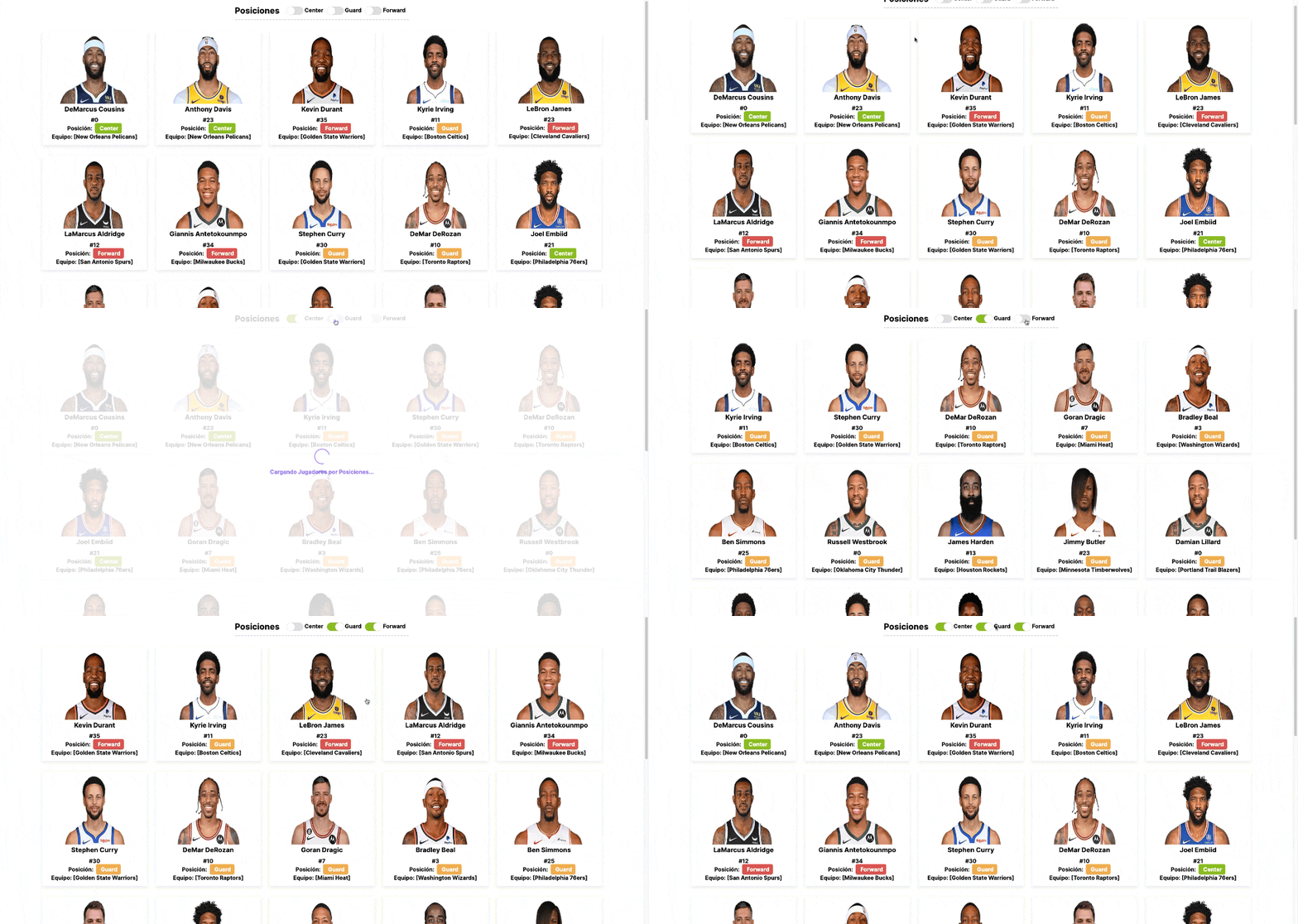 👉
👉 Implementación de Filtros Checkbox en ReactJS utilizando el paquete Loading Request
 👉
👉 Mostrando Resultados de una API REST en Next.js

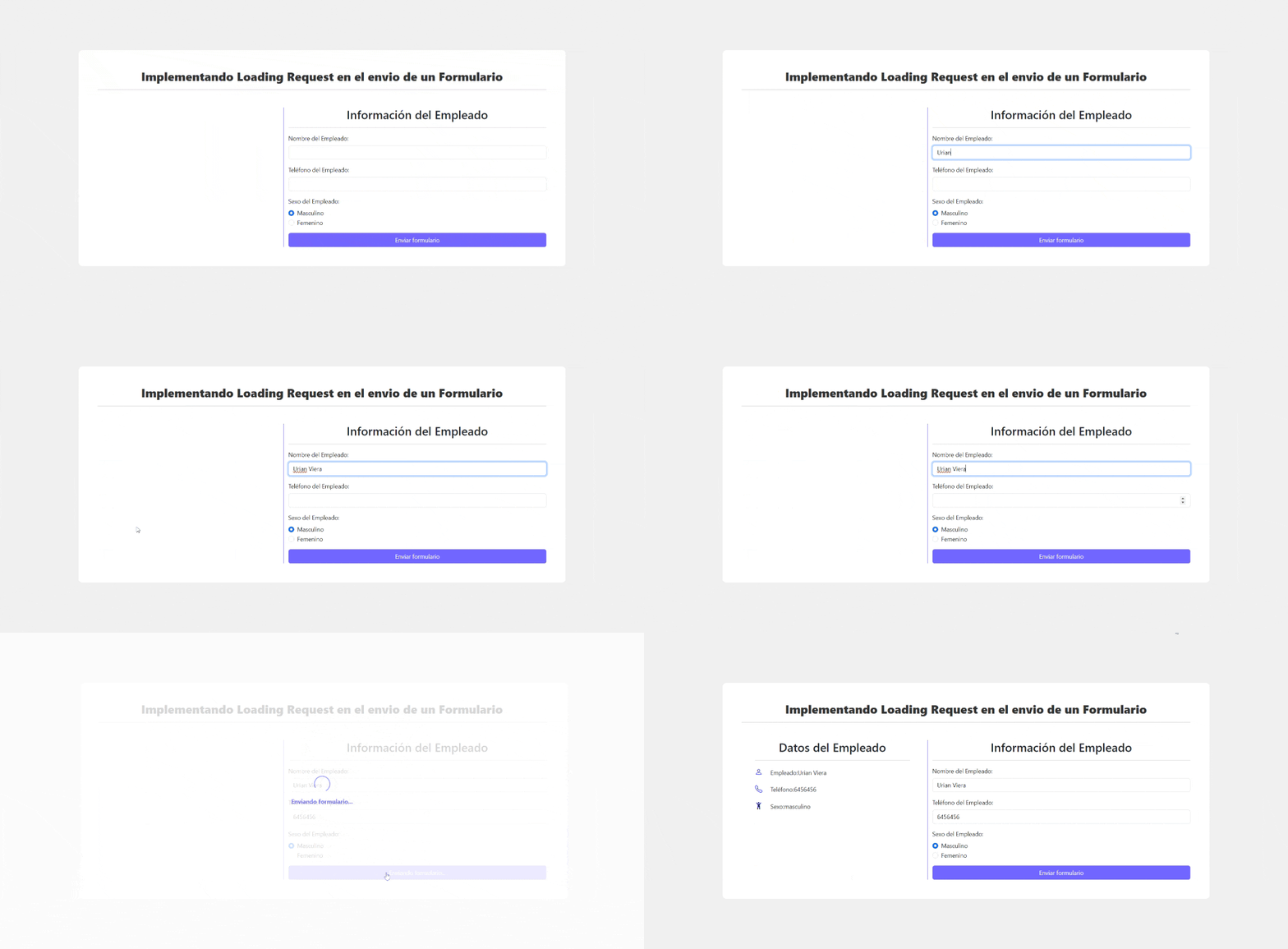
Resultado Completo del Ejemplo Práctico con Svelte

Uso a través de CDN
También puedes incluir loading-request directamente en tu proyecto utilizando un enlace CDN. Sigue estos pasos:
<!DOCTYPE html>
<html lang="es">
  <head>
    <meta charset="UTF-8" />
    <meta name="viewport" content="width=device-width, initial-scale=1.0" />
    <title>Formulario con Loading Request</title>
  </head>
  <body>
    <h2>Enviar mensaje</h2>

    <form id="contactForm">
      <input type="text" id="name" placeholder="Nombre" required /><br /><br />
      <input type="email" id="email" placeholder="Email" required /><br /><br />
      <button type="submit">Enviar</button>
    </form>

    <!-- Incluir loading-request desde CDN -->
    <script src="https://unpkg.com/loading-request@latest/dist/loading-request.min.js"></script>

    <script>
      const form = document.getElementById("contactForm");

      form.addEventListener("submit", async (e) => {
        e.preventDefault();

        const name = document.getElementById("name").value.trim();
        const email = document.getElementById("email").value.trim();
        if (!name || !email) return alert("Por favor completa todos los campos 😅");

        loadingRequest.show({
          message: "Enviando mensaje...",
          spinnerColor: "#3b82f6",
          textColor: "#333",
        });

        try {
          const res = await fetch("https://jsonplaceholder.typicode.com/posts", {
            method: "POST",
            headers: { "Content-Type": "application/json" },
            body: JSON.stringify({ name, email }),
          });

          if (!res.ok) throw new Error("Error al enviar el mensaje");

          loadingRequest.update({
            message: "¡Mensaje enviado exitosamente!",
            spinnerColor: "#10b981",
          });

          form.reset();
        } catch {
          loadingRequest.update({
            message: "Error al enviar mensaje 😞",
            spinnerColor: "#ef4444",
          });
        } finally {
          // Espera un poco antes de ocultar el loading
          setTimeout(() => loadingRequest.hide(), 1500);
        }
      });
    </script>
  </body>
</html>
CDN: uso correcto (UMD y ESM)
Si cargas la librería desde CDN, usa la API global: loadingRequest.show(...), loadingRequest.hide() y loadingRequest.update(...). Si utilizas ESM con <script type="module">, importa las funciones: import { showLoading, hideLoading, updateLoading } from 'loading-request'.
📚 API Completa
showLoading(config?): void
showLoading Es una función que muestra un loading con configuración personalizada, puede recibir un objeto con los siguientes parámetros:
showLoading({
  message: 'Procesando...',
  spinnerColor: '#3b82f6',
  minDuration: 1000
});
Todos los valores son opcionales, por lo que puedes mostrar el loading con la configuración por defecto.
showLoading({ message: 'Procesando...'});Muestra un loading con configuración personalizada.
Parámetros de configuración:
- message: Mensaje a mostrar (default:
'Cargando...') - spinnerColor: Color del spinner (default:
'#7366ff') - textColor: Color del texto (default:
'#7366ff') - textSize: Tamaño del texto (default:
'16px') - backgroundColor: Color de fondo (default:
'#fff') - opacity: Opacidad del overlay (default:
0.90) - minDuration: Tiempo mínimo visible en ms (default:
500)
hideLoading(): Promise
hideLoading Es una función que oculta el loading activo respetando automáticamente el minDuration configurado.
await hideLoading(); // Respeta minDuration automáticamenteupdateLoading(config): void
updateLoading Es una función que actualiza la configuración del loading activo en tiempo real. Puedes cambiar el mensaje, el color del spinner, el color del texto, el tamaño del texto, el color de fondo y la opacidad del overlay.
updateLoading({
  message: 'Finalizando...',
  spinnerColor: '#28a745'
});
Únete y Contribuye
Si encuentras algún problema o tienes una idea para mejorar el paquete, por favor abre un issue o envía un pull request en GitHub: https://github.com/urian121/loading-request
👨💻 Desarrollador
Urian Viera
🌐 urianviera.com
📺 YouTube
💌 [email protected]
☕ ¡Apóyame en PayPal!
Copyright
© 2024 Urian Viera. Todos los derechos reservados.
License
Licensed under ISC

Agradecimientos
¡Gracias a todos los Devs 👨💻 que han utilizado y contribuido al desarrollo de Loading Request! Su apoyo y retroalimentación son fundamentales para mejorar continuamente este paquete.