
local-cli-agent
v5.3.14
Published
Local CLI - OpenAI-Compatible Local CLI Coding Agent

Maintainers
 gkstmdgk2731
Readme
Local CLI


OpenAI-Compatible CLI Coding Agent for Local & On-Prem LLM Environments
Use your own LLM (vLLM, Ollama, LM Studio, Azure OpenAI, or any OpenAI-compatible API) as a full coding agent - no cloud dependency, no API key costs.
Quick Demo — Tool Usage
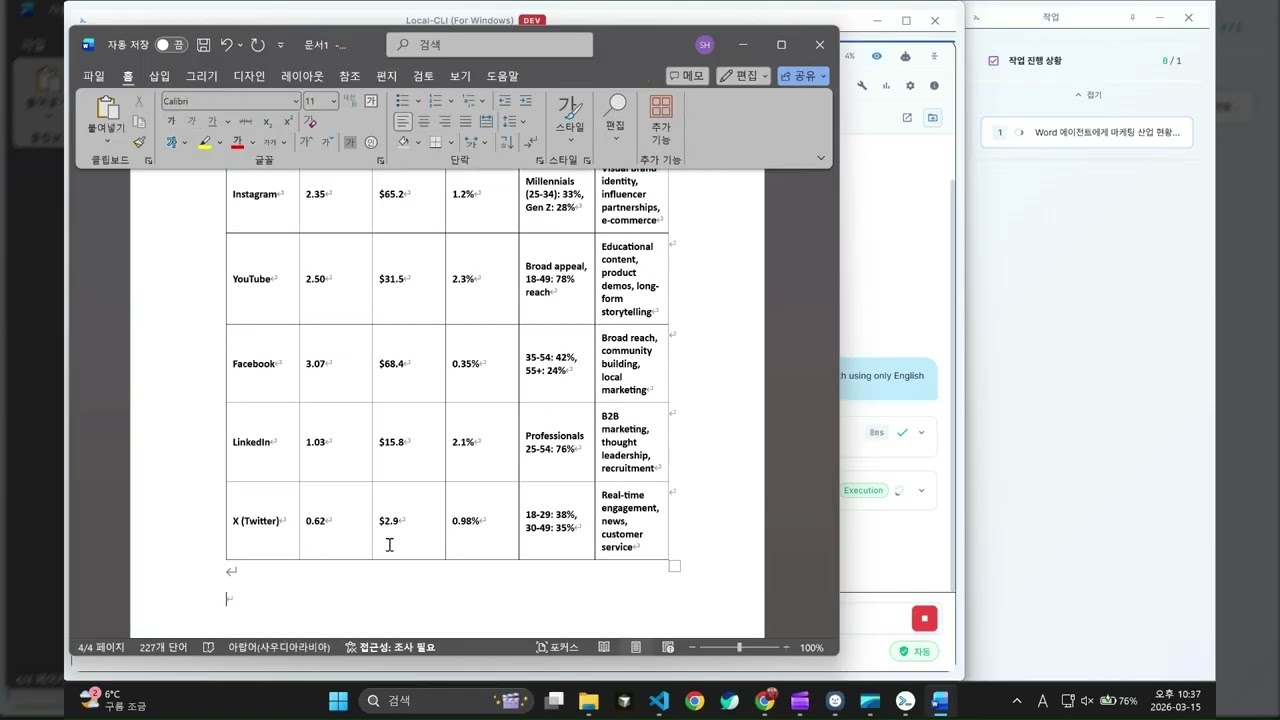
Quick Demo: Watch Local CLI use tools to automate real tasks.
https://github.com/user-attachments/assets/77cc96c9-cb22-4411-8744-3a006b00c580
Plan & Execute Demo: Local CLI autonomously editing code with Plan & Execute.
Office Automation Demos
Create professional Word, Excel, and PowerPoint documents with AI:
Why Local CLI?
| Benefit | Description |
|---------|-------------|
| Zero Cloud Dependency | Runs entirely on your local/on-prem LLM. Your code never leaves your network. |
| No API Cost | Use open-source models (Llama, Qwen, DeepSeek, etc.) for free. |
| Any OpenAI-Compatible API | Works with vLLM, Ollama, LM Studio, Azure OpenAI, Google Gemini, and more. |
| Autonomous Coding Agent | Reads, searches, edits, and creates code files — not just chat. |
| Plan & Execute | Breaks complex tasks into TODO steps and executes them step by step. |
| Safe by Default | Supervised mode requires your approval before any file modification. |
| Office Sub-Agents | Dedicated create/modify sub-agents for Excel, Word, PowerPoint with structured execution. |
| Pipe Mode | Non-interactive CLI mode (-p) for scripting and automation pipelines. |
| Desktop GUI (Electron) | Dual-window desktop app with chat + real-time task monitoring. Auto-update supported. |
| Vision Model Support | Analyze images and screenshots with Vision Language Models. |
| Office Automation | Control Excel, Word, PowerPoint directly via PowerShell/COM (Windows). |
| Browser Automation | Chrome/Edge CDP control - navigate, click, screenshot, scrape data. |
Installation
CLI (npm)
# Install globally
npm install -g local-cli-agent

# Run
local-cli
The endpoint setup wizard launches automatically on first run.
Desktop App (Windows)
Download the latest LOCAL-BOT-Setup-{version}.exe from the Releases page.
- NSIS installer — installs to
%LOCALAPPDATA%\LOCAL BOT\ - Auto-update — the app automatically checks GitHub Releases for updates and notifies you when a new version is available
Build from Source
git clone https://github.com/A2G-Dev-Space/Local-CLI.git
cd Local-CLI
npm install && npm run build
node dist/cli.js
Key Features
Dual-Window Desktop App
The Electron desktop app provides a Chat Window and a separate Task Popup for real-time task monitoring:
- Chat Window - Full-featured chat UI with markdown rendering, code syntax highlighting, and file diff viewer
- Task Popup - Always-on-top task tracker showing current progress, execution status, and tool activity
- Multi-session - Run multiple independent agent sessions in parallel via worker threads
- "Waiting for user input" indicator when the agent needs your response
- Taskbar flashing when tasks complete or user input is needed (even when minimized)
- Auto-expanding input - Text area grows dynamically up to half the screen height
- Table paste - Paste tables from Excel or web pages — auto-converts to markdown
- Image paste - Paste or attach images for Vision model analysis
- Per-model selection - Choose different models for Planning and Execution
- Last folder restore - Reopens the last working directory on app restart
- VSCode diff toggle - Persistent setting for automatic file diff viewing
Plan & Execute
Automatically decomposes requests into TODO steps and executes them:
You: Add a logging system to the project

TODO List                            1/3
  [x] Create logger.ts
  [ ] Add imports to existing code
  [ ] Apply error handling
Deep Research (Search Sub-Agent)
Performs Perplexity-level web research using its own headless Chrome engine — no external search API (Tavily, SerpAPI, Google API) required.
- Dual-engine search: Naver (primary) + Google (secondary)
- Internal source search: Configure additional URLs (Confluence, internal wikis) via
researchUrlsin config - Visits actual source pages, extracts content, cross-verifies facts
- Injects today's date for recency assessment
- Returns comprehensive answers with source citations
- Handles Cloudflare-blocked sites gracefully (auto-skip + alternative sources)
Confluence Integration
Edit or create Confluence pages directly via confluence_request:
- Opens a visible browser to access Confluence
- Supports macros, tables, rich text, ProseMirror/TinyMCE editors
- Configure
browserServiceswith typeconfluencein config to enable
{
  "browserServices": [{ "type": "confluence", "name": "My Confluence", "url": "https://confluence.example.com" }],
  "researchUrls": [{ "name": "My Confluence", "url": "https://confluence.example.com" }]
}
Jira Integration
Manage Jira issues directly via jira_request:
- Opens a visible browser to access Jira (no API key needed)
- Fetch assigned/watching issues via JQL, create issues (Epic, Story, Task, Bug, Sub-task), add comments, transition status
- Two-phase issue creation: fill form → user confirmation → submit
- Autonomous DOM discovery — works with Cloud, Server, and Data Center
- Configure
browserServiceswith typejirain config to enable
{
  "browserServices": [{ "type": "jira", "name": "My Jira", "url": "https://jira.example.com" }]
}
Office Sub-Agents
Office automation uses a dedicated Sub-Agent architecture where each Office app has specialized create and modify agents:
| App | Create Agent | Modify Agent | Capabilities | |-----|-------------|-------------|-------------| | Excel | Structured sheet builder | Tool-based editor | Charts, formatting, conditional formatting, pivot tables, formulas, sparklines | | Word | Section-by-section builder | Tool-based editor | Headers, paragraphs, tables, images, TOC, footnotes, styles, page setup | | PowerPoint | Layout-aware slide builder | Tool-based editor | Slides, text, images, shapes, themes, speaker notes, transitions |
How it works:
- Enhancement LLM analyzes the user's request and generates detailed content
- Planning LLM creates a structured JSON plan (design system, sections/sheets/slides)
- Execution builds the document section-by-section using specialized builder functions
- Review LLM evaluates quality and triggers refinements if needed
This architecture produces enterprise-quality Office documents with consistent formatting, proper structure, and content appropriate to the topic.
Vision Language Model (VLM)
Analyze images and screenshots directly from the chat:
- Enable via
/settings> Vision Model toggle - Use
read_imagetool to analyze screenshots, diagrams, and UI mockups - Supports any OpenAI-compatible Vision endpoint
- Automatic screenshot verification for execution results
Supervised Mode
Every file modification requires your explicit approval:
- Tab to toggle between Auto / Supervised mode
- Only file modification tools need approval (read and search tools are always allowed)
- Reject with feedback to guide the agent's next attempt
Browser Automation
- Navigate pages, click elements, fill forms
- Take screenshots, extract text
- Uses Chrome DevTools Protocol directly — no WebDriver or external server needed
LLM Compatibility
Works well even with smaller or less capable open-source models:
- Schema pre-validation - Fixes malformed tool calls before execution
- Smart retry - Automatically retries on transient LLM errors with context
- Extended retry with user prompt - On persistent failures, offers a retry option instead of crashing
- Loop detection - Breaks out of repetitive tool call cycles
- Tool name sanitization - Cleans up malformed tool names caused by special tokens in model output
- Prompt repetition - Reinforces critical instructions for models with limited context retention
Session Management
- Save and restore conversation history
- Auto-context compression when token usage reaches 80%, preserving TODO state
- Resume work exactly where you left off
Commands & Shortcuts
Slash Commands
| Command | Description |
|---------|-------------|
| /help | Show help information |
| /clear | Reset conversation |
| /compact | Compress conversation |
| /load | Load saved session |
| /model | Switch model |
| /settings | Settings menu |
| /usage | Token usage |
| /docs | Docs management |
| /tool | Toggle optional tools (browser/office) |
Keyboard Shortcuts
| Key | Action |
|-----|--------|
| Ctrl+C | Exit |
| ESC | Interrupt current task |
| Tab | Toggle Auto / Supervised |
| @ | File browser |
| / | Command autocomplete |
Configuration
# Terminal — setup wizard launches on first run
local-cli

# Inside Local CLI — open settings menu
/settings
Any OpenAI-compatible API works: vLLM, Ollama, LM Studio, Azure OpenAI, Google Gemini, or internal LLM servers.
Requirements
- Node.js v20+
- npm v10+
- Git
- Windows (required only for Office and Browser automation features)
Changelog
v5.0.4
- Rebranded CLI to
local-cli, Electron toLOCAL BOT - Pipe mode logging setup for
--verbose,--debug,--llm-logflags - SubAgent tool call and phase loggers for
-ps(specific) mode
v5.0.2
- Office Sub-Agent v5 — Dedicated create agents with structured execution for Excel, Word, PowerPoint
- Excel: Sheet-by-sheet builder with automatic chart/formatting generation
- Word: Section-by-section builder with TOC, page setup, and consistent styling
- PowerPoint: Layout-aware slide builder with design system and review loop
- Unified branding cleanup (removed all enterprise references)
- Switched to npm publish + GitHub Release deployment (removed binary distribution)
- Electron rebranded to
LOCAL BOTwith NSIS installer and auto-update via GitHub Release - Fixed Electron vision tool missing + worker shutdown race condition
- Fixed Jarvis mode auto-update not triggering
v5.0.1
- Added pipe mode (
-p) for non-interactive CLI usage in scripts and automation - Fixed pipe mode final_response capture bug
- Office Sub-Agent architecture (Agent as a Tool) with specialized prompts
v5.0.0
- Sub-Agent architecture — Dedicated sub-agents for Office and Browser with manager/worker LLM pattern
- Jarvis autonomous assistant mode — Always-on-top voice-style UI with tray menu
- Multi-session support — Run multiple independent sessions in parallel via worker threads
- Extended LLM retry — User-facing retry prompt on persistent LLM failures instead of crashing
- Auto-generated session titles — Planning LLM generates meaningful session names
- Planning auto-save to prevent session loss on interruption
v4.5.1
- Fixed Electron shutdown crash (write-after-end)
- Fixed Planning LLM tool_choice fallback for unsupported models
- Fixed Electron chatCompletion response validation crash
v4.5.0
- Electron: 6 UX improvements (waiting indicator, taskbar flash, auto-expanding input, VSCode diff persistence, table paste, image paste)
- Enhanced Planning/Execution prompts + GPT-OSS reasoning_effort support
- Execution result verification rules with Vision screenshot verification
- Auto-compact parity between CLI and Electron (TODO preservation)
- Screenshots now saved to working directory
v4.4.0
- Per-model selection for Planning and Execution LLMs
- Last opened folder restoration on app restart
- Error telemetry system (ErrorReporter)
- Fixed Excel write_range bug (#N/A values)
- Excel tool parameter validation + trim handling
v4.3.0
- Vision Language Model (VLM) support with read_image tool
- Settings UI Vision toggle
- Schema pre-validation + Prompt repetition for less capable LLMs
- Office COM DisplayAlerts auto-suppression
- Office COM Visible always-on + Electron Launch method
v4.2.0
- Electron Dual-window UI (Chat + Task popup) — major UI refactoring
- LLM message structure improvement (XML-based History/Request separation)
- Smart retry + loop detection for LLM robustness
- Tool name sanitization (special token contamination defense)
- edit_file CRLF/LF normalization for Windows files
- PowerShell curl/wget alias auto-substitution
- Supervised Mode bug fixes + escape character handling
v4.1.5 — v4.1.7
- UI/UX improvements and docs-search disable
- Fixed Planning LLM infinite loop (askUser callback)
- 3-second delay + Supervised Mode fixes + model selection bug fix
Documentation
Contact
- GitHub Issues: https://github.com/A2G-Dev-Space/Local-CLI/issues
- Email: [email protected]
License
MIT License
GitHub: https://github.com/A2G-Dev-Space/Local-CLI