
local-diff-reviewer
v1.0.10
Published
Open a local GitHub-style diff review Web UI for the current repository.


Readme
diff-review
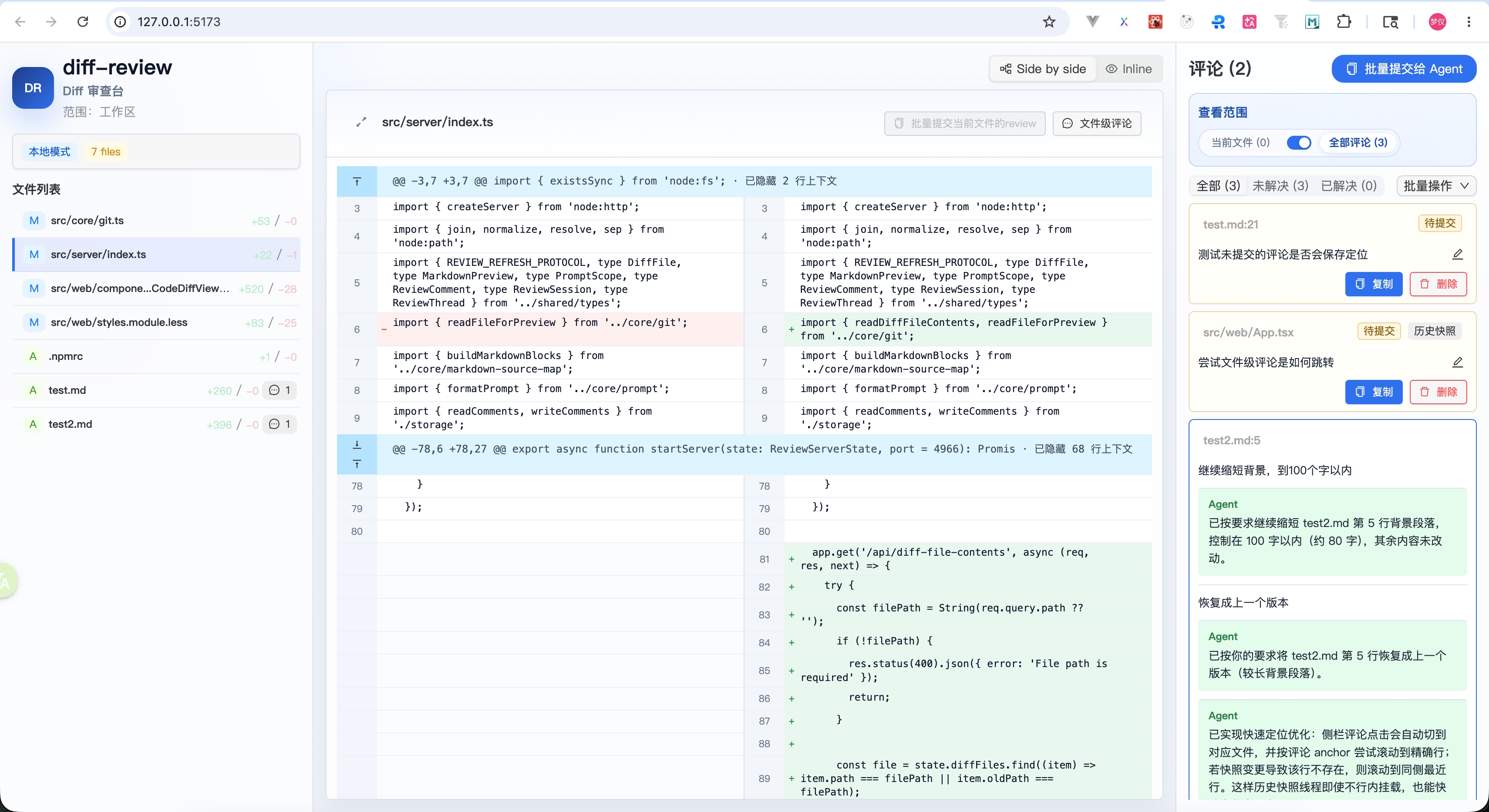
AI chat 里的本地代码审查工具。可以直接用 CLI 打开,也可以安装成 agent skill。
Quick Start
Try it first:
npx --yes local-diff-reviewerInstall and use:
npm install -g local-diff-reviewer
local-diff-reviewer
Enable use from AI agents:
npx skills add Mone-Lee/diff-review功能边界
- 查看当前工作区 diff、staged diff、指定 revision diff。
- 代码文件使用 GitHub 风格 unified diff。
- Markdown 文件只展示 Preview,不提供 Diff / Preview 切换。
- 支持文件级评论、代码行级评论、Markdown source line 评论。
- 支持 submit / replied / resolved 评论状态。
- 一条 thread 下可以包含多条 comment;同一锚点的新评论会追加到已有 thread。
- 支持通过内部
--comment参数预置 agent findings / replies。 - 支持复制极简 AI prompt。
CLI 使用方式
local-diff-reviewer
local-diff-reviewer staged
local-diff-reviewer HEAD~1 HEAD
local-diff-reviewer stop
local-diff-reviewer --repo /path/to/project
这三种模式分别表示:
working:审查当前工作区里尚未git add的改动。staged:审查已经git add、但还没有提交的改动。revision:审查两个 revision 之间的差异,例如local-diff-reviewer HEAD~1 HEAD会比较HEAD~1..HEAD。
停止当前项目已启动的 review 进程:
stop:按当前 Git 仓库范围清理该仓库启动过的 review 运行进程(包含其 API 端口进程)。
local-diff-reviewer stop
local-diff-reviewer --repo /path/to/project stop
如果命令不是在目标项目目录里启动,可以用 --repo <path> 显式指定要审查的 Git 仓库:
local-diff-reviewer --repo /path/to/project
local-diff-reviewer --repo /path/to/project staged
每次启动都会创建独立的本地 review 会话。多个项目里分别执行 local-diff-reviewer 或 /diff-review 时,打开的页面会分别绑定启动时的项目,不会被最后一次启动覆盖。默认优先使用 127.0.0.1:4966;如果端口已被占用,会自动选择一个空闲端口。
项目 A /diff-review -> http://127.0.0.1:4966  -> 项目 A diff
项目 B /diff-review -> http://127.0.0.1:<空闲端口> -> 项目 B diff
页面打开后,代码 diff 和 Markdown 预览会固定为本次启动时的快照;工作区继续变动不会改写已打开页面里的代码内容。评论线程会在页面可见时持续同步。若需要审查最新工作区内容,请再次执行 local-diff-reviewer 或 /diff-review 打开新的 review 会话。
注意:本地开发的 --dev 模式仍使用 Vite dev server,端口和 API proxy 是固定的;多项目并行审查请使用默认的构建页面模式。
Skill 使用方式
在 AI chat 中使用:
/diff-review
/diff-review staged
/diff-review HEAD~1 HEAD
/diff-review stop
安装 skill:
npx skills add Mone-Lee/diff-reviewskill 会以目标 workspace 作为命令工作目录运行 npx --yes local-diff-reviewer [args...],因此 /diff-review 会审查当前项目,而不是 skill 安装目录。
预置 agent 评论
CLI 支持重复传入 --comment <json>,用于在打开 UI 前把 agent 审查结果写入评论存储。
代码 diff 行评论:
npx --yes local-diff-reviewer \
  --comment '{"type":"thread","filePath":"src/foo.ts","position":{"side":"new","line":36},"body":"这里没有处理空数组,可能导致运行时报错。"}'
Markdown source line 评论:
npx --yes local-diff-reviewer \
  --comment '{"type":"thread","filePath":"README.md","position":{"type":"markdown","line":22},"body":"这里可以补充 old/new side 的例子。"}'
文件级评论:
npx --yes local-diff-reviewer \
  --comment '{"type":"thread","filePath":"src/foo.ts","body":"这个文件的错误处理策略需要统一。"}'
回复已有 thread:
npx --yes local-diff-reviewer \
  --comment '{"type":"reply","threadId":"<thread-id>","body":"同意,这里应该按 repoRoot 隔离评论存储。"}'
thread 评论会以 author: "agent" 写入:如果同一锚点已经存在 thread,会作为新的 comment 追加进去;否则创建 replied thread。reply 会向目标 thread 追加一条 agent 回复并把状态切到 replied。为避免 agent finding 反复注入导致刷屏,同一 thread 内相同正文的 agent comment 会被视为重复并跳过。若路径不在当前 diff 中、行号无法定位或内容重复,脚本会跳过并在终端打印 warning。
当 agent 收到从 UI 复制出的 [thread:<id>] prompt 并完成处理后,应使用 type: "reply" 把处理结果写回原 thread,作为 author: "agent" 的 comment 保留在评论流里。回复内容应简要说明已修改什么,或说明为什么没有修改。
评论状态含义:
submit:只有用户提交的评论,还没有 agent finding / reply。replied:已有 agent 内容,或从 resolved 重新打开。resolved:用户确认完成后的状态。
发布流程
npm run release
npm run release minor
npm run release major
该命令会按顺序执行:
- 发布前检查 npmjs 认证与连通性(
npm whoami --registry=https://registry.npmjs.org/+npm ping --registry=https://registry.npmjs.org/) npm run release:checknpm version <patch|minor|major>(默认patch)npm publishgit pushgit push --tags
若 npmjs 认证缺失或过期,发布会在 preflight 阶段提前失败,并提示执行:
npm login --registry=https://registry.npmjs.org/
npm whoami --registry=https://registry.npmjs.org/
只有在 npm publish 成功后,才会自动推送提交和标签到 GitHub。
本地开发
npm install
npm run dev
npm run typecheck
npm run build
npm run dev(等价于 npm run review:dev)会启动 API 服务并打开 Vite dev server,前端代码修改会使用 Vite HMR 热更新。npm run review 优先使用已构建的 dist/web。
仅调试前端时可使用:
npm run web:dev注意:web:dev 只启动 Vite,不会启动 API 服务。
评论数据默认归档在 ~/.local/diff-review/logs。Windows 下使用类似位置:
%LOCALAPPDATA%\diff-review\logs,如果未设置 LOCALAPPDATA 则退到
~/AppData/Local/diff-review/logs。