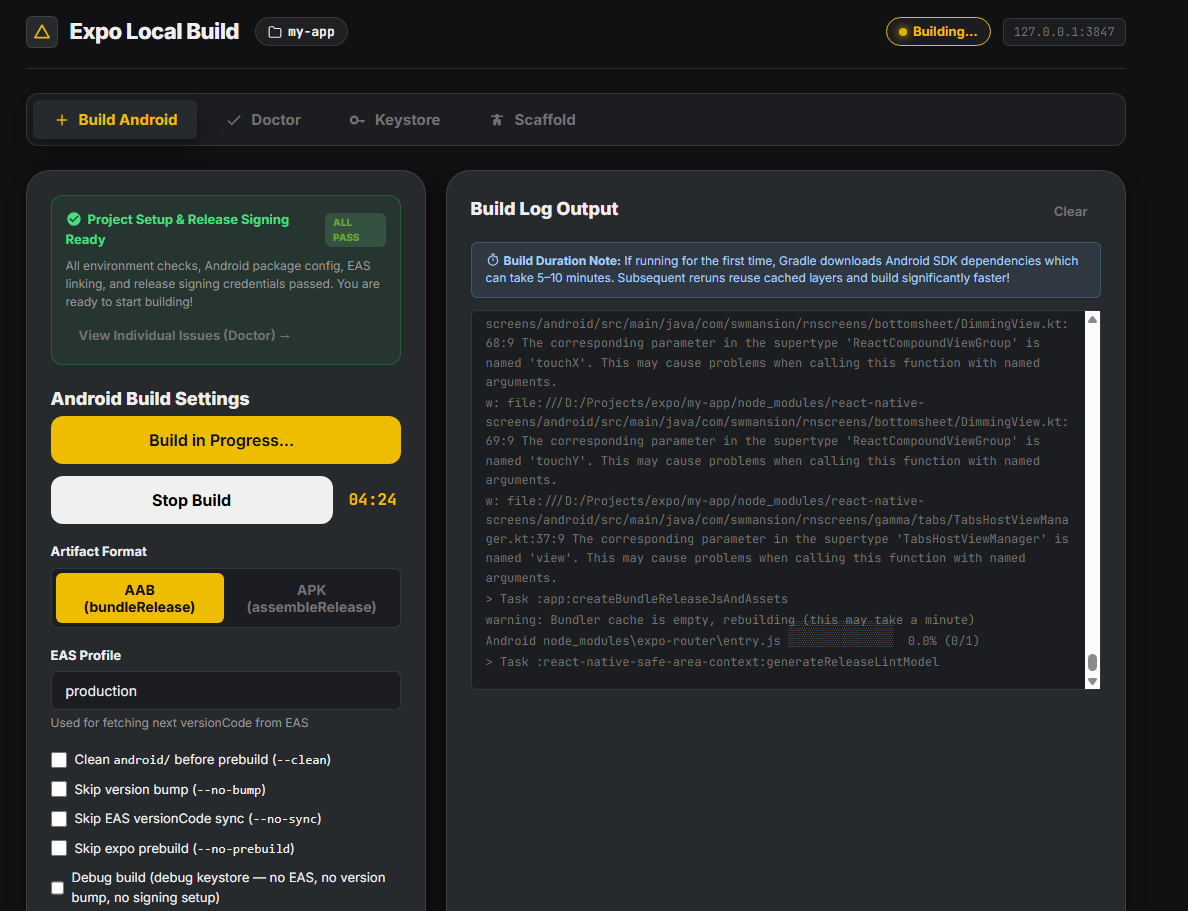
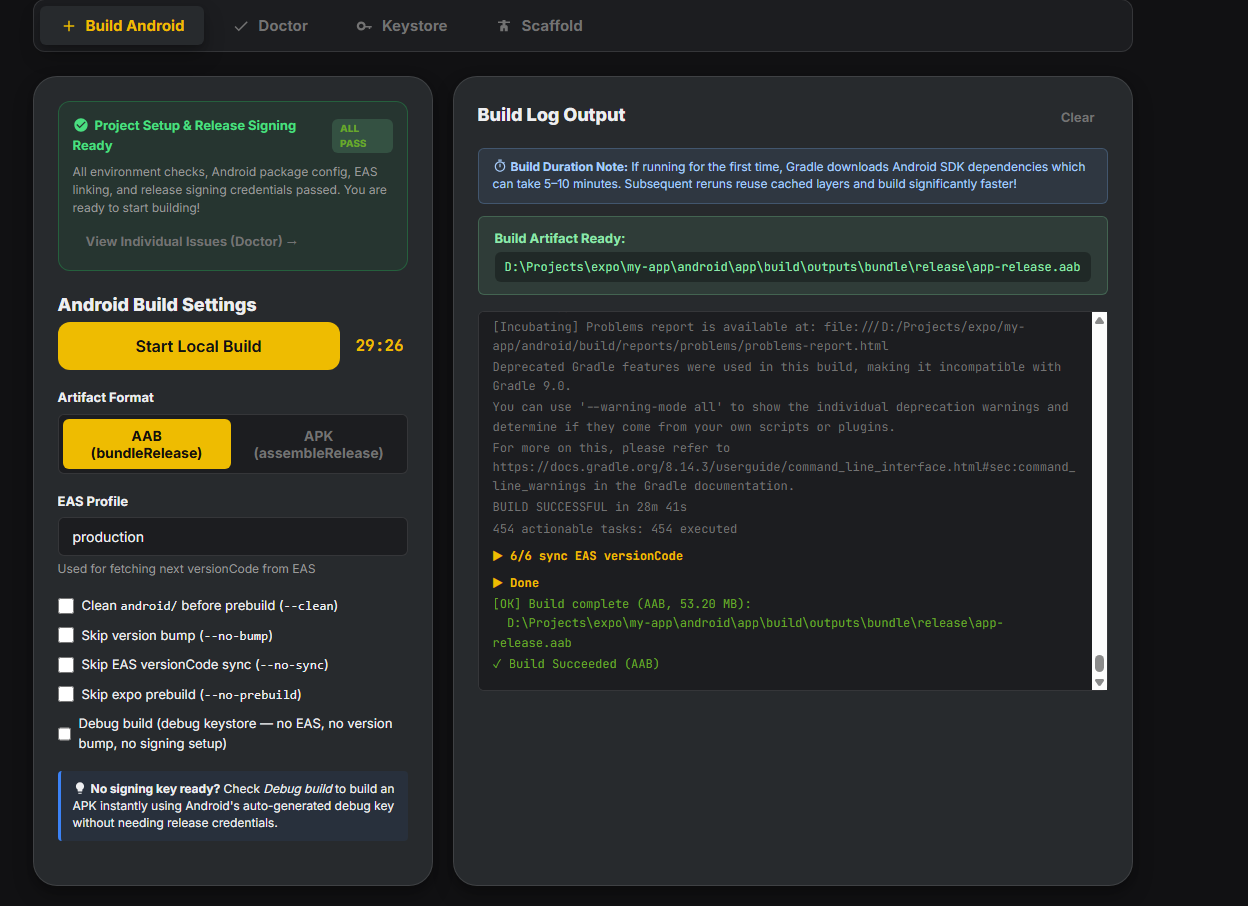
local-expo-build
v0.4.3
Published
One-stop CLI for local Expo builds. Android (stable) → AAB/APK with EAS-synced versionCode and managed signing. iOS (experimental, macOS) → IPA via xcodebuild with auto export-options.plist.
Maintainers
Readme
local-expo-build
One-stop CLI for local Expo Android APK / AAB builds — works on Windows, macOS, and Linux (unlike
eas build --local, which rejects Windows). Own your signing, skip the EAS cloud queue, no eas.json required.
local-expo-build automates the painful parts of running expo prebuild + gradlew bundleRelease (or xcodebuild archive) yourself:
Android (stable):
- Detects your Expo SDK and pins the Gradle wrapper to a version that actually works (e.g. SDK 55 → Gradle 8.13, working around the
expo-manifestscomponents.releasebug). - Bumps your app version and pulls the next
versionCodefrom EAS so Play Store ingest doesn't reject the upload. - Injects a release
signingConfiginto the generatedandroid/app/build.gradlefrom akeystore.propertiesyou control. - Scaffolds
credentials.jsonfrom the same source so EAS submit / cloud builds can reuse your local JKS. - Restores your
.jksintoandroid/app/ifexpo prebuild --cleanwipes it (no morevalidateSigningRelease > Keystore file not found). - Runs
gradlew assembleRelease/bundleReleaseand prints the absolute path + size of the produced artifact. - Pushes the new
versionCodeback to EAS via GraphQL soeas build/eas submitstay in sync.
iOS (experimental, macOS only — community-tested):
- Orchestrates
xcodebuild archive+-exportArchivefor.ipaoutput. - Auto-detects the workspace + scheme produced by
expo prebuild --platform ios. - Generates
export-options.plistper build with sensible defaults forapp-store/ad-hoc/development/enterprisedistribution methods. - Reads
.p12+ provisioning profile paths fromcredentials.json(same file format EAS downloads).
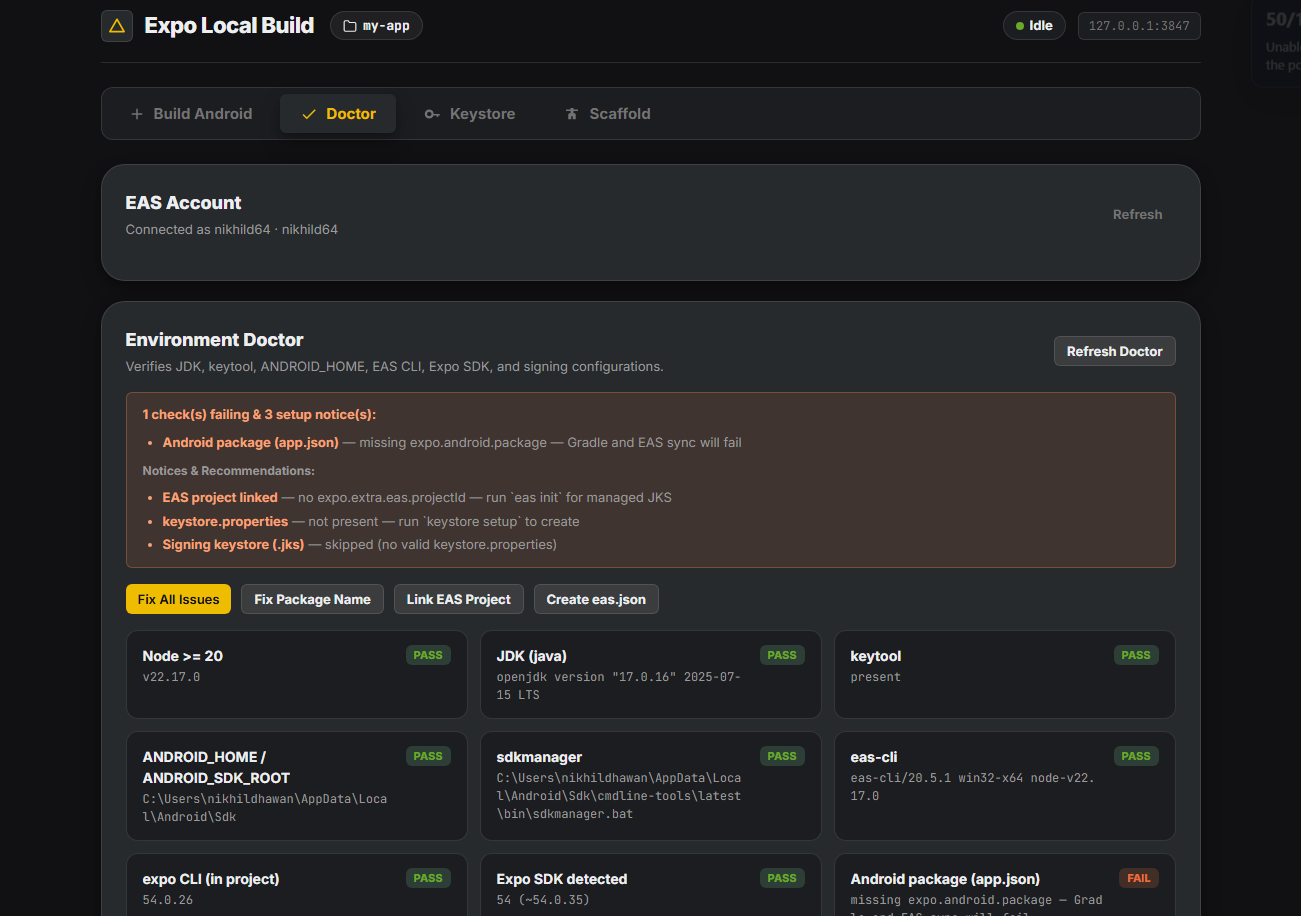
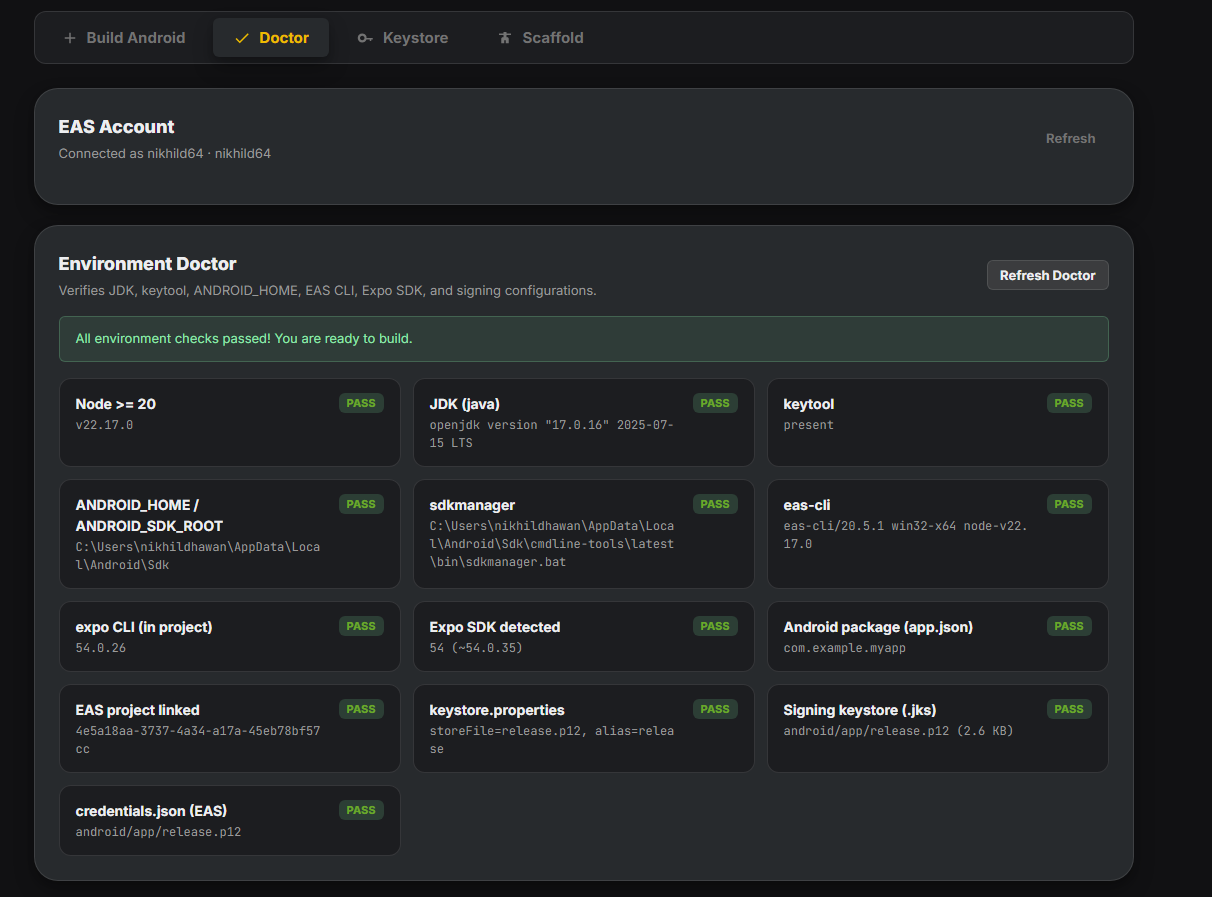
doctor is a setup wizard, not just a health check. It detects missing pieces (expo.android.package, EAS link, eas.json, keystore) and offers to fix each one interactively — eas init, eas build:configure, keystore picker (with one-prompt rehydrate from credentials.json when possible), all chained.

Two modes:
- Scaffold (recommended) —
npx local-expo-build initdrops reusable, committable scripts into your project; you runnpm run build:android:aabfrom then on. - Runner —
npx local-expo-build build android --aab; one command, no files touched in your repo.
Install
npm i -g local-expo-build
# or use it ad hoc
npx local-expo-build --helpQuick start (recommended — scaffold mode)
cd <your-expo-project>
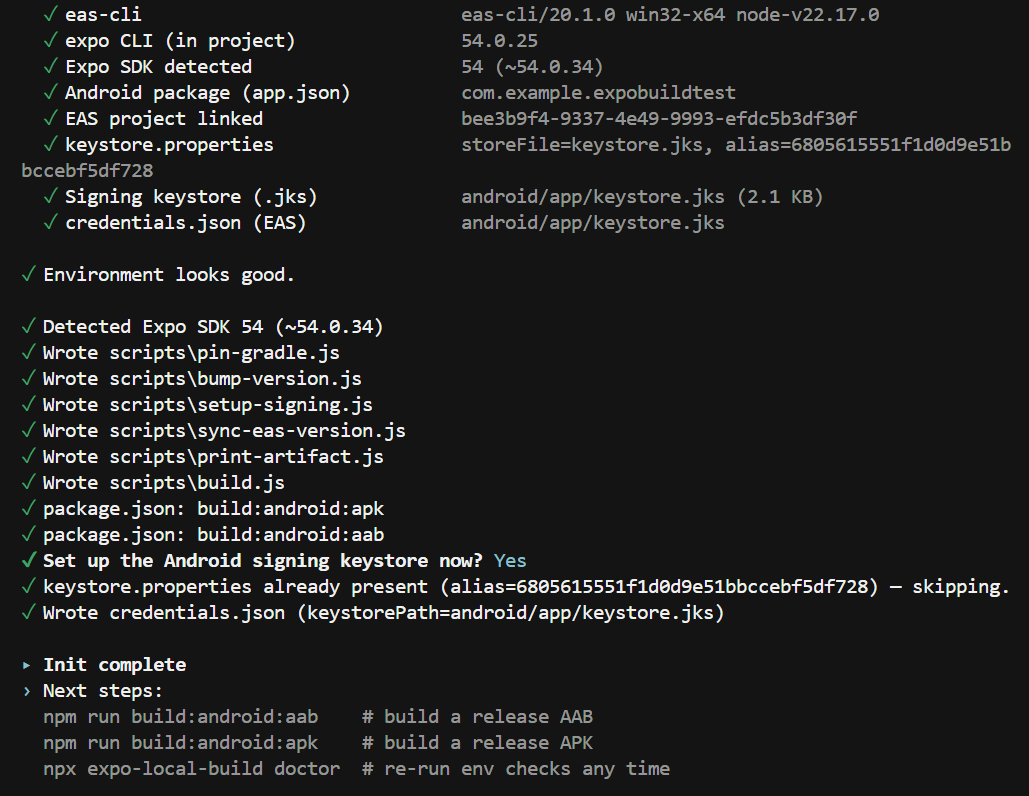
npx local-expo-build initinit runs doctor first as a pre-flight, walks you through any missing setup (EAS link, eas.json, keystore), then drops the build scripts and adds the build:android:apk / build:android:aab entries to your package.json. Then:
npm run build:android:aab # release AAB → android/app/build/outputs/bundle/release/app-release.aab
npm run build:android:apk # release APK → android/app/build/outputs/apk/release/app-release.apkAfter the build finishes, the absolute path + size of the artifact is printed at the very end so you always know where it landed.
Skip the pre-flight in CI: npx local-expo-build init --no-doctor --no-keystore.
Alternative — runner mode (no scaffold)
npx local-expo-build doctor # env + setup wizard
npx local-expo-build build android --aab # full pipeline → .aabUseful if you don't want any files committed to your repo and prefer to drive the whole pipeline from a single CLI call each time.
Commands
local-expo-build init [--force] [--no-keystore] [--no-doctor]
Scaffold scripts + package.json entries
(runs `doctor` first by default)
local-expo-build doctor Env check + interactive auto-fix wizard
(eas init → eas build:configure →
keystore setup)
# ── Android (stable) ──
local-expo-build build android [--apk|--aab] [--profile <name>]
[--clean] [--no-bump] [--no-sync] [--no-prebuild]
Run the full Android pipeline → .aab|.apk
local-expo-build keystore setup Interactive picker:
rehydrate | existing | generate | EAS
local-expo-build keystore import Register an existing .jks
local-expo-build keystore create Generate a new keystore via keytool
local-expo-build keystore fetch Open `eas credentials` to download a .jks
local-expo-build keystore rehydrate [--move]
Bind credentials.json + .jks into
keystore.properties (no password re-entry).
# ── iOS (experimental, macOS only) ──
local-expo-build build ios [--method <m>] [--scheme <s>] [--configuration <c>]
[--team-id <id>] [--profile-name <n>] [--bundle-id <id>]
[--clean] [--no-bump] [--no-prebuild]
Run the full iOS pipeline → .ipa
--method = app-store | ad-hoc |
development | enterprise
# ── Shared ──
local-expo-build update-scripts [-y|--yes]
Refresh scaffolded scripts/*.js to the
version bundled with this CLI.Global flags: --cwd <path>, --verbose, --dry-run.
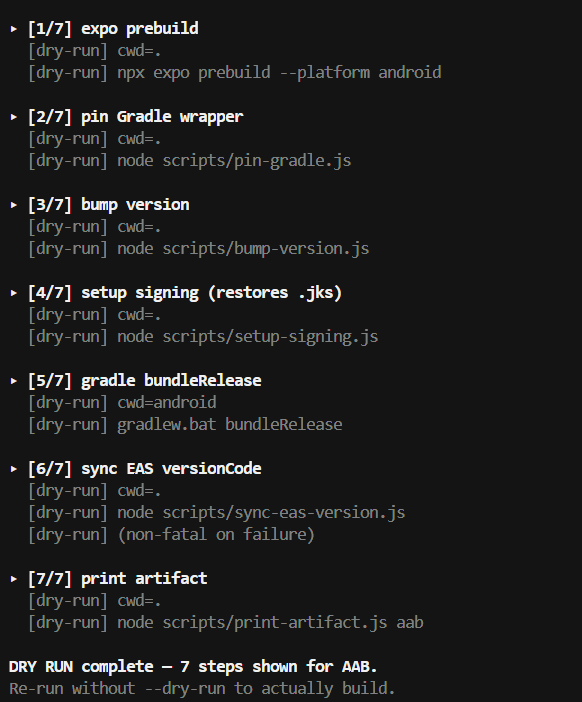
Dry-run is wired into
build androidand the scaffolded orchestrator. Use it to preview the full pipeline (great for screenshots, sanity checks, CI plan-mode):npx local-expo-build --dry-run build android --aab # runner mode npm run build:android:aab -- --dry-run # scaffold mode (or: node scripts/build.js aab --dry-run)
--cleanprompts interactively when neither--cleannor--no-cleanis passed. Default is No (faster). Say yes after an Expo SDK upgrade, plugin change, orMainActivity not found/ "android project is malformed" errors. Pass--cleanor--no-cleanexplicitly to skip the prompt.

How it compares
| | eas build (cloud) | eas build --local | npx expo run:android/ios | local-expo-build |
| --- | --- | --- | --- | --- |
| Runs locally | No | Yes | Yes | Yes |
| Works on Windows | Yes (cloud) | No ¹ | Yes (debug only) | Yes |
| Works on macOS / Linux | Yes (cloud) | Yes | Yes | Yes |
| Produces a signed release .aab / .apk | Yes | Yes | No (debug) | Yes (Android) |
| Produces a signed release .ipa | Yes | Yes | No (debug) | Yes (iOS, experimental) |
| Counts against EAS free build quota | Yes | No | No | No |
| Manages release signing config for you | Yes | Yes | No | Yes |
| Bumps versionCode from EAS automatically | Yes | Yes | No | Yes (Android) |
| Wait in cloud queue | Sometimes | Never | Never | Never |
| Needs eas-cli installed | Yes | Yes | No | Optional ² |
| Needs eas.json set up | Yes | Yes | No | No |
| Needs EAS account / login | Yes | Yes | No | Optional ² |
| Pipeline editable per-project | No | No | No | Yes (scaffold mode) |
¹ eas build --platform android --local errors with "Unsupported platform, macOS or Linux is required to build apps for Android" on Windows — EAS's local build infrastructure uses Unix-only tooling.
² Only needed for: EAS keystore fetch, versionCode sync back to EAS, or doctor's eas init / eas build:configure auto-fixes. The build itself runs without any EAS dependency.
TL;DR:
- On Windows?
local-expo-buildis the only option in the Expo ecosystem to build Android locally. - On Mac/Linux + happy with EAS? Use
eas build --local— it's the official path with managed credentials +eas submitintegration. - On Mac/Linux + want lightweight / no EAS lock-in?
local-expo-buildis your fit — no eas.json, no login, fully editable pipeline.
Why not just use eas build --local?
If you're on Mac or Linux and already invested in EAS (account, eas.json, profiles, eas submit workflow), eas build --platform android --local is the official Expo path and you should use it. It integrates seamlessly with eas submit, managed credentials, and the rest of the EAS toolbox.
Use local-expo-build instead when any of these is true:
- You're on Windows.
eas build --localliterally won't run — it errors out with"Unsupported platform, macOS or Linux is required to build apps for Android". This is the killer use case: there's no other path to local Expo Android builds on Windows. - You don't want an EAS account. No login, no
eas.json, no project-link ceremony. Just point at any Expo project and get a signed.aab. - You want to vendor + edit the build pipeline in your repo. Scaffold mode drops 6 readable JS files into
scripts/that you can customize per-project (custom version bumping, project-specific signing tweaks, pre/post hooks).eas buildis a black box by design. - Your project pre-dates EAS (SDK 50 era) and you never set up the EAS link.
local-expo-buildworks on any Expo SDK ≥ 50 with no migration needed. - You want to script around predictable artifact paths. Output always lands at
android/app/build/outputs/{apk,bundle}/release/.... EAS local copies through temp dirs.
Both tools can coexist. The CLI also writes a credentials.json at project root, which eas submit (and eas build cloud, if you ever want to use it) reads directly — your local-built .aab can still be uploaded via eas submit --path /path/to/app.aab without re-signing.
Keystore sources
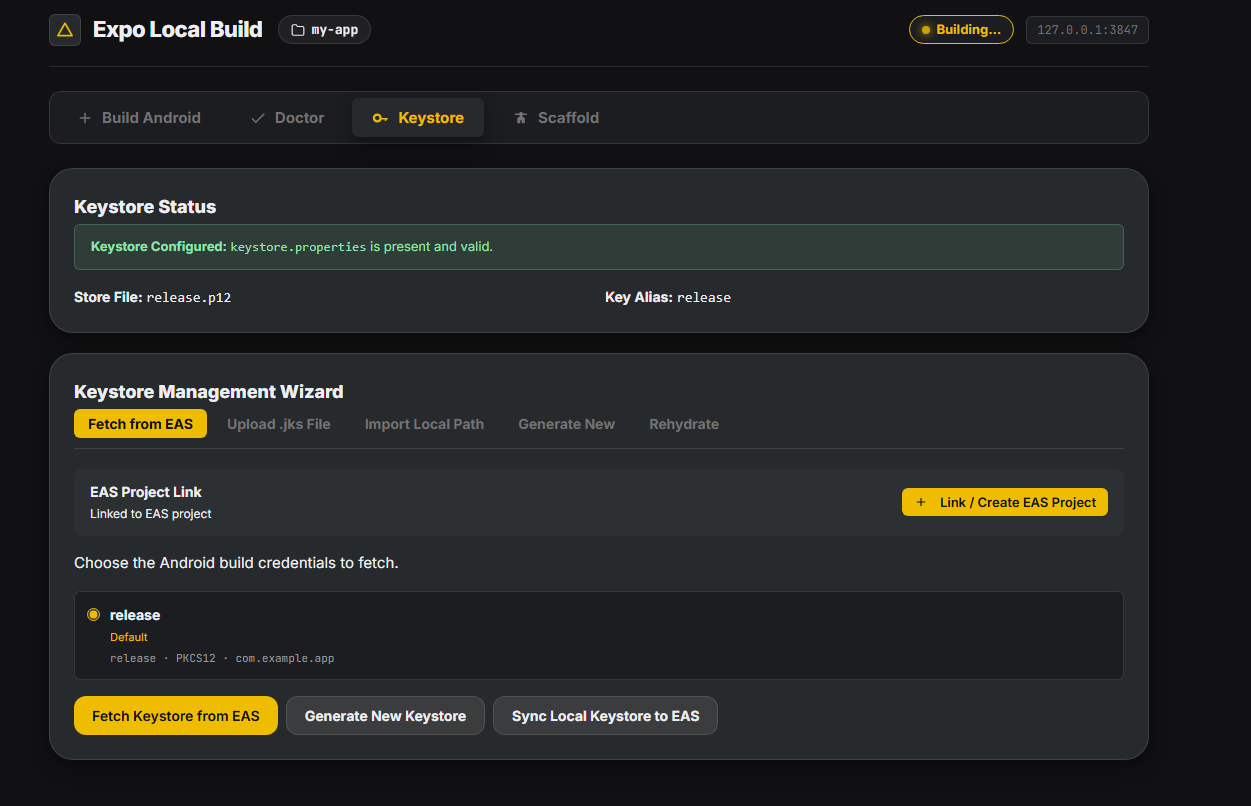
When keystore setup runs (or when doctor / init prompt for it), you'll see one of these. Rehydrate appears at the top conditionally — only when a complete credentials.json + .jks are already on disk:
| Source | What happens |
| --- | --- |
| Rehydrate | Reads credentials.json + the .jks it points at, copies the .jks into android/app/<basename>, writes keystore.properties. No password re-entry. Ideal after keystore fetch. |
| Existing .jks | You point to a file + provide alias/passwords. Copied into android/app/. If a matching credentials.json is on disk (same path or same content hash), the password prompts are skipped — values reused automatically. |
| Generate new | Wizard runs keytool -genkeypair with sane defaults (RSA 2048, 10000d). |
| EAS | Opens eas credentials so you can download the project's current keystore from EAS. |
In every case, after the keystore is registered the CLI also writes a matching credentials.json at the project root and adds keystore.properties, *.jks, and credentials.json to .gitignore.
Bringing your own keystore (EAS-managed flow)
The lowest-friction path from a brand-new clone to a buildable project when your team already has a keystore on EAS. This is what doctor will walk you through.
1. Fetch the keystore via EAS CLI
npx local-expo-build keystore fetch
# Pre-flight: if eas.json or projectId is missing, we'll offer
# to run `eas init` / `eas build:configure` before launching EAS.EAS opens its interactive menu. Pick:
✔ Which build profile do you want to configure? › production
✔ What do you want to do? › Keystore: Manage everything needed to build your project
✔ What do you want to do? › Download existing keystore
✔ Display sensitive information? › Yes
✔ Go back
✔ What do you want to do? › credentials.json: Upload/Download credentials …
✔ What do you want to do? › Download credentials from EAS to credentials.json
✔ What do you want to do? › ExitYou now have:
<scope>__<project>.jksat project root (from "Download existing keystore"),credentials.jsonat project root with all four required fields,credentials/android/keystore.jks(the filecredentials.jsonactually references).
2. Bind everything in one step
npx local-expo-build keystore rehydrateThat copies the .jks referenced by credentials.json into android/app/<basename> and writes keystore.properties using the passwords already in credentials.json — no re-typing.
✓ Copied credentials/android/keystore.jks → android/app/keystore.jks
✓ keystore.properties written from credentials.json (alias=6805615551f1…)
✓ Wrote credentials.json (keystorePath=android/app/keystore.jks)3. Build
npm run build:android:aab # scaffold mode
# or
npx local-expo-build build android --aab # runner modeTip: you can skip step 2 entirely —
doctordetects the rehydrate state automatically and offers the same one-prompt fix inline.
iOS (experimental, macOS only)
Status: community-tested. The iOS pipeline ships behind an experimental banner because the maintainer develops on Windows and can't validate every build configuration. The code is built on Apple's documented
xcodebuildinterface and follows the same patterns as the Android side, but please file issues when you hit something — and PRs are very welcome.
Prerequisites
iOS local builds are constrained by Apple and require all of:
- macOS (Xcode is macOS-only — Apple does not ship
xcodebuildfor Linux or Windows) - Xcode 14+ with Command Line Tools (
xcode-select --install) - Apple Developer account ($99/yr — required for distribution signing certificates)
- A distribution
.p12+ provisioning profile installed in your keychain (drag the.p12into Keychain Access; double-click the.mobileprovisionto install)
local-expo-build doctor checks for Xcode / xcodebuild automatically on macOS hosts and skips the checks elsewhere.
Quick start (iOS)
# 1. Download credentials from EAS (same flow as Android)
npx local-expo-build keystore fetch
# In the EAS menu pick: iOS → Download credentials to credentials.json
# This produces:
# - credentials.json with an `ios` section
# - ios/certs/dist.p12 (distribution certificate)
# - ios/certs/profile.mobileprovision (provisioning profile)
# 2. (one-time, manual) Import the .p12 into your login keychain
# and double-click the .mobileprovision file. Both go into ~/Library/...
# Xcode does this automatically on double-click.
# 3. Build the .ipa
npx local-expo-build build ios --method app-store \
--team-id ABCDE12345 \
--bundle-id com.yourcompany.yourapp \
--profile-name "Your Profile Name"The build runs through these 5 steps:
1/5 expo prebuild (ios)
2/5 bump version
3/5 detect Xcode workspace + credentials
4/5 xcodebuild archive
5/5 xcodebuild -exportArchive (method=app-store)
Build complete (.ipa, 14.3 MB):
/path/to/your/app/ios/build/export/YourApp.ipaUse --dry-run to preview the 5 steps without invoking xcodebuild.
What the CLI does NOT handle (yet)
By design, the experimental iOS support keeps a tight scope so we don't ship untested Apple-keychain code that could leave your machine in a weird state. You're still responsible for:
- Keychain
.p12import. Double-click the file in Finder, orsecurity import dist.p12 -k ~/Library/Keychains/login.keychain-db -P <password>. - Provisioning profile install. Double-click the
.mobileprovision, or copy to~/Library/MobileDevice/Provisioning Profiles/<UUID>.mobileprovision. - TestFlight / App Store upload. Use
xcrun altool --upload-appor Apple's Transporter app after the.ipais built.
These are on the roadmap (full certs setup flow + EAS cert fetch + TestFlight upload) for a future release once there's been enough community testing of the core build flow.
iOS-specific files
| Path | Purpose | Gitignored? |
| --- | --- | --- |
| credentials.json → ios block | EAS local-credentials shape for iOS (distributionCertificate.path/password, provisioningProfilePath) | Yes (auto via the Android setup) |
| ios/build/export-options.plist | Regenerated per build with the chosen distribution method | No — derived per-build, safe to commit or gitignore as you prefer |
| ios/build/<Scheme>.xcarchive | Intermediate archive produced by xcodebuild archive | Yes (recommend adding ios/build/ to .gitignore) |
| ios/build/export/<Scheme>.ipa | The final .ipa | Yes (recommend adding ios/build/ to .gitignore) |
Known caveats
- Auto-detected scheme is the workspace basename. Works for Expo's default prebuild output; pass
--scheme MyOtherSchemeif your project has multiple schemes. - Manual signing requires
--team-id. Without it,xcodebuildfalls back to automatic signing, which only works fordevelopmentbuilds if your Apple ID is logged into Xcode. - Multi-bundle apps not handled. If your project has app extensions (widgets, watch app, share extension), each needs its own provisioning profile and the current
--profile-nameflag only sets one. File an issue with yourapp.jsonextra.eas.build.experimental.ios.appExtensionssetup if you hit this. - No
bumpVersionfor iOS-specificbuildNumber. Today the bump step still updatesversionCodeinandroid/app/build.gradle(no-op on iOS-only builds). Expo's prebuild readsexpo.versionfromapp.jsonand writes it intoInfo.plist'sCFBundleShortVersionString— forCFBundleVersion(the iOS equivalent ofversionCode) you currently need to manage that inapp.json→ios.buildNumbermanually. PRs to wire this up are welcome.
How it works (iOS pipeline)
expo prebuild --platform ios
→ (you import .p12 + provisioning profile manually, one-time)
→ bump app.json version (src/core/bumpVersion.ts)
→ detect ios/<Workspace>.xcworkspace (src/core/ios/detect.ts)
→ read credentials.json `ios` section (src/core/ios/credentials.ts)
→ write ios/build/export-options.plist (src/core/ios/exportOptions.ts)
→ xcodebuild archive (src/core/ios/xcodebuild.ts)
→ xcodebuild -exportArchive → .ipaFiles this CLI creates / touches
| Path | Purpose | Gitignored? |
| --- | --- | --- |
| keystore.properties (root) | Gradle release signingConfig source of truth: storeFile, storePassword, keyAlias, keyPassword | Yes (auto) |
| credentials.json (root) | EAS submit/cloud's local-credential pointer. Kept in sync with keystore.properties. | Yes (auto) |
| android/app/<storeFile> | The actual .jks that Gradle reads | Yes (*.jks, auto) |
| eas.json (root) | EAS build profile config (created by eas build:configure) | No — commit it |
| app.json → expo.extra.eas.projectId | EAS link (written by eas init) | No — commit it |
| app.json → expo.android.package | Android applicationId | No — commit it |
| scripts/build.js | (Scaffold mode only) single orchestrator entry point — what npm run build:android:* actually calls | No — commit it |
| scripts/{pin-gradle,bump-version,setup-signing,sync-eas-version,print-artifact}.js | (Scaffold mode only) per-step modules orchestrated by build.js; edit any one to customize that step for your project | No — commit them |
Security:
keystore.propertiesandcredentials.jsonboth contain plaintext keystore passwords. The CLI gitignores them automatically. Don't commit them. Don't paste them into chat. If you need them in CI, base64-encode and inject via secrets.
Multi-SDK support
local-expo-build carries a small table of Gradle wrapper versions per SDK in src/core/pinGradle.ts:
export const GRADLE_PIN: Record<number, string | null> = {
50: null,
51: null,
52: null,
53: null,
54: null,
55: '8.13', // expo-manifests components.release workaround
56: null,
};If your SDK isn't pinned, pinGradle is a no-op. Add a row + open a PR if a future SDK needs one.
Requirements
All platforms:
- Node ≥ 20 (Node 18 reached EOL in April 2025)
eas-cliis optional — only needed for EAS version sync, EAS credentials fetch, or doctor'seas init/eas build:configureauto-fixes
Android builds (cross-platform):
- JDK 17 (recommended for Expo SDK 55)
- Android SDK +
ANDROID_HOMEenv var keytoolonPATH(ships with the JDK)
iOS builds (macOS only):
- macOS (Apple does not ship
xcodebuildfor Linux or Windows) - Xcode 14+ with Command Line Tools (
xcode-select --install) - Apple Developer account ($99/yr — for distribution signing certificates)
Run local-expo-build doctor to verify all of the above — iOS-specific checks are auto-skipped on non-macOS hosts.
How it works (pipeline)
expo prebuild --platform android
→ pin Gradle wrapper (src/core/pinGradle.ts)
→ bump version + EAS code (src/core/bumpVersion.ts)
→ ensure keystore (src/core/keystore/*)
→ restore .jks into android/app (src/core/setupSigning.ts → ensureKeystoreInAndroidApp)
→ inject release signing (src/core/setupSigning.ts)
→ write/sync credentials.json (src/core/writeCredentialsJson.ts)
→ gradlew {assemble|bundle}Release
→ sync versionCode to EAS (src/core/syncEasVersion.ts)
→ print artifact path + size (templates/scripts/print-artifact.js)The scaffolded scripts/*.js files mirror the same logic so they're vendorable and editable per-project.
Doctor's auto-fix chain
expo.android.package (app.json or app.config.*) → prompt + write to app.json
EAS link (expo.extra.eas.projectId) → offer `eas init`
eas.json → offer `eas build:configure --platform android`
keystore.properties → offer keystore picker
├─ credentials.json + .jks present → rehydrate (no password re-entry)
└─ else → existing | generate | EASEach accepted step re-runs the affected checks in place. If everything ends up green, doctor exits 0; otherwise the remaining items are printed under Suggested next steps to complete setup.
Dynamic configs (app.config.{js,ts,cjs,mjs}) are supported: doctor shells out to npx expo config --json --type public and reads the resolved config. If the Expo CLI fails to resolve (e.g. you haven't npm installed yet), the affected rows show a yellow warning instead of pretending. Auto-writes still target app.json only — we don't modify dynamic config files.
init runs the entire doctor chain as its pre-flight before scaffolding. Pass --no-doctor to skip.
Your package.json ends up with just two added lines, both pointing at the orchestrator:
{
"scripts": {
"build:android:apk": "node scripts/build.js apk",
"build:android:aab": "node scripts/build.js aab"
}
}The orchestrator (scripts/build.js) prints numbered progress (▸ [3/7] bump version, etc.) and a final total time. EAS version sync is treated as non-fatal — if your EAS login expires, the build still succeeds and you get a single warning line instead of a hard fail.
Troubleshooting
validateSigningRelease > Keystore file '…/android/app/keystore.jks' not found
This happens when expo prebuild --clean (or the "android project is malformed — reinitialize?" prompt) wipes android/ between keystore setup and the Gradle build. The pipeline restores it automatically as of v0.2.0 — make sure your scaffolded scripts/setup-signing.js is up to date:
npx local-expo-build init --forceIf the recovery itself fails, you'll get a clear list of paths it tried; the fix is usually:
npx local-expo-build keystore rehydrate # if you have credentials.json
# or
npx local-expo-build keystore import <path-to-jks>eas credentials failed: Command failed with exit code 1
eas credentials refuses to start without eas.json and a linked expo.extra.eas.projectId. v0.2.0 pre-flights both and offers to run eas init / eas build:configure interactively. If you skipped those prompts, run them manually:
eas init
eas build:configure --platform androidThen re-run npx local-expo-build keystore fetch.
Missing expo.android.package in app.json
Doctor catches this as a critical check and offers to write it for you with a sensible default derived from expo.slug or expo.ios.bundleIdentifier. If you're using app.config.{js,ts}, doctor can't statically write to it — add the field by hand:
{
"expo": {
"android": {
"package": "com.yourcompany.yourapp"
}
}
}"The android project is malformed, would you like to clear and reinitialize?"
This is expo prebuild detecting that our injected signingConfigs.release block doesn't match what it would generate fresh. Accepting it is safe — the build chain re-injects signing and the recovery step puts the .jks back before Gradle runs.
expo CLI (in project) not found in doctor
You haven't installed deps in the target Expo project yet. Run npm install (or pnpm install / yarn) in the project root.
Build artifact is signed but Play Console rejects it
Two common causes:
versionCodealready used. The--no-syncflag suppresses pushing the newversionCodeback to EAS — if you used it and Play sees the same code as a previous upload, it'll reject. Don't pass--no-syncunless you're managing versions manually.- Different keystore than the one originally registered. Play Store requires the same keystore for all updates to a published app. Use
keystore fetch+keystore rehydrateto get back the original.
Testing the CLI locally in another Expo app
Three iteration loops, fastest to most-realistic:
# 1. npm link — fastest dev loop
cd local-expo-build && npm run build && npm link
cd ../my-test-app && npm link local-expo-build
# now changes in local-expo-build (with `npm run dev` watching) are picked up
# on the next `npx local-expo-build ...` call from my-test-app.
# 2. npm pack — exactly what end users will install
cd local-expo-build && npm run build && npm pack
cd ../my-test-app && npm i ../local-expo-build/local-expo-build-0.2.0.tgz
# 3. Direct invocation — no install at all
cd local-expo-build && npm run build
node /abs/path/local-expo-build/bin/local-expo-build.js doctor --cwd /abs/path/my-test-appRoadmap
- [x] iOS local builds (experimental in v0.4.0 — awaiting community testing)
- [x] Auto-update
GRADLE_PINtable from a hosted manifest (v0.3.0) - [ ]
certs setupinteractive flow for iOS (.p12 import + provisioning profile install viasecurity/ Keychain Access automation) - [ ] iOS
buildNumber(CFBundleVersion) bump + EAS sync — parity with Android'sversionCodeflow - [ ] TestFlight / App Store Connect upload (
xcrun altool/notarytoolwrapper) - [ ] Symbol upload (
mapping.txt→ Play Console / Sentry; iOS.dSYMto Sentry) - [ ] CI presets (
init --cithat scaffolds a GitHub Actions / GitLab CI workflow with base64-encoded secrets)
Contributing
PRs welcome — see CONTRIBUTING.md for dev setup, code layout, and conventions.
Changelog
See CHANGELOG.md.
License
MIT © Nikhil Dhawan
Not affiliated with Expo or Google. "Expo" and "EAS" are trademarks of 650 Industries, Inc. This project consumes EAS's public APIs (api.expo.dev/graphql, eas-cli) but is independently maintained.