
local-file-picker
v0.2.3
Published
Vue 3 file/directory picker modal backed by a Node.js Express middleware. Returns absolute paths from the local filesystem.

Maintainers
 xzisme
Readme
local-file-picker
基于 Vue 3 + Express 的本地文件 / 目录选择器,通过 Node.js 后端直接读取文件系统,可获取绝对路径。


功能特性
- 📄 选择文件 / 文件夹 — 可多选,返回本地绝对路径
- 📁 新建文件夹 — 弹窗内可直接创建目录,自动选中新文件夹(需后端中间件支持)
- 🔍 全局搜索 — 支持索引搜索(快)和实时遍历降级搜索
- 📍 面包屑导航 — 路径导航,支持快捷访问家目录、桌面、文档等
- 💾 盘符列表 — Windows 多盘符支持
- ✅ 多选 — Ctrl/Cmd + 点击多选
- 默认目录 —— 通过 defaultPath prop 传入默认目录,打开弹窗直接定位
- 地址栏跳转 —— 弹窗顶部可直接输入目录路径回车跳转,支持绝对路径、相对路径、盘符跳转
- ⚡ SQLite 索引 — 后台建立文件索引,全局搜索毫秒级响应
适用于本地工具、内部后台、Electron 应用等场景,不适合部署到公网(服务端直接读取宿主机文件系统)。
预览
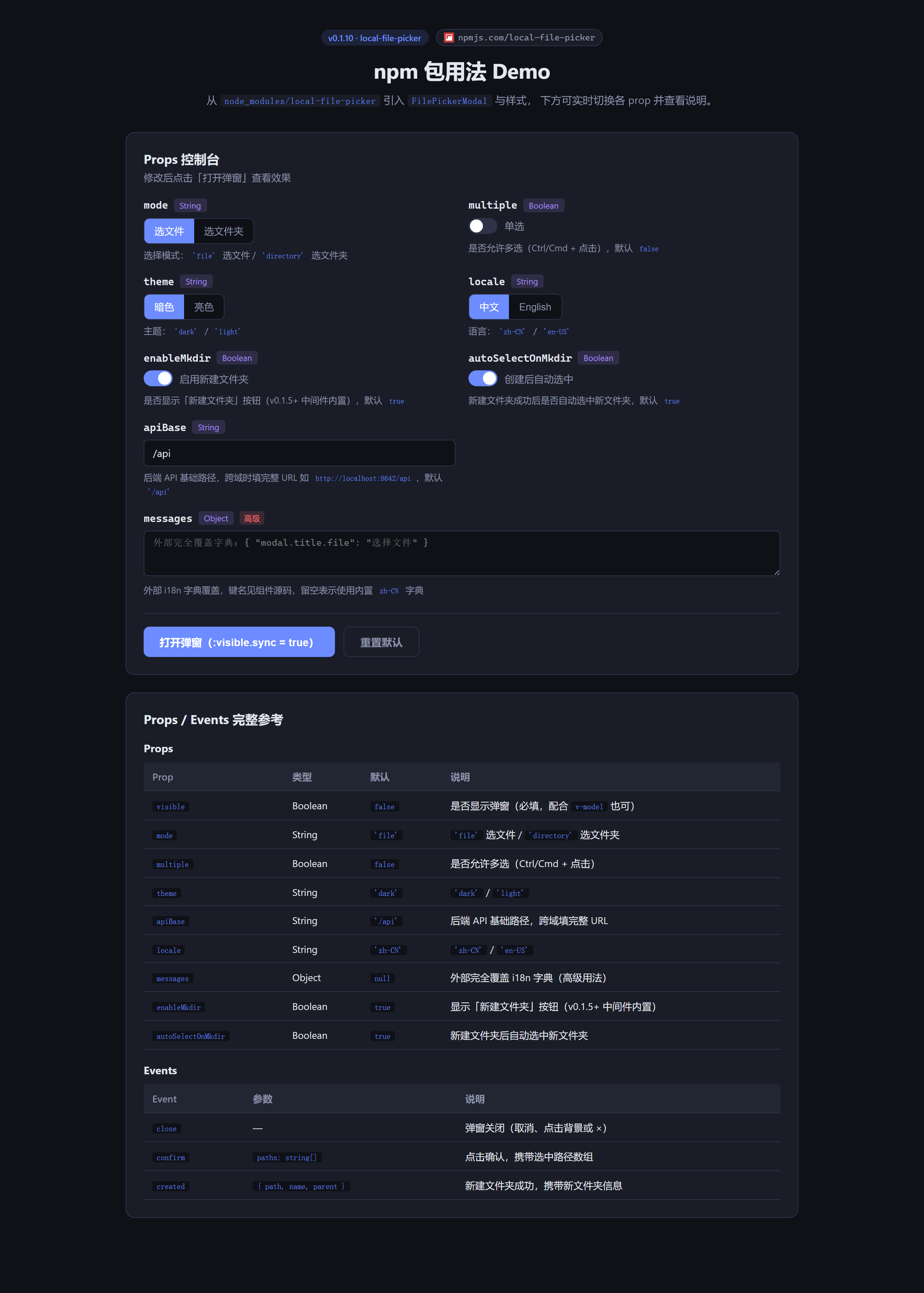
Demo 控制台(9 个 prop 实时切换 + 说明文案 + 完整 API 参考表):
弹窗打开态(选文件夹 + 暗色主题 + 启用新建文件夹):
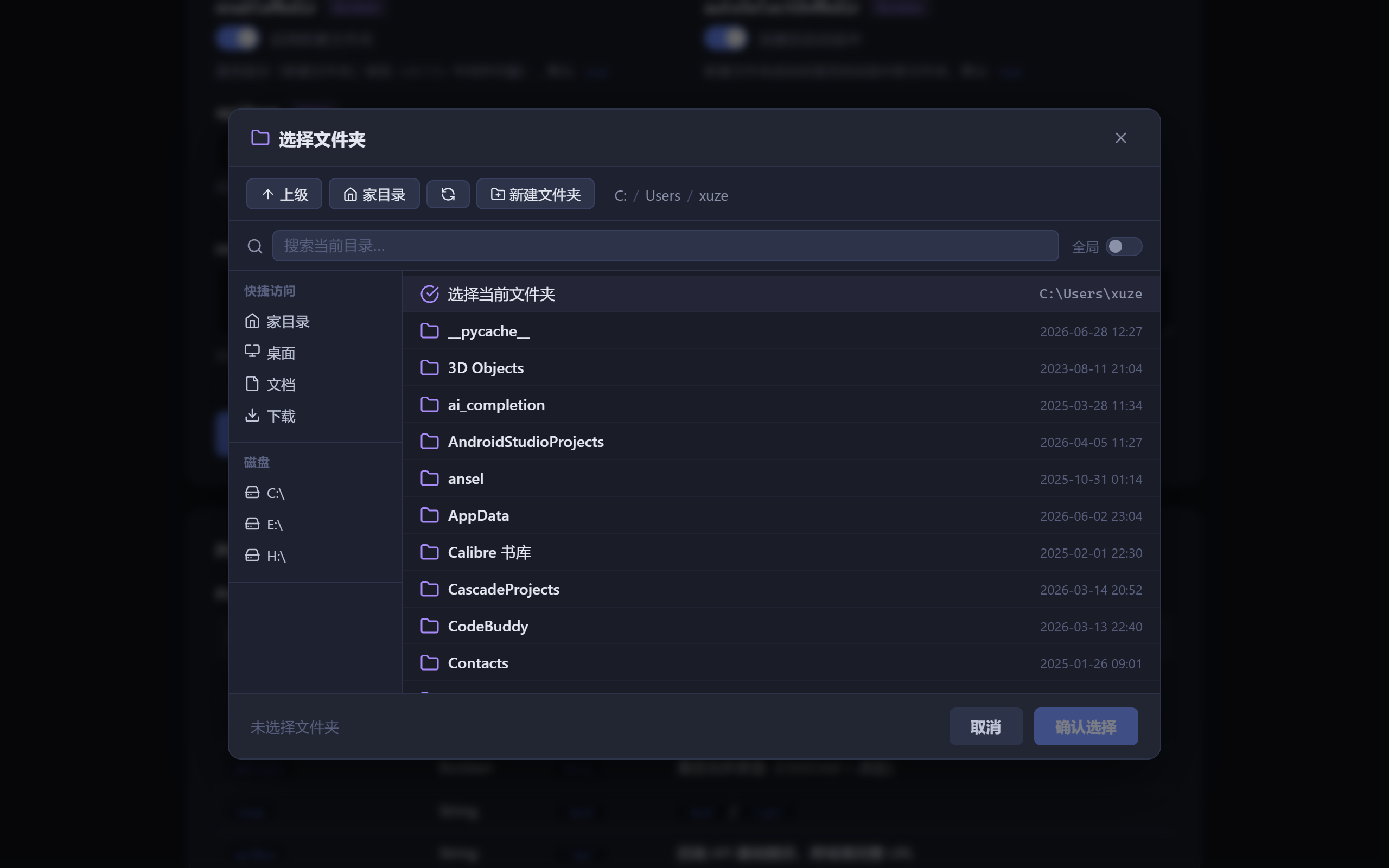
安装
npm install local-file-picker快速上手
第一步:后端挂载中间件
在你的 Express 应用中挂载 file-picker 中间件:
// server.js
import express from 'express';
import cors from 'cors';
import { createFilePickerMiddleware } from 'local-file-picker';

const app = express();
app.use(cors());
app.use(express.json());

// 将所有 /api/fs/* 路由交给中间件处理
app.use('/api', createFilePickerMiddleware());

app.listen(3000, () => console.log('Server running on http://localhost:3000'));
中间件选项
app.use('/api', createFilePickerMiddleware({
  // SQLite 索引数据库路径(默认 ~/.file-picker-index.db)
  dbPath: '/custom/path/index.db',

  // 建立索引时跳过的目录名(Set 或 Array)
  skipDirs: new Set(['node_modules', '.git', 'dist']),

  // 是否强制重建索引(默认读取 FORCE_REINDEX 环境变量)
  forceReindex: false,
}));
第二步:前端使用 Vue 组件
安装后构建产物引入
// main.js 或按需引入
import { FilePickerModal } from 'local-file-picker/client';
import 'local-file-picker/dist/file-picker.css'; // 引入样式
组件用法
<template>
  <button @click="open = true">选择文件</button>

  <FilePickerModal
    :visible="open"
    mode="file"
    api-base="http://localhost:3000/api"
    @close="open = false"
    @confirm="onConfirm"
  />
</template>

<script setup>
import { ref } from 'vue';
import { FilePickerModal } from 'local-file-picker/client';
import 'local-file-picker/dist/file-picker.css';

const open = ref(false);

function onConfirm(paths) {
  // paths 是选中路径的数组,如 ['C:\\Users\\xuze\\Documents\\report.pdf']
  console.log('选中文件:', paths);
  open.value = false;
}
</script>
组件 Props
| Prop | 类型 | 默认值 | 说明 |
| ---------- | --------- | -------- | ------------------------------------------------ |
| visible | Boolean | false | 是否显示弹窗 |
| mode | String | 'file' | 'file' 选文件 / 'directory' 选文件夹 |
| api-base | String | '/api' | 后端 API 基础路径,如 'http://localhost:3000/api' |
| enable-mkdir | Boolean | false | 是否启用弹窗内"新建文件夹"功能(需要后端中间件支持 POST /fs/mkdir) |
| auto-select-on-mkdir | Boolean | true | 创建成功后自动选中新文件夹 |
| multiple | Boolean | false | 是否允许多选 |
| defaultPath | String | "" | 打开弹窗时的默认目录(绝对路径或相对路径如 ..\\foo)。留空则使用用户主目录;不可访问时回落主目录并提示 |
| theme | String | 'dark' | 'dark' / 'light' |
| locale | String | 'zh-CN' | 'zh-CN' / 'en-US' |
| messages | Object | null | 外部完全覆盖 i18n 字典(高级用法) |
组件 Events
| Event | 参数 | 说明 |
| --------- | --------------- | ---------------------------- |
| close | — | 弹窗关闭(取消或点击背景) |
| confirm | paths: string[] | 用户点击确认,携带选中路径 |
| created | { path, name, parent } | 新建文件夹成功后触发,携带新文件夹信息 |
API 接口说明
中间件挂载后提供以下接口(以挂载在 /api 为例):
| 方法 | 路径 | 说明 |
| ------ | --------------------- | ---------------------------------------- |
| GET | /api/health | 健康检查 + 索引状态 |
| GET | /api/fs/home | 获取用户家目录路径 |
| GET | /api/fs/drives | 获取磁盘列表(Windows 盘符 / Linux /) |
| GET | /api/fs/list | 列出目录内容 ?dir=路径 |
| GET | /api/fs/search | 全局搜索 ?q=关键词&mode=file\|directory\|all&limit=200 |
| GET | /api/fs/index-status| 索引进度状态 |
| POST | /api/fs/reindex | 触发重建索引 |
| POST | /api/fs/mkdir | 新建文件夹 { parent, name },返回 { path, name } |
本地开发 Demo
git clone https://github.com/xz333221/local-file-picker.git
cd local-file-picker
npm install
npm run dev:server   # 后端 http://localhost:8642
npm run dev:client   # 前端 http://localhost:7891
或一键启动:
npm run dev构建发布包
npm run build
# 输出 dist/file-picker.mjs 和 dist/file-picker.css
发布到 npm:
npm publish技术栈
| 层 | 技术 | 版本 | | ------ | --------------- | ------- | | 前端 | Vue 3 + Vite | 3.5 / 7 | | 后端 | Express | 5.x | | 索引 | Node SQLite | 内置 |
License
MIT © 2026 xuze
快速启动
# 1. 安装后端依赖
cd server && npm install

# 2. 安装前端依赖
cd ../client && npm install

# 3. 启动后端(端口 8642)
cd ../server && npm run dev

# 4. 启动前端(端口 7891)— 另开终端
cd client && npm run dev
然后在浏览器打开 http://localhost:7891
端口说明
| 服务 | 端口 | | ---- | ---- | | 前端 | 7891 | | 后端 | 8642 |
API 端点
| 方法 | 路径 | 说明 | | ---- | --------------- | --------------------------- | | GET | /api/health | 健康检查 | | GET | /api/fs/home | 获取用户家目录路径 | | GET | /api/fs/drives | 获取可用磁盘盘符列表 | | GET | /api/fs/list | 列出目录内容 (?dir=xxx) |