
localidraw
v0.9.0
Published
A local Excalidraw for the .excalidraw files in a folder: projects and canvases in a sidebar, autosave to disk, and live merge of edits made by your coding agent.

Maintainers
 edspencer
Readme
Localidraw
A local Excalidraw for the .excalidraw files on your machine.
npx localidraw --open              # Scratch (~/.localidraw/drawings), and the folders you add
npx localidraw add ~/code/web-app  # a project's drawings too: they show at once
npx localidraw .                   # or just the current folder, on its own
It opens http://localhost:3729/.
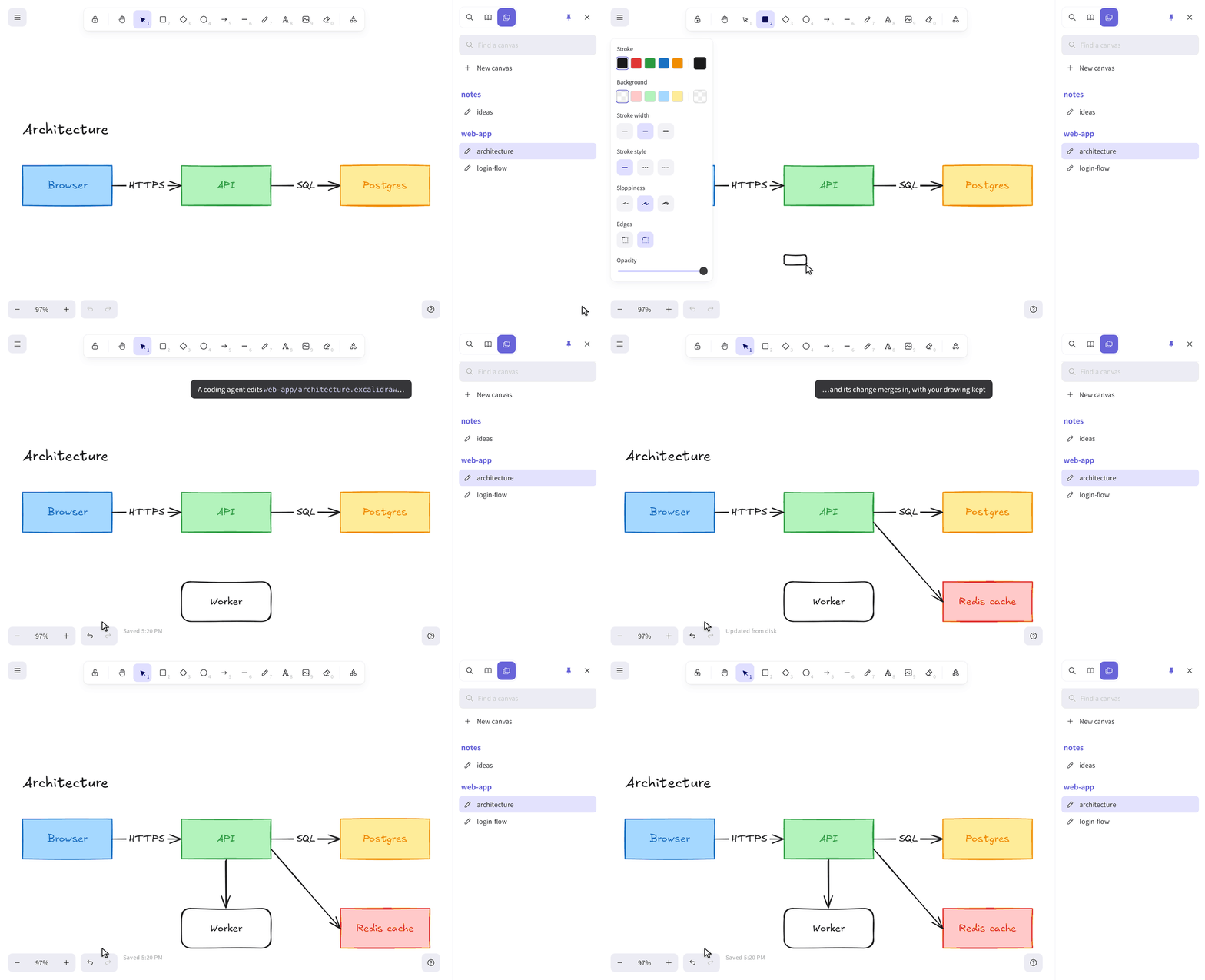
Drawn live in Localidraw, while a script edits the file as an agent would. The pointer and the captions are added for the recording (tools/docs-media).
Localidraw serves the real Excalidraw editor, full screen in your browser, on the drawings in a folder on your machine. There's no export step and no cloud copy: what you draw is saved straight to the file.
- Every folder, plus Scratch. One Localidraw serves the folders you list with
localidraw add, and Scratch, a folder of its own for when you just want to draw (Folders and Scratch). - Projects and canvases. Every folder in those that holds
.excalidrawfiles is a project, and each file is a canvas. They're listed in a Canvases tab in Excalidraw's own sidebar, next to the Library, with a filter and New canvas, and each canvas can be renamed, moved or deleted from there (a delete goes to a trash folder, and can be undone). One canvas per diagram, rather than one endless board. - Saved as you draw. Each canvas is written back to its file under a second after you stop. Opening a canvas, or
moving around it, never writes it, so browsing leaves
git statusclean. - Draw alongside your coding agent. When something else changes a file (an agent editing the JSON, a
git pull), the canvas updates within a second. The change is merged per element with what you've drawn since, so neither of you loses work. - A Library to share. Excalidraw's Library of reusable shapes is kept in your browser, or, with a
library.excalidrawlibat the top of the folder, in that file, shared and merged like a canvas (the Library). - Looks like Excalidraw, because it is. It's Excalidraw 0.18.1, the version the VS Code extension uses, so files stay compatible both ways. Localidraw's own additions follow Excalidraw's UI conventions (docs/AESTHETIC.md).
- Works offline, and only for you. Fonts and all are in the package. It listens on 127.0.0.1, and refuses requests from other hosts and sites. You can host it for a team, behind a reverse proxy that does the login.
The documentation is at https://localidraw.edspencer.net, including how a coding agent should edit a canvas.
Options
localidraw [serve] [folder] [--port <n>] [-o] [-q] [--host <addr> --allowed-host <name>] [--poll [ms]]
localidraw add <folder> [--name <name>] | remove <name|folder> | folders   [--json]
localidraw service install [-o] | uninstall | start [-o] | stop | restart | status   [--json]
localidraw service logs [-f] [-n <lines>]
localidraw update [--check] [--to <version|tag>] [--yes] [--force] [--json]
localidraw busy [--json]
localidraw doctor [--json] [--offline]serve: run it in the foreground. It's the default, solocalidrawislocalidraw serve. With no folder, it serves Scratch and the folders in~/.localidraw/config.json, and follows that file as it changes.folder: serve this folder alone instead, with no list and no Scratch.node_modulesand dot-folders are skipped. Command names win over folder names: a folder calledadd,service,update,busyordoctoris given as./service.add <folder>,remove <name>,folders: edit and print the list. No running Localidraw is needed, and one that is shows the change at once.--port <n>: the port (default 3729, which spells "DRAW" on a phone keypad, or$PORT).-o,--open: open it in your browser, once it answers.-q,--quiet: print only the first line,Localidraw <version>: <url>.
To host it (on a server, or in Docker, behind a reverse proxy):
--host <addr>: the address to listen on (default127.0.0.1, or$LOCALIDRAW_HOST).--allowed-host <name>: a host name to answer to besides localhost, such asdraw.example.com. Repeat it for more, or set$LOCALIDRAW_ALLOWED_HOSTS(comma-separated). A--hostbeyond loopback won't start without one.--poll [ms]: find changes by checking the files every so often (default 2000 ms) rather than by file events, for a folder on NFS or SMB, or$LOCALIDRAW_POLL.
Ctrl-C or SIGTERM (docker stop, a service manager) stops it once any save under way is written, and it exits 0. It
exits 1 when it fails (the port is in use, say), and 2 for a usage error, with the usage after the message. With no
folder, a port held by a Localidraw that serves the list already isn't a failure: it prints
Localidraw is already running: <url> (opening it, with --open) and exits 0. These follow the
CLI contract that Ed's local tools share.
To keep it running in the background from login on, on macOS (launchd) or Linux (systemd), install it as a service:
npm install -g localidraw
localidraw service install --open
There's one service per machine, serving Scratch and the list, so localidraw add <folder> is all a new folder takes:
no restart, and service install takes no folder. localidraw service status says how it is (exit 0,
3 for not running, 4 for not installed), and localidraw service logs -f follows its log, in ~/.localidraw/logs/.
Running as a service has the rest.
localidraw update updates a global install to the latest version, restarts the service, and puts the old version
back if the new one doesn't start (--check only looks). localidraw busy exits 75 while a canvas is being saved,
for a script or Watchtower to wait on, and localidraw doctor checks that it can run here, with a fix for each
problem. Localidraw asks the npm registry only when you run update or doctor.
Updating has the rest.
Localidraw has no login of its own: when you host it, authentication is the reverse proxy's job. There's a Docker
image, ghcr.io/edspencer/localidraw (amd64 and arm64), and a compose.yaml.
Self-hosting has the details and the limits.
The open canvas is in the URL (?canvas=web-app/docs/flow.excalidraw, the folder's name first), so you can bookmark
it. Your viewport per canvas,
the theme and the sidebar are remembered by the browser, not written into the files.
How the merge works
Every Excalidraw element has a version that goes up each time it changes. Localidraw remembers each element's
version as of the last time the page and the file agreed. When the file changes on disk:
- an element only the file changed takes the file's copy, even an older one (so a
git checkoutof the file sticks); - an element both sides changed keeps the higher version (the file wins a tie), and if that's the file's, a notice in the footer says your edit was replaced, and can show you which;
- an element the file no longer has is removed, unless you've changed it since;
- anything you've drawn that the file doesn't know about stays.
A save carries the hash of the version it was based on. If the file has moved on in the meantime, the server refuses the save and sends back the new version, and the page merges it before saving again. So a write on disk is never silently overwritten.
For tools that edit canvases: bump an element's version when you change it (Excalidraw's own
convertToExcalidrawElements and bumpVersion do), or a simultaneous edit to it in the browser wins.
Development
npm install
npm start            # build, then run on this checkout's folder (npm start -- ~/some/folder)
npm run dev          # the same, rebuilding and reloading as you edit
npm test             # node:test: the merge, the file rules, the server API and the docs
npm run typecheck
npm run smoke:pack   # pack, install the tarball into a temp prefix, run it, check it serves
See CONTRIBUTING.md to contribute, and AGENTS.md for the conventions. Security problems: SECURITY.md, please, not an issue.
Licence
MIT. Localidraw bundles Excalidraw (MIT) and its fonts; see NOTICE.md. It isn't affiliated with Excalidraw.