
log-color-highlight
v1.6.0
Published
Node Js command line utility for highlighting log files
Downloads
136

Maintainers
 gliviu
Readme
log-color-highlight
Node Js command line utility for highlighting log files.
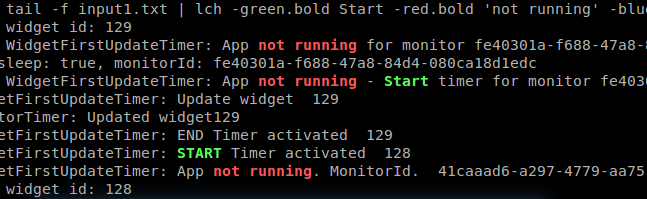
Install
$ npm install log-color-highlight -gUsage
lch [options] -style1 regex1 [-style2 regex2] ...Options
-f filePath     Input file path.
                If this is not provided standard input is used
-c configPath   Path to configuration file.
-s style        Implicit style.
-cs             Case sensitive.
                By default text matching is done case insensitive.
-p              Add style/modifier preset.
-h --help       Prints this help message.
Highlighting
Multiple styles may be combined using dot notation.
echo Information, warnings, errors | lch -green info -yellow.bold warn error failureIf no style is specified it defaults to red. This behavior may be altered with -s option which is mostly useful if specified in configuration files.
echo Some errors | lch errorStyles
Colors: black, red, green, yellow, blue, magenta, cyan, white, gray
Background colors: bgBlack, bgRed, bgGreen, bgYellow, bgBlue, bgMagenta, bgCyan, bgWhite
Styling: reset, bold, dim, italic, underline, inverse, hidden, strikethrough
Modifiers
cs Forces matches to be case sensitive..
echo Info, Warn | lch -green.cs info -yellow warnwl Highlights the whole line
echo highlight whole line | lch -green.wl whole -yellow lightesc Escapes regex special characters
echo [error] ... [info] | lch -red.esc [error] -yellow "\[info\]"Presets
Define common style. Useful together with configuration files.
echo "[error] ... [info]" | lch -p err=red.bold -p inf=yellow.bold -err error -inf infoConfiguration file
Supports the same highlighting syntax as used from command line. In addition allows multiple lines and comments.
# Presets
-p failure=red.bold
-p success=green.bold

# Highlighting
-yellow.bold warn warning warnings deprecated

-success success successful successfully
-success "Operation.*completed"

-failure "Operation.*failed"
-failure err error errors erroneous
-failure wrong
-failure fail failure
echo Successful, warnings, errors | lch -c lch.confExamples
Highlight 'error' and 'warn' in default color (red)
echo some errors and warnings | lch error warnStyles
echo "log color highlight" | lch -red.bold log -blue.italic.underline highlightImplicit style
echo "implicit style" | lch -s bold -red implicit -red.reset styleForce case sensitive globally
echo "case sensitive" | lch -cs sensitive CASEToggle case sensitivity per pattern using cs and ci modifiers
echo "case sensitive Case Sensitive" | lch -green.cs sensitive -red caseecho "case sensitive Case Sensitive" | lch -cs -green sensitive -red.ci.bold caseRegular expressions
echo "using regular expressions" | lch -green .*regular -blue exp.*Escape regex special characters. Following examples are equivalent.
echo "[ERROR] On receive (ctrl) - monitorId" | lch -red.esc [error] -cyan.esc "receive (ctrl) - monitorId"echo "[ERROR] On receive (ctrl) - monitorId" | lch -red \[error\] -cyan "receive \(ctrl\) - monitorId"Later options take precedence over previous ones
echo "log color highlight" | lch -green "log color highlight" -blue "color" -red "lor hi"Nested highlights
echo "log color highlight" | lch -blue "color" -red "log color"Test
cd log-color-highlight
npm install
npm test
Changelog
1.4.0 whole line modifier
      updated cli help message/readme
1.3.0 config file is searched in user home folder or LCH_CONFIG env variable path
1.2.0 presets
1.1.1 regular expression escape modifier
1.1.0 case sensitivity modifiers
Alternatives
Lch doesn't fit? Try one of the following.