
log-supervisor
v1.0.2
Published
Organize logs more effectively

Maintainers
 shiverzheng
Readme
Log Supervisor
二次封装的debug,让你项目中的console.log更有组织性。
序言
在我们日常业务中,涉及很多数值计算,测试同学需要查看各个数值是否正确,项目中就存在很多console.log,随着业务增长,在后续的本地开发与测试中,日志信息愈加混乱,一打开控制台日志信息铺天盖地,为了更好的组织和管理日志,能看到自己想要的看到的日志,Logger应运而生。
用法
基本
npm i log-supervisor
    import Logger from 'log-supervisor'

    // 首先设置前缀 - 可以是任何你想要的字符
    Logger.prefix = 'pp'

    enum Loggers {
        Default = 'log',
        L1 = 'logger1',
        L2 = 'logger2'
    }

    // 注册一个logger, register的参数为每一个logger的命名空间
    const logger1 = Logger.register(Loggers.L1)
    logger1('I am working hard!')

    // 为了区分不同业务的日志,可以继续注册一个logger
    const logger2 = Logger.register(Loggers.L2)
    logger2('I am working hard too!')

    // 让他们开始干活吧
    Logger.do(Loggers.L1, Loggers.L2)

    // 或者你想只让指定的logger干活 => Logger.do(Loggers.L2)

    // 再或者全都开始干吧 => Logger.do()
我们可以通过使用Logger.bindToWindow将logger注册到window上,在控制台中键入logger以调用相应的方法。
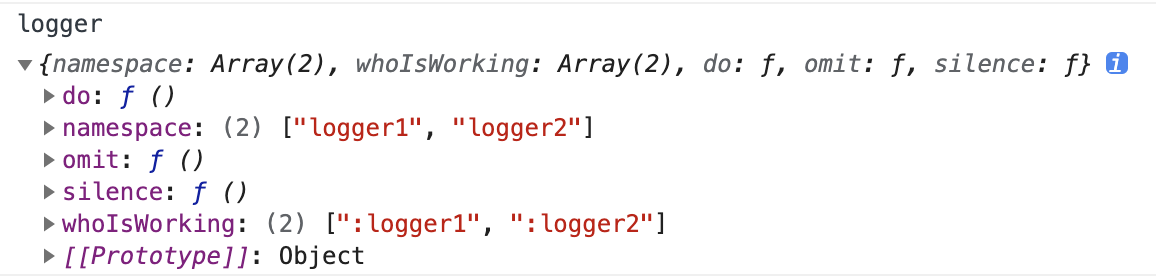
logger.namespace可以查看项目中所有注册的logger的namespace。
logger.do(<namespace1_you_want>, <namespace2_you_want>...),可以开启项目中已经注册的任意的logger。
logger.omit(<namespace1_you_do_not_want>, <namespace2_you_do_not_want>...),可以忽略某些你不想要的logger。
logger.silence()可以让所有logger闭嘴。
logger.whoIsWorking可以查看工作中的logger。
以上方法在控制台调用之后,刷新完页面后生效。
高级
根据项目的环境变量,我们可以在代码中预设好Logger,下面提供我们业务中的配置:
const env = process.env.NODE_ENV

switch (env) {
    case 'production': {
        // 生产环境, 彻底禁用Logger,控制台中也无法打开,不产生任何日志
        Logger.disable()
        break
    }
    case 'development': {
        // 测试环境,开启控制台,开启所有logger,测试同学可以通过控制台logger相关命令,自由掌控
        Logger.do()
        bindToWindow()
        break
    }
    case 'local': {
        // 本地环境,开启自己想要的日志
        Logger.do(Loggers.L1)
        bindToWindow()
        break
    }
    default:
        Logger.disable()
}
VUE
将logger绑定到VUE上,在VUE中就可以通过this.$log打印一些通用日志。
import Vue from 'vue'

Vue.prototype.$log = Logger.register(Loggers.Default)
建议
在eslint中开启no-console,可以避免将本地开发调试代码时所写的无用的console.log提交到git中,
"no-console": ["error", { allow: ["warn", "error"] }]当然Logger不会对console.log做处理,可以自由选择使用场景。