
logger-issues
v0.0.42
Published
Easy way to handle logs, warnings, and errors, with the ability to create GitHub/Gitea issues automatically in production environments and receive AI-Powered feedback

Maintainers
 janselalb
Readme
logger-issues
Easy way to handle logs, warnings, and errors, with the ability to create GitHub/Gitea issues automatically in production environments.
Get started
GitHub
You can use classic or fine-grained github tokens
Classic token
- Access to this url https://github.com/settings/tokens/new?scopes=repo
- Write a "Note" for the token
- Select "No expiration"
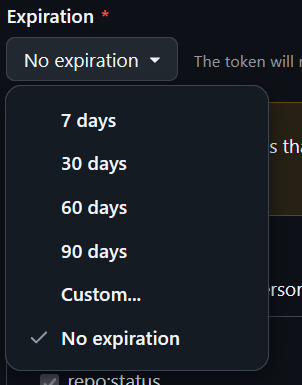
- Press "Generate token"
Fine-grained token (Preview)
- Access to this url https://github.com/settings/personal-access-tokens/new
- Set the token name
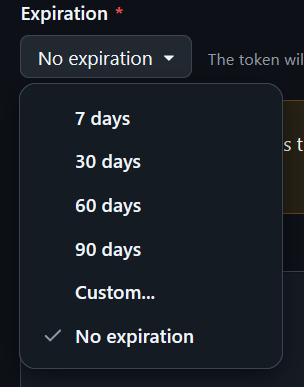
- Select "No expiration"
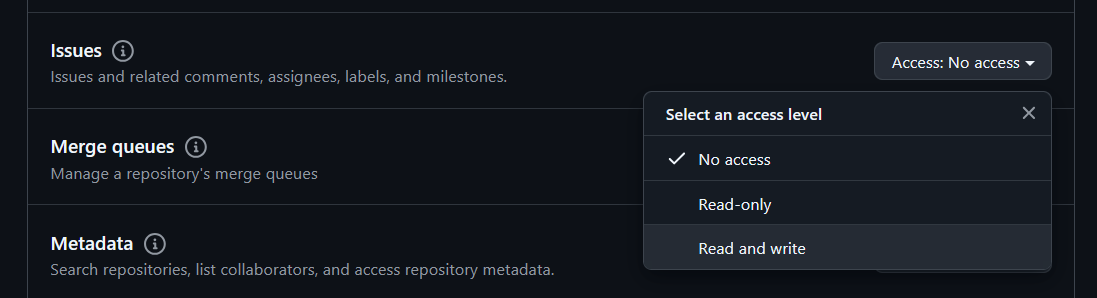
- Select "Read and write" permission to issues. (Permissions/Repository permissions/Issues)
 5- Press "Generate token"
Instantiate
import Loggers from 'logger-issues'

const Log = new Loggers.GithubLogger(
	"token",//Create a personal access token at https://github.com/settings/tokens/new?scopes=repo
	"owner",//GITHUB_REPO_OWNER
	"repo_name",//GITHUB_REPO_NAME
	true,//isInProduction
	(error)=>{
		console.error("ON_ERROR",{error})
	},
	(warn)=>{
		console.warn("ON_WARN",{warn})
	}
);
Gitea
import  Loggers  from  'logger-issues'

const Log = new Loggers.GiteaLogger(
	"token",//Create a personal access token at https://gitea.your.host/user/settings/applications
	"gitea.your.host",//GITEA_HOST
	"owner",//GITEA_REPO_OWNER
	"repo_name",//GITEA_REPO_NAME
	true,//isInProduction
	(error)=>{
		console.error("ON_ERROR",{error})
	},
	(warn)=>{
		console.warn("ON_WARN",{warn})
	}
);
Usage
//Basic  logging
logger.l('This is a log message'); // Won't show in production
logger.d('This is a debug message'); // Won't show in production

// Warning
logger.w({
	warning: 'This is a warning',
	isIssue: true,
	data: { userId:  123, action:  'login' },
	routes: [
		{
			name: 'Home',
			params: {}
		},
		{
			name: 'Login',
			params: { redirect: '/dashboard' }
		}
	],
	labels: ['warning', 'user-action'] //in gitea is array of numbers that represents label ids
});

// Error
logger.e({
	error: new Error('This is an error'),
	data: { userId:  456, action:  'payment' },
	routes: [
		{
			name: 'Dashboard',
			params: {}
		},
		{
			name: 'Payment',
			params: { amount:  100 }
		}
	],
	labels: ['error', 'payment-issue'] //in gitea is array of numbers that represents label ids
});

// Timing
logger.ts(
	'Operation X',
	true //isAnIssue
);
// ... perform some operation
logger.te('Operation X');


// Using the issue method directly
logger.issue({
	title:  'Direct Issue Creation',
	body:  'This is a directly created issue',
	data: { someKey:  'someValue' },
	routes: [{ name:  'Settings', params: { section:  'privacy' } }],
	labels: ['direct-issue'] //in gitea is array of numbers that represents label ids
});
Example
Expo
import * as Device from "expo-device";
import { useNavigationState } from "@react-navigation/native";

const  devices  = {
	[Device.DeviceType.PHONE]:  "phone",
	[Device.DeviceType.TABLET]:  "tablet",
	[Device.DeviceType.DESKTOP]:  "desktop",
	[Device.DeviceType.TV]:  "tv",
	[Device.DeviceType.UNKNOWN]:  "unknown",
};

function CustomErrorBoundary ({error}) {
	const routes = useNavigationState((state) => state.routes);
	useEffect(() => {
		const finalRoutes = routes.map(({ name, params }) => ({ name, params }));
		Log.e(
			error,
			{
				name: Device.deviceName,
				type: typeof Device.deviceType === "number" ? devices[Device.deviceType] : Device.deviceType,
				brand: Device.brand,
				manufacturer: Device.manufacturer,
				modelId: Device.modelId,
				modelName: Device.modelName,
				osName: Device.osName,
				osVersion: Device.osVersion,
				platformApiLevel: Device.platformApiLevel,
			},
			finalRoutes
		);
	}, []);

	//return ...
}