
logpainter
v0.0.8
Published
A utility for console loaders and styled console messages.


Readme
LogPainter 🚀





logpainter is a lightweight and easy-to-use package for adding stylized console messages and animated loaders in Node.js.
Installation 📦
npm install logpainteror for development
npm install logpainter --save-devUsage 🛠️
log – Styled Console Messages 🎨
Use log to display formatted messages in the terminal with colors, emojis, and text styles.
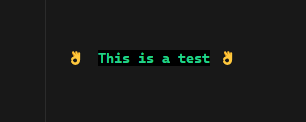
import { log } from 'logpainter'

log('This is a test', {
  color: 'green',
  emojiStart: 'thumbs_up',
  bold: true,
  emojiEnd: 'thumbs_up'
})
Example Output:
spinner – Animated Terminal Loaders ⏳
Use spinner to display a loading animation while executing an asynchronous task.
import { spinner } from 'logpainter'

spinner(asyncFunction, {
  message: 'Making a request...',
  loaderName: 'dots'
})
  .then((res) => {
    log('Success!', {
      color: 'green',
      emojiStart: 'check_mark'
    })
  })
  .catch((err) =>
    log('Failed!', {
      color: 'red',
      emojiStart: 'cross_mark'
    })
  )
Example Output:

Available Options ⚙️
log Options:
| Option | Type | Description |
| ------------ | --------- | -------------------------------------------- |
| color | string | Text color (red, blue, green, etc.). |
| bold | boolean | Bold text. |
| bgColor | string | Background color. |
| indent | number | Spaces before the text. |
| emojiStart | string | Emoji at the beginning. |
| emojiEnd | string | Emoji at the end. |
| aling | string | Text alingnment (left, center, right). |
spinner Options (extends log options)
spinner includes all options from log, plus the following:
| Option | Type | Description |
| ------------ | -------- | ------------------------------------------------ |
| message | string | Loading message. |
| loaderName | string | Loader animation style (dots, clock, etc.). |
Available Emojis 🎭
The package includes 155 popular emojis. Examples:
| Name | Emoji | Name | Emoji |
|------|------|------|-------|
| grinning_face | 😀 | thumbs_up | 👍 |
| face_with_tears_of_joy | 😂 | thumbs_down | 👎 |
| red_heart | ❤️ | fire | 🔥 |
| check_mark | ✅ | cross_mark | ❌ |
| star | ⭐ | warning | ⚠️ |
| hamburger | 🍔 | pizza | 🍕 |
| coffee | ☕ | dog | 🐶 |
| cat | 🐱 | airplane | ✈️ |
| rocket | 🚀 | car | 🚗 |
| phone | 📱 | laptop | 💻 |
| trophy | 🏆 | party_popper | 🎉 |
TypeScript Support 🟦
LogPainter provides full TypeScript support with autocomplete.
import type { LogFn, SpinnerFn, LogOptions, SpinnerOptions, Colors } from 'logpainter'License 📜
MIT License © 2025 ChifoDev