
loopgen
v0.7.1
Published
The vendor-neutral verification & provenance gate for AI-generated code — bring your own agent. Local runs leave tamper-evident evidence; CI runs produce a verifiable, signed attestation (Sigstore/SLSA) you can gate merges on.

Maintainers
 nagiiciva
Readme
loopgen


The vendor-neutral verification & provenance gate for AI-generated code — bring your own agent.
Whatever agent writes the code — Claude Code, Codex, Cursor, or a local model — loopgen does the part a
stateless model can't: it runs your real test / lint / build, gates on the exit codes,
enforces forbidden-path and iteration limits, and records the run in a hash-chained ledger. Locally
that's tamper-evident evidence; in CI it signs the entry against the Sigstore/Rekor public
transparency log — a verifiable, signed attestation you can gate merges on.
npx loopgen init             # scan your repo + pick bounded-loop templates (local wizard, nothing written)
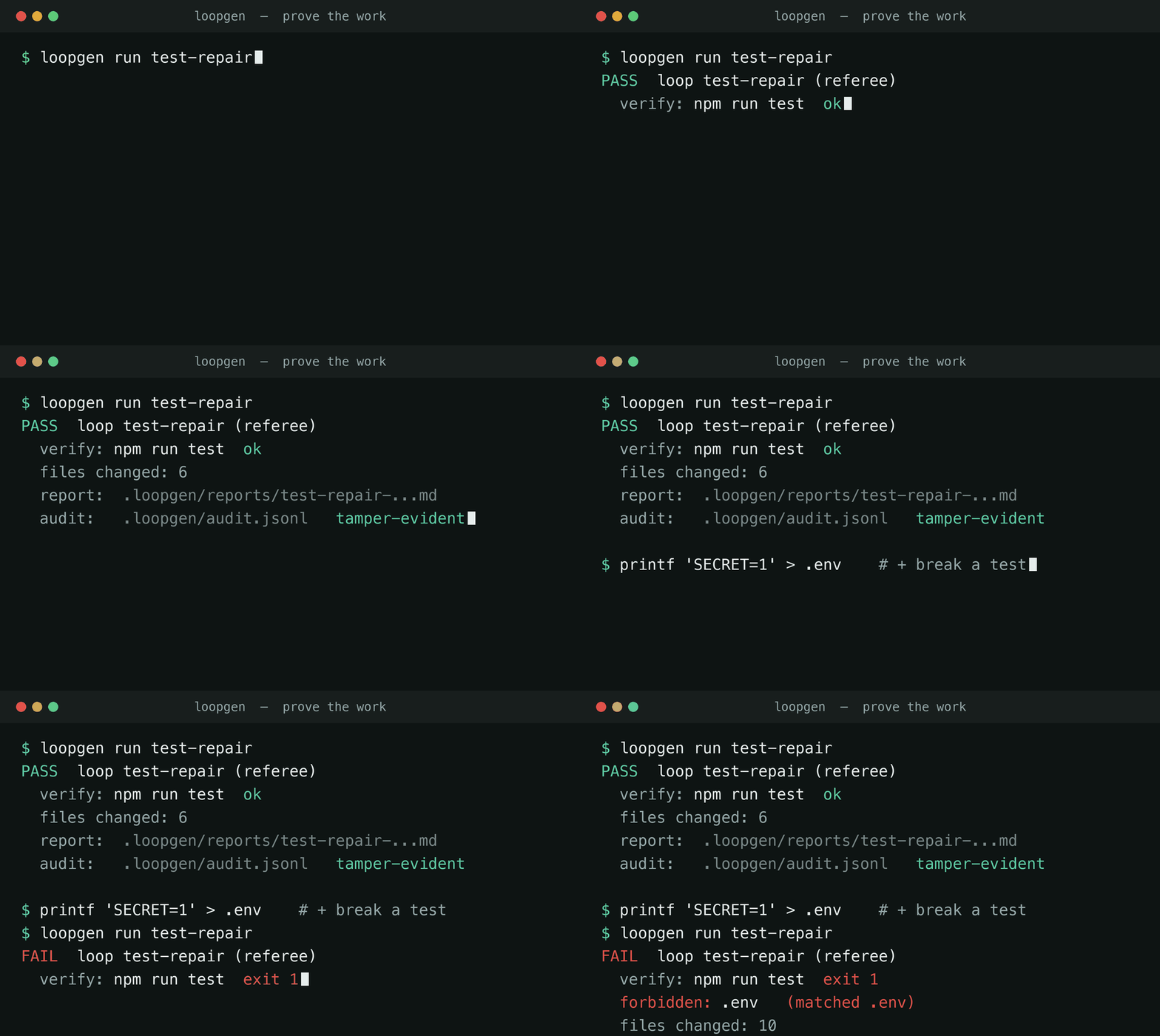
npx loopgen run test-repair # run + verify the loop; leave tamper-evident evidence (signed in CI) — exits 0/1- ✅ Verify the work —
loopgen runexecutes a loop, gates on your real verification commands, checks forbidden paths, and writes a hash-chained audit a chatbot cannot. Referee mode verifies any agent's change; driven mode drives a local model itself and blocks forbidden writes before they land. - 🔏 Attest the work — run it in CI and loopgen signs the audit entry against the Sigstore/Rekor public transparency log (keyless — no keys to manage): a verifiable, signed attestation bound to the commit, not just a local self-attested log. Evidence vs. proof →
- 🧾 Govern the agents —
loopgen auditrolls up every dev's hash-chained ledger into a report + a self-contained HTML dashboard, and a CI merge gate (audit check, also a GitHub Action) blocks PRs that lack passing, untampered — and optionally attested — proof. - 🏠 Local-first & open source (MIT) — no telemetry, no cloud; drives only your local models; API keys are referenced by env-var name only.
📖 中文说明见 中文 · English documentation below.
中文
项目简介
面向 AI 生成代码的厂商中立「验证 + 溯源」闸门 —— 自带 agent。 无论代码由谁写(Claude Code、Codex、
Cursor 或本地模型),loopgen 做的是无状态模型做不到的那部分:执行你真实的 test / lint / build、
按退出码判定、强制禁止路径与迭代上限,并把这次运行记进一条哈希链账本。本地运行得到的是防篡改证据
(tamper-evident evidence);在 CI 里它会把这条记录对 Sigstore/Rekor 公开透明日志签名 —— 一份可被
第三方校验的签名证明(attestation),可直接用于合并闸门。
npx loopgen init             # 扫描仓库 + 选择有界循环模板(本地向导,不写文件)
npx loopgen run test-repair # 跑这个循环、验证它,并留下「通过」的证据(退出码 0/1,可接 CI)- ✅ 验证工作 ——
loopgen run执行循环、按你的真实验证命令判定、检查禁止路径,写下 chatbot 做不到的 哈希链审计。referee 模式验证任意 agent 的改动;driven 模式自己驱动本地模型,并在落盘前拦截禁止路径写入。 - 🔏 签名证明 —— 在 CI 里运行,loopgen 会把审计条目对 Sigstore/Rekor 公开透明日志签名(keyless, 无需自管密钥):一份绑定 commit、可被第三方校验的签名证明,而非仅本地自证日志。证据 vs 证明 →
- 🧾 治理 agent ——
loopgen audit把每个开发者的哈希链账本聚合成报告 + 自包含 HTML 看板,CI 合并闸门 (audit check,也有现成 GitHub Action)挡住「缺少通过/未被篡改、以及可选未签名证明」的 PR。 - 🏠 local-first & 开源(MIT) —— 无遥测、无云调用;只驱动你的本地模型;API key 仅按环境变量名引用。
仍可先用内置 demo 预览:
loopgen init不需要真实项目、也不会写入文件。生成的可审查文件包括.loopgen/playbooks/*.md、Codex/Claude/Cursor/AGENTS.md 适配输出、.loopgen/state/*.md等。
适合谁先尝试
如果你有一个带 npm scripts 和 GitHub Actions 的 TypeScript/Node 项目,并且已经在用 Claude Code、Codex 或 Cursor,loopgen 能自动识别你的 test/lint/build 命令,并在 5 分钟内生成可直接使用的 agent 配置。其他角色(QA、 Ops、Product 等)也有对应模板。
快速上手
最快方式:npx(无需克隆)
npx loopgen init # 在 demo 模式下打开本地向导,无需配置,也不会写入文件从源码运行(开发场景)
npm install
npm run build
npm run loopgen -- scan --demo
npm run loopgen -- preview --demo
--demo 会使用内置示例项目 examples/demo-webapp,只生成预览,不会写入你的真实项目。
3. 启动本地 Web 向导
npm run loopgen -- init .打开终端中打印的本地地址,通常是:
http://127.0.0.1:8787在 Web 向导中:
- 选择 Try demo:快速查看 loop engineering 的效果。
- 选择 Use my project:扫描真实项目。
- 点击 Choose folder 从本地桌面选择项目目录,或手动粘贴项目路径。
- 按角色或场景选择模板。
- 点击 Generate preview 查看 diff。
- 确认无误后再点击 Apply files 写入项目。
4. 在真实项目中生成预览
npm run loopgen -- scan .
npm run loopgen -- preview . --templates test-repair --adapters codex,claude
生成 Ollama runbook:
npm run loopgen -- preview . \
  --templates test-repair \
  --adapters ollama \
  --ollama-model llama3.1
生成 LM Studio 或 llama.cpp 等 OpenAI-compatible runbook:
npm run loopgen -- preview . \
  --templates test-repair \
  --adapters openai-compatible \
  --openai-compatible-model qwen2.5-coder \
  --openai-compatible-base-url http://localhost:1234/v1
loopgen 只生成配置和运行手册,不会自动调用本地模型。API key 只通过环境变量名引用,不会把密钥值写入文件。
5. 确认后写入文件
npm run loopgen -- apply . --templates test-repair --adapters codex,claude如果你已经确认 diff,可以使用:
npm run loopgen -- apply . --templates test-repair --adapters codex,claude --yes常用命令
npm run loopgen -- init [project]
npm run loopgen -- scan --demo
npm run loopgen -- scan [project] --json
npm run loopgen -- preview --demo
npm run loopgen -- preview [project] --templates all --adapters codex,claude
npm run loopgen -- preview [project] --templates test-repair --adapters ollama --ollama-model llama3.1
npm run loopgen -- preview [project] --templates test-repair --adapters openai-compatible --openai-compatible-model qwen2.5-coder
npm run loopgen -- apply [project] --templates all --adapters codex,claude
npm run loopgen -- run [loop] [project]
apply 会先展示 diff。没有 --yes 时,它会要求你确认后才写入文件。
运行并验证(loopgen run)
生成配置只是说明,loopgen run 会真正执行验证并留下证据 —— 这是模型本身做不到的。
在用任意 agent(Claude Code、Cursor、Codex 等)完成一段有界的改动后,运行:
npm run loopgen -- run test-repair .它会:对照 git 跑出本次改动 → 执行该 loop 的 verification.commands 并按退出码判定通过/失败 →
检查是否动了 forbiddenPaths(如 .env)→ 写入一条带哈希链、防篡改的审计记录
.loopgen/audit.jsonl,以及一份可读的「证明报告」.loopgen/reports/*.md。通过则进程退出码为 0,
失败为 1(便于接入 CI / git hook)。
--dry-run:只检查、不写文件。--base <ref>:指定对比的 git ref(默认HEAD)。- 说明:referee 模式是事后检测,而非沙箱阻断——它证明改动通过了你的真实验证、且没有改动禁止路径。
driven 模式 —— 让 loopgen 自己跑这个 loop(--mode driven)
driven 模式从「事后检测」升级为「过程阻断」:loopgen 驱动一个本地模型(Ollama 或任意 OpenAI-compatible 服务)跑有界的 agent 循环,并在落盘前强制护栏 —— 写禁止路径会在落盘前被拦, 不在白名单里的命令不会执行,超过迭代/时间上限就停。
npm run loopgen -- run test-repair . --mode driven --adapter ollama --ollama-model qwen2.5-coder每轮模型给出一小批 JSON 动作(write_file / run_command / finish);loopgen 逐条校验
(限制在仓库内、拦禁止路径、命令白名单、大小上限),应用允许的动作,跑你的 verification.commands,
再把结果喂回去 —— 直到验证通过、模型 finish、或触达 maxIterations / 超时。它写入同一套带哈希链的
审计 + 一份含完整迭代历史(包括每次被拦动作)的证明报告。
- local-first:只调用你配置的本地/自托管模型;API key 只按环境变量名读取,绝不记录或写入文件。
- 需要干净的 git 工作区(
--allow-dirty可跳过);--dry-run只预览第一轮提议、不写文件。 - 诚实说明:有界 + 强制 + 验证 + 留证 —— 不是沙箱。 模型仍会提议,loopgen 负责框住、限制、验证、留证。
治理 —— 把审计账本变成团队证据(loopgen audit)
每次 loopgen run 都会往本仓库的、带哈希链的 .loopgen/audit.jsonl 追加一条。audit 命令族把这些账本
变成团队级、可用于合规的证据,以及一个 CI 闸门 —— local-first、无需服务器:
npm run loopgen -- audit verify                  # 校验哈希链是否完好(防篡改)
npm run loopgen -- audit summary                 # 单仓库:通过率、按 loop、违规数
npm run loopgen -- audit aggregate ../repos --html gov.html --report gov.md   # 聚合多个仓库/开发者
npm run loopgen -- audit check --require test-repair --require-no-violations --require-chain   # CI 闸门
aggregate 会在给定的文件/目录里找 audit.jsonl,合并成一份汇总,并可生成一个自包含的 HTML 治理看板
(直接打开即可,无需服务器)和一份 markdown 报告。check 是合并闸门:当某个必需 loop 没有通过记录、
有改动碰了禁止路径、或链断了,就以非 0 退出 —— 接进 CI 即可在「证据缺失/不足」时挡住合并。
也有现成的 GitHub Action(会把治理汇总写进 job summary,并在策略违规时让 job 失败):
- uses: Nagiici/Loopgen/.github/actions/[email protected]
  with:
    require: test-repair,ci-failure-repair
    require-no-violations: "true"
    require-chain: "true"
可用 adapter:
agents-md:通用AGENTS.md,可被 Claude Code、Codex、Cursor、Copilot、Gemini CLI、Aider 等读取codexclaudecursor:.cursor/rules/*.mdc规则windsurf:.windsurfrulesollamaopenai-compatible
本地模型参数:
--ollama-model--ollama-base-url,默认http://localhost:11434--openai-compatible-model--openai-compatible-base-url,常见值包括 LM Studio 的http://localhost:1234/v1和 llama.cpp 的http://localhost:8080/v1--openai-compatible-api-key-env,只填写环境变量名,例如LOCAL_LLM_API_KEY
模板场景
当前模板库覆盖五类技术协作场景:
- Maintenance:CI 修复、测试修复、依赖升级、PR 评论处理。
- Delivery:发布准备、变更日志生成、回滚检查、版本升级检查。
- Quality:类型错误收敛、lint 清理、测试覆盖补洞、死代码清理。
- Knowledge:README 更新、架构说明、onboarding 指南、决策记录。
- Cross-functional:需求澄清、QA 验收清单、数据处理检查、客户问题复盘。
生成文件
loopgen 会生成一组小而可审查的文件:
.loopgen/loopgen.loop.yaml:中间 loop 表示。.loopgen/playbooks/*.md:通用 loop playbook。.loopgen/state/*.md:循环状态、尝试记录和阻塞点。AGENTS.md:通用 agent 指令文件,可被大多数 AI 编码工具读取。.codex/skills/*、.codex/automations/*、.codex/agents/*:Codex 适配输出。.claude/skills/*、.claude/loops/*、.claude/agents/*:Claude 适配输出。.cursor/rules/*.mdc与.windsurfrules:Cursor 与 Windsurf 规则。.loopgen/adapters/ollama/config.json与.loopgen/adapters/ollama/*.md:Ollama 本地运行时配置和 runbook。.loopgen/adapters/openai-compatible/config.json与.loopgen/adapters/openai-compatible/*.md:OpenAI-compatible server 配置和 runbook。
默认安全策略包括:有限迭代、maker/checker 分离、必须验证、禁止读取敏感路径、状态文件记录。
本地模型 runbook 会包含 loop 目标、上下文来源、验证命令、停止条件、状态文件路径、模型提示词模板,以及对应运行时的 curl 示例。
故障排查
- 如果没有推断出验证命令,生成的 loop 会进入 draft 模式,并带有 TODO 验证命令。
- 如果选择了 Ollama 或 OpenAI-compatible adapter 但没有填写模型名,
loopgen仍会生成文件,并在 config 和 runbook 中留下 warning/TODO。 - 如果 Web 向导提示缺少静态资源,请先运行
npm run build。 - Demo 模式只能预览,不能写入文件;需要写入时请切换到 Use my project。
- 如果 loop 尝试读取
.env、生产密钥或 credential 文件,应立即停止并视为安全违规。 - 如果同一失败在最大迭代次数后仍重复出现,应停止并请求人工输入。
贡献模板
新增模板时,请修改 src/core/templates.ts,补充目标、上下文、步骤、验证命令、停止条件和模板元数据,并为生成结果添加测试。模板应保持明确、有限、可审查。
English
Overview
loopgen is a verified runner for AI coding loops: it scans a project, generates inspectable bounded-loop
configs, then runs them — executing your real verification, enforcing guardrails, and writing
tamper-evident proof. The generated, inspectable files (the input to loopgen run):
- Tool-agnostic
.loopgen/playbooks/*.mdfiles for anyone who wants to understand the loop before using an agent tool. - Codex outputs:
.codex/skills/*,.codex/automations/*, and checker agents. - Claude outputs:
.claude/skills/*,.claude/loops/*, and checker notes. - Local/open-source model adapters: config and runbooks for Ollama and OpenAI-compatible servers such as LM Studio and llama.cpp.
- State files:
.loopgen/state/*.mdfor recording attempts, outcomes and blockers.
The product goal is low-friction adoption. You can start with the built-in demo project, preview generated loops, and learn the value of loop engineering without writing to your real project.
Why loopgen?
Most AI coding agents optimize for speed and run with broad permissions. loopgen makes the opposite trade-off the default, so an agent's work stays reviewable:
- Bounded iterations (default 3) — the loop stops instead of grinding forever.
- Required verification — success is defined by your real
test/lint/buildcommands, not the model's say-so. - Forbidden secret paths —
.env,secrets/**, and credential files are off-limits by construction. - Maker/checker separation — a separate checker reviews the diff and verification output before continuing.
- State-file audit log — every attempt, outcome, and blocker is written to
.loopgen/state/*.md.
Who should start here
If you have a TypeScript/Node project with npm scripts and GitHub Actions and you already use Claude
Code, Codex, or Cursor, loopgen auto-detects your test/lint/build commands and generates
ready-to-use agent configs in under five minutes. Other roles (QA, Ops, Product, Data) have matching
templates too.
What you get
A small, inspectable set of files. For example, a generated Codex skill looks like:
---
name: loopgen-test-repair
description: Diagnose failing tests in my-app, fix the underlying issue, and verify the relevant suite.
---

# Test repair

## Verify
- `npm run test`

## Stop conditions
- A verification command is missing or undefined.
- The same failure repeats after the maximum iteration count.

State file: `.loopgen/state/test-repair.md`
Maximum iterations: 3
Quick Start
Fastest: npx (no clone required)
npx loopgen init # opens the local wizard in demo mode — no setup, nothing writtenFrom source (development)
npm install
npm run build
npm run loopgen -- scan --demo
npm run loopgen -- preview --demo
--demo uses the built-in examples/demo-webapp fixture. It is preview-only and will not write files to your real project.
3. Start the local Web wizard
npm run loopgen -- init .Open the printed local URL, usually:
http://127.0.0.1:8787In the wizard:
- Choose Try demo to see loop engineering outputs quickly.
- Choose Use my project to scan a real project.
- Click Choose folder to select a local project directory, or paste the project path manually.
- Filter templates by role or category.
- Click Generate preview to inspect the diff.
- Click Apply files only after reviewing the generated files.
4. Preview loops for a real project
npm run loopgen -- scan .
npm run loopgen -- preview . --templates test-repair --adapters codex,claude
Generate Ollama runbooks:
npm run loopgen -- preview . \
  --templates test-repair \
  --adapters ollama \
  --ollama-model llama3.1
Generate LM Studio, llama.cpp, or other OpenAI-compatible runbooks:
npm run loopgen -- preview . \
  --templates test-repair \
  --adapters openai-compatible \
  --openai-compatible-model qwen2.5-coder \
  --openai-compatible-base-url http://localhost:1234/v1
loopgen only generates configuration and runbooks. It does not execute local models automatically. API keys are referenced by environment variable name only; secret values are never written into generated files.
5. Apply after review
npm run loopgen -- apply . --templates test-repair --adapters codex,claudeIf you already reviewed the diff:
npm run loopgen -- apply . --templates test-repair --adapters codex,claude --yesCLI
npm run loopgen -- init [project]
npm run loopgen -- scan --demo
npm run loopgen -- scan [project] --json
npm run loopgen -- preview --demo
npm run loopgen -- preview [project] --templates all --adapters codex,claude
npm run loopgen -- preview [project] --templates test-repair --adapters ollama --ollama-model llama3.1
npm run loopgen -- preview [project] --templates test-repair --adapters openai-compatible --openai-compatible-model qwen2.5-coder
npm run loopgen -- apply [project] --templates all --adapters codex,claude
npm run loopgen -- run [loop] [project]
apply always shows a diff first. Without --yes, it asks for confirmation before writing files.
Verify & attest the work (loopgen run)
Generating config is just instructions. loopgen run actually runs the verification and leaves a
tamper-evident record — something a stateless model cannot do. After you (or any agent — Claude Code,
Cursor, Codex) complete a bounded change, run:
npm run loopgen -- run test-repair .It diffs your working tree against git, executes the loop's verification.commands and gates pass/fail on
the real exit codes, checks whether any forbiddenPaths (e.g. .env) were touched, and writes a
tamper-evident, hash-chained audit record to .loopgen/audit.jsonl plus a human-readable proof report
in .loopgen/reports/*.md. The process exits 0 on pass and 1 on fail, so it composes into CI / git hooks.
--dry-run— run the checks, write nothing.--base <ref>— git ref to diff against (defaultHEAD).- Scope: referee mode is detection, not a sandbox — it records that the change passed your real verification and didn't modify forbidden paths; it does not block reads or out-of-tree writes.
- Trust: locally this is tamper-evident evidence. Run it in CI and loopgen signs the audit entry against
the Sigstore/Rekor public transparency log — a verifiable, signed attestation bound to the commit.
Attestation is automatic in CI with an OIDC identity (
--no-attestto opt out); verify it withloopgen audit verify --attestation. See docs/THREAT-MODEL.md for what each tier does and doesn't prove.
Driven mode — loopgen runs the loop (--mode driven)
Driven mode goes from detection to prevention: loopgen drives a local model (Ollama or any OpenAI-compatible server) through a bounded agentic loop and enforces guardrails at apply time — a forbidden-path write is blocked before it lands, a non-allowlisted command is never run, and the loop stops at the iteration/time limit.
npm run loopgen -- run test-repair . --mode driven --adapter ollama --ollama-model qwen2.5-coderEach iteration the model proposes a small JSON action batch (write_file / run_command / finish);
loopgen validates every action (root-confined, forbidden paths blocked, command allowlist, size caps),
applies the allowed ones, runs your verification.commands, and feeds the result back — until verification
passes, the model finishes, or it hits maxIterations / the timeout. It writes the same hash-chained
audit + a proof report with the full iteration history (including every blocked attempt).
- Local-first: only your configured local/self-hosted model is called; API keys are read by env-var name only and never logged or stored.
- Needs a clean git tree (
--allow-dirtyto override);--dry-runpreviews the first proposal without writing. - Honest scope: bounded + enforced + verified + proven — not a sandbox. The model still proposes; loopgen bounds, confines, verifies, and proves.
Governance — turn the ledgers into team evidence (loopgen audit)
Every loopgen run appends to a per-repo, hash-chained .loopgen/audit.jsonl. The audit commands turn
those ledgers into team-level, compliance-ready evidence and a CI gate — local-first, no server:
npm run loopgen -- audit verify                  # verify the hash chain is intact (tamper check)
npm run loopgen -- audit verify --attestation    # also cryptographically verify the CI signatures
npm run loopgen -- audit summary                 # one repo: pass rate, by loop, violations
npm run loopgen -- audit aggregate ../repos --html gov.html --report gov.md   # roll up many repos/devs
npm run loopgen -- audit check --require test-repair --require-no-violations --require-chain   # CI gate
npm run loopgen -- audit check --require-attested # gate on a verifiable CI attestation, not just a local log
aggregate scans the given files/directories for audit.jsonl, merges them into one rollup, and can write
a self-contained HTML governance dashboard (just open it — no server) plus a markdown report. check is
the merge gate: it exits non-zero if a required loop has no passing run, a run touched forbidden paths, or
the chain is broken — wire it into CI to block merges on missing or insufficient proof.
There's a ready-made GitHub Action (it renders the governance rollup into the job summary and fails the job on policy violations):
- uses: Nagiici/Loopgen/.github/actions/[email protected]
  with:
    require: test-repair,ci-failure-repair
    require-no-violations: "true"
    require-chain: "true"
Available adapters:
agents-md— oneAGENTS.mdread by Claude Code, Codex, Cursor, Copilot, Gemini CLI, Aider, and morecodexclaudecursor—.cursor/rules/*.mdcruleswindsurf— a.windsurfrulesfileollamaopenai-compatible
Local model flags:
--ollama-model--ollama-base-url, defaulting tohttp://localhost:11434--openai-compatible-model--openai-compatible-base-url, commonlyhttp://localhost:1234/v1for LM Studio orhttp://localhost:8080/v1for llama.cpp--openai-compatible-api-key-env, an environment variable name such asLOCAL_LLM_API_KEY
Template Library
The current library covers five categories:
- Maintenance: CI failure repair, test repair, dependency upgrade, PR comment handling.
- Delivery: release preparation, changelog generation, rollback checks, version upgrade checks.
- Quality: type error reduction, lint cleanup, coverage gap fill, dead code cleanup.
- Knowledge: README refresh, architecture notes, onboarding guides, decision records.
- Cross-functional: requirements clarification, QA acceptance checklists, data processing checks, customer issue retros.
Generated Files
loopgen writes a small, inspectable set of files:
.loopgen/loopgen.loop.yaml: intermediate loop representation..loopgen/playbooks/*.md: tool-agnostic loop playbooks..loopgen/state/*.md: attempts, outcomes and blockers.AGENTS.md: a universal agent instruction file read by most AI coding tools..codex/skills/*,.codex/automations/*,.codex/agents/*: Codex-oriented outputs..claude/skills/*,.claude/loops/*,.claude/agents/*: Claude-oriented outputs..cursor/rules/*.mdcand.windsurfrules: Cursor and Windsurf rules..loopgen/adapters/ollama/config.jsonand.loopgen/adapters/ollama/*.md: Ollama runtime config and runbooks..loopgen/adapters/openai-compatible/config.jsonand.loopgen/adapters/openai-compatible/*.md: OpenAI-compatible runtime config and runbooks.
Generated loops include safety defaults: bounded iterations, maker/checker separation, required verification, forbidden secret paths and state-file logging.
Local model runbooks include the loop goal, context sources, verification commands, stop criteria, state-file path, a model prompt template and a runtime-specific curl example.
Troubleshooting
- If no verification command is inferred, generated loops stay in draft mode with a TODO verification command.
- If you select Ollama or OpenAI-compatible adapters without a model name,
loopgenstill generates files and adds warnings/TODOs to the config and runbook. - If the Web wizard says assets are missing, run
npm run build. - Demo mode is preview-only. Switch to Use my project before applying files.
- If a loop tries to read
.env, production secrets or credential files, stop and treat it as a safety violation. - If the same failure repeats after the maximum iteration count, stop and ask for human input.
Contributing Templates
Add template definitions in src/core/templates.ts, including the goal, context sources, steps, verification commands, stop conditions and template metadata. Add tests for generated outputs. Keep templates explicit, bounded and easy to inspect.