
lu-query
v2.19.0
Published
MCP server for Oracle DB over stdio (1:1 port of mcp-oracle-db 2.13.0)


Readme
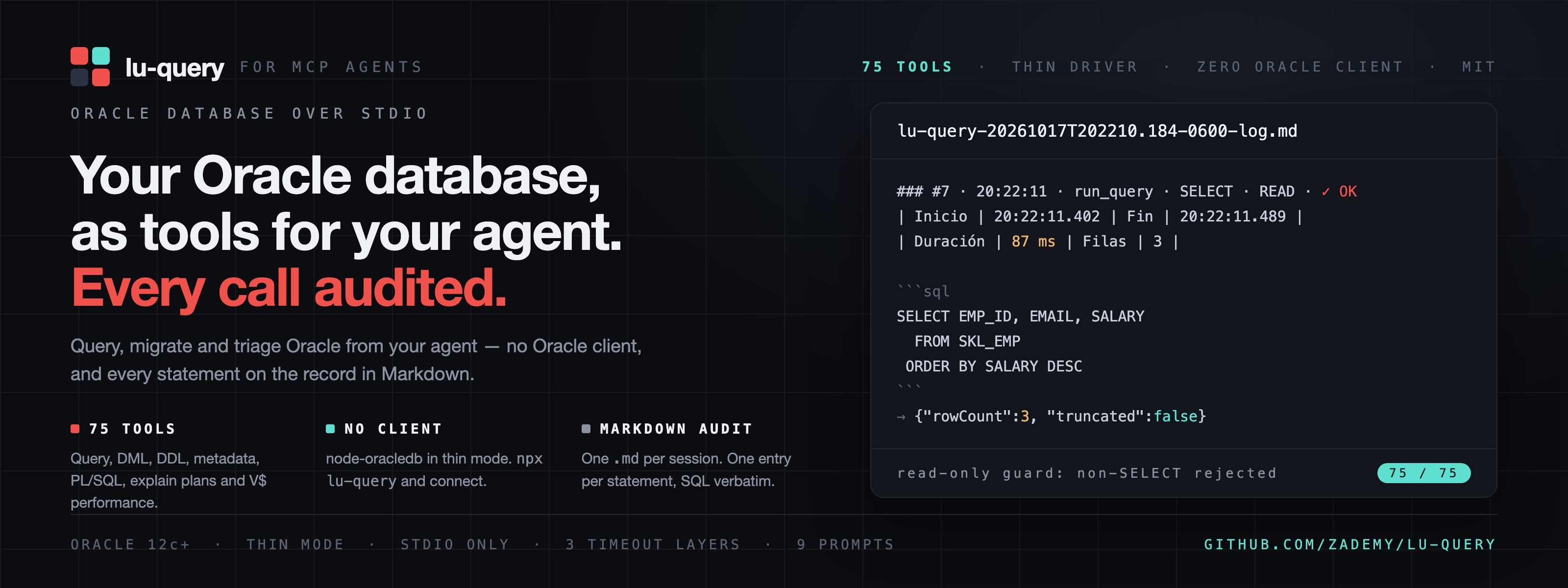


MCP server that exposes an Oracle database to MCP clients over stdio - 75 tools for querying, changing, inspecting and triaging it, with zero-install thin mode and a Markdown audit of every statement.
Requirements
- Node.js >= 22
- Oracle Database 12c+ (developed and tested against Oracle Database 26ai Free)
- No Oracle Client installation: node-oracledb runs in thin mode
Quick start
npx lu-queryClient configuration (Claude Desktop example; any MCP client works):
{
  "mcpServers": {
    "lu-query": {
      "command": "npx",
      "args": ["lu-query"],
      "env": {
        "ORACLE_DB_URL": "jdbc:oracle:thin:@//db.host:1521/FREEPDB1",
        "ORACLE_DB_USERNAME": "app_user",
        "ORACLE_DB_PASSWORD": "secret"
      }
    }
  }
}
With OpenCode
1. Install once. The package ships the lu-query binary, so a single global install gives you the command forever:
npm i -g lu-query2. Export the Oracle credentials in the environment that launches OpenCode (your shell profile is fine). They never need to live in the config file.
3. Register the server in opencode.json (global, in ~/.config/opencode/) or in .opencode/ for a single project:
{
  "$schema": "https://opencode.ai/config.json",
  "mcp": {
    "servers": {
      "lu-query": {
        "type": "local",
        "command": ["lu-query"],
        "environment": {
          "ORACLE_DB_URL": "{env:ORACLE_DB_URL}",
          "ORACLE_DB_USERNAME": "{env:ORACLE_DB_USERNAME}",
          "ORACLE_DB_PASSWORD": "{env:ORACLE_DB_PASSWORD}",
          "MCP_AUDIT_DIR": "/home/you/.lu-query/audit"
        }
      }
    }
  }
}
4. Verify: opencode mcp list → ✓ lu-query connected. The nine MCP prompts become commands like /lu-query:review-sql-performance.
Notes:
{env:NAME}is OpenCode's substitution syntax for reading a variable from the environment; shell forms like$NAMEare not expanded inside JSON. Keep the password in the environment, not in the file.- Pin
MCP_AUDIT_DIRto an absolute path like above. Without it the audit Markdown lands in./mcp-audit-logsrelative to the process working directory, which is your project — audit files would show up in the repo. SetMCP_AUDIT_ENABLED=falseto turn auditing off. - npm may warn that install scripts for
oracledbwere blocked. It is harmless: lu-query runs node-oracledb in thin mode and needs no native client. - No
ORACLE_DB_SCHEMA? Every tool uses the connected user's schema; set it to pin one. - The pool is lazy: the server answers
initializewithout a database; the credentials are only needed when a tool actually queries.
Prefer no global install? Use "command": ["npx", "-y", "lu-query"] instead: same behavior, npx downloads and caches the package on the first call — and that first call can exceed the 30 s default startup timeout, so add "timeout": { "startup": 120000 }.
From a local clone
While working on the code (or on an unpublished build), point the command at your local build instead of the installed one:
"lu-query": {
  "type": "local",
  "command": ["node", "/absolute/path/to/lu-query/dist/index.js"],
  "cwd": "/absolute/path/to/lu-query",
  "environment": {
    "ORACLE_DB_URL": "{env:ORACLE_DB_URL}",
    "ORACLE_DB_USERNAME": "{env:ORACLE_DB_USERNAME}",
    "ORACLE_DB_PASSWORD": "{env:ORACLE_DB_PASSWORD}"
  }
}
Run npm run build first: dist/ is generated and gitignored.
The pool is lazy: the server starts and answers initialize without a database; the first tool call opens the connection.
Configuration
| Variable | Required | Default | Purpose |
| ----------------------------- | --------- | ------------------ | ------------------------------------------------------------------------------------------------------ |
| ORACLE_DB_URL | yes | — | Connect string: JDBC (jdbc:oracle:thin:@//host:1521/service) or easy-connect (host:1521/service) |
| ORACLE_DB_USERNAME | yes | — | Database user |
| ORACLE_DB_PASSWORD | yes | — | Database password |
| ORACLE_DB_SCHEMA | no | session default | Schema set via ALTER SESSION SET CURRENT_SCHEMA on each pooled session |
| ORACLE_POOL_SIZE | no | 4 | Connection pool size |
| MCP_SERVER_VERSION | no | package version | Version reported by the server |
| MCP_AUDIT_ENABLED | no | true | Session audit on by default — the only contract change vs the Java server (which defaulted to false) |
| MCP_AUDIT_DIR | no | ./mcp-audit-logs | Directory for audit Markdown files |
| SENTRY_ENABLED | no | false | Error reporting to Sentry |
| SENTRY_DSN | if Sentry | — | Sentry DSN |
| SENTRY_ENV | no | local | Sentry environment |
| SENTRY_RELEASE | no | 0.0.1-SNAPSHOT | Sentry release |
| SENTRY_SEND_DEFAULT_PII | no | false | PII in Sentry events |
| SENTRY_AUTH_TOKEN | no | — | Accepted for config parity; unused at runtime (@sentry/node has no such setting) |
| LOG_LEVEL / APP_LOG_LEVEL | no | INFO | Server log level |
All of them in one place, ready to paste. Only the first three are required; drop any other line and its default from the table applies. The same names go in the environment block of an MCP client config.
# required
export ORACLE_DB_URL='jdbc:oracle:thin:@//db.host:1521/FREEPDB1'
export ORACLE_DB_USERNAME='app_user'
export ORACLE_DB_PASSWORD='change-me'

# optional
export ORACLE_DB_SCHEMA='APP'             # pin a schema instead of the connected user's
export ORACLE_POOL_SIZE='8'                # connections kept open (default 4)
export MCP_AUDIT_ENABLED='true'            # session audit Markdown on/off
export MCP_AUDIT_DIR='/var/log/lu-query'  # absolute path, or it lands in the client's cwd
export LOG_LEVEL='INFO'                    # APP_LOG_LEVEL also works
export SENTRY_ENABLED='false'              # stays off until SENTRY_DSN is set

# Sentry, only if you report errors (values from your Sentry project)
# export SENTRY_DSN='https://[email protected]/1234567'
# export SENTRY_ENV='production'
# export SENTRY_RELEASE='2.16.3'
# export SENTRY_SEND_DEFAULT_PII='false'
# export SENTRY_AUTH_TOKEN=''

# export MCP_SERVER_VERSION='2.16.3'       # only to pin the reported version
{
"ORACLE_DB_URL": "jdbc:oracle:thin:@//db.host:1521/FREEPDB1",
"ORACLE_DB_USERNAME": "app_user",
"ORACLE_DB_PASSWORD": "change-me",
"ORACLE_DB_SCHEMA": "APP",
"ORACLE_POOL_SIZE": "8",
"MCP_AUDIT_ENABLED": "true",
"MCP_AUDIT_DIR": "/var/log/lu-query",
"LOG_LEVEL": "INFO",
"MCP_SERVER_VERSION": "2.16.3",
"SENTRY_ENABLED": "false",
"SENTRY_DSN": "",
"SENTRY_ENV": "",
"SENTRY_RELEASE": "",
"SENTRY_SEND_DEFAULT_PII": "false",
"SENTRY_AUTH_TOKEN": ""
}The same set as JSON, for the environment block of a client config (mcp.servers.<name> in opencode.json, mcpServers.<name> in claude_desktop_config.json). Empty values are read as unset.
Sentry, only if you want error reporting. All six keys ship in the JSON above:
SENTRY_ENABLED- master switch; off means nothing is ever sent.SENTRY_DSN- client key of your Sentry project. Without it the server stays off and says so on stderr.SENTRY_ENV- environment tag on every event (localby default).SENTRY_RELEASE- version tag on every event (0.0.1-SNAPSHOTby default, inherited from the Java config).SENTRY_SEND_DEFAULT_PII- let Sentry attach IPs and user agents (falseby default).SENTRY_AUTH_TOKEN- build token of the Java setup, accepted for config parity and ignored at runtime.
Limits. Result sets are capped at 1000 rows. Three timeout layers: statement 120 s, socket 30 s, MCP request watchdog 150 s. Identifiers are validated against ^[A-Za-z][A-Za-z0-9_$#]{0,127}$; literals are escaped (' -> '').
Architecture reference
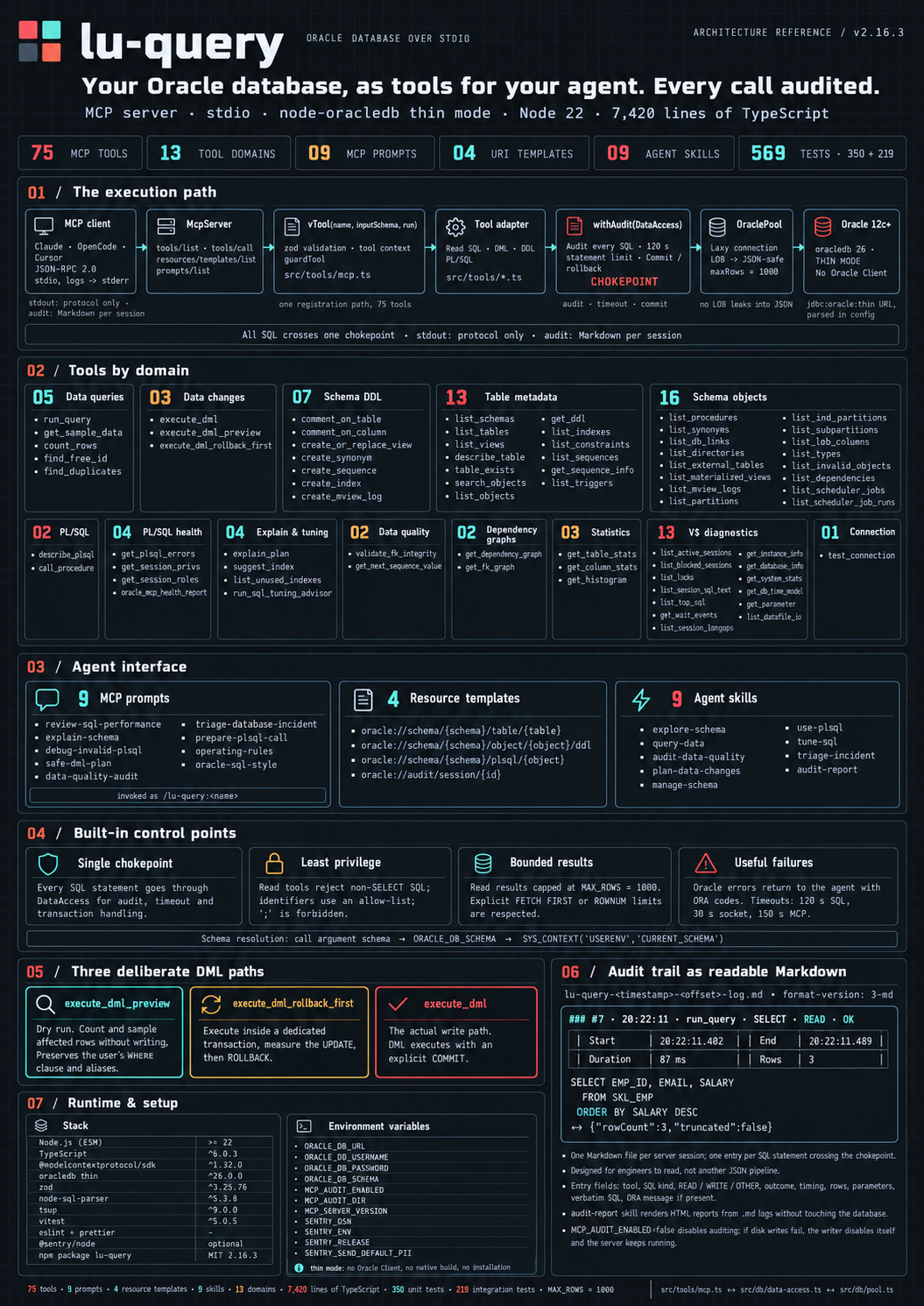
The whole server on one page: the execution path from the MCP client to Oracle, the 75 tools by domain, the agent interface (prompts, resource templates, skills), the built-in control points, the three DML paths and the audit trail.
Session audit
Every session writes one Markdown file lu-query-<timestamp>-log.md in MCP_AUDIT_DIR, with one entry per tool execution: tool name, statement kind (SELECT, INSERT, ...) and type (READ/WRITE/OTHER), duration, rows, parameters and the SQL verbatim.
### #1 · 11:33:52 · test_connection · SELECT · READ · ✅ OK

| Inicio | 11:33:52.410 | Fin | 11:33:52.492 | Duración | 82 ms | Filas | 1 | Parámetros | |

```sql
SELECT * FROM V$VERSION
```
The table labels are Spanish because that is the literal output of the audit writer; the field names are part of the format the lu-query-audit-report skill parses.
Read a session back with the resource oracle://audit/session/{id} (autocomplete offers current and recent ids). Audit disables itself on I/O errors and says so on stderr. Set MCP_AUDIT_ENABLED=false to turn it off. Audit files contain every statement executed — protect the directory (see SECURITY.md).
Tools (75)
System (1)
| Tool | Purpose |
| ----------------- | ------------------------------------------------------------------------- |
| test_connection | Connectivity check: database version, name, current user/schema, instance |
Query (2)
| Tool | Purpose |
| ----------------- | -------------------------------------------------------------------------------------- |
| run_query | Run a single SELECT (verbatim, CTEs allowed) with optional offset/limit pagination |
| get_sample_data | First N rows of a table (default 10, max 1000) with progress notifications |
DML (3)
| Tool | Purpose |
| ---------------------------- | -------------------------------------------------------------------------------------------- |
| execute_dml | Execute one INSERT/UPDATE/DELETE/MERGE and commit |
| execute_dml_preview | Dry-run an UPDATE/DELETE: rows that would be affected plus the WHERE breakdown, no execution |
| execute_dml_rollback_first | Execute DML inside a transaction that is immediately rolled back — nothing persists |
DDL (7)
| Tool | Purpose |
| ------------------------ | ------------------------------------------------------------------------------- |
| comment_on_table | Add or replace a table comment (own tables only) |
| comment_on_column | Add or replace a column comment (own tables only) |
| create_or_replace_view | Create or replace a view in the user's own schema |
| create_synonym | Create a private or public synonym for another schema's object |
| create_sequence | Create a sequence in the user's own schema |
| create_index | Create an index on a table (columns array; table ownership or CREATE ANY INDEX) |
| create_mview_log | Create a materialized-view log for fast refresh |
Metadata — core (8)
| Tool | Purpose |
| ---------------- | --------------------------------------------------------------------- |
| list_schemas | List schemas (users) visible to the connection |
| list_tables | List tables with optional schema and LIKE pattern |
| list_views | List views with optional schema and LIKE pattern |
| describe_table | Columns of a table: type, nullability, default, comment |
| table_exists | true/false via ALL_TABLES (views not considered) |
| search_objects | Search objects by case-insensitive LIKE pattern, optional type filter |
| list_objects | List objects by schema and type (tables, views, packages, ...) |
| get_ddl | DDL of an object via DBMS_METADATA.GET_DDL (as CLOB string) |
Metadata — catalog (21)
| Tool | Purpose |
| ------------------------- | --------------------------------------------------------------- |
| list_indexes | Indexes of a table with columns, uniqueness, status |
| list_constraints | PK/FK/unique/check constraints with columns and references |
| list_sequences | Sequences with range, increment, last number, cycle, cache |
| get_sequence_info | Metadata of a single sequence |
| list_triggers | Triggers with type, event, table, status |
| list_procedures | Procedures, functions, packages, types |
| list_synonyms | Private/public synonyms with resolved target and DB link |
| list_db_links | Database links visible to the user |
| list_directories | Directory objects and filesystem paths |
| list_external_tables | External tables: driver, directory, reject limit, access params |
| list_materialized_views | MViews with refresh mode/method, last refresh, staleness |
| list_mview_logs | Materialized-view logs on tables |
| list_partitions | Table partitions: high value, rows, compression, last analyzed |
| list_ind_partitions | Index partitions: status, leaf blocks, distinct keys |
| list_subpartitions | Subpartitions of a composite-partitioned table |
| list_lob_columns | LOB columns: segment, index, caching, SECUREFILE, retention |
| list_types | User-defined types: typecode, attributes, methods, supertype |
| list_invalid_objects | Objects with status INVALID (broken code) |
| list_dependencies | Objects a given object depends on (impact analysis) |
| list_scheduler_jobs | Scheduler jobs: state, run/failure counts, next run |
| list_scheduler_job_runs | Recent job run details: duration, error code, output |
Optimizer statistics & health (7)
| Tool | Purpose |
| -------------------------- | ---------------------------------------------------------------------------------------------------------- |
| get_table_stats | Table optimizer stats: rows, blocks, avg row length, last analyzed |
| get_column_stats | Column stats: NDV, density, nulls, buckets |
| get_histogram | Histogram endpoints of a column |
| get_session_privs | Granted and effective system privileges |
| get_session_roles | Enabled roles with admin/default flags |
| get_plsql_errors | Compilation errors of PL/SQL units |
| oracle_mcp_health_report | One-shot readiness check: connectivity, version, catalog role, invalid objects, server config, audit state |
PL/SQL (2)
| Tool | Purpose |
| ---------------- | --------------------------------------------------------------------------------------------- |
| describe_plsql | Arguments and full source of a PL/SQL object |
| call_procedure | Execute a procedure/function/package subprogram with IN/OUT/INOUT args and REF CURSOR returns |
Explain & tuning (4)
| Tool | Purpose |
| ------------------------ | ---------------------------------------------------------------------------------- |
| explain_plan | Execution plan via EXPLAIN PLAN + DBMS_XPLAN without executing the statement |
| suggest_index | Analyse a statement's plan; propose CREATE INDEX when a table is read by full scan |
| list_unused_indexes | Indexes with columns and best-effort usage info |
| run_sql_tuning_advisor | DBMS_SQLTUNE report with recommendations |
Graphs & helpers (7)
| Tool | Purpose |
| ------------------------- | -------------------------------------------------------------------------------- |
| get_next_sequence_value | NEXTVAL of a sequence — side-effecting read: it advances the counter |
| validate_fk_integrity | Orphan rows per FK of a table (empty list = integrity intact) |
| find_free_id | Lowest free id in 1..maxRange (default 1000, cap 10000) not present in the table |
| find_duplicates | Duplicate value groups in one or more columns (NULLs excluded) |
| count_rows | Exact row count of a table without running SQL |
| get_dependency_graph | Object-dependency graph of a schema (Mermaid) |
| get_fk_graph | Foreign-key graph of a schema or table (Mermaid) |
Performance — V$ views (13)
Requires SELECT ANY DICTIONARY (or equivalent) on the database user; tools return a grant hint on ORA-00942/01031.
| Tool | Purpose |
| ----------------------- | ---------------------------------------------------------------------------------- |
| list_active_sessions | ACTIVE sessions: user, machine, program, last call elapsed |
| list_blocked_sessions | Blocked sessions with blocker sid/user and wait event |
| list_locks | DML/transaction/user locks held and requested, object and decoded mode |
| get_session_sql_text | Full SQL text currently executed by a session (sid + serial#) |
| list_top_sql | Top-N SQL by buffer_gets (default), disk_reads, elapsed_time, executions, cpu_time |
| get_wait_events | Current waits from V$SESSION_WAIT, optional sid/class filter |
| get_session_longops | Long-running operations with progress from V$SESSION_LONGOPS |
| get_instance_info | Instance name, host, version, startup time, status, archiver |
| get_database_info | Database name, creation, log mode, open mode, role |
| get_system_stats | Cumulative V$SYSSTAT stats: parses, DB time, physical IO |
| get_db_time_model | V$SYS_TIME_MODEL: DB CPU, DB time, parse times |
| get_parameter | Initialization parameters from V$PARAMETER |
| list_datafile_io | Datafiles with size, reads/writes and average IO time |
Resources (4)
| URI template | Purpose |
| ---------------------------------------------- | -------------------------------------------------------------------- |
| oracle://audit/session/{id} | Markdown audit log of a session (current resolves to the live one) |
| oracle://schema/{schema}/table/{table} | Column-level description of a table or view |
| oracle://schema/{schema}/object/{object}/ddl | DDL source of any object (type auto-detected) |
| oracle://schema/{schema}/plsql/{object} | PL/SQL source (procedure, function, package, type body) |
Prompts (9)
review-sql-performance, explain-schema, debug-invalid-plsql, safe-dml-plan, data-quality-audit, triage-database-incident, prepare-plsql-call, operating-rules, oracle-sql-style — read-only working guides for common Oracle tasks through these tools.
Agent skills (optional)
Ten skills. Eight teach an agent how to use these 75 tools well - which tool for which job, in what order, what mutates, how failures look, how to read results. One turns the audit trail into an interactive HTML report. The last one, below, benchmarks a .sql file and proposes index changes. Install them with the skills CLI, which puts each skill where your agent looks for them:
npx skills@latest add zademy/lu-query           # install the ten skills
npx skills@latest add zademy/lu-query --list    # just show them
Useful flags: -g install globally instead of per project, -a <agent> pick the target (claude-code, opencode, cursor, codex, gemini-cli, …), -s <skill> install one skill (or '*' for all), --copy copy instead of symlink.
No CLI? Copy them by hand - each folder is self-contained (SKILL.md + references/):
cp -r node_modules/lu-query/skills/lu-query-* ~/.claude/skills/ # Claude Code and OpenCodeSkills: lu-query-explore-schema, lu-query-query-data, lu-query-audit-data-quality, lu-query-plan-data-changes, lu-query-manage-schema, lu-query-use-plsql, lu-query-tune-sql, lu-query-triage-incident, lu-query-audit-report, lu-query-benchmark-sql. Catalog and examples provenance: skills/README.md. Installing the server never installs skills on its own.
SQL benchmark and index recommendations
lu-query-benchmark-sql asks for your .sql file and compares the original and rewritten queries. Its HTML report opens in a light theme with an optional remembered dark theme, and includes a smooth replay of recorded runs, interactive table-access metrics, and plain-language index advice: candidates to test, existing indexes to review, and predicates that can prevent an index lookup. Each recommendation includes evidence, trade-offs and a validation step. An unused index in one plan is not automatically a bad index. Proposed SQL is displayed, not executed.
The report uses the existing MCP tools. Table timings are inclusive plan statistics, not live intra-query telemetry. Result fingerprints are a consistency check, not proof of equivalence. See the skill catalog for installation.
Security
See SECURITY.md. Highlights: stdio only (no ports), identifier allow-list, escaped literals, audit directory must be protected. The database user should be least-privilege: the server relies on Oracle grants, not on its own checks, for anything the tools do not validate.
Contributing
See CONTRIBUTING.md. Releasing to npm is manual and done by the maintainer. Vocabulary in GLOSSARY.md; decisions in docs/adr/.
License
MIT (c) 2026 Sadot Hernández Moreno