
lwc-generator-cli
v1.0.4
Published
AI-powered Lightning Web Component generator with interactive web UI

Maintainers
 mohanchinnappan
Readme
🚀 LWC Generator CLI
A powerful Node.js CLI tool for Salesforce developers that leverages AI to generate complete Lightning Web Components with all necessary artifacts from simple requirements.



✨ Features
- 🤖 Multiple AI Providers: Support for Ollama, OpenAI, Anthropic, and Groq
- ⚡ Complete LWC Generation: Creates JS, HTML, CSS, XML, and Apex classes
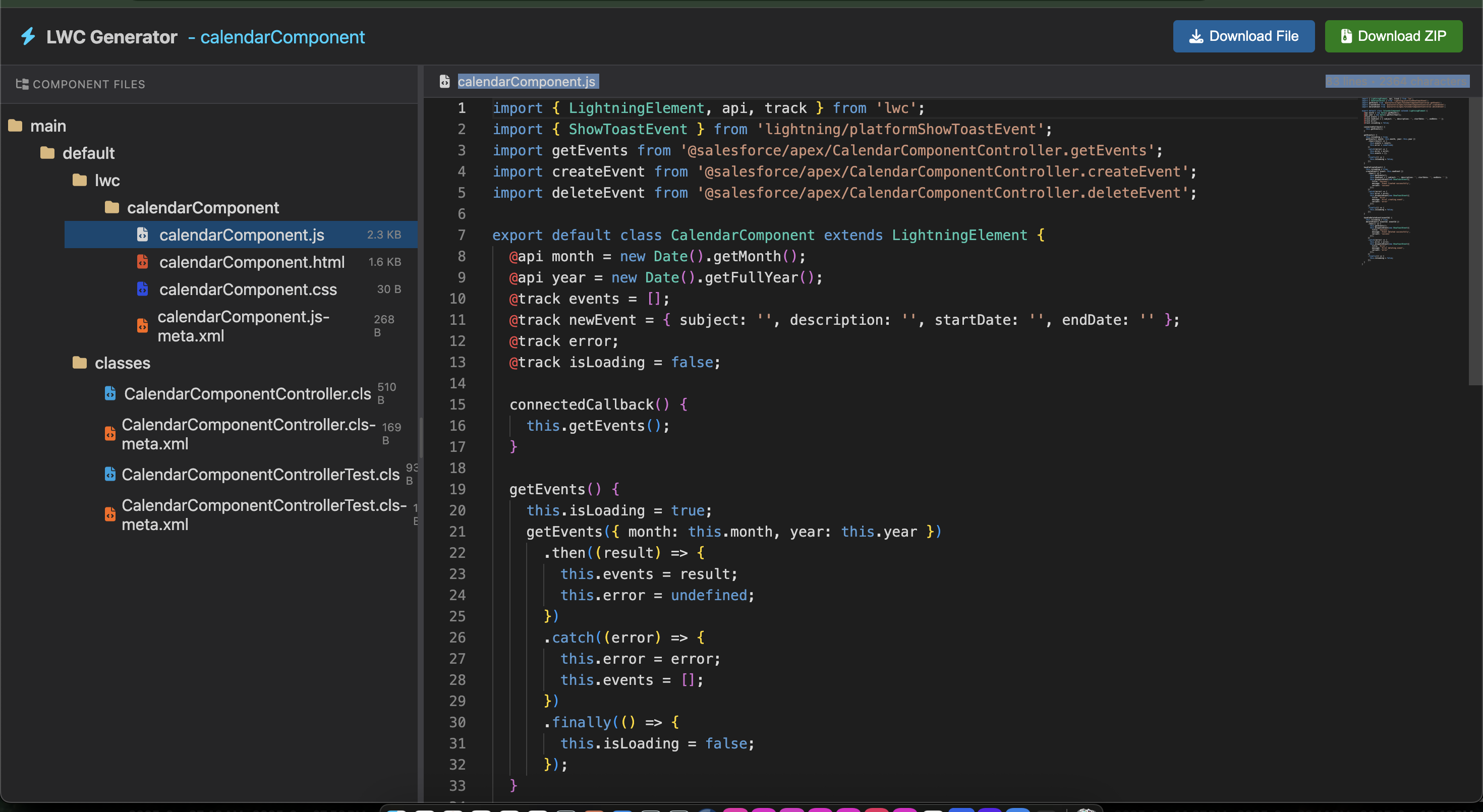
- 🌲 Tree View Interface: VSCode-like file explorer for all generated artifacts
- 🎨 Monaco Editor: Professional code editing with syntax highlighting
- 💾 Smart Downloads: Export individual files or complete ZIP package
- 📊 Multi-File Management: Seamlessly switch between generated artifacts
- 🔄 Live Editing: Modify any generated file before downloading
- 📝 Requirements-Based: Generate from inline requirements or requirement files
📦 Installation
npm install -g lwc-generator-cli🎯 Usage
Generate LWC from Inline Requirement
Using Ollama (Local, No API Key Required):
lwc-gen create \
  -r "Create a contact list component with search and pagination" \
  -m ollama \
  --model-name llama3.2
Using OpenAI:
lwc-gen create \
  -r "Build an account dashboard with charts and data tables" \
  -m openai \
  --api-key sk-your-openai-key \
  --model-name gpt-4
Using Anthropic:
lwc-gen create \
  -r "Create a file upload component with drag and drop" \
  -m anthropic \
  --api-key sk-ant-your-key \
  --model-name claude-sonnet-4.5-20250929
Using Groq:
lwc-gen create \
  -r "Build a calendar component with event management" \
  -m groq \
  --api-key gsk-your-groq-key \
  --model-name mixtral-8x7b-32768
Generate from Requirements File
Create a requirements.txt file:
Component Name: opportunityTracker
Description: Opportunity tracking dashboard
Features:
- Display opportunities in a data table
- Filter by stage and amount
- Export to CSV
- Inline editing capability
- Real-time updates using LDS
Then generate:
lwc-gen create \
  -f requirements.txt \
  -m ollama \
  --model-name llama3.2
📋 Command Reference
Global Options
| Option | Alias | Description | Required |
|--------|-------|-------------|----------|
| --requirement <text> | -r | Inline requirement description | ⚠️* |
| --requirement-file <file> | -f | Path to requirements file | ⚠️* |
| --model <provider> | -m | AI provider (ollama, openai, anthropic, groq) | ✅ |
| --api-key <key> | | API key (not needed for Ollama) | ⚠️ |
| --model-name <name> | | Specific model name | ❌ |
| --ollama-url <url> | | Ollama server URL (default: http://localhost:11434) | ❌ |
| --output-dir <dir> | -o | Output directory (default: ./lwc-output) | ❌ |
*Either -r or -f is required
Commands
create
Generates a complete LWC component package with:
- JavaScript Controller (
componentName.js) - HTML Template (
componentName.html) - CSS Stylesheet (
componentName.css) - Metadata XML (
componentName.js-meta.xml) - Apex Controller (if needed for server-side logic)
- Test Classes (Apex and Jest tests)
🤖 Supported AI Models
Ollama (Local - Free)
- Default:
llama3.2 - Others:
codellama,llama2,mistral - Setup: Install from ollama.ai
OpenAI
- Recommended:
gpt-4,gpt-4-turbo - Budget:
gpt-3.5-turbo - API Key: Get from platform.openai.com
Anthropic
- Recommended:
claude-sonnet-4.5-20250929 - Others:
claude-opus-4.1,claude-sonnet-4 - API Key: Get from console.anthropic.com
Groq
- Recommended:
mixtral-8x7b-32768 - Others:
llama2-70b-4096,gemma-7b-it - API Key: Get from console.groq.com
🖥️ Web Interface Features
The tool automatically opens a beautiful web interface with:
Left Pane - Tree View
- 📁 VSCode-style file explorer
- 🎯 Click to view/edit files
- 🎨 Color-coded file types
- 📊 File size indicators
Right Pane - Monaco Editor
- Full Apex/JavaScript/HTML/CSS syntax highlighting
- Dark theme optimized
- Line numbers and minimap
- Search and replace
- Code folding
- IntelliSense support
Action Bar
- 💾 Download Individual Files
- 📦 Download Complete ZIP
- 📊 Live Statistics
- 🔄 Refresh Generated Code
📝 Generated Artifacts Structure
componentName/
├── componentName.js          # JavaScript controller
├── componentName.html        # HTML template
├── componentName.css         # Component styles
├── componentName.js-meta.xml # Metadata configuration
└── apex/
    ├── ComponentNameController.cls      # Apex controller
    ├── ComponentNameController.cls-meta.xml
    ├── ComponentNameControllerTest.cls  # Test class
    └── ComponentNameControllerTest.cls-meta.xml
💡 Example Requirements
Simple Component
Create a simple greeting component that displays a personalized messageData-Driven Component
Build a contact search component with:
- Search input field
- Results displayed in cards
- Click to view details
- Edit inline capability
Complex Dashboard
Create an opportunity analytics dashboard featuring:
- Pipeline chart (Chart.js)
- Top opportunities table
- Stage distribution donut chart
- Filter by owner and date range
- Export to PDF functionality
🔧 Advanced Usage
Custom Output Directory
lwc-gen create \
  -r "Create a task manager component" \
  -m ollama \
  -o ./my-components
Using Environment Variables
export OPENAI_API_KEY=sk-your-key
lwc-gen create -r "Build a calculator" -m openai
Batch Generation
Create multiple components from a batch file:
# batch-requirements.txt
Component 1: Contact List|Display contacts with search
Component 2: Account Dashboard|Show account metrics
Component 3: Case Manager|Manage support cases

lwc-gen batch -f batch-requirements.txt -m ollama
🎨 UI Customization
The web interface supports URL parameters for customization:
# Open with specific theme
?theme=dark

# Start with a specific file selected
?file=componentName.js

# Hide tree view initially
?hideTree=true
🔒 Security Notes
- API keys passed via CLI (use env vars in production)
- Never commit API keys to version control
- Use
.envfiles for sensitive configuration - Ollama runs locally for complete privacy
- Generated code follows Salesforce security best practices
🚀 Best Practices
- Start Simple: Begin with basic requirements, iterate as needed
- Be Specific: More detail = better generated code
- Review Generated Code: Always review before deploying
- Test Thoroughly: Use generated test classes as starting point
- Version Control: Track all generated components in Git
📚 Examples
Example 1: Contact Search
lwc-gen create \
  -r "Create a contact search component with filters for account and title" \
  -m ollama
Generates:
contactSearch.js- Search logic with wire adapterscontactSearch.html- Search UI with lightning-inputcontactSearch.css- Styled cardsContactSearchController.cls- SOQL search logic
Example 2: File Uploader
lwc-gen create \
  -r "Build a file upload component supporting multiple files with preview" \
  -m anthropic \
  --api-key $ANTHROPIC_KEY
Generates:
- Drag-and-drop interface
- File preview thumbnails
- Upload progress bars
- Apex controller for ContentVersion handling
🛠️ Troubleshooting
Ollama Connection Issues
# Check if Ollama is running
curl http://localhost:11434/api/tags

# Start Ollama
ollama serve
Port Already in Use
# Use custom port
lwc-gen create -r "..." -m ollama --port 8081
API Rate Limits
# Add delay between requests
lwc-gen create -r "..." -m openai --rate-limit-delay 2000
📄 License
MIT License - Use freely in your projects!
🤝 Contributing
Contributions welcome! Please submit PRs or open issues on GitHub.
🌟 Roadmap
- [ ] Jest test generation
- [ ] SFDX project integration
- [ ] Component library templates
- [ ] Storybook integration
- [ ] CI/CD pipeline templates
- [ ] Multi-language support
Happy Component Building! 🎉