
macvscr
v0.5.0
Published
macOS menu-bar tool that creates controllable virtual displays — arbitrary resolution, HiDPI, aspect ratio, and iMac presets. Unblocks HiDPI screen-sharing on headless Macs.

Maintainers
 kezhaofeng
Readme
macvscr
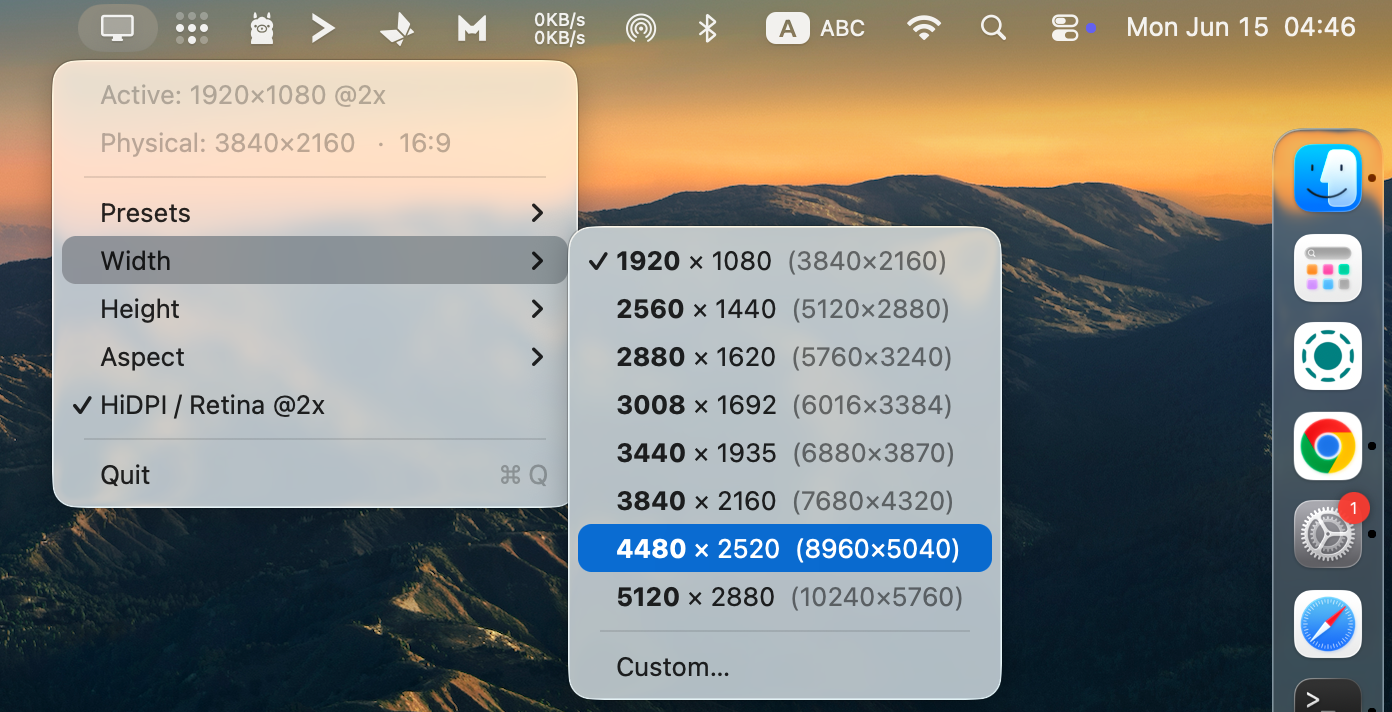
A macOS menu-bar tool that creates controllable virtual displays — arbitrary resolution, HiDPI (Retina @2x), aspect ratio, and iMac presets. It unblocks HiDPI screen-sharing on headless Macs (e.g. a Mac mini with no monitor attached), where the session is otherwise locked to 1920×1080 non-HiDPI.
Install
npx -y macvscr@latest setup     # zero-install: stable binary + shell alias + login LaunchAgent
# or
npm install -g macvscr && macvscr setup
Requires macOS 13+ on Apple Silicon (arm64).
Three ways to run (progressive)
| Mode | Command | Behavior | Stop |
|---|---|---|---|
| ① Foreground | macvscr (default) or macvscr run | occupies the terminal, prints guidance; Ctrl+C to quit | Ctrl+C |
| ② Background | macvscr run -d | detached; the terminal returns immediately | macvscr stop |
| ③ Login service | macvscr setup | LaunchAgent — runs at login, restarts on crash | macvscr stop / macvscr uninstall |
macvscr                                  # foreground, default 3440×1440 @2x
macvscr --width 2560 --ratio 16:9 --hidpi
macvscr run -d --width 2560 --ratio 16:9
macvscr setup --width 2560 --ratio 16:9
Manage the service
macvscr status        # loaded? running? pid?
macvscr stop          # universal stop (service + any background instance)
macvscr start         # start the installed service
macvscr restart       # restart
macvscr uninstall     # full teardown: LaunchAgent + ~/.macvscr + shell alias
macvscr --help        # everything
Resolution model
Everything you type and see is in logical pixels; HiDPI (@2x) doubles the physical surface.
2560×1440 @2x→ logical workspace 2560×1440, physical 5120×2880 (the Retina way macOS describes a 5K iMac)1920×1080(HiDPI off) → logical = physical = 1920×1080
The tray header shows both, so logical and physical are never confused.
CLI flags (all pixel values are logical)
--width <px>            logical width
--height <px>           logical height (mutually exclusive with --ratio)
--ratio <W:H>           compute height from width + aspect (16:9, 21:9, …)
--hidpi / --no-hidpi    Retina @2x on/off (default on)
--refresh <Hz>          refresh rate (default 60)
--name <name>           display name prefix
Menu bar
Click the display icon: Presets ▸ (iMac sizes folded in with tails), Width ▸ / Height ▸ / Aspect ▸ (each with a Custom… input dialog), HiDPI / Retina @2x, Quit. Width, height, and ratio are linked (width is the master axis). Switching rebuilds the display live — no restart.
Headless / Screen Sharing
- On the headless Mac, run
macvscr setupand pick a preset from the menu bar. - From another Mac, connect via Screen Sharing → View menu → select the dummy.
- The remote session renders at the chosen geometry with Retina.
Verify
system_profiler SPDisplaysDataType | grep -i virtual
# → Virtual Display <physical W>x<physical H>   Resolution: <W> x <H>
Notes
- A menu-bar app needs your GUI session, so the service starts at login (LaunchAgent), not boot (a LaunchDaemon has no GUI).
- The LaunchAgent runs the stable
~/.macvscr/macvscrdirectly — nonpx/network at login. Themacvscrcommand (alias) still uses npx so you always get subcommands + the latest version. - The virtual display is owned by the process and is destroyed when
macvscrquits. - Uses the macOS private
CGVirtualDisplay*SPI (in the public CoreGraphics binary). SIP stays on; the app is non-sandboxed. - Logs:
/tmp/macvscr.out.log,/tmp/macvscr.err.log. - MIT licensed. Source: https://github.com/gaubee/macvscr