
magic-editor-x
v1.5.1
Published
Advanced block-based editor for Strapi v5 with Editor.js, Media Library integration, and real-time collaboration support

Maintainers
 schero94
Readme
Magic Editor X
Advanced Block-Based Content Editor for Strapi v5 with Real-Time Collaboration




ALPHA RELEASE v1.4.0-alpha.1 - Custom Blocks with Tier-based Limits now available! Create your own editor blocks without writing code.
What's New in v1.4.0-alpha.1
Custom Blocks (Contentful-style)
Create custom editor blocks directly from the Admin UI - no code required!
- Simple Blocks - Text/HTML blocks with configurable fields (text, textarea, select, color, checkbox)
- Embedded Entry Blocks - Reference other Strapi content types with preview fields (like Contentful Inline Entries)
- HTML Templates - Define custom templates with
{{fieldName}}placeholders - Replaces Dynamic Zones - Simpler alternative for structured content within the editor
Tier-Based Limits
| Feature | FREE | PREMIUM | ADVANCED | |---------|------|---------|----------| | Simple Blocks | 3 | 10 (combined) | Unlimited | | Embedded Entry | - | 10 (combined) | Unlimited | | Export/Import | - | - | Yes | | API Access | - | - | Yes |
Previous Updates (v1.2.0)
- Character-Level Collaboration - Multiple users can now type in the same paragraph simultaneously without conflicts
- Webtools Links Integration - Optional integration with PluginPal's Webtools Links addon for internal/external link management
- Direct Link Editing - Click on any link to instantly open the link editor modal
- Improved Fullscreen Mode - Blocks now stretch to full width, Media Library modal works correctly
Introduction
Magic Editor X is a production-ready Strapi v5 Custom Field that brings the power of Editor.js to your content management workflow. Unlike traditional WYSIWYG replacements or plugins that override Strapi's default editor, Magic Editor X integrates as a proper Custom Field in Strapi's Content-Type Builder, giving you complete control over when and where to use it.
Built on proven technologies like Editor.js for the editing interface and Y.js for conflict-free real-time collaboration, this plugin provides a modern, extensible content editing experience that scales from solo developers to large editorial teams.
Why Magic Editor X? :)
For Developers:
- Clean JSON output instead of unstructured HTML
- 25+ pre-configured Editor.js tools out of the box
- Type-safe content structure with versioned schemas
- Real-time collaboration with CRDT (Conflict-free Replicated Data Types)
- Full TypeScript support with proper type definitions
- Extensible architecture for custom block types
For Content Teams:
- Familiar Medium-style block editor experience
- Live collaborative editing with presence indicators
- Keyboard shortcuts for fast content creation
- Inline formatting without toolbar clutter
- Media Library integration for asset management
- AI-powered content suggestions (premium)
Screenshots
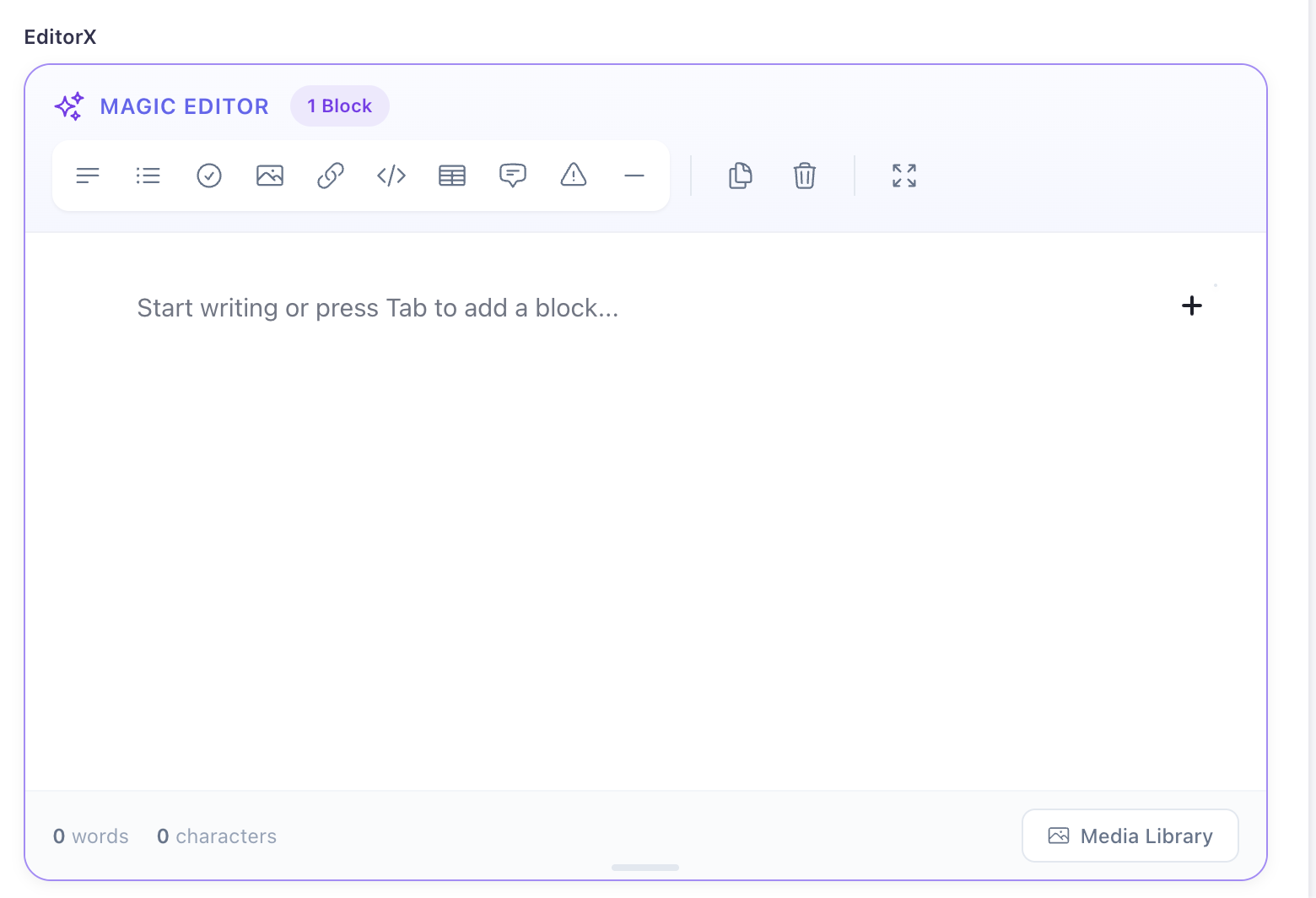
Editor Interface
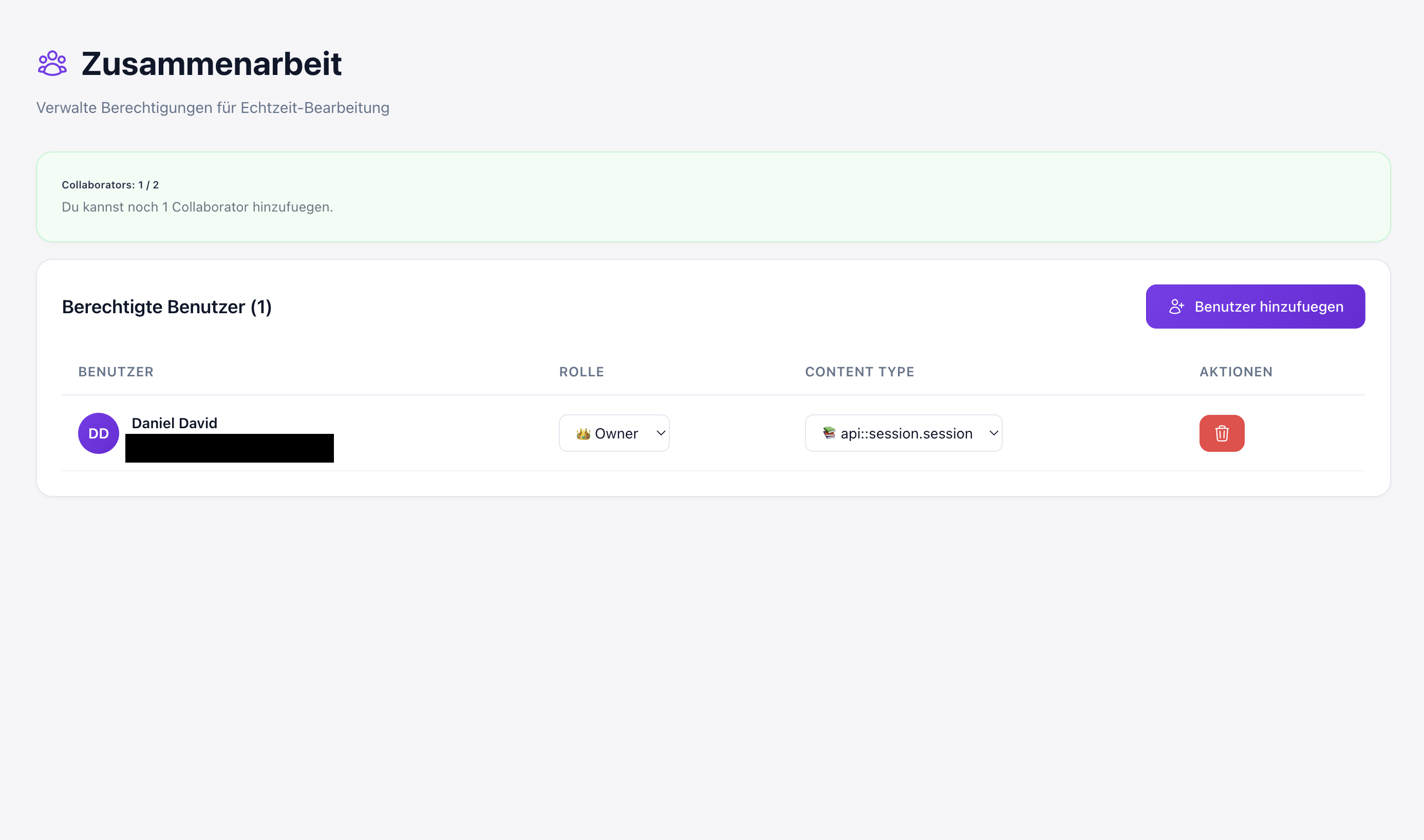
Real-Time Collaboration
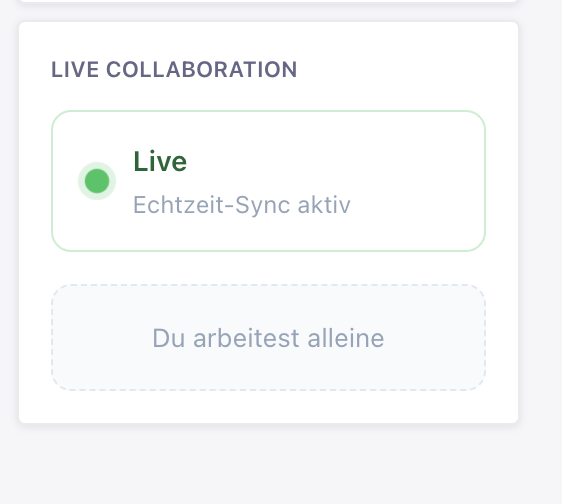
Collaboration Widget
Architecture Overview
Magic Editor X follows a clean client-server architecture with three main components:
Client-Side (Admin Panel)
admin/
├── src/
│   ├── components/
│   │   ├── EditorJS/           # Main editor component
│   │   ├── EditorTools/        # Custom tools (Button, Hyperlink, AI, WebtoolsLink)
│   │   ├── MediaLib/           # Strapi Media Library adapter
│   │   └── LiveCollaborationPanel.jsx  # Collaboration UI
│   ├── hooks/
│   │   ├── useMagicCollaboration.js    # Y.js & Socket.io integration
│   │   ├── useWebtoolsLinks.js         # 🆕 Webtools Links addon integration
│   │   ├── useAIAssistant.js           # AI features
│   │   └── useLicense.js               # License management
│   ├── utils/
│   │   └── YTextBinding.js     # 🆕 Y.Text <-> contenteditable binding
│   ├── config/
│   │   └── tools.js            # Editor.js tools configuration
│   └── index.js                # Plugin registration
Key Technologies:
- React 18 - UI components with hooks
- Editor.js 2.31 - Block-based editor core
- Y.js 13.6 - CRDT for real-time sync
- Socket.io-client 4.8 - WebSocket communication
- IndexedDB - Local persistence via y-indexeddb
Server-Side (Strapi Backend)
server/
├── src/
│   ├── controllers/
│   │   ├── editor-controller.js        # Image upload, link previews
│   │   ├── collaboration-controller.js # Permission management
│   │   ├── realtime-controller.js      # Session tokens
│   │   └── license-controller.js       # License validation
│   ├── services/
│   │   ├── realtime-service.js         # Y.js document management
│   │   ├── access-service.js           # Permission checks
│   │   ├── license-service.js          # License API
│   │   └── snapshot-service.js         # Document snapshots
│   ├── routes/
│   │   ├── admin.js            # Admin panel routes
│   │   └── content-api.js      # Public API routes
│   └── config/
│       └── index.js            # Plugin configuration
Key Technologies:
- Socket.io 4.8 - WebSocket server
- Y.js 13.6 - Server-side CRDT state
- Open Graph Scraper - Link metadata extraction
- Strapi 5.31 - Backend framework
Data Flow
- Editor Changes → Y.js Document (CRDT) → Socket.io → Server → Other Clients
- Image Upload → Strapi Controller → Strapi Upload Service → Media Library
- Link Preview → Backend Scraper → OpenGraph Metadata → Client
- Collaboration → Permission Check → Session Token → WebSocket Connection
Features Deep Dive
1. Block-Based Content Structure
Magic Editor X stores content as structured JSON, not HTML. Each block has a unique ID, type, and data object:
{
  "time": 1699999999999,
  "blocks": [
    {
      "id": "abc123",
      "type": "header",
      "data": {
        "text": "Hello World",
        "level": 2
      }
    },
    {
      "id": "def456",
      "type": "paragraph",
      "data": {
        "text": "This is <b>bold</b> and <i>italic</i> text."
      }
    },
    {
      "id": "ghi789",
      "type": "list",
      "data": {
        "style": "unordered",
        "items": [
          {
            "content": "First item",
            "items": []
          },
          {
            "content": "Second item with nested list",
            "items": [
              {
                "content": "Nested item",
                "items": []
              }
            ]
          }
        ]
      }
    }
  ],
  "version": "2.31.0"
}
Benefits:
- Predictable, type-safe content structure
- Easy to parse, transform, and render
- Version control friendly (no HTML diffs)
- Can be validated against JSON schemas
- Simple to migrate between systems
2. Real-Time Collaboration (CRDT Technology)
Magic Editor X uses Y.js, a battle-tested CRDT implementation, to enable true real-time collaboration without conflicts:
How It Works:
- Y.Doc Creation - Each content entry gets a shared Y.js document
- Local Changes - Edits create CRDT operations (not plain text diffs)
- Sync Protocol - Operations are sent via Socket.io to the server
- Server Broadcast - Server distributes operations to all connected clients
- Automatic Merge - Y.js guarantees conflict-free merges (no "last write wins")
- Persistence - Changes are stored in IndexedDB for offline capability
🆕 Character-Level Collaboration (v1.2.0)
Starting with v1.2.0, Magic Editor X supports simultaneous editing within the same block. Multiple users can type in the same paragraph at the same time without conflicts:
┌─────────────────────────────────────────────────────────┐
│  Before v1.2.0: Block-Level Sync                        │
│  User A edits Block 1 → User B's Block 1 changes lost   │
├─────────────────────────────────────────────────────────┤
│  After v1.2.0: Character-Level Sync                     │
│  User A types "Hello" → User B types "World" → "HelloWorld" │
│  Both changes merge seamlessly!                          │
└─────────────────────────────────────────────────────────┘
Hybrid Data Structure:
Y.Mapfor block metadata (type, tunes, order)Y.Textfor character-level content (rich text with formatting)Y.Mapfor document metadata (blockOrder, timestamps)
Example: Collaborative Editing Flow
// Client A types "Hello" at position 0
const update = Y.encodeStateAsUpdate(yDoc);
socket.emit('collab:update', update);

// Server broadcasts to all clients
socket.broadcast.to(roomId).emit('collab:update', update);

// Client B applies the update
Y.applyUpdate(yDoc, update);
// Editor automatically re-renders with "Hello"
Presence & Cursors:
// Awareness protocol for presence
awareness.setLocalStateField('cursor', {
  blockId: 'abc123',
  position: 42,
  user: {
    id: 'user-1',
    name: 'John Doe',
    color: '#FF6B6B'
  }
});

// Other clients receive cursor updates
awareness.on('change', ({ added, updated, removed }) => {
  // Render remote cursor indicators
  renderCursors(awareness.getStates());
});
3. 25+ Editor.js Tools
Magic Editor X comes with a comprehensive collection of tools, categorized for easy reference:
Block Tools (21 Tools)
| Tool | Description | Package | Shortcut |
|------|-------------|---------|----------|
| Header | H1-H6 headings with alignment | @editorjs/header | CMD+SHIFT+H |
| Paragraph | Text blocks with inline formatting | @editorjs/paragraph | - |
| Nested List | Multi-level ordered/unordered lists | @editorjs/nested-list | CMD+SHIFT+L |
| Checklist | Interactive todo lists | @editorjs/checklist | CMD+SHIFT+C |
| Quote | Blockquotes with caption | @editorjs/quote | CMD+SHIFT+Q |
| Warning | Alert boxes | @editorjs/warning | CMD+SHIFT+W |
| Code | Basic code blocks | @editorjs/code | CMD+SHIFT+P |
| Code (Highlight) | Syntax-highlighted code | @calumk/editorjs-codeflask | - |
| Delimiter | Visual section separator | @editorjs/delimiter | CMD+SHIFT+D |
| Table | Create/edit tables | @editorjs/table | CMD+SHIFT+T |
| Embed | YouTube, Vimeo, Twitter, etc. | @editorjs/embed | - |
| Raw HTML | Insert raw HTML | @editorjs/raw | - |
| Image | Upload by file or URL | @editorjs/image | - |
| Simple Image | Image by URL only | @editorjs/simple-image | - |
| Link Preview | Rich link cards with metadata | @editorjs/link | - |
| Attaches | File attachments | @editorjs/attaches | - |
| Media Library | Strapi Media Library picker | Custom | - |
| Personality | Author/person cards | @editorjs/personality | - |
| Alert | Colored alert messages | editorjs-alert | CMD+SHIFT+A |
| Toggle | Collapsible content blocks | editorjs-toggle-block | - |
| Button | CTA buttons | Custom | - |
Inline Tools (7 Tools)
| Tool | Description | Package | Shortcut |
|------|-------------|---------|----------|
| Bold | Bold text | Built-in | CMD+B |
| Italic | Italic text | Built-in | CMD+I |
| Marker | Highlight text | @editorjs/marker | CMD+SHIFT+M |
| Inline Code | Code formatting | @editorjs/inline-code | CMD+SHIFT+I |
| Underline | Underline text | @editorjs/underline | CMD+U |
| Strikethrough | Strike through text | @sotaproject/strikethrough | CMD+SHIFT+S |
| Hyperlink | Links with target/rel | Custom | CMD+K |
| Tooltip | Add tooltips to text | editorjs-tooltip | - |
Block Tunes (3 Tunes)
| Tune | Description | Package |
|------|-------------|---------|
| Alignment | Left, center, right, justify | editorjs-text-alignment-blocktune |
| Indent | Multi-level indentation | editorjs-indent-tune |
| Text Variant | Call-out, citation, details styles | @editorjs/text-variant-tune |
Plugins (2 Plugins)
| Plugin | Description | Package |
|--------|-------------|---------|
| Undo/Redo | History management | editorjs-undo |
| Drag & Drop | Reorder blocks by dragging | editorjs-drag-drop |
Custom Blocks (User-Defined)
Magic Editor X allows you to create your own custom blocks without writing code! This feature is similar to Contentful's embedded entries and can replace Strapi's Components + Dynamic Zones setup.
Creating Custom Blocks via Admin UI
- Go to Settings > Magic Editor X > Custom Blocks
- Click Create Block
- Fill in the form:
- Block Name - Unique identifier (e.g.,
productCard) - Display Label - Shown in the editor toolbox
- Block Type:
- Simple Block - Text/HTML content with custom fields
- Embedded Entry - Links to existing Strapi content
- Block Name - Unique identifier (e.g.,
- Configure additional options (fields, template, icon)
- Click Create Block
The new block appears immediately in the editor toolbox!
Block Types
Simple Blocks: Custom text/HTML blocks with configurable fields.
| Option | Description |
|--------|-------------|
| Placeholder | Hint text for empty content |
| Template | Custom HTML with {{fieldName}} placeholders |
| Fields | Add custom fields (text, select, color, checkbox) |
| Styles | Custom CSS as JSON object |
Embedded Entry Blocks: Embed existing Strapi content directly in your editor.
| Option | Description |
|--------|-------------|
| Content Type | Target content type (e.g., api::product.product) |
| Title Field | Field to display as entry title |
| Display Fields | Fields shown in preview |
Creating Custom Blocks via Config (Developers)
For developers who prefer code-based configuration:
// config/plugins.js
'magic-editor-x': {
  enabled: true,
  config: {
    customBlocks: [
      {
        name: 'productCard',
        label: 'Product Card',
        blockType: 'embedded-entry',
        contentType: 'api::product.product',
        displayFields: ['title', 'price', 'thumbnail'],
        titleField: 'title',
        icon: '<svg>...</svg>',
      },
      {
        name: 'callToAction',
        label: 'Call to Action',
        blockType: 'simple',
        placeholder: 'Enter CTA text...',
        fields: [
          { name: 'buttonText', label: 'Button Text', type: 'text' },
          { name: 'buttonUrl', label: 'Button URL', type: 'text' },
          { name: 'variant', label: 'Style', type: 'select', options: ['primary', 'secondary'] },
        ],
        template: `
          <div class="cta-block">
            <p data-field="content">{{content}}</p>
            <a href="{{buttonUrl}}" class="btn btn-{{variant}}">{{buttonText}}</a>
          </div>
        `,
      },
    ],
  },
},
Import/Export Custom Blocks
Custom blocks can be exported and imported between environments:
- Go to Settings > Magic Editor X > Custom Blocks
- Click Export to download a JSON file
- On another instance, click Import and select the file
Custom Block Output Format
Custom blocks save their data in the standard Editor.js format:
{
  "type": "productCard",
  "data": {
    "entry": {
      "id": 42,
      "documentId": "abc123",
      "title": "Product Name",
      "price": 99.99
    },
    "contentType": "api::product.product"
  }
}
4. Media Library Integration
Seamless integration with Strapi's built-in Media Library:
// Custom MediaLibAdapter bridges Editor.js and Strapi
class MediaLibAdapter {
  static get toolbox() {
    return {
      title: 'Media Library',
      icon: '<svg>...</svg>'
    };
  }

  render() {
    const button = document.createElement('button');
    button.textContent = 'Choose from Media Library';
    button.onclick = () => {
      // Opens Strapi's Media Library modal
      this.config.mediaLibToggleFunc();
    };
    return button;
  }

  save(blockContent) {
    return {
      url: blockContent.url,
      caption: blockContent.caption,
      alt: blockContent.alt
    };
  }
}
5. Webtools Links Integration (Optional)
Magic Editor X integrates seamlessly with the Webtools Links addon by PluginPal for enhanced link management:
Features:
- 🔗 Internal Link Picker - Select pages/entries from your Strapi content
- 🌐 External URL Support - Paste external URLs with validation
- ✏️ Edit Existing Links - Click on a link to edit its URL and text
- 🔍 Link Detection - Automatically detects when cursor is inside a link
Setup:
- Install the Webtools Links addon (requires Webtools license)
- Magic Editor X auto-detects the addon and enables the Link Picker button
Usage:
// The integration uses Strapi's plugin API
const getPlugin = useStrapiApp('WebtoolsLinks', (state) => state.getPlugin);
const linksPlugin = getPlugin('webtools-addon-links');
const { openLinkPicker } = linksPlugin?.apis;

// Open picker with existing link data (for editing)
const result = await openLinkPicker({
  linkType: 'both',           // 'internal', 'external', or 'both'
  initialHref: existingUrl,   // Pre-fill for editing
  initialText: selectedText   // Pre-fill link text
});
Without Webtools:
If Webtools is not installed, a subtle promo link appears in the editor footer pointing to the addon store page.
6. AI-Powered Features (Premium)
Built-in AI assistant for content enhancement:
Grammar Check:
// Automatically fix grammar and spelling
aiAssistant.check(text) → corrected text
Style Improvement:
// Make text more professional, casual, or friendly
aiAssistant.rewrite(text, style: 'professional') → improved text
Content Generation:
// Generate content based on prompts
aiAssistant.generate(prompt) → generated content
Installation & Setup
1. Install Package
npm install magic-editor-x
# or
yarn add magic-editor-x
# or
pnpm add magic-editor-x
2. Enable Plugin
Create or update config/plugins.ts (or .js):
export default () => ({
  'magic-editor-x': {
    enabled: true,
    config: {
      // Editor Configuration
      enabledTools: [
        'header', 'paragraph', 'list', 'checklist', 'quote',
        'warning', 'code', 'delimiter', 'table', 'embed',
        'raw', 'image', 'mediaLib', 'linkTool'
      ],

      // Upload Limits
      maxImageSize: 10 * 1024 * 1024, // 10MB
      allowedImageTypes: [
        'image/jpeg', 'image/png', 'image/gif',
        'image/webp', 'image/svg+xml'
      ],

      // Link Previews
      linkPreviewTimeout: 10000, // 10 seconds

      // Real-Time Collaboration
      collaboration: {
        enabled: true,
        sessionTTL: 2 * 60 * 1000, // 2 minutes
        wsPath: '/magic-editor-x/realtime',
        wsUrl: null, // Auto-detect or set custom URL
        allowedOrigins: ['http://localhost:1337'],
        allowedAdminRoles: ['strapi-super-admin'],
        allowedAdminUserIds: [],
      },

      // API Response Settings
      api: {
        autoParseJSON: true, // Auto-parse JSON strings to objects in API responses
      },
    },
  },
});
3. Content Security Policy (Optional)
For link previews with external images, update config/middlewares.ts:
export default [
  'strapi::logger',
  'strapi::errors',
  {
    name: 'strapi::security',
    config: {
      contentSecurityPolicy: {
        useDefaults: true,
        directives: {
          'connect-src': ["'self'", 'https:'],
          'img-src': [
            "'self'",
            'data:',
            'blob:',
            'market-assets.strapi.io',
            '*', // Allow external images for link previews
          ],
          'media-src': [
            "'self'",
            'data:',
            'blob:',
            'market-assets.strapi.io',
          ],
          upgradeInsecureRequests: null,
        },
      },
    },
  },
  'strapi::cors',
  'strapi::poweredBy',
  'strapi::query',
  'strapi::body',
  'strapi::session',
  'strapi::favicon',
  'strapi::public',
];
4. Build & Start
# Build admin panel with plugin
npm run build

# Start in development mode
npm run develop

# Or in production
npm run start
5. Add Field to Content Type
- Navigate to Content-Type Builder
- Select a content type or create a new one
- Click Add another field
- Go to the Custom tab
- Select Magic Editor X
- Configure field name and options
- Click Finish and save the content type
Configuration Reference
Plugin Configuration
All options for config/plugins.ts:
interface MagicEditorXConfig {
  // Tool Selection
  enabledTools?: string[]; // Default: all tools

  // Upload Settings
  maxImageSize?: number; // Bytes, default: 10MB
  allowedImageTypes?: string[]; // MIME types

  // Link Preview Settings
  linkPreviewTimeout?: number; // Milliseconds, default: 10000

  // API Response Settings
  api?: {
    autoParseJSON: boolean; // Auto-parse JSON strings to objects, default: true
  };

  // Collaboration Settings
  collaboration?: {
    enabled: boolean; // Default: true
    sessionTTL: number; // Milliseconds, default: 120000 (2 min)
    wsPath: string; // WebSocket path, default: '/magic-editor-x/realtime'
    wsUrl: string | null; // Custom WebSocket URL (for proxies)
    allowedOrigins: string[]; // CORS origins
    allowedAdminRoles: string[]; // Roles that can collaborate
    allowedAdminUserIds: number[]; // Specific user IDs
  };
}
Field Options
When adding the field in Content-Type Builder:
Base Settings:
- Placeholder - Placeholder text (default: "Start writing or press Tab...")
- Required - Make field mandatory
- Private - Exclude from API responses
Advanced Settings:
- Minimum Height - Editor height in pixels (default: 300)
- Max Length - Maximum characters (optional)
- Min Length - Minimum characters (optional)
API Response Format
Automatic JSON Parsing
Magic Editor X automatically transforms JSON string fields into structured objects in API responses for better developer experience.
Without auto-parsing (raw Strapi response):
{
  "data": {
    "id": 1,
    "documentId": "abc123",
    "editorX": "{\"time\":1699999999999,\"blocks\":[{\"id\":\"xyz\",\"type\":\"paragraph\",\"data\":{\"text\":\"Hello\"}}],\"version\":\"2.31.0\"}"
  }
}
With auto-parsing (Magic Editor X middleware active):
{
  "data": {
    "id": 1,
    "documentId": "abc123",
    "editorX": {
      "time": 1699999999999,
      "blocks": [
        {
          "id": "xyz",
          "type": "paragraph",
          "data": {
            "text": "Hello"
          }
        }
      ],
      "version": "2.31.0"
    }
  }
}
Configuration:
Auto-parsing is enabled by default. To disable it, add to config/plugins.ts:
{
  'magic-editor-x': {
    config: {
      api: {
        autoParseJSON: false // Disable automatic JSON parsing
      }
    }
  }
}
Manual Parsing (if auto-parse is disabled):
// Client-side parsing
const response = await fetch('/api/articles/1');
const data = await response.json();

// Parse Editor.js field manually
const editorContent = JSON.parse(data.data.editorX);
console.log(editorContent.blocks); // Array of blocks
API Reference
Public API Endpoints
These endpoints are available for content-api usage:
Fetch Link Metadata
GET /api/magic-editor-x/link?url=https://example.comResponse:
{
  "success": 1,
  "meta": {
    "title": "Example Domain",
    "description": "Example domain for documentation",
    "image": {
      "url": "https://example.com/og-image.jpg"
    }
  }
}
Upload Image by File
POST /api/magic-editor-x/image/byFile
Content-Type: multipart/form-data

files.image: <file>
Response:
{
  "success": 1,
  "file": {
    "url": "https://cdn.example.com/image.jpg",
    "name": "image.jpg",
    "size": 123456
  }
}
Upload Image by URL
POST /api/magic-editor-x/image/byUrl
Content-Type: application/json

{
  "url": "https://example.com/image.jpg"
}
Response:
{
  "success": 1,
  "file": {
    "url": "https://cdn.example.com/image.jpg",
    "name": "image.jpg",
    "size": 123456
  }
}
Admin API Endpoints
These endpoints require authentication and admin permissions:
License Management
GET /magic-editor-x/license/status
GET /magic-editor-x/license/limits
POST /magic-editor-x/license/auto-create
POST /magic-editor-x/license/store-key
Collaboration Permissions
GET /magic-editor-x/collaboration/permissions
POST /magic-editor-x/collaboration/permissions
PUT /magic-editor-x/collaboration/permissions/:id
DELETE /magic-editor-x/collaboration/permissions/:id
Real-Time Sessions
POST /magic-editor-x/realtime/session-tokenRequest:
{
  "roomId": "api::article.article|abc123|content",
  "fieldName": "content"
}
Response:
{
  "token": "eyJhbGciOiJIUzI1NiIsInR5cCI6IkpXVCJ9...",
  "expiresAt": 1699999999999
}
Collaboration System
Permission Model
Magic Editor X uses a flexible role-based permission system:
Roles:
- Owner - Full control (edit, delete, manage permissions)
- Editor - Can edit content
- Viewer - Read-only access
Permission Scope:
- Per content type (e.g.,
api::article.article) - Per user or role
- Inherits from Strapi's built-in RBAC
Managing Collaborators
Navigate to Plugins > Magic Editor X > Collaboration to:
Add Collaborator
- Select user
- Choose content type
- Assign role (Viewer, Editor, Owner)
Update Permission
- Change role
- Modify content type access
Remove Collaborator
- Revoke access
Collaboration Limits
Limits are enforced based on your license:
| License | Concurrent Collaborators | |---------|-------------------------| | FREE | 2 | | PREMIUM | 10 | | ADVANCED | Unlimited |
Note: The editor itself is completely free. You only pay for extended collaboration features.
Pricing
Magic Editor X follows a freemium model:
| Feature | FREE | PREMIUM | ADVANCED | |---------|------|---------|----------| | Price | $0 | $9.90/mo | $24.90/mo | | Full Editor | Yes | Yes | Yes | | All 25+ Tools | Yes | Yes | Yes | | Real-Time Sync | Yes | Yes | Yes | | Collaborators | 2 | 10 | Unlimited | | Version History | - | Yes | Yes | | AI Assistant | - | Pay-per-use | Included | | Priority Support | - | Email | Email + Chat | | Custom Blocks | - | - | Yes |
Get started: https://store.magicdx.dev/
Development & Extension
Custom Block Types
Create your own block tools:
// custom-tools/MyCustomTool.js
export default class MyCustomTool {
  static get toolbox() {
    return {
      title: 'My Tool',
      icon: '<svg>...</svg>'
    };
  }

  constructor({ data, api, config }) {
    this.data = data;
    this.api = api;
    this.config = config;
  }

  render() {
    const wrapper = document.createElement('div');
    wrapper.classList.add('my-custom-tool');
    // Add your UI
    return wrapper;
  }

  save(blockContent) {
    return {
      // Your data structure
      text: blockContent.querySelector('input').value
    };
  }

  static get sanitize() {
    return {
      text: {} // Sanitizer config
    };
  }
}
Register in config/tools.js:
import MyCustomTool from './custom-tools/MyCustomTool';

export const getTools = ({ mediaLibToggleFunc, pluginId }) => {
  return {
    // ... existing tools
    myCustomTool: {
      class: MyCustomTool,
      config: {
        // Your config
      }
    }
  };
};
Extending Collaboration
Hook into collaboration events:
// In your component
const { awareness } = useMagicCollaboration({
  enabled: true,
  roomId: 'my-room',
  onRemoteUpdate: () => {
    console.log('Remote update received');
  }
});

// Listen to presence changes
awareness.on('change', ({ added, updated, removed }) => {
  console.log('Users joined:', added);
  console.log('Users updated:', updated);
  console.log('Users left:', removed);
});
Troubleshooting
Common Issues
1. Editor Not Loading
Check browser console for errors. Common causes:
- Plugin not enabled in
config/plugins.ts - Build not run after installation (
npm run build) - CSP blocking external resources
2. Image Upload Failing
Verify:
- Strapi Upload plugin is enabled
- File size within limits (default 10MB)
- File type is allowed
- User has upload permissions
3. Collaboration Not Working
Debug checklist:
- WebSocket connection established (check Network tab)
- Session token valid (check
/realtime/session-tokenresponse) - User has collaboration permissions
- Firewall/proxy allows WebSocket connections
4. Link Previews Not Showing
Ensure:
- CSP allows
img-src: '*'in middlewares config - Target site returns OpenGraph metadata
- Link preview timeout not too short (default: 10s)
Enable Debug Logging
Add to config/plugins.ts:
{
  'magic-editor-x': {
    config: {
      debug: true // Enable verbose logging
    }
  }
}
Roadmap
✅ Completed
- Version History - Track all content changes with snapshot restore (v1.1.0)
- Character-Level Collaboration - Simultaneous editing in same block (v1.2.0)
- Webtools Links Integration - Internal/external link picker (v1.2.0)
🚧 In Progress
- Comments & Annotations - Inline comments for editorial workflow
- Custom Blocks API - Simplified API for creating custom tools
📋 Planned
- Advanced AI - Content suggestions, auto-completion, tone analysis
- Offline Mode - Full offline editing with sync on reconnect
- Import/Export - Markdown, HTML, DOCX conversion
- Templates - Pre-built content templates
- Block Permissions - Per-block editing restrictions
Resources
- Documentation: https://docs.magicdx.dev/
- Store: https://store.magicdx.dev/
- GitHub: https://github.com/Schero94/magic-editor-x
- Strapi Custom Fields: https://docs.strapi.io/cms/features/custom-fields
- Editor.js: https://editorjs.io/
- Y.js: https://docs.yjs.dev/
Contributing
Contributions are welcome! Please:
- Fork the repository
- Create a feature branch (
git checkout -b feature/amazing-feature) - Commit your changes (
git commit -m 'Add amazing feature') - Push to the branch (
git push origin feature/amazing-feature) - Open a Pull Request
Development Setup:
git clone https://github.com/Schero94/magic-editor-x.git
cd magic-editor-x
npm install
npm run watch:link
License
MIT License - See LICENSE for details
Copyright (c) 2024-2025 Schero D.
Support
- Email: [email protected]
- Issues: https://github.com/Schero94/magic-editor-x/issues
- Discord: https://discord.gg/magicdx
Built with dedication by Schero D.
Part of the MagicDX Plugin Suite for Strapi