
magic-type
v1.0.0-beta.7
Published
<h1 align="center"> Magic Type </h1> <p align="center">🎩 Use Your TypeScript definitions at runtime. Powered by <a href="https://github.com/Cryrivers/manta-style" target="_blank">Manta Style</a>.</p> <p align="center"> <img src="https://img.shields.io/


Readme
Installation
- With Yarn
yarn global add magic-type- With NPM
npm install -g magic-typeYou could also use Magic Type locally as well.
Usage
Let's take the following code as an example.
// typings/api.ts
export type MyAPIRequest = {
  time: number;
  input: string;
};
Compile TypeScript definitions

Usage: magictype [options]

Options:
  -V, --version          output the version number
  -i --inputFile <file>  The entrypoint of files to be compiled
  -o --outputDir <dir>   The output directory of compiled files
  -c --cjs               Transpile modules to CommonJS (Otherwise it will output ES modules)
  -h, --help             output usage information
Use magic types at runtime
import { MyAPIRequest } from "./api";

// Use Magic Types as normal TypeScript types
type MyType = {
  key: MyAPIRequest;
};

// Use Magic Type at Runtime

// Check if user input matches MyAPIRequest
function checkMyInput(input: any) {
  return MyAPIRequest.validate(input);
}

// Format user input to match MyAPIRequest
function formatMyInput(input: any) {
  return MyAPIRequest.format(input);
}

// Generate a mock MyAPIRequest data
function getMockData() {
  return MyAPIRequest.deriveLiteral([]).mock();
}
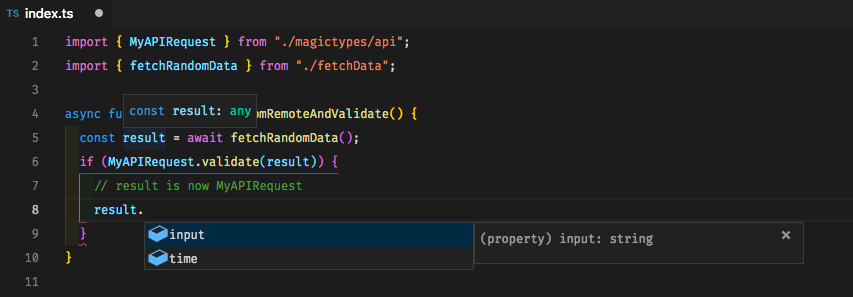
Developer Experience with TypeScript's type guard
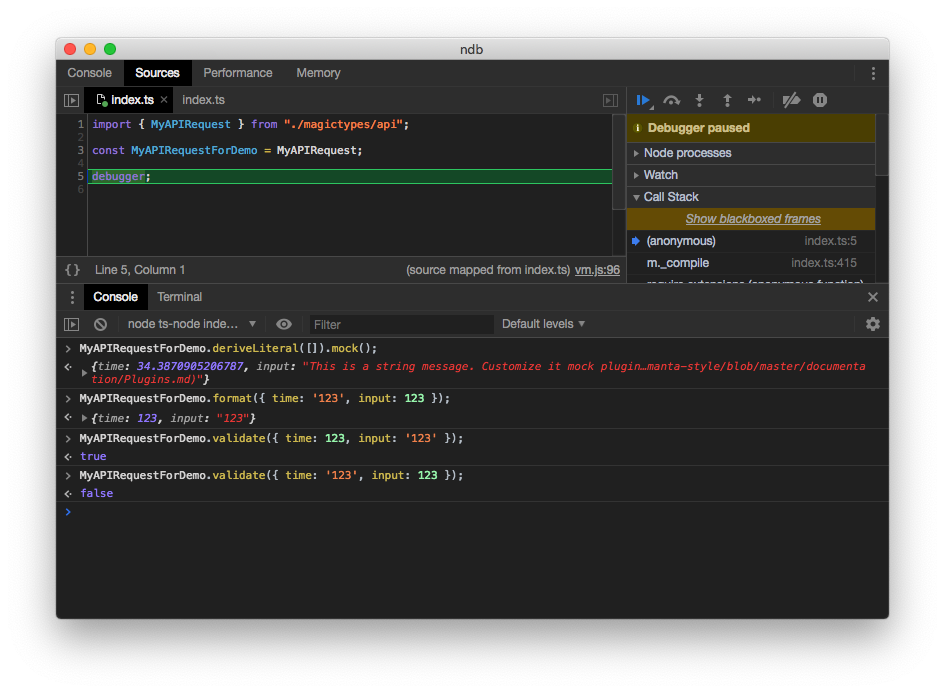
Runtime Screenshot:
Unsupported Syntax
Please be noted there's no warnings against unsupported syntax yet (And Magic Type may crash as well). Please kindly check by yourself.
extendskeyword ininterfacedeclaration will be ignored.- Union (
A | B) and intersection(A & B) on index signatures are not supported. - Functions
inferkeywordReturnType<T>andInstanceType<T>are not supported due to unsupportedinferkeyword and functions.
License
Magic Type is MIT licensed