
magicr
v0.1.1-beta
Published
AI-powered changelog generator from your commit history, built for dev workflows.

Maintainers
 warengonzaga
Readme
Magic Release 🪄 








🪄 AI-powered changelog generator that transforms your Git commit history into beautiful, professional changelogs following Keep a Changelog standards.
Magic Release automatically generates comprehensive, well-structured changelogs from your Git commit history using advanced AI. Simply run magicr in your repository and watch as it intelligently categorizes commits, creates semantic release notes, and produces professional documentation that your users will love. ✨
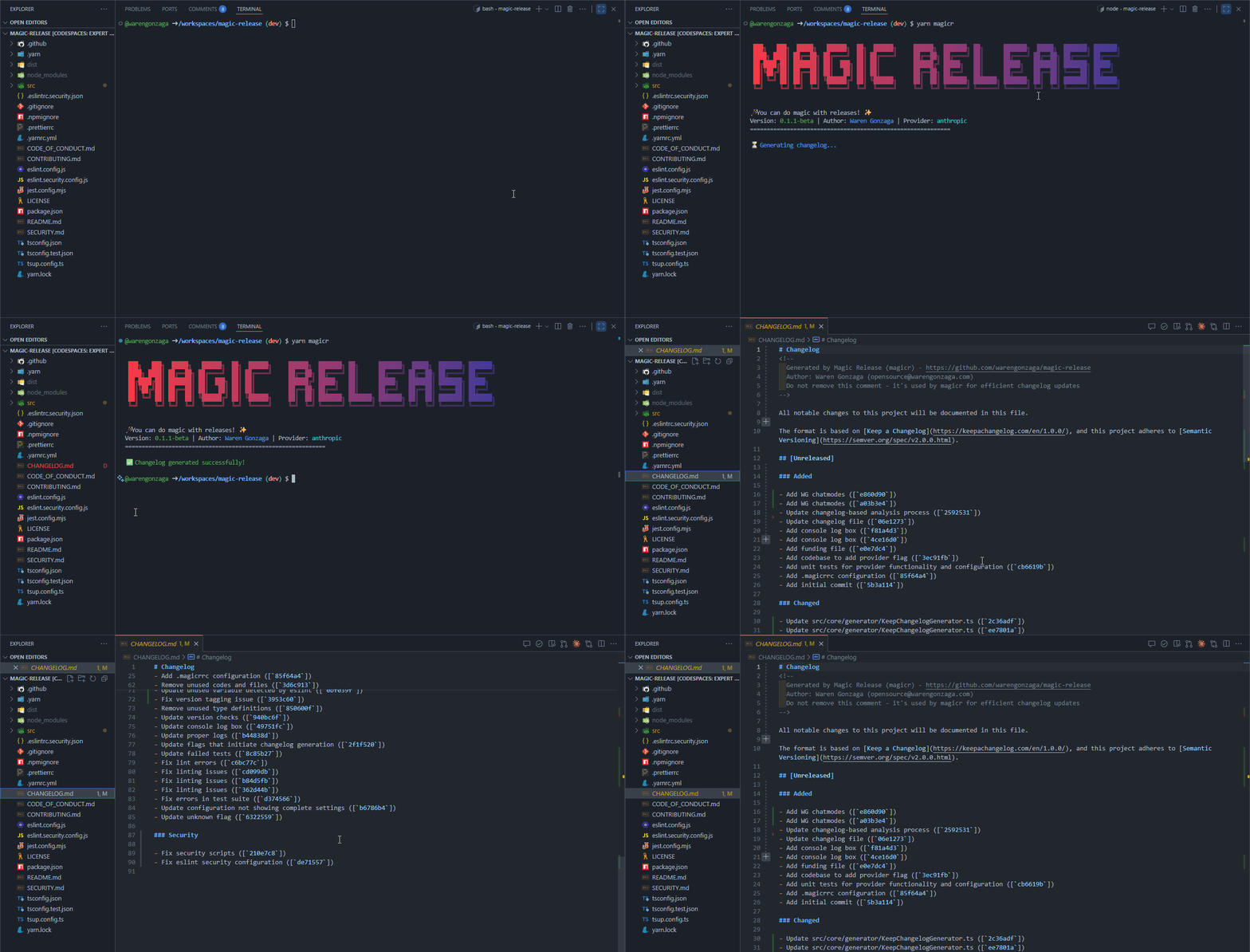
📽️ Demo
✨ Key Features
- 🤖 Multiple AI Providers - Support for OpenAI GPT-4, Anthropic Claude, and Azure OpenAI
- 📋 Keep a Changelog Format - Industry-standard changelog structure and formatting
- 🎯 Smart Categorization - AI-powered commit analysis into features, fixes, breaking changes, and more
- ⚡ Zero Configuration - Works out of the box with intelligent defaults
- 🛠️ Flexible Setup - Interactive configuration wizard and project initialization
- 🔍 Range Support - Generate changelogs for specific commit ranges or versions
- 🚀 No Installation Required - Use with
npxwithout global installation - 📝 Conventional Commits - Full support for conventional commit format
- 🔗 Smart Linking - Automatic GitHub/GitLab issue and PR linking
- 🎨 Customizable - Configurable output format and content inclusion
Have suggestions? Let me know!
[!IMPORTANT]
This project is currently in beta (v0.1.0-beta). While fully functional, expect occasional improvements and refinements. Report any issues you encounter - your feedback helps make it better! 🙏
🚀 Quick Start
Get up and running in seconds with these simple steps:
Option 1: Use with npx (Recommended)
# Navigate to your project
cd your-project

# Generate changelog instantly
npx magicr

# Or with custom options
npx magicr --from v1.0.0 --to HEAD --verbose
Option 2: Global Installation
# Install globally
npm install -g magicr

# Use anywhere
cd your-project
magicr
What happens when you run it
- 🔍 Analyzes your Git commit history intelligently
- 🤖 Categorizes commits using AI into proper changelog sections
- 📝 Generates a beautiful
CHANGELOG.mdfollowing Keep a Changelog standards - 🎯 Preserves existing changelog content and adds new entries
- 🔗 Links to issues, PRs, and commits automatically
😎 Demo
📹 Coming soon! In the meantime, try it out in your project.
Common Commands
# Basic usage - generate changelog from all commits
magicr
# or with npx
npx magicr

# Generate changelog from specific commit range
magicr --from v1.0.0 --to v2.0.0
# or with npx
npx magicr --from v1.0.0 --to v2.0.0

# Preview without writing files
magicr --dry-run

# Include verbose output for debugging
magicr --verbose

# Set up API key (auto-detects OpenAI)
magicr --set-key sk-your-openai-key
# or with npx
npx magicr --set-key sk-your-openai-key

# Interactive configuration setup
magicr --config

# Initialize project configuration
magicr --init

# Switch or list AI providers
magicr --provider
[!NOTE] Magic Release supports multiple AI providers including OpenAI, Anthropic, and Azure OpenAI. By default, it uses OpenAI's
gpt-4o-minimodel. You'll need an API key from your chosen provider:OpenAI: Get your API key at platform.openai.com Anthropic: Get your API key at console.anthropic.com Azure OpenAI: Configure through your Azure portal
# Set up your API key (auto-detects provider)
magicr --set-key your-api-key
# or with npx
npx magicr --set-key your-api-key

# Or specify provider explicitly
magicr --provider anthropic --set-key your-anthropic-key
# or with npx
npx magicr --provider anthropic --set-key your-anthropic-key
📦 Installation
Requirements:
- Node.js ≥ 20.0.0
- Yarn ≥ 4.0.0 (recommended) or npm
Global Installation
# Using npm
npm install -g magicr

# Using yarn
yarn global add magicr
Using npx (No Installation Required)
# Run directly without installing
npx magicr

# You can use all the same options
npx magicr --set-key your-api-key
npx magicr --from v1.0.0 --to v2.0.0
💖 Motivation
Creating and maintaining changelogs is often a tedious, time-consuming task that many developers either skip or do inconsistently. Magic Release was born from the frustration of manually categorizing commits, writing user-friendly descriptions, and maintaining proper changelog formatting across multiple projects.
By leveraging the power of modern AI, Magic Release transforms this chore into an effortless, automated process. It not only saves countless hours but also ensures consistency, professionalism, and adherence to industry standards like Keep a Changelog format.
The vision: Every project deserves a professional changelog that helps users understand what changed, when, and why - without the developer overhead. 🎯
🏗️ Architecture
Magic Release is built with a modular, extensible architecture:
Core Components
- 🧠 LLM Service - Unified interface supporting multiple AI providers
- 📝 Commit Parser - Analyzes conventional commits and semantic patterns
- 🏷️ Tag Manager - Handles version detection and semantic versioning
- 📊 Git Service - Interfaces with Git repository operations
- 📄 Changelog Generator - Produces Keep a Changelog format output
- ⚙️ Configuration Store - Secure credential and settings management
Supported AI Providers
- OpenAI - GPT-4, GPT-3.5 Turbo models
- Anthropic - Claude 3 family models
- Azure OpenAI - Enterprise-grade AI with custom deployments
Data Flow
- Repository Analysis → Extract commits, tags, and metadata
- AI Processing → Categorize and enhance commit descriptions
- Content Generation → Create structured changelog entries
- Format & Output → Generate final changelog following standards
🎯 Contributing
We welcome contributions! Here's how you can help make Magic Release even better:
Ways to Contribute
- 🐛 Report bugs - Found an issue? Create a bug report
- 💡 Request features - Have an idea? Suggest a feature
- 📝 Improve docs - Help us make the documentation clearer
- 🔧 Submit PRs - Fix bugs or implement new features
- ⭐ Give feedback - Share your experience using Magic Release
Development Setup
# Clone the repository
git clone https://github.com/warengonzaga/magic-release.git
cd magic-release

# Install dependencies
npm install

# Run tests
npm test

# Build the project
npm run build

# Test locally
npm run dev
Contributing Guidelines
- Please read our Contributing Guide first
- Submit pull requests to the
devbranch - Follow the existing code style and conventions
- Add tests for new features
- Update documentation as needed
Your contributions help make changelog generation effortless for developers worldwide! 🌍
🐛 Issues
Please report any issues and bugs by creating a new issue here, also make sure you're reporting an issue that doesn't exist. Any help to improve the project would be appreciated. Thanks! 🙏✨
🙏 Sponsor
Like this project? Leave a star! ⭐⭐⭐⭐⭐
Want to support my work and get some perks? Become a sponsor! 💖
Or, you just love what I do? Buy me a coffee! ☕
Recognized my open-source contributions? Nominate me as GitHub Star! 💫
📋 Code of Conduct
Read the project's code of conduct.
📃 License
This project is licensed under GNU General Public License v3.0.
📝 Author
This project is created by Waren Gonzaga, with the help of awesome contributors.
💻 with ❤️ by Waren Gonzaga and Him 🙏