
manifast
v1.3.3
Published
Local, read-only visualizer + live-reload + export for AI-authored wireframes and dev docs (.manifast/).
Downloads
1,172

Maintainers
 jayflix
Readme
Manifast
A local, read-only visualizer for AI-authored wireframes and dev docs.
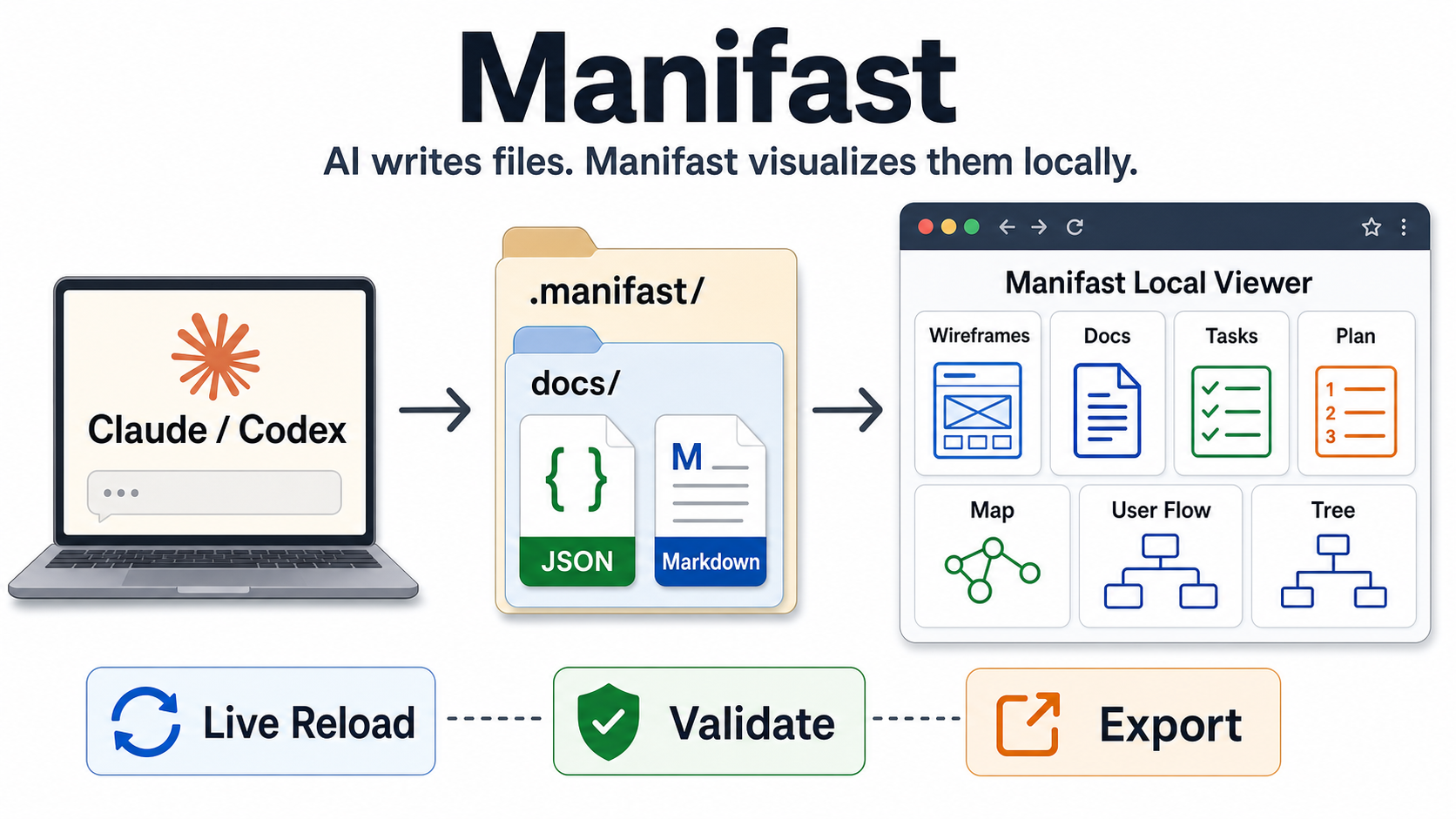
v1.3.3 · version history in CHANGELOG.md · working on Manifast's own code? see CLAUDE.md
How it works: an AI coding agent (Claude Code
or Codex) writes structured files into a
.manifast/ folder → Manifast renders them as live views in your browser → edit (or let
the agent edit) and the view live-reloads. The agent authors; the app only
visualizes — it never calls an AI itself. You need one of those agents to author
content, but Manifast itself is just a local viewer.
Claude Code / Codex write structured files into a .manifast/ folder (wireframe
JSON, PRD/spec Markdown, task/plan JSON, and diagram JSON). Manifast renders them
as a live wireframe canvas, doc viewer, kanban board, roadmap,
relationship map, user-flow view, and feature-tree view — with
live reload when the agent edits a file, light/dark themes + accent
colors, and export to PNG/SVG/HTML/JSON/Markdown/ZIP. Fully local, personal,
no accounts, no database, no AI calls.
The app never writes your files, with two scoped exceptions: manifast init
(scaffolds the workspace and refreshes Manifast-managed skill files without
overwriting your own content) and the
Document management feature, which writes only doc
frontmatter (uid + status/metadata, never the body). The single source of
truth is the .manifast/ folder; the server just reads, validates, and serves it.
Screenshots
| Docs | Tasks |
|---|---|
|  |
|  |
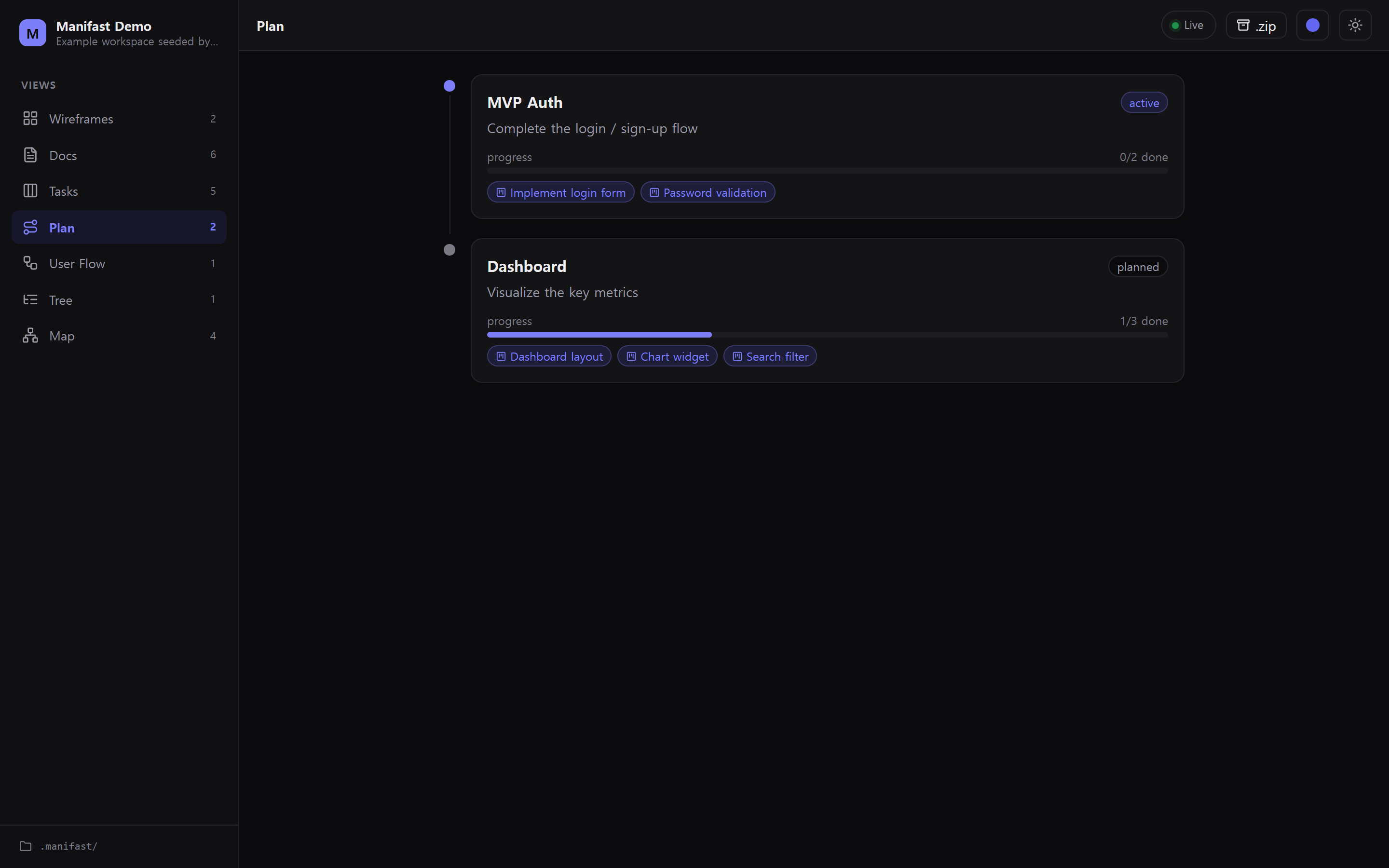
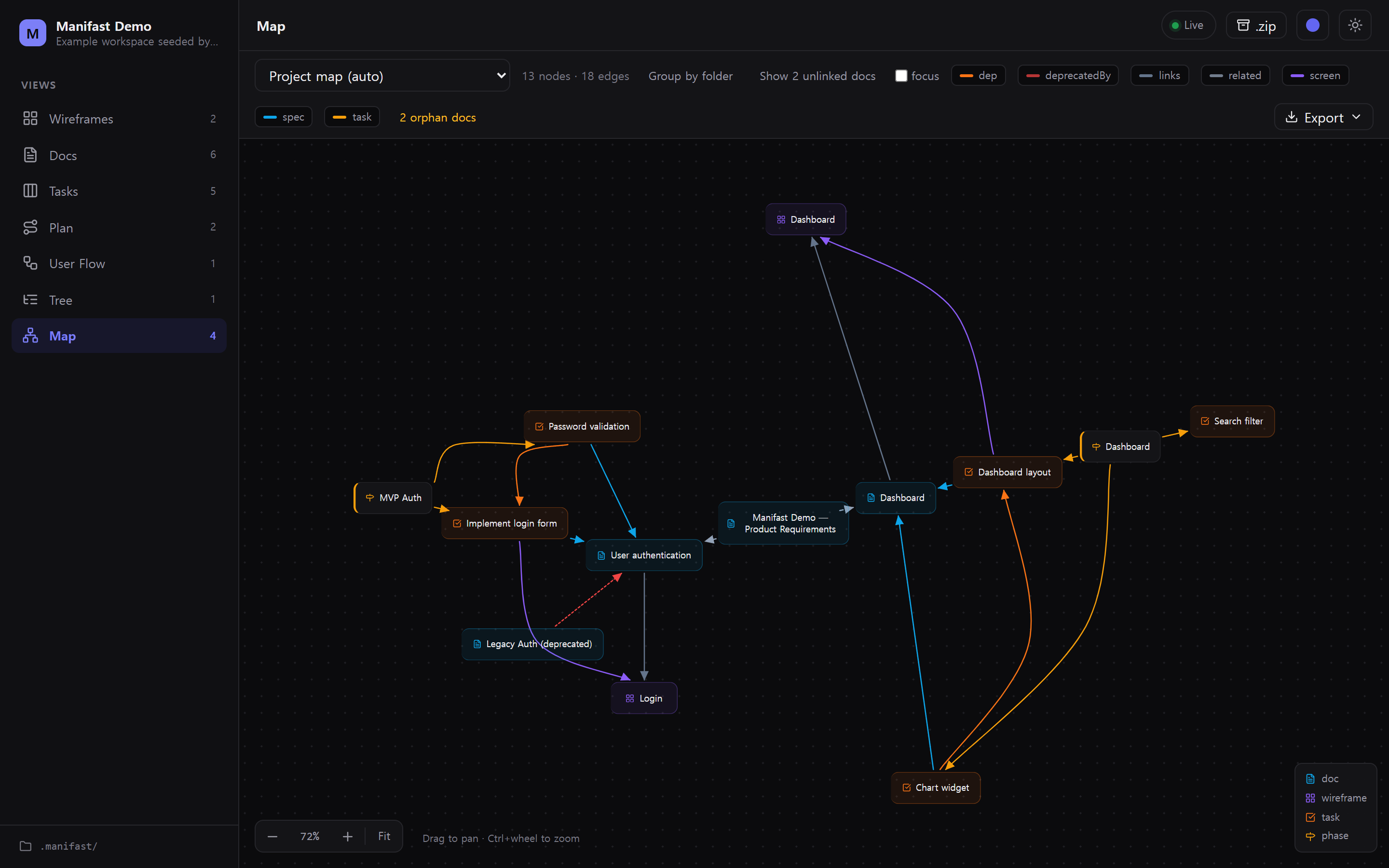
| Plan | Map |
|
|
| Plan | Map |
|  |
|  |
|
Requirements
- Node.js ≥ 20 (developed/tested on Node 22)
- No API keys, no network — everything runs on
localhost.
Install
Install the CLI globally from npm:
npm install -g manifast   # put the `manifast` command on your PATH
manifast --version
Or run it without installing:
npx manifastBuilding from source? See CLAUDE.md — clone,
npm install,npm run build, thennpm install -g .(bumpversionfirst; the same version reports "up to date" and won't refresh).
Quick start
Prerequisite: to author content you need an AI coding agent installed — Claude Code or Codex. Manifast doesn't write content for you; it visualizes what the agent writes. (Just want to look around first? Skip to the demo below — no agent required.)
# 1) In your project, scaffold .manifast/ and install the agent guide
manifast init

# 2) In the SAME folder, open your agent (Claude Code or Codex) and ask, e.g.
#    "Design a login + dashboard screen and write the PRD."
#    The agent auto-reads .manifast/AGENTS.md (Claude Code also loads the
#    .claude/skills/manifast skill) and writes valid files into .manifast/.
#    You don't copy anything in — the guide loads itself.

# 3) Start the viewer (opens your browser at http://localhost:4317)
manifast
Edit any .manifast/ file (or let the agent edit it) and the matching view
refreshes in ~300 ms — no full page reload.
Just want to see it first? Until an agent writes files, the views are empty — that's expected, not a bug. Load a sample workspace to explore every view right away (no agent needed):
manifast init --example   # seed a demo .manifast/ (never overwrites your files)
manifast                  # explore the wireframe, docs, tasks, plan & diagram views
manifast init --rm-example  # later: remove the demo (keeps anything you changed)
CLI
| Command | Action |
|---|---|
| manifast | Start the server for the current folder and open the browser |
| manifast <dir> | Use <dir> (or <dir>/.manifast) as the workspace |
| manifast init [dir] | Scaffold .manifast/ + install/refresh Manifast-managed agent guides without overwriting user content |
| manifast init --example | Also seed a demo .manifast/ workspace so the views aren't empty (never overwrites your files) |
| manifast init --rm-example | Remove the seeded demo content (keeps any file you edited or added) |
| manifast validate [dir] | Check the workspace against the schemas + links; exits 1 on errors (--strict also fails on warnings) |
| manifast --port <n> | Use a specific port (default 4317; next free port if taken) |
| manifast --no-open | Don't open the browser |
| manifast --help / --version | Help / version |
What init installs
.manifast/
  AGENTS.md                        # LLM-neutral authoring guide
  schema/*.json                    # JSON Schema (generated from the zod source)
  wireframes/  prd/  specs/  tasks/  plan/  diagrams/
.claude/skills/manifast/           # Claude Code skill + checklist/workflow docs
.claude/skills/{brainstorm,write-plan,implement}/
AGENTS.md / CLAUDE.md              # managed Manifast directive block, preserving your text
User-owned text is preserved; Manifast-managed files are refreshed when the
bundled guide/schema changes. Re-running init is safe.
Troubleshooting
- The views are empty. Manifast only renders what an agent has written into
.manifast/; until then the views are blank — that's expected, not a bug. Runmanifast init --exampleto load a demo workspace, or ask your agent to author something. - Port 4317 is already in use. Manifast automatically falls back to the next
free port — check the
manifast running → …line for the actual URL, or pick one withmanifast --port 5000. manifast: command not found. The global install isn't on yourPATH— re-runnpm install -g manifast, or just usenpx manifast(no install needed).
The views
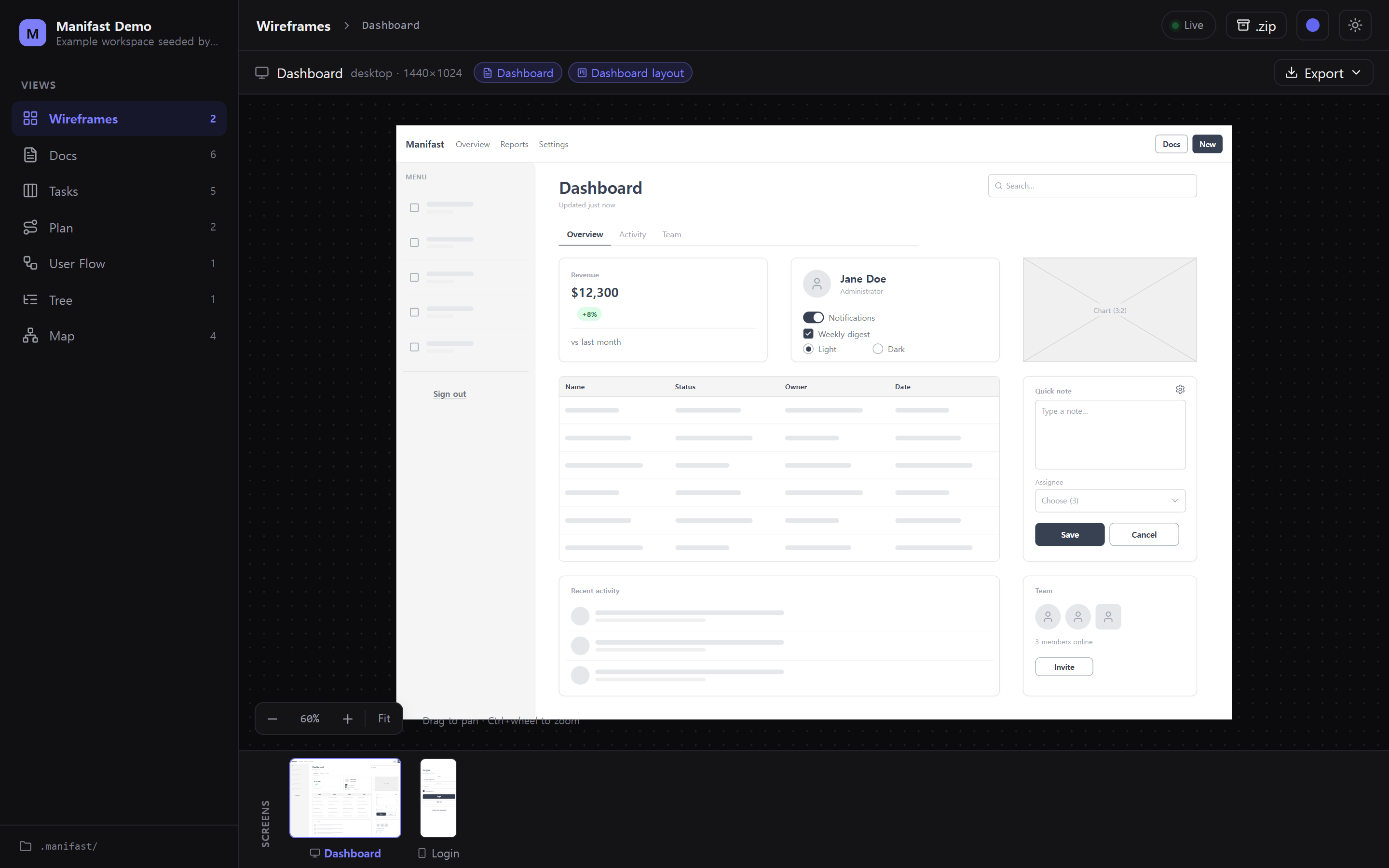
- Wireframes — infinite canvas (drag to pan, ⌘/Ctrl+scroll to zoom, 10–400%,
auto-refit on resize) with a bottom thumbnail strip. Low-fidelity grayscale
render of an 18-node catalog (Box, Text, Button, Input, Textarea, Checkbox,
Radio, Toggle, Select, Image, Avatar, Icon, Divider, Badge, Navbar, Table,
List, Tabs).
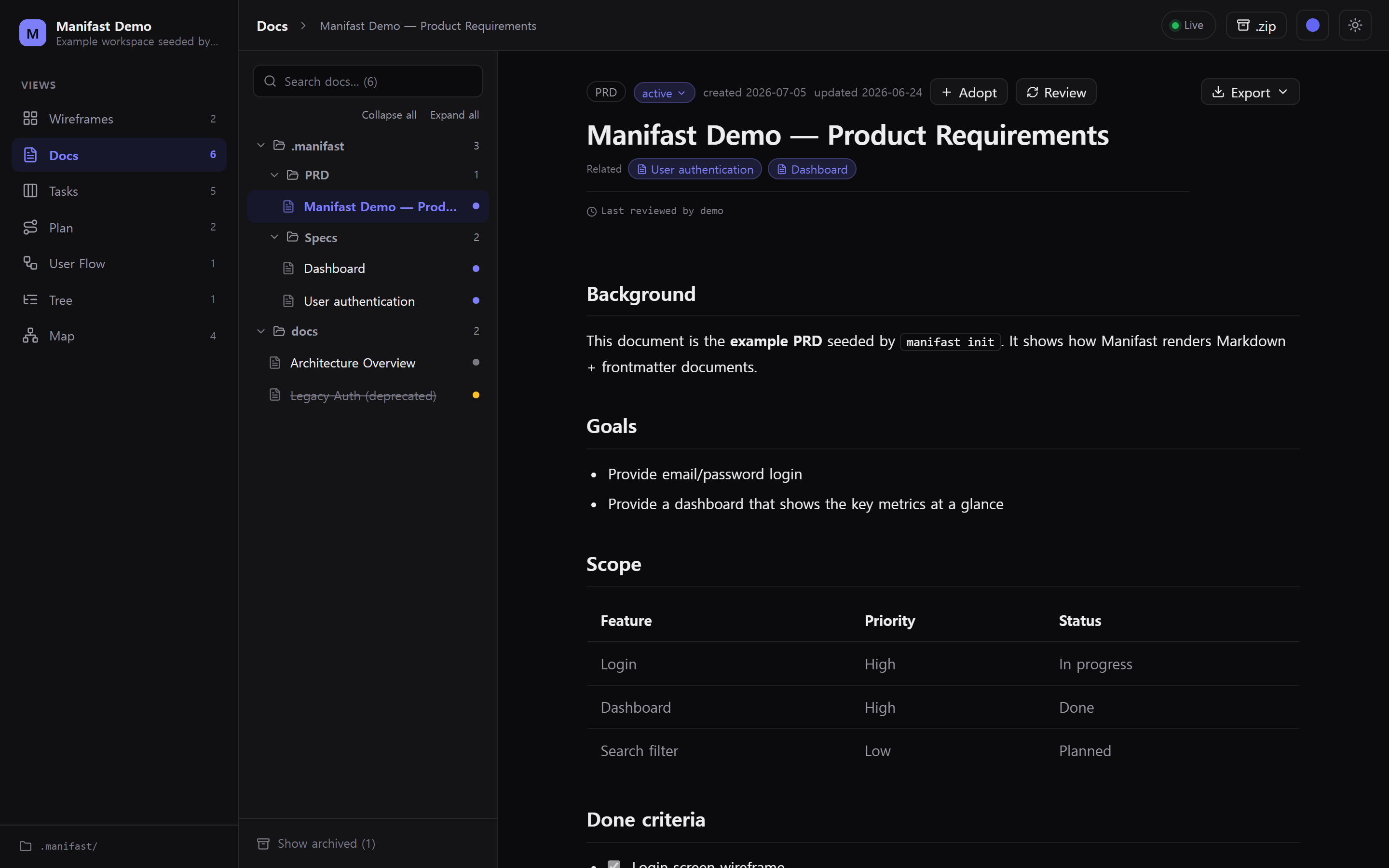
Iconaccepts any lucide name. - Docs — a searchable doc rail + reader; PRD/spec Markdown (GFM: tables, task
lists, highlighted code) with a frontmatter header card, linked-wireframe
thumbnail, task chips, and related / referenced-by doc chips. Relative
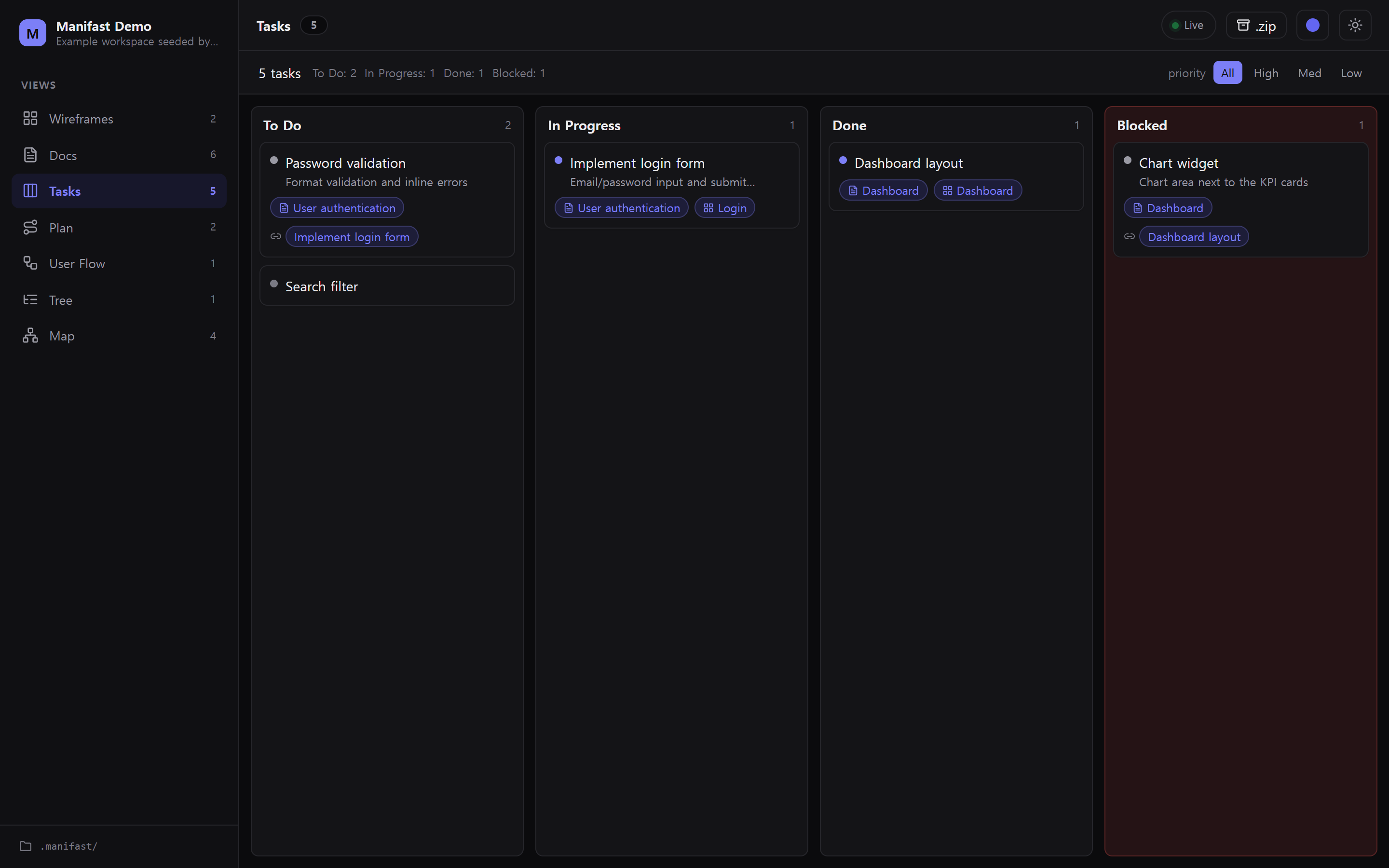
.mdlinks in the body navigate inside the app. - Tasks — fixed 4-column kanban (todo / in_progress / done / blocked) with priority dots, spec/wireframe link chips, and dependency chips.
- Plan — vertical roadmap of phases with per-phase task progress.
- Map — relationship graph of how docs, wireframes, tasks and the plan connect. Nodes are typed (per-kind color + icon + legend), edges are colored and labelled by relation kind, and relationship maps lay out radially (hub + rings) while flows/architecture use directional dagre; see Maps & diagrams.
- User Flow — directed flow diagrams (
kind: "flow") with start/page/action/ decision/end node types (decisions render as diamonds) and labelled edges. - Tree — hierarchy diagrams (
kind: "tree") for feature trees, sitemaps, and requirement breakdowns.
Links between items (spec ↔ wireframe ↔ task ↔ plan) are clickable chips that jump to the target; broken links (missing ids) show greyed-out.
Appearance — toggle light/dark and pick an accent color (indigo / emerald / orange / blue) from the header; both persist locally and default to your OS theme.
Export
Per-view Export menus + a global .zip button in the header:
- Wireframe → PNG (2×), SVG, HTML (self-contained inline-style), JSON (original), all screens → ZIP of PNGs (one click for a multi-screen flow)
- Map / diagram → PNG, SVG (exported against the current theme so edges stay visible), JSON for authored diagrams
- Doc → Markdown (original), HTML (self-contained), Print/PDF (standalone print window — no app chrome)
- Whole workspace → ZIP of
.manifast/
Filenames keep non-ASCII titles; all export runs in the browser and the server only serves files.
Document management (v2)
Manifast also works as a lightweight doc dashboard over your project's existing docs, with lifecycle tracking:
- Multiple sources — docs are discovered from
.manifast/prd,.manifast/specs, anddocs/by default. Configure via.manifast/manifast.json:
Plain{ "sources": { "docs": [".manifast/prd", ".manifast/specs", "docs", "rfcs"], "exclude": ["docs/drafts"] } }.mdfiles (no frontmatter) are ingested too — title comes from the first# H1or filename, dates from the filesystem. - Lifecycle —
status: draft | active | done | deprecated | archivedpluscreatedAt/updatedAt/deprecatedAt/deprecatedBy. Deprecated docs show a strikethrough + successor link; archived docs are hidden behind a toggle (or put them underdocs/archive/). - Stable
uid(move tracking) — click Adopt on a doc to stamp a randomuidinto its frontmatter. The doc is then tracked by thatuidacross folder moves/renames; links keep resolving. (Distinct from the human-friendlyid.) - Relationships & orphans — connect docs to each other / to specs with
frontmatter
related: [id, …](on top of spec→wireframe/tasks and task→spec), or just link them in the Markdown body — relative[text](./other.md)links are auto-detected as relations. The Map flags orphan docs (no link in or out) so loose docs are easy to find and wire up; docs that share asourcescode path count as related too, and root files (README/CLAUDE/AGENTS) are exempt from the orphan warning.
This is the one place the app writes files — and only frontmatter
(uid + status/metadata), never the document body. It's an intentional, scoped
relaxation of v1's read-only rule (see DESIGN.md Appendix B).
Full in-app body editing is not included.
Maps & diagrams (v3)
The Map view visualizes relationships as a node/edge graph. Nodes carry a per-kind color + icon (with a legend), edges are colored and labelled by relation kind, and the layout adapts to the content — relationship maps use a radial hub + rings, hierarchies a tidy tree, flows/architecture directional dagre lanes. Labels are measured for full-width scripts (Korean, CJK) so they don't truncate.
- Auto project map — built by the app from existing links (doc ↔ wireframe ↔
task ↔ plan, frontmatter
related, and Markdown body links) +uid, no file needed. Click a node to jump to that item. - Agent-authored diagrams — when you ask Claude/Codex to "diagram the
architecture" or "map the docs", it analyzes the repo (incl. root
CLAUDE.md/AGENTS.md/README.md, now ingested) and writes.manifast/diagrams/<id>.json(manifast.diagram/1: nodes/edges/groups/kind). Manifast lays it out and renders it — the agent does the analysis, the app only draws (no in-app AI). Architecture "tracking" = re-run analysis → updated diagramgeneratedAt(deep history would need git).
File formats
Authoritative details live in the installed SKILL.md / AGENTS.md and in
.manifast/schema/*.json. In short:
wireframes/<id>.json—schema: "manifast.wireframe/1", a screen with arootnode tree. Each node has a parent-relativeframe {x,y,w,h}. OnlyBoxmay containchildren.prd/prd.md,specs/<id>.md,docs/**/*.md—schema: manifast.doc/1YAML frontmatter (id, one of the documentedtypevalues,title, optionalstatus,wireframe,tasks[],related[],sources[],updatedAt) + Markdown body.tasks/tasks.json—schema: "manifast.tasks/1",tasks[].plan/plan.json—schema: "manifast.plan/1",phases[].diagrams/<id>.json—schema: "manifast.diagram/1",nodes[],edges[], optionalgroups[],kind,layout, and clickablenode.ref.
Invalid JSON/frontmatter never blanks the screen: the offending item shows an error banner; everything else keeps rendering.
Development
npm install
npm run dev      # Vite (SPA + HMR) on :5173 proxying /api + /ws to the API on :4317
npm run build    # gen schema JSON → build SPA (dist/web) → bundle CLI (dist/cli)
npm run check    # headless SSR smoke test of the renderer + views
npm run typecheck
npm start        # run the built CLI (node dist/cli/index.js)
npm run dev watches skill/examples/.manifast by default; set MANIFAST_DIR
to point it elsewhere.
Architecture
src/
  shared/schema/*   zod schemas — the single source of truth
  shared/types.ts   DTOs shared by server + web
  server/           Fastify: workspace discovery + zod validation, REST
                    (/api/workspace, /api/file, /api/files, /api/raw),
                    chokidar watcher (100 ms debounce), WS broadcast (/ws)
  cli/              `manifast` / `manifast init` (mri arg parsing, `open`)
  web/              Vite + React 19 + Tailwind v4 SPA
                    wireframe canvas+renderer (inline-styled, reused for export),
                    docs/tasks/plan views, link graph, live-reload hook
skill/              SKILL.md, AGENTS.md, schema/ (generated), examples/
scripts/            schema generation, server bundling, dev launcher, SSR check
The zod schemas generate skill/schema/*.json via zod-to-json-schema, so app
validation and the agent contract come from one source.
Notable design choices (where DESIGN.md left it open)
- shadcn-style, minimal: lightweight Tailwind components (
cn+ cva) instead of pulling the full shadcn + Radix dependency tree — keeps runtime deps small. - chokidar v4 dropped glob watching, so the watcher watches the
.manifast/directory recursively and filters paths (dotfiles ignored,awaitWriteFinish). - Wireframe nodes render with inline styles, so the exact same DOM powers the on-screen canvas, the PNG/SVG (html-to-image), and the self-contained HTML serializer.
- YAML parses unquoted dates (
updatedAt: 2026-06-24) toDate; the server normalizes them back to strings so frontmatter matches the schema. - Export is per-view; the whole-workspace ZIP is a single global action.
- Dev runs Vite + the API server via a small shell-free Node launcher
(
scripts/dev.mjs) so it works cross-platform.
Constraints (by design)
No authentication, no database, no cloud, no in-app Anthropic/MCP calls. Document
authoring is the agent's job; the app's only writes are doc frontmatter uid +
status/metadata (the v2 doc-management feature above) — never the document body,
and never wireframes/tasks/plan (those stay read-only).