
mano-plan
v1.1.1
Published
Installer for Mano — a fast planning loop for AI-assisted development: plan in small phases and validate each assumption before it becomes code, with the human in control at every step.
Downloads
291

Maintainers
 ceceppa
Readme
Mano
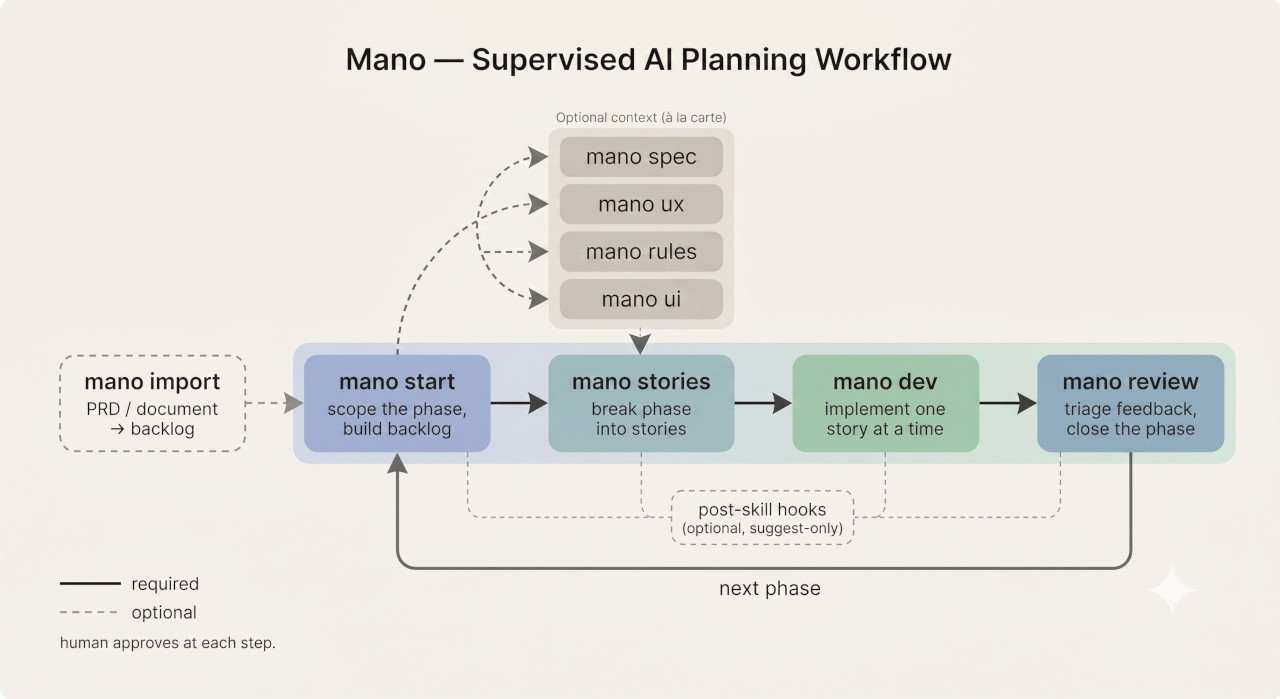
Mano is a fast planning loop for AI-assisted development.
Plan in small phases and validate each assumption before it becomes code. You stay in control of the direction — correcting course at the brief, not after dozens of tasks have already shipped.
Mano is built on a simple assumption: software projects rarely move in a straight line. Feedback, testing, and technical discovery invalidate early assumptions. So the goal isn't a perfect upfront plan — it's a tight loop where each small phase is scoped, reviewed, and corrected before the next one starts. You catch the wrong turn early, while it's still cheap to change.
Each phase breaks into self-contained stories an agent implements one at a time. On greenfield work this keeps the build loop focused — but the point throughout is that you approve the direction at every seam. Mano never hands the wheel to an agent that generates everything and asks once.
Important: Mano is not a compiled CLI tool, a deterministic software framework, or an autonomous planning system. It is a set of skills, templates, and instructions that rely entirely on your AI agent's context window. You, the human, are the ultimate enforcer of scope, context, and quality.
Installation
Run this in your project's root directory:
npx mano-plan installThis installs Mano into your project:
_mano/— the skills, templates, hooks, and workflow Mano reads at runtimeAGENTS.md— the agent contract, dropped at your project root (always)CLAUDE.mdand.cursorrules— optional editor entry points; the installer asks which you want
Pin a version with npm's own syntax:
npx mano-plan@latest install     # newest published version
npx [email protected] install      # a specific version
Updating: re-run npx mano-plan install in the same project. Existing files are left untouched — your edits are safe. Use --force to overwrite Mano's files with the newer versions, or --yes to accept defaults without prompts.
Once installed, type mano in your AI IDE's chat to see available commands, or mano start to begin.
Core Principles
Human judgment stays in control
Mano supports engineering judgment; it does not replace it. The AI may challenge vague ideas, surface gaps, suggest defaults, and help decompose work, but the human owns the final decisions.
Adaptive planning beats predictive planning
Mano expects plans to change. Artifacts should evolve when real feedback, implementation constraints, or better understanding invalidate earlier assumptions. Change is a normal part of the workflow, not a failure of planning.
Low-cost adaptation
Mano optimizes for reducing the cost of changing direction. Small phases, short tickets, focused context, and lightweight artifacts make it easier to update the plan without rewriting a large pre-planned system.
Planning compression
Mano deliberately keeps planning surface area small. Use the minimum artifacts needed to make the next phase clear enough to build. Do not generate specs, UX docs, rules, or UI guidance just because they exist as actions.
AI as a thinking partner
Mano should help you think more clearly, not encourage passive acceptance. Skills are expected to challenge abstraction, short-sighted decisions, missing assumptions, and overloaded scope.
Commands
| Command | What it does |
|---------|-------------|
| mano | Show available commands and current status. |
| mano status | Scans output folder. Where am I? What's next? |
| mano import [doc] | Turn an existing PRD or document into a backlog, then stop. Run mano start afterwards to scope the first phase. |
| mano start | Scope a new project or phase. This is a dedicated command, not part of mano [action]. (mano start) |
| mano [action] | Run a planning action: spec, ux, rules, ui, stories, review. Any order, when its inputs are useful. |
| mano dev | Implement the next pending story for the active phase. The bridge from a finished stories/ folder into code. Follows the implementation contract in AGENTS.md. |
| mano continue | Auto-run only when there is a single obvious next planning step. If several planning actions are still reasonable, it stops and shows the options instead of picking the shortest path. |
| mano help [skill] | Show what a skill does and when to use it. |
mano dev is the named path into implementation, but you don't have to remember the command — plain phrasing like "implement the next story" routes to the same flow. Either way the agent follows the implementation contract in AGENTS.md.
mano dev is a generic implementer, not a language specialist. If you have a dedicated coding skill (e.g. a C++ specialist), you can have it implement instead — just point it at the contract: something like "@cpp-pro, implement the next pending story following the 'Implementing a story' contract in AGENTS.md." The specialist then writes the code under the same rules as the default implementer (AC only, one-line done, stop on a gap rather than inventing). The key is the contract reference — invoking a specialist with a bare "implement the next story" skips the discipline that keeps implementation supervised and on-scope.
Actions are independent, not sequential. There is no fixed conveyor belt, but not every action is equally useful at every moment. Each skill checks for required context first: some can proceed with partial inputs, others warn and redirect you to the action that creates the missing artifact.
When a user types a Mano command in their AI IDE's chat interface, the agent is instructed to carry out that planning command directly. Since this relies entirely on the agent's context window and instruction-following capabilities, you must actively steer the agent if it hallucinates state or breaks character.
If any command launches the wrong skill, use the hyphenated form. Every Mano action also exists as an exact skill name
mano-<action>(mano-start,mano-review,mano-dev, …). If the spaced form ever invokes a built-in or third-party skill that shares the action word (a code-review tool grabbingmano review, a dev server grabbingmano dev), re-run it hyphenated — the hyphenated name matches a Mano skill and nothing else. Full dispatch rule:workflow.md.
mano [action] handles everything — first run, discussion, and regeneration. Run it again on the same action to discuss changes or regenerate output.
Skills
| Command | Role | File |
|------|------|------|
| mano import | Decomposes an existing PRD/document into a backlog, then stops | skills/import.md |
| mano start | Scopes the idea, populates the backlog (from conversation), proposes phases | skills/start.md |
| mano rules | Defines and updates project rules — components, patterns, architecture | skills/rules.md |
| mano spec | Translates the phase brief into tech spec | skills/spec.md |
| mano ux | Defines UX flows — screens, navigation, user interactions | skills/ux.md |
| mano ui | Establishes visual language and component guide | skills/ui.md |
| mano stories | Breaks specs into implementable stories | skills/stories.md |
| mano review | Phase review, triage, closes the phase | skills/review.md |
| mano dev | Implements the next pending story (thin pointer to the AGENTS.md contract) | skills/dev.md |
The user owns scope, priorities, and product tradeoffs. mano spec can recommend concrete technical defaults and mano ui can set a concrete visual direction, but both are always overridable.
How it works: The "À La Carte" Philosophy
Mano is strictly à la carte and functions as a Just-In-Time (JIT) planning system.
You only pay the cognitive tax for what you are building today. Two planning actions are usually required to execute a phase: mano start to scope the work, and mano stories to generate the tasks — then mano dev to implement each story, and mano review to close the phase. Every other action (spec, ux, rules, ui) is optional context tightening.
The optional actions can be skipped; mano review cannot. Review is what closes a phase — it is the only action that moves the phase's backlog items off in-phase-[N] to resolved, and mano start will not scope the next phase until the current one is closed that way.
Optional actions can be created now, reused from existing work, copied from a similar project, adapted from external inputs, or skipped entirely when they would add noise. Only run them when the current phase needs more clarity, constraints, or alignment. You never run the whole pipeline "just in case."
Skipping is not free, though. "Optional" means you decide where the decision gets made — not that the decision goes away. If a phase genuinely needs a constraint that a skipped artifact would have captured (a folder convention, an API contract, a visual rule), the coding agent doesn't stop and ask — it invents one on the spot, per-story, with no record. That's fine when the choice is inconsequential and bad when it isn't: skip an artifact when its decisions are obvious or don't matter yet; run it when leaving those decisions to an implementer would let them drift. Where it's relevant, a skill's next-action recommendation will note what an absent artifact leaves unpinned, so you can choose deliberately rather than by omission.
Human approval before phase briefs
On a new project, mano start populates the backlog (from conversation), suggests a candidate first phase, and then stops. It must not create phase-[N]/phase-brief.md, create stories, or mark backlog items as in-phase-[N] until the human explicitly approves the phase scope. If you're starting from an existing PRD or document, run mano import <doc> first — it decomposes the document into the backlog — then mano start to scope the phase.
Example fuller pass
- (Optional)
mano import <doc>→ decompose an existing PRD/document into the backlog first. Skip if you're starting from a conversation. mano start→mano startscopes input, populates the backlog, suggests the next phase, and waits for approval before writing the phase brief.mano spec→mano specwrites tech spec.mano ux→mano uxdefines UX flow (for user-facing phases).mano rules→mano rulesdefines project rules (recommended for new projects).mano ui→mano uicreates or updates design brief + preview.mano stories→mano storiesbreaks into stories.mano dev→ implement the next pending story (repeat until the phase is built). Ship. Gather feedback.mano review→mano reviewtriages feedback into the backlog, writes the review log, closes the phase.
This is an example path, not a mandatory conveyor belt. After any step, choose the next action from the artifacts that are still missing or need revision.
Minimal phase
mano start→mano startscopes input, creates/updates the backlog, and suggests the next phase.- Approve the phase brief scope.
mano stories→mano storieswrites stories directly.mano dev→ implement the next pending story, repeat until the phase is built.mano review→mano reviewtriages feedback and closes the phase. Required — this is what lets the nextmano startproceed.
Use the minimal path when the phase is already clear and extra artifacts would add noise instead of signal. The optional planning actions are what you skip here; review still closes the phase.
Escape hatch
After a review, mano review closes the phase. If you don't need Mano for the rest — that's fine. A tool that never lets go is a dependency, not a tool.
Mid-build feedback
Requirements change during implementation. You don't have to finish the phase to adjust:
- Found a bug or missing feature? Use
mano stories—mano storieswill create a new story, numbered to reflect ship order (e.g.story-3a-…, where the letter marks insertion position, not a sub-task of story 3), and ask whether to implement it now or queue it for later. - Need to change scope? Use
mano startto talk tomano start— update assumptions, adjust scope, flag stories that turned out wrong. - Need to regenerate specs or stories? Run
mano [action]again — the skill will check what exists and offer to update or regenerate.
For mano spec, rerunning the command is also how you sync the planning doc back to reality after project setup. Once the project has a real manifest and lockfile (any language — package.json/package-lock.json, pnpm-lock.yaml, yarn.lock, bun.lockb, Cargo.lock, go.sum, requirements.txt/uv.lock, CMakeLists.txt, etc.), or anytime you add/remove/replace a library, run mano spec again so mano spec can reconcile _mano_output/tech-spec.md with the actual installed toolchain.
The pipeline doesn't require you to finish before course-correcting.
Output
_mano_output/
├── backlog.md               ← future work, deferred items, review follow-ups (created by `mano import` or `mano start`, owned by `mano start`, updated by `mano review`, editable by you)
├── tech-spec.md             ← project-wide, cumulative (`mano spec` extends per phase)
├── ux-flow.md               ← project-wide, cumulative (`mano ux` extends per phase)
├── design-brief.md          ← project-wide visual language (if generated)
├── design-preview.html      ← visual preview (if generated)
├── project-rules.md         ← optional; created by `mano rules` or provided manually when project rules are useful
├── reviews.md               ← review log; `mano start` reads this when shaping later phases
├── phase-1/
│   ├── phase-brief.md       ← problem, vision, scope for this phase
│   └── stories/
│       ├── README.md         ← story index
│       └── story-*.md        ← one file per story
├── phase-2/
│   └── ...
└── ...
Each phase brief is self-contained — problem, vision, design principle, scope, assumptions, and risks. Technical decisions and UX flow live at project level and grow only when they are useful. Future work lives in backlog.md. Artifacts are living working documents, not permanent contracts.
Planning artifacts live under _mano_output/. The only framework scaffold written outside that folder is AGENTS.md at the project root, copied during mano start so coding agents know where Mano artifacts live.
Mano's installed runtime layout lives under _mano/ inside the user's project. This repository contains the framework source files at the root for authoring, but the contract exposed to coding agents in real projects uses _mano/skills and _mano/templates.
A Warning on State Detection
Mano tells the AI to treat the filesystem as the source of truth, "scanning" _mano_output/ to determine the current project state. However, AI agents do not natively scan files unless those files are injected into their context window. If the agent confidently hallucinates a wrong state, it is because it lacks context. You must explicitly @-mention the relevant _mano_output/ files to ground it back in reality.
Customisation
You can override or guide the framework's default behavior by adding specific files to your workspace.
1. Project Rules (_mano_output/project-rules.md)
This optional file manages architectural patterns, routing formats, workflow preferences, and other recurring constraints when the project needs them.
- Creation: Created by running
mano rules, copied from another project, or written manually.mano startdoes not seed this file automatically. - Updates:
mano rulesis the primary command for updating this file. Other actions may respect it when present, but optional artifacts are not created just to complete a default structure.
Spec vs Rules: What's the difference? Mano enforces a strict separation of concerns to prevent AI context bloat:
tech-spec.mdis the WHAT (The Blueprint): It defines libraries, data schemas, and interface contracts (e.g., "We will use PostgreSQL, and the/usersendpoint returns JSON").project-rules.mdis the HOW (The Building Codes): It defines architectural patterns, folder structures, and styling guidelines (e.g., "All API handlers must be wrapped incatchAsync, and we separate UI logic from data fetching").The quick test: the spec answers a reviewer's question — "is this the right technical approach?" Rules answer a contributor's question — "where do I put this file and what do I name it?" A decision the spec already settled (which library, which data format) becomes a rule the moment someone has to act on it consistently (where those files live, what they're named). Folder structure, naming, and file-placement conventions are always rules, never spec — even before
project-rules.mdexists.
2. Bring Your Own Artifacts
Because Mano operates on a strictly "à la carte" file-based system, you can completely skip a skill by providing your own documentation. If you already have a spec or design, simply create the corresponding file in _mano_output/ and Mano will read and respect it automatically:
design-brief.mdtech-spec.mdux-flow.mdproject-rules.md
Reality of Context
Mano does not create true agent isolation, persistent memory, or deterministic workflows.
LLMs only reason over the context currently provided to them. Artifact boundaries, role specialization, and phase separation are maintained through user discipline and selective context exposure — not hard enforcement.
Mano reduces planning entropy by encouraging bounded reasoning scopes and structured project artifacts, but humans remain responsible for:
- validating outputs
- resolving contradictions
- detecting stale assumptions
- deciding what context to expose
This is not a fully autonomous system. It is a collaboration framework for guiding LLM-assisted planning work.
Artifact Trust Hierarchy
When artifacts conflict, prefer sources in this order:
- Explicit human decisions
- Current phase brief
- Project rules
- Technical specifications
- UX/UI documentation
- Generated stories or tasks
Lower-level artifacts should be regenerated or updated when they drift from higher-priority decisions.
Artifact Drift
Project artifacts may become outdated as decisions evolve.
Artifacts can exist in four states:
- Current — aligned with latest project direction
- Stale — partially outdated but still useful
- Conflicting — contradicts newer decisions
- Deprecated — retained only for historical reference
When major decisions change, regenerate downstream artifacts rather than patching inconsistencies incrementally.
Aligning drift
Drift is the normal cost of staying in control: as you change direction, edit code, or rescope, the artifacts that described the old state fall behind. Mano treats this as expected, not a fault.
Re-running the relevant skill (for example mano rules) can align artifacts that have drifted — updating a stale reference to match what its source-of-truth artifact now says, rather than restating the same fact in several places. Each shared value or decision has one owning artifact; the others reference it, so alignment means re-pointing the references, not copying the value around.
Alignment is a supervised step, not an automatic sync. When a value or decision conflicts across artifacts — the same fact stated differently in two places — Mano surfaces the conflict for you to resolve instead of silently picking one. A reconciliation you did not approve is not a success. For small drift, alignment is the low-cost fix; for major decision changes, prefer full regeneration (above).
Common Failure Modes
Mano cannot eliminate typical LLM failure patterns.
Watch for:
- stale artifact assumptions
- contradictory project documents
- speculative architecture growth
- overconfident recommendations
- context leakage between planning phases
- unnecessary process expansion
When outputs become unfocused or contradictory, reduce context scope and regenerate artifacts from the latest trusted decisions.
Project-Level Customization
Mano is intentionally small. The skills, templates, and workflow documents in _mano/ describe how Mano thinks, not how your specific project behaves. When you run Mano on a real project, you'll discover constraints, conventions, and integration friction that are specific to your stack, your tooling, or your collaborating skills. Those belong in your project's AGENTS.md, not in Mano itself.
Common places where project-specific rules earn their place:
Output discipline for third-party skills. Specialist skills (language experts, code reviewers, accessibility auditors) often have their own output habits — verbose verification notes, scratch test files, narrative explanations appended to artifacts. These habits make sense for one-shot interactions and become noise in long-running projects. AGENTS.md is the right place to constrain them.
Tooling conventions. Package manager choice, test framework, build commands, dependency installation patterns. These are project decisions, not framework decisions. Recording them in AGENTS.md keeps implementing agents consistent across stories without bloating Mano's own files.
Implementation house style. Naming, file placement, framework-specific patterns. Some of these belong in
_mano_output/project-rules.md(wheremano rulescaptures repeatable conventions); some belong in AGENTS.md (where coding agents read at session start). The line is roughly: rules that constrain what gets built go in project-rules; rules that constrain how agents behave during implementation go in AGENTS.md.Integration with external systems. If your project uses an external review skill, a specific testing service, a particular deployment flow, document how Mano-shaped work hands off to those systems. Don't try to make Mano itself aware of them.
The pattern is: Mano stays general; your project's AGENTS.md absorbs the specifics. This keeps Mano upgradable across projects and keeps your project's particular constraints from drifting into framework files where they don't belong.
Human-Readable Artifacts
Mano artifacts are optimized for humans first. They should be easy to read, edit, trim, or replace manually without rerunning a skill. Skills accelerate planning, but they do not own the documents.
The backlog may contain a short, optional Core Product Principles section for durable product values that should survive across phases — expectations such as speed, simplicity, interaction feel, accessibility level, or tone that are easy to lose during iterative planning. Keep it small and human-editable; it does not need a separate process or artifact.
mano start owns this continuity and copies only the principles relevant to the current phase into the phase brief. Downstream skills operate from the phase brief and explicitly provided context rather than reading the backlog for general project memory.
How Skills Stay Disciplined
A few design principles keep Mano's skills predictable — especially with smaller models — without adding process.
These are not extra steps. They are lightweight guardrails baked into how each skill behaves.
Anti-Rationalization
Skills should not justify weak outputs with excuses such as:
- "This is enough for now" when important ambiguity remains.
- "The user can figure it out later" when a decision affects the current phase.
- "This is obvious" when the artifact does not state the reasoning clearly.
- "We can add detail later" when missing detail blocks implementation.
- "The model probably knows" when context was not provided.
When a skill cannot produce a useful artifact from the available context, it should say what is missing, explain the tradeoff, and offer a smaller useful next step.
Exit Criteria
Artifacts should have simple "good enough" checks.
Exit criteria are not approval gates. They help humans quickly judge whether an artifact is usable, incomplete, or too vague.
A Mano artifact is usually good enough when:
- it supports the current phase
- it is readable and editable by a human
- it avoids unnecessary future planning
- it exposes important assumptions
- it gives the next skill or developer enough context to continue
Progressive Disclosure
Skills should load or request only the context needed for the current task.
Prefer:
- phase brief before full backlog
- relevant artifact sections before entire documents
- explicit provided context before inferred project memory
- small targeted follow-up questions before broad discovery
Avoid pulling every artifact into every skill. Mano should preserve useful reasoning quality by keeping context bounded.
Optional Post-Skill Hooks
Mano can support optional post-skill hooks through a local hooks/ folder.
Hooks are suggest-only. They do not run automatically.
A hook becomes active only when an .example.md file is copied or renamed without .example:
hooks/post-spec.example.md  -> inactive
hooks/post-spec.md          -> active
When an active hook exists, Mano mentions it after the related skill finishes and asks whether to run it.
Hooks are useful for optional external review, validation, or specialist checks that are specific to your project.
Default example hooks include:
hooks/post-start.example.md
hooks/post-spec.example.md
hooks/post-rules.example.md
hooks/post-ux.example.md
hooks/post-ui.example.md
hooks/post-stories.example.md
hooks/post-review.example.md
To use a project-specific external check, copy an example hook and replace [external-review-command] in the suggested prompt with the command or skill you want to run.
Mano should not:
- run hooks automatically
- print the hook's suggested prompt unless asked
- mention specific external skill names in generic output
- modify files through a hook unless explicitly asked
Hooks are best run after the human reviews the generated artifact. This avoids stale validation when the artifact is edited after generation.