
mark-my-image
v0.1.3
Published
A React component library for image annotation.

Maintainers
 gaurav812
Readme
🌟 Features
- Pen & Highlighter — Freehand drawing with customizable colors and stroke widths.
- Lines & Arrows — Draw straight lines or arrows for precise markup.
- Shapes — Add rectangles and circles (filled or outlined).
- Text Tool — Insert and edit text directly on your image.
- Image Upload — Overlay additional images on the canvas.
- 🎨 Rich Styling Options
- Tailwind-based color palette
- Adjustable stroke widths and styles (solid, dashed, dotted)
- ⚙️ Core Controls
- Undo/Redo
- Delete objects
- Select, move, scale, and rotate annotations
- Draggable Toolbar — Move the toolbar anywhere you like.
- 💾 Export — Save annotated images as PNG, JPEG, or SVG.
🖼️ Screenshots & Demo
Toolbar & Annotation Tools
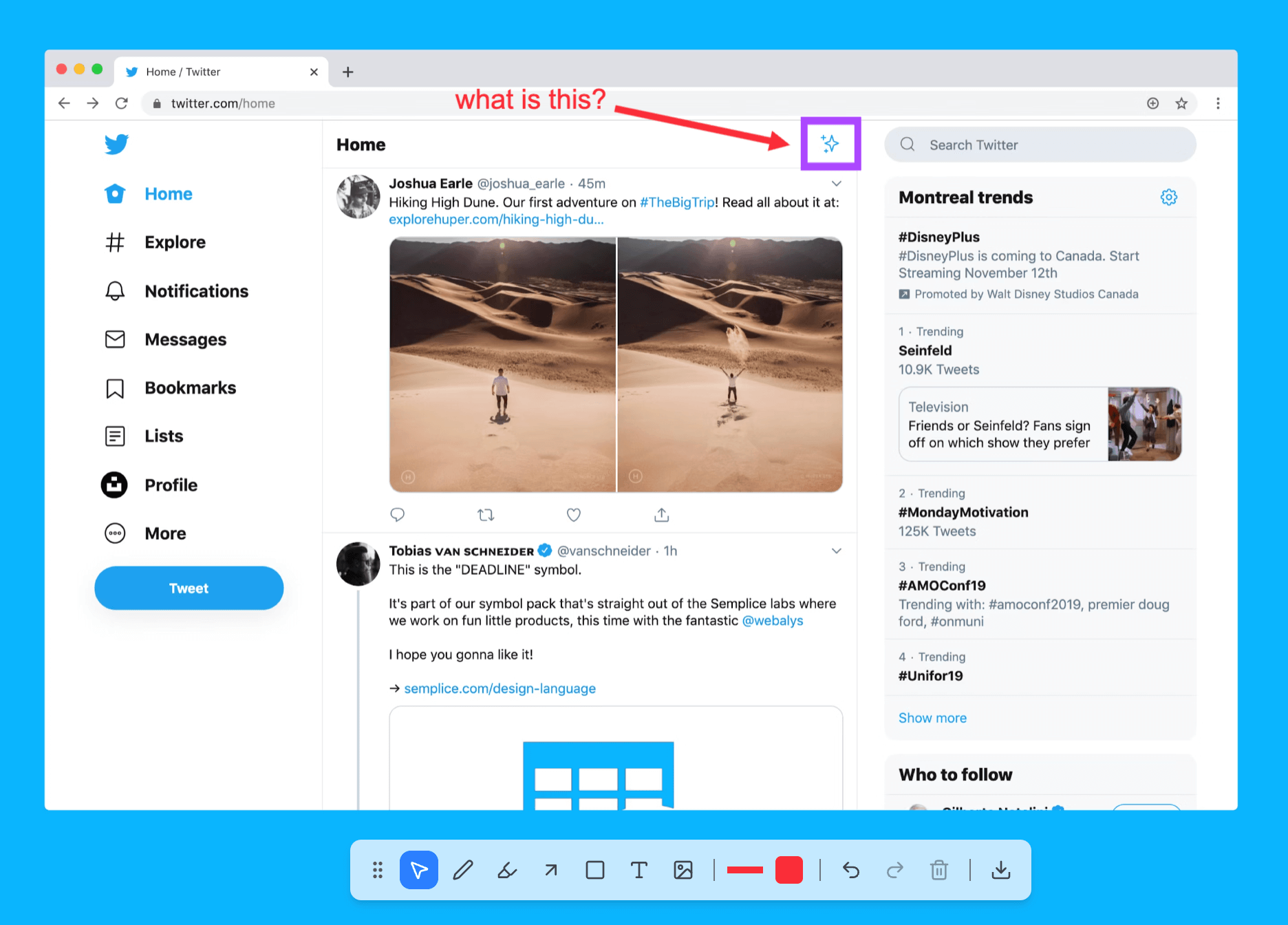
Example
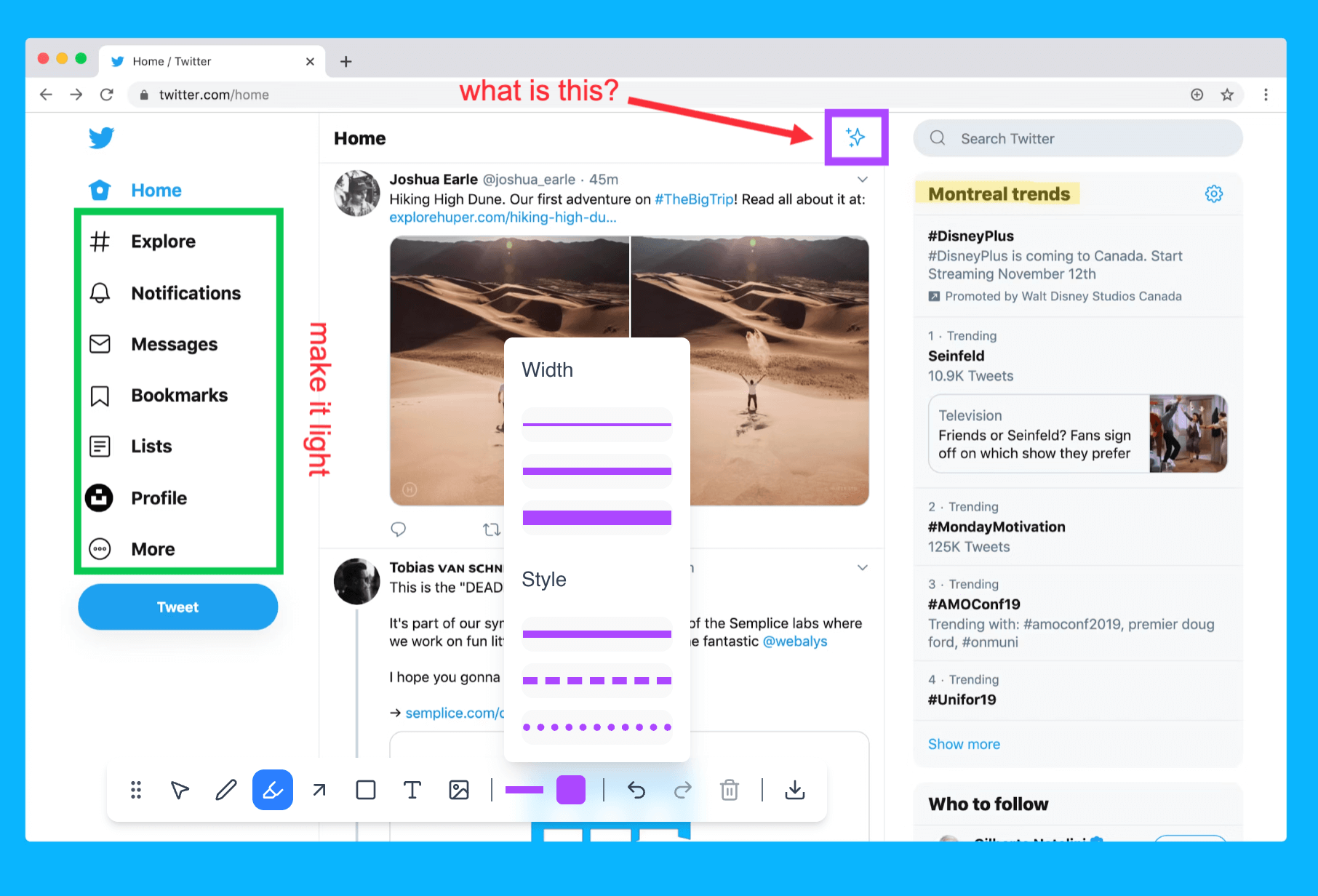
Live Demo
Try it out: Live Demo Link
🧩 Basic Usage
import React, { useRef } from "react";
import { AnnotationTool } from "mark-my-image";

function MyComponent() {
  const annotationToolRef = useRef(null);
  const screenshotUrl = "/path/to/image.png";

  const handleExport = () => {
    const dataUrl = annotationToolRef.current?.getCanvasDataURL("png");
    if (dataUrl) {
      const link = document.createElement("a");
      link.href = dataUrl;
      link.download = "annotation.png";
      link.click();
    }
  };

  return (
    <div style={{ width: 800, height: 600 }}>
      <AnnotationTool ref={annotationToolRef} imageSource={screenshotUrl} />
      <button onClick={handleExport} style={{ marginTop: 10 }}>
        Export as PNG
      </button>
    </div>
  );
}

export default MyComponent;
⚙️ Component API
AnnotationTool Props
| Prop | Type | Default | Description |
| ------------------------ | ---------------------------------------------------------------------------------------------------------- | ----------------------------- | ----------------------------------------------------- |
| imageSource | string \| Blob \| File | Required | Source image (URL, File, Blob, or data URI). |
| ref | React.Ref<AnnotationToolRef> | — | Access imperative methods (e.g., getCanvasDataURL). |
| className | string | "" | Custom CSS class for the container. |
| style | React.CSSProperties | {} | Inline styles for the container. |
| enabledTools | EnabledTool[] | DEFAULT_TOOLS | Array of tool names to show in the toolbar. |
| initialToolbarPosition | { top?: string \| number; left?: string \| number; right?: string \| number; bottom?: string \| number } | { bottom: 20, left: "50%" } | Initial toolbar position. |
EnabledTool Type
type EnabledTool =
  | "select"
  | "pen"
  | "highlighter"
  | "line"
  | "shape"
  | "text"
  | "image"
  | "color"
  | "stroke"
  | "undo"
  | "redo"
  | "delete"
  | "export";
Ref Methods
getCanvasDataURL(format?, options?)
Export the annotated image as a data URL.
| Parameter | Type | Default | Description |
| -------------------- | -------------------------- | ------- | ---------------------------- |
| format | "png" \| "jpeg" \| "svg" | "png" | Output format. |
| options.quality | number | 0.92 | JPEG quality (0–1). |
| options.multiplier | number | 1 | Scale multiplier for export. |
Returns: string | undefined — Base64 data URL (e.g., data:image/png;base64,...).
🧪 Local Development & Testing
Because mark-my-image is a React component library, it needs to be tested inside another React application (like your main app or a demo project).
Here’s how you can set up local development and test changes quickly:
1. Clone and Install
Clone the repository and install dependencies:
git clone https://github.com/gaurav8trivedi12/mark-my-image.git
cd mark-my-image
npm install
2. Start Development Build
Run the local development build in watch mode:
npm run dev
This keeps the compiled files in sync as you modify the source code.
3. Link the Library Locally
Use npm link (or yarn link) to make your local build available globally:
npm link
Then, in your consumer app (where you want to test the library):
cd ../your-test-app
npm link mark-my-image
This lets your test project use your local version of mark-my-image instead of the npm-published one.
4. Import and Test
In your test app, import the component as usual:
import { AnnotationTool } from "mark-my-image";Start your test app and verify changes live. Any edits you make to the library’s source (while npm run dev is running) will be reflected automatically.
5. Clean Up After Testing
Once done testing, unlink the local package:
npm unlink mark-my-image
npm install mark-my-image
This restores the npm-published version.
🤝 Contributing
Contributions are welcome!
- Fork the repository
- Create your feature branch (
git checkout -b feature/my-feature) - Commit your changes (
git commit -m 'Add my feature') - Push to the branch (
git push origin feature/my-feature) - Open a Pull Request 🚀
Please ensure that:
- Code is formatted with Prettier
- All TypeScript types are valid
- ESLint passes without errors
📄 License
Licensed under the GNU Affero General Public License v3.0 (AGPL-3.0)
with an Attribution Exception.
See LICENSE_SUMMARY.md for full license.
Attribution Exception
You are permitted to use this software in proprietary or closed-source applications without releasing your source code, provided that the "Powered by markmyimage" watermark remains visible and functional in the UI.
Removal of the watermark requires a commercial license: COMMERCIAL_LICENSE.txt.
🧱 Built With
🌟 Acknowledgements
Thanks to the open-source community for inspiration, and to the developers of Fabric.js, Radix UI, and Tailwind CSS for making this project possible.
Made with ❤️ using React and Fabric.js.