
markdown-slides-cli
v1.0.9
Published
Interactive markdown slide presentation with live editing and minimap view

Maintainers
 mohanchinnappan
Readme
📊 Markdown Slides
A powerful, interactive markdown slide presentation tool with live editing, minimap view, and fullscreen and stdin support. Create beautiful presentations from simple markdown files!


✨ Features
- 📝 Markdown-Based - Write slides in simple markdown syntax
- 🎯 Flexible Input - Load from files or stdin (pipe support)
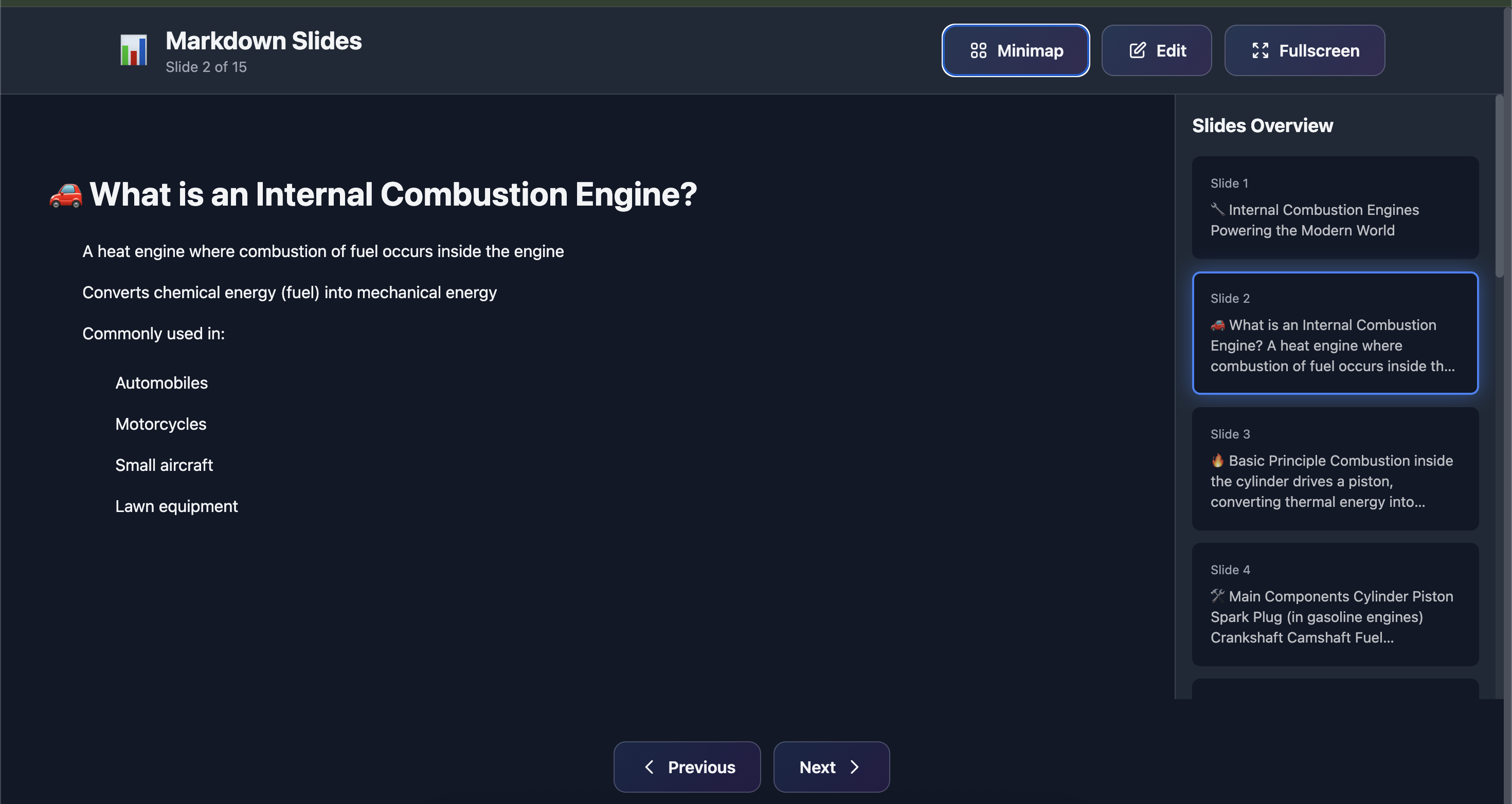
- 🗺️ Minimap View - Navigate slides with thumbnail overview
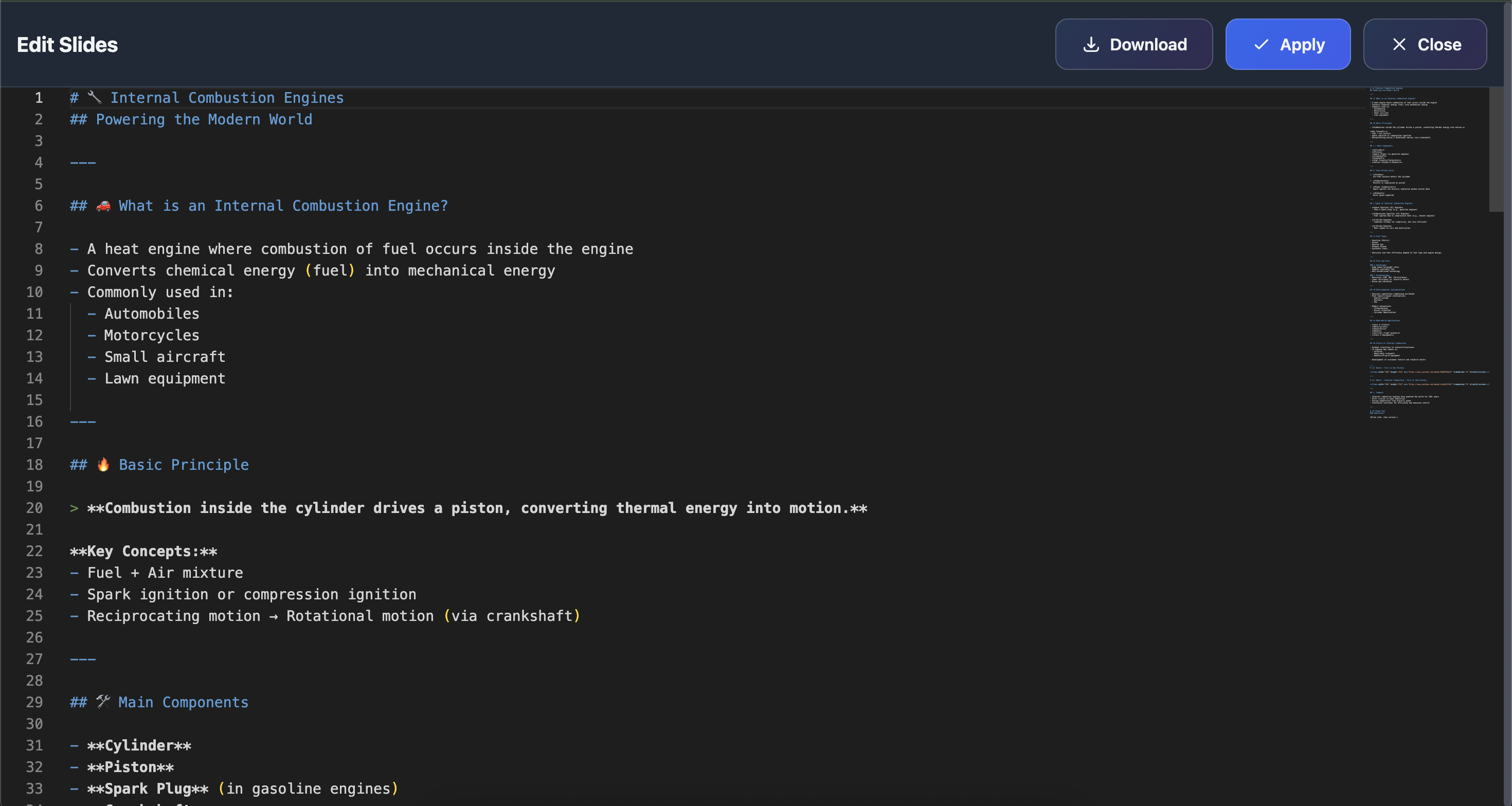
- ✏️ Live Editor - Built-in Monaco editor (VS Code's editor)
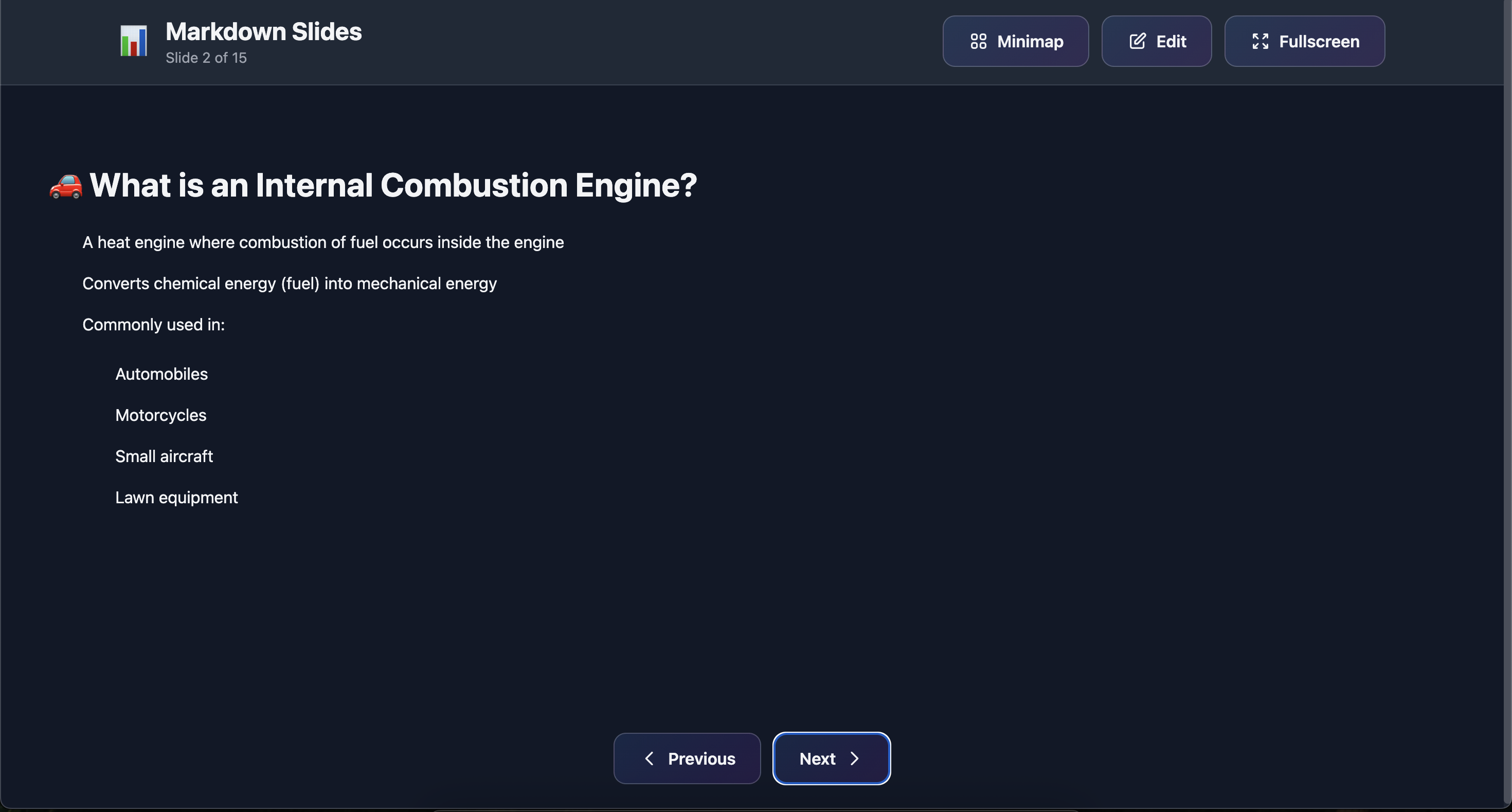
- 🎨 Beautiful Rendering - Full markdown support with syntax highlighting
- 📱 Responsive Design - Works on desktop, tablet, and mobile
- 🎬 Fullscreen Mode - Present without distractions
- ⌨️ Keyboard Navigation - Navigate with arrow keys and shortcuts
- 💾 Export Edited Slides - Download your modified presentations
- 🌙 Dark Theme - Easy on the eyes during presentations
- 🚀 Zero Config - Works out of the box
Screenshots
 )
) )
) )
)
📦 Installation
Global Installation
npm install -g markdown-slides-cliAfter global installation, you can use it anywhere:
markdown-slides -f presentation.md
# or the shorter alias
md-slides -f presentation.md
🚀 Quick Start
1. Create Your Markdown File
Create a file called slides.md:
# Welcome to My Presentation
This is the first slide

---

# Second Slide
- Point 1
- Point 2
- Point 3

---

# Code Example
```javascript
function hello() {
  console.log('Hello World!');
}
### 2. Run the Presentation

**From a file:**

```bash
node markdown-slides.js -f slides.md
Or with global installation:
markdown-slides -f slides.mdFrom stdin (pipe):
# Pipe from a file
cat slides.md | markdown-slides

# Pipe from echo
echo "# Slide 1\n---\n# Slide 2" | markdown-slides

# Using heredoc
markdown-slides << EOF
# Welcome
This is my presentation
---
# Second Slide
More content here
EOF

# Combine with other commands
curl https://raw.githubusercontent.com/user/repo/main/slides.md | markdown-slides
Your browser will automatically open with your presentation!
🎮 CLI Options
| Option | Alias | Description | Default |
|--------|-------|-------------|---------|
| --file | -f | Markdown file path (optional if using stdin) | - |
| --port | -p | Server port | 3457 |
| --title | -t | Presentation title | Markdown Slides |
| --theme | - | Slide theme (dark/light/blue) | dark |
| --help | -h | Display help | - |
Examples
File-based:
# Basic usage
markdown-slides -f presentation.md

# Custom port and title
markdown-slides -f slides.md -p 8080 -t "My Presentation"

# Different theme
markdown-slides -f deck.md --theme blue
Stdin-based:
# From pipe
cat slides.md | markdown-slides

# With options
cat slides.md | markdown-slides -p 8080 -t "My Talk"

# From command output
generate-slides.sh | markdown-slides

# From URL
curl https://example.com/slides.md | markdown-slides
⌨️ Keyboard Shortcuts
| Key | Action |
|-----|--------|
| → or Space | Next slide |
| ← | Previous slide |
| Home | Go to first slide |
| End | Go to last slide |
| F or F11 | Toggle fullscreen |
| E | Open editor |
| M | Toggle minimap |
| Esc | Close editor / Exit fullscreen |
📝 Markdown Syntax
Slide Separators
Slides are separated by horizontal rules or top-level headers:
Method 1: Horizontal Rules
# Slide 1
Content here

---

# Slide 2
More content

***

# Slide 3
Even more content
Method 2: Top-Level Headers
# Slide 1
Content

# Slide 2
Content

# Slide 3
Content
Supported Markdown Features
- Headers:
# H1through###### H6 - Bold:
**bold**or__bold__ - Italic:
*italic*or_italic_ - Lists: Ordered and unordered
- Code Blocks: With syntax highlighting
- Inline Code:
`code` - Links:
[text](url) - Images:
 - Blockquotes:
> quote - Tables: Standard markdown tables
- Horizontal Rules:
---or***
Example Slide
# My Awesome Slide 🚀

## Key Points

- **Important**: This is bold
- *Emphasis*: This is italic
- `code`: Inline code example

## Code Example

```javascript
const greeting = "Hello World!";
console.log(greeting);
"This is a blockquote"
| Feature | Status | |---------|--------| | Edit | ✅ | | View | ✅ |
## 🎨 Using the Editor

### Opening the Editor

1. Click the **"Edit"** button in the header
2. Or press `E` on your keyboard

### Editing Your Slides

- The Monaco editor provides full VS Code-like experience
- Syntax highlighting for markdown
- Built-in minimap for long documents
- Auto-completion and formatting

### Applying Changes

1. Make your edits in the Monaco editor
2. Click **"Apply"** to update the presentation
3. Or click **"Close"** to discard changes

### Downloading Edited Slides

Click the **"Download"** button in the editor to save your modified markdown file.

## 🗺️ Minimap Navigation

### Opening the Minimap

1. Click the **"Minimap"** button in the header
2. Or press `M` on your keyboard

### Using the Minimap

- View thumbnails of all slides
- Current slide is highlighted
- Click any thumbnail to jump to that slide
- Minimap shows slide content preview

## 🎬 Fullscreen Presentation

### Entering Fullscreen

1. Click the **"Fullscreen"** button
2. Or press `F` or `F11`

### Fullscreen Features

- Header automatically hides
- Navigation controls fade to semi-transparent
- Full immersive presentation experience
- Press `Esc` or `F11` to exit

## 📖 Example Presentations

### Simple Presentation

```markdown
# Introduction
Welcome to my talk!

---

# Problem Statement
What are we solving?
- Issue 1
- Issue 2
- Issue 3

---

# Solution
Here's how we fix it:
1. Step one
2. Step two
3. Step three

---

# Conclusion
Thank you! 🎉
Technical Presentation
# API Documentation

---

# REST Endpoints

## GET /users
Retrieve all users

```json
{
  "users": [
    {"id": 1, "name": "Alice"}
  ]
}
Authentication
Use Bearer tokens:
curl -H "Authorization: Bearer TOKEN" /api/usersTechnologies Used
- Node.js - Runtime environment
- Commander - CLI argument parsing
- Marked - Markdown parsing
- Monaco Editor - Code editor (VS Code)
- Tailwind CSS - Styling
🤝 Use Cases
- 📚 Educational Content - Teaching materials, tutorials
- 💼 Business Presentations - Pitch decks, reports
- 🎤 Conference Talks - Technical presentations
- 📖 Documentation - Product demos, guides
- 👨🏫 Training Materials - Workshops, courses
- 📊 Data Presentations - Reports with code examples
- 🔄 Dynamic Content - Generate slides from scripts and pipe to viewer
- 🌐 Remote Content - Fetch and present markdown from URLs
💡 Tips & Tricks
Creating Effective Slides
- Keep It Simple - One main idea per slide
- Use Visual Hierarchy - Headers, lists, emphasis
- Add Code Examples - With syntax highlighting
- Include Emojis - Make slides more engaging 🎉
- Use Tables - For structured data
- Add Images - Break up text-heavy slides
Presentation Tips
- Test Before Presenting - Preview all slides
- Use Fullscreen - Minimize distractions
- Practice Navigation - Learn keyboard shortcuts
- Prepare Backup - Download PDF version
- Have Notes Ready - Use separate notes file
Advanced Usage
Stdin Input: Pipe markdown directly without creating files
cat slides.md | markdown-slides -p 3000Dynamic Generation: Combine with other tools
# Generate slides from a script
./generate-report.sh | markdown-slides

# Fetch from URL
curl https://example.com/slides.md | markdown-slides

# Use with heredoc for quick presentations
markdown-slides << 'EOF'
# Quick Demo
This is a quick presentation
---
# Thank You!
EOF
Custom Styling: Edit the embedded CSS in markdown-slides.js
Custom Themes: Modify the color scheme in the <style> section
Hosting: Deploy with any static file server or Node.js hosting
🐛 Troubleshooting
Port Already in Use
# Use a different port
markdown-slides -f slides.md -p 8080
Browser Doesn't Open
# Manually open the URL shown in console
# Usually: http://localhost:3457
Editor Not Loading
- Check internet connection (Monaco loads from CDN)
- Try refreshing the page
- Clear browser cache
Slides Not Rendering
- Ensure markdown syntax is correct
- Check for proper slide separators (
---) - Verify file encoding is UTF-8
No Input Provided Error
# Either provide a file
markdown-slides -f slides.md

# Or pipe content via stdin
cat slides.md | markdown-slides
echo "# Slide" | markdown-slides
📋 Requirements
- Node.js >= 14.0.0
- Modern web browser (Chrome, Firefox, Safari, Edge)
- Internet connection (for CDN resources)
📦 Dependencies
commander- CLI argument parsing
All other features (Marked, Monaco Editor, Tailwind CSS) load from CDNs.
🚀 Future Enhancements
- [ ] Speaker notes support
- [ ] Timer and progress indicator
- [ ] Export to PDF
- [ ] Custom themes/templates
- [ ] Slide transitions and animations
- [ ] Remote control via mobile
- [ ] Collaborative editing
- [ ] Drawing/annotation tools
- [ ] Video embed support
- [ ] Auto-save functionality
📝 License
MIT License (c) Mohan Chinnappan
📚 Quick Reference Card
┌─────────────────────────────────────────┐
│     MARKDOWN SLIDES QUICK REFERENCE     │
├─────────────────────────────────────────┤
│ Start Server:                           │
│   markdown-slides -f slides.md          │
│   cat slides.md | markdown-slides       │
│                                         │
│ Keyboard Shortcuts:                     │
│   → / Space     Next slide              │
│   ←             Previous slide          │
│   Home          First slide             │
│   End           Last slide              │
│   F / F11       Fullscreen             │
│   E             Open editor             │
│   M             Toggle minimap          │
│   Esc           Close / Exit            │
│                                         │
│ Slide Separator:                        │
│   ---           (3 dashes)              │
│   ***           (3 asterisks)           │
│   # Header      (top level)             │
└─────────────────────────────────────────┘
Markdown Slides framework with library of Slides
Using a slide from this collection
curl https://raw.githubusercontent.com/mchinnappan100/myslides/refs/heads/main/ic/ic-engines.md | markdown-slidesMade with ❤️ for presenters, educators, and developers
Happy Presenting! 🎤✨