
markvis
v2.2.1
Published
Charts as text in Markdown. Write a short chart block; markvis draws it as SVG from a script tag, JavaScript, React, or any Markdown renderer. Where it cannot draw, the numbers stay as a table.

Maintainers
 geekplux
Readme
markvis


Charts in Markdown. The numbers are the picture.
Write a short chart block in Markdown. markvis draws it wherever the Markdown is shown: a page, a note, a chat reply, a docs site. Where it cannot draw, the numbers stay as a table.
type: bar
title: Visits by day
x: day
y: visits

day,visits
Mon,3
Tue,5
Wed,4
Thu,6
Fri,8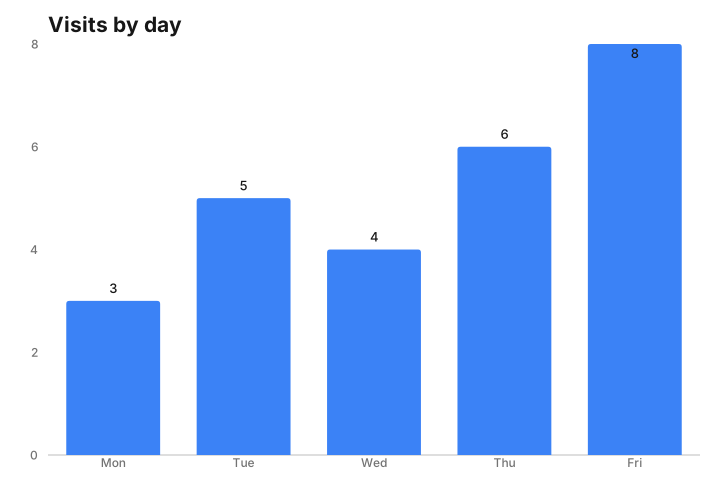
58 kB gzip · 0 dependencies · under 1 ms a chart · plain SVG
One script tag, in a page or a Markdown file. Every chart block on it draws.
<script src="https://cdn.jsdelivr.net/npm/markvis@2/dist/markvis.min.js"></script>JavaScript. One call. It never throws: a wrong block comes back as its rows and one error line.
import { render } from "markvis";

element.innerHTML = render(blockText).html;
React. Follows its container, and draws while a reply streams.
import { Markvis } from "markvis/react";

<Markvis source={blockText} />
GitHub. github.com runs no scripts, so bake a picture next to the block. A workflow step can do it on every push.
npx markvis bake README.mdTell your model. Put the 250-token instruction in a system prompt and it writes this block instead of an image or JSON. The same text opens llms.txt.
Your colors. A chart drawn in your page reads your CSS variables (--markvis-ink, --markvis-grid, --markvis-series-1 …), so it follows light, dark, and brand colors. Each color keeps a fixed fallback, and bake writes fixed colors by default.
Play · Examples · Integrate · Theming · Chart types
Why markvis
- The chart is a table of text. Readable in raw Markdown, changed by editing one number, and a model can read the numbers back.
- The data never disappears. Without markvis the block is readable text, and the comment form (a one-line comment above a Markdown table) shows as a plain table, on github.com too. A block that cannot draw keeps its rows and shows one error line with a stable code.
- Models write it from a short instruction. A 250-token model instruction for a system prompt; the same text opens llms.txt.
- Safe by design. A block holds data only: no HTML, no scripts. Every title, label, and cell is escaped in the SVG and the table.
- Seventeen chart types with readable defaults, and no d3.
What you can write
| | |
| --- | --- |
| Code block tags | chart markvis vis |
| Chart kinds | bar line area scatter pie hist heatmap funnel waterfall radar gauge sankey treemap dumbbell bullet boxplot calendar |
| Fields | markvis type title unit x y series plus theme palette surface. Type-local: layout innerRadius min max orient role target |
| Numbers | Comma-separated rows, or one Markdown table. Not JSON as the default. No JavaScript in the block. |
theme: how it is drawn: folio (default) highcharts shadcn docs ant recharts graphite. palette: colors only: ink porcelain warm cool vivid. Unknown look → table + error, never a silent swap. Pie slices are not forced to 100. Rows stay in the order you wrote them.
Install and bake
2.x replaces 0.0.13 (the old d3 renderer stays in legacy/).
npm install markvis
npx markvis bake README.md
bake writes a picture next to the file and adds a Markdown image so GitHub can show it. The code block stays. Running bake again does nothing if nothing changed. npx markvis check notes.md checks every chart block in the file and exits non-zero if any block is invalid.
On GitHub, a workflow step bakes the pictures on every push (full workflow):
- uses: geekplux/markvis@masterA blank measure cell is missing, not zero. Text such as N/A is an error (E_BAD_NUMBER) and the table stays. Omit markvis for version 2; any other version is rejected.
To parse without drawing, parseBlock(text) returns the chart or a stable error code with the rows. To read every chart in a document, parseDocument(markdown).
In a Markdown site — markdown-it, remark, or rehype. Each returns the picture and the data table:
import markdownItMarkvis from "markvis/markdown-it"; // md.use(markdownItMarkvis)
import remarkMarkvis from "markvis/remark";          // remark().use(remarkMarkvis)
import rehypeMarkvis from "markvis/rehype";          // MDX, Docusaurus: rehypePlugins: [rehypeMarkvis]
With an AI: put docs/prompt.md in the system prompt, or point a model at llms.txt or skills/markvis/SKILL.md. It should write only the fields listed there, not a PNG, and never invent a type id.
Docs
Get started · Integrate · SPEC.md · Themes · Architecture · Contributing · Changelog
In 2017 this project was a renderer (GitHub Trending). This is the rewrite: the same name, for people and for AI. 0.0.13 (the old d3 renderer): legacy/.