
marlin-conf
v2.10.5
Published
configuration tool for Marlin project


Readme
marlin-config
This is a help tool, intended for easy configuration of Marlin firmware
supported OS: Linux,Mac,Windows

Main features
- instant changing of Configuration*.h files
- quick help for Marlin options and G-codes
- compilation and uploading your customized firmware
- console for access to serial ports
- collaborative editor for whole project
- share your configuration on the site
- automatical installer for PlatformIO
Features:
- automatically clone repository from Marlin github if you don't have it
- instant changing of Configuration*.h files
- allow to filter only changed options overall and for each section
- show help for all options
- show help for G-codes
- show allowed options/gcodes depend to your configuration
- auto search options in Marlin github issues
- reset configuration changes
- switch between releases/branches and update git repository from github
- switch or load provided examples of configuration
- upload your old configuration over current from Configuration files
- compile and upload the firmware to your device via PlatformIO Core
- access to all serial ports using console manager (with auto ports changing detection)
- simple 3D tool for positioning printer head in console manager
- snippets allow compose the BootScreen, calculate a step values for various stepper motors
- quick navigation with a right sided menu
- create an issue on Marlin github with your configuration
- share your configurator access via LAN or WAN (with changes log)
Snippets
- stepper motors calculators (belt driven, screw driven, extruder)
- startup bootscreen preview
- custom bootscreen editor
- sharing your connection with UPnP helper with QRcodes
- using your phone as webcam
in project used documentation from MarlinDocumentation
Install marlin-config from binaries
We provide prebuilt binaries for macOS, Linux 32 / 64 and Windows 32 / 64. This is the latest release.
Dependencies
- git
- PlatformIO Core (optional)
Using
After run appears a File dialog and asks to open any empty folder (then will be cloning for last version of marlin from github) or folder with the Marlin git repository
Install from NPM package

sudo npm -g i marlin-conf
some hints for Windows-Installation
Dependencies
- git
- node.js
- PlatformIO Core (optional)
Hints
Linux users issue about access to USB serial ports
Warning! Please install 99-platformio-udev.rules and check that your board's PID and VID are listed in the rules.
https://raw.githubusercontent.com/platformio/platformio/develop/scripts/99-platformio-udev.rules
Using
open terminal in an empty folder or in a folder with Marlin repository and type
mct and confirm action
Preview
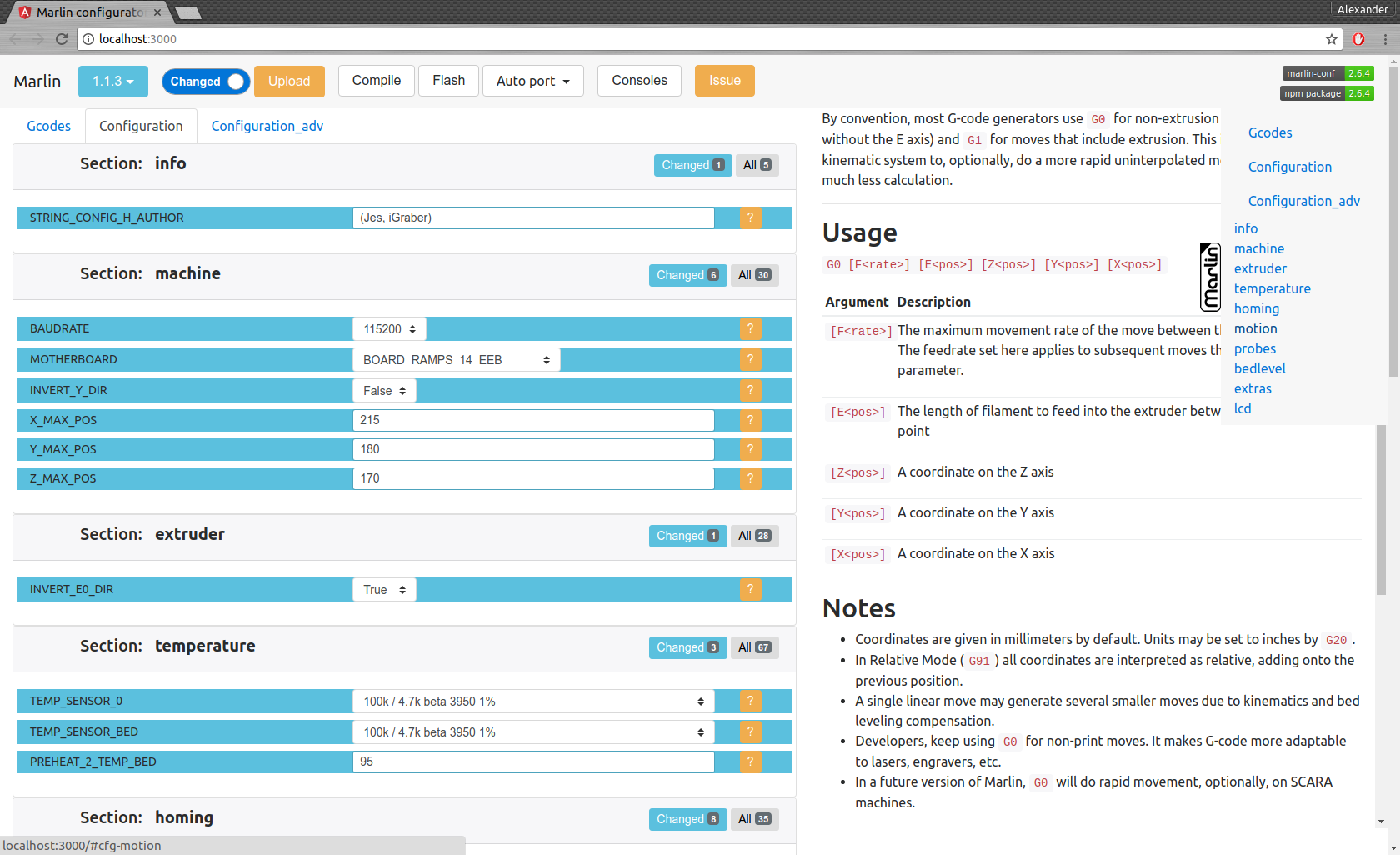
hints
- In clean/unchanged configuration you can change current release version
- You can drag in browser your Configuration*.h files
mct help
usage: mct help|git|tree|conf|clone
You need to run it in Marlin git repository
commands:
    mct
        asks to 'clone' if current folder has no repository then run 'conf'
    mct conf
        open browser for interactive configuration
    mct clone
        clone current Marlin repository to current working directory
    mct git <git-tag> json|h|txt
        json: compare [gitroot]/Marlin/Configuration*.h files
              between git-tag files and files in folder then
              create .json files with your personal setting
        h:    extend [gitroot]/Marlin/Configuration*.h files
              from git-tag with .json files contained your personal setting
        txt:  like json but create txt files contained only changes
              for publication
    mct tree json|h|rm
      Each of these traverse [gitroot]/Marlin/example_configurations directory
        json: compare configurations with main files [gitroot]/Marlin/Configuration*.h
              and generate .json file with its differences for each
              and .not files for #defines which not present in base files
        h:    recreate .h files based on
              main files [gitroot]/Marlin/Configuration*.h and .json
        rm:   remove .json and .not files
command interface:
creating file for issue publication
mct git 1.1.0-RC7 txt(compare 1.1.0-RC7 release with your current files in folder and create readable text file)migrate configuration:
- with one command you can create .json files with your personal states/values/comments for each #define
- example:
mct git 1.1.0-RC7 json(compare 1.1.0-RC7 release with your current files in folder and create .json)
than copy .json files to another folder or change git branch
recover your configuration
- example:
mct git 1.1.0-RC8 h(use 1.1.0-RC8 release and add your stored in .json configuration)