
marpacer
v0.1.1
Published
A presenter console for Marp decks, with timing plans that live in the deck.

Maintainers
 mkellnhofer
Readme
marpacer

marpacer is a presenter console for Marp decks that helps you stay on pace while presenting.
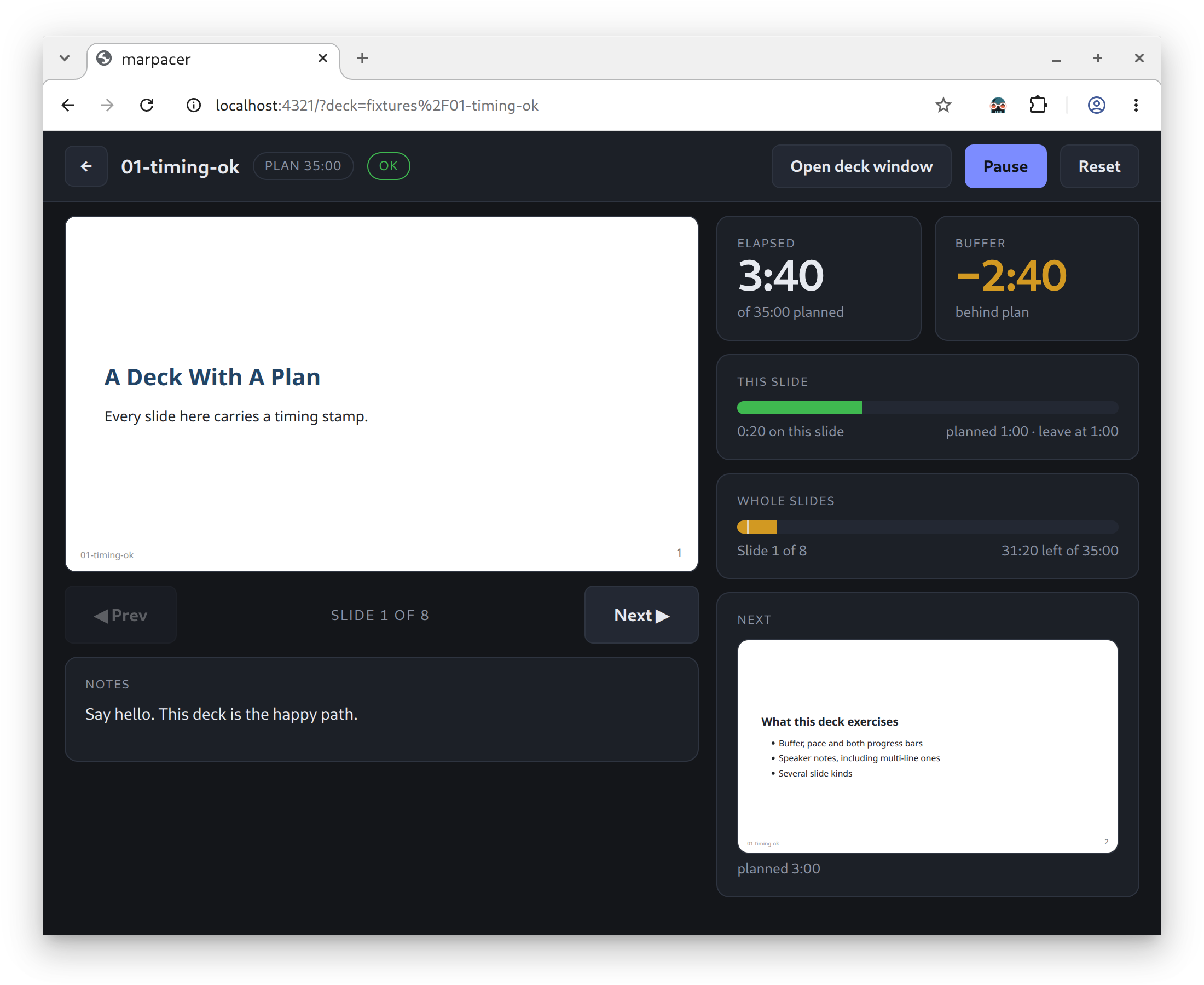
Add a time estimate to each slide, and marpacer tracks your progress against the plan — showing how long the current slide has been up and how far ahead or behind you are.
Features
- Pace feedback while you talk. Each slide carries an estimate, so the console can tell you whether you are ahead or behind, right now, rather than only at the end.
- Speaker notes from plain HTML comments. Nothing to learn and nothing to maintain alongside the deck — the notes sit next to the slide they belong to.
- Windows, kept in sync. The deck goes on the projector, the console stays on your laptop. Moving a slide in one moves it in the other — no clicking back and forth, and no second server.
- Real Marp rendering. It is marp-core, so custom themes, math and syntax highlighting behave exactly as they do everywhere else.
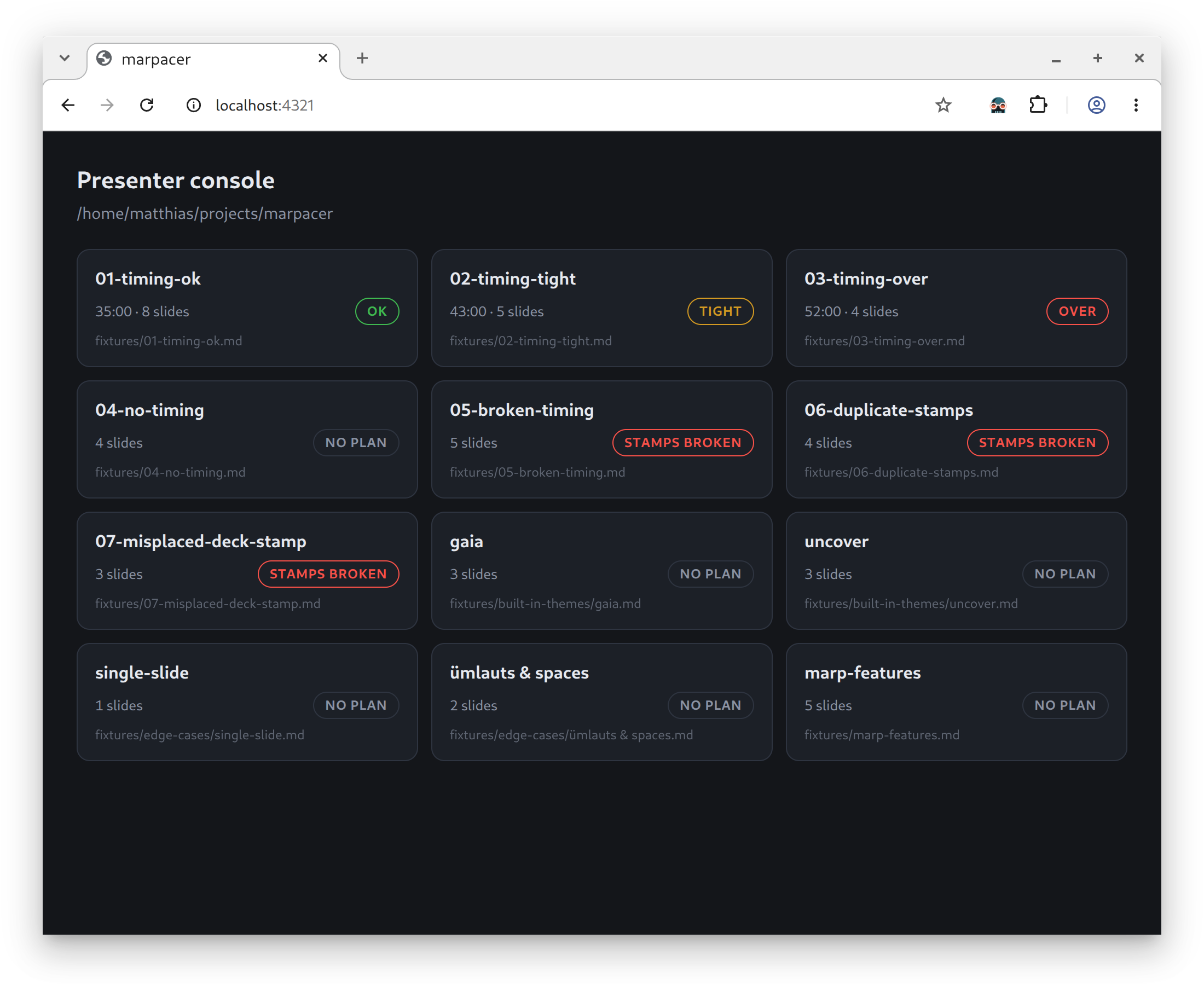
- A deck picker. Point it at a folder and it lists every deck it finds, with each one's timing estimate against its target.
Use
Run it without installing anything:
npx marpacer serve path/to/decksOr add it to a project, so everyone working on the decks gets the same version:
npm install --save-dev marpacer{
"scripts": {
"present": "marpacer serve --theme-set ./themes .",
"check": "marpacer check ."
}
}npm run present finds the command without a global install — npm puts a project's
executables on PATH for its own scripts. To have it everywhere instead:
npm install -g marpacerCommands
marpacer serve [options] [dir]   serve the console for the decks under dir
marpacer check [options] [dir]   verify their timing stamps, exit 1 on problems
marpacer help                    show this help

dir defaults to the current folder.

  --all              include decks normally hidden: those git ignores
                     (generated ones) and those whose name starts with _
  -p, --port <n>     port to listen on (default 4321)      [serve]
  --theme-set <dir>  folder of theme CSS files             [serve]
                     (default: <dir>/themes)
Open the console at http://localhost:4321/, pick a deck, and put the deck window
on the projector.
The first run pulls marp-core, which is a chunky dependency — roughly 73 MB, most of it the MathJax and KaTeX engines it bundles for math support. Later runs are quick.
Speaker notes
Any HTML comment in a slide that is not a Marp directive is picked up as that slide's notes:
## Anatomy of a URL

<!-- Draw the URL on the board first.
Ask for the scheme before revealing it. -->
Multi-line comments keep their line breaks, and several comments on one slide are joined. Comments inside fenced code blocks are left alone — those are HTML being taught, not notes.
Timing stamps
A deck's timing plan lives in the deck, written as link reference definitions — a piece of Markdown that no renderer shows. It never appears on a slide, and never as a speaker note.
One stamp per deck, before the first slide:
[timing-deck]: # '{ "targetMinutes": 45, "note": "where this deck is likely to slip" }'and one per slide:
[timing-slide]: # '{ "minutes": 4 }'| Field | Meaning |
|-----------------|---------------------------------------------------|
| targetMinutes | The slot the deck has to fit, e.g. 45 |
| note | Optional: where this deck is likely to slip |
| minutes | Estimate for one slide |
That is everything you write. Slide numbers, running totals and the deck's estimate are
worked out from those, so inserting or reordering a slide leaves no stale number behind.
The console reads the deck as ok, tight — less than a tenth of the target to spare —
or over.
An apostrophe inside a stamp is written \', because the JSON sits in a single-quoted
title.
marpacer check goes through a folder of decks and exits 1 if any stamp is
unreadable, missing, duplicated, or not a number.
Themes and rendering
A deck picks its theme with theme: in front matter. Marp's own default, gaia and
uncover come built in, and every *.css in the --theme-set folder is added alongside
them, so a custom theme can build on a built-in one with @import 'default'.
Everything else marp-core does works too, because it is marp-core: syntax highlighting,
math ($$…$$, rendered by MathJax), and auto-scaling directives such as <!-- fit -->.
Marp's browser helper is inlined into each deck page, which is what makes auto-scaling
work and what keeps SVG slides correct in Safari.
Raw HTML in decks is rendered as written — these are your own files, presented locally.
Copyright and License
Copyright Matthias Kellnhofer. All rights reserved.
Licensed under the Apache License, Version 2.0 (the "License"); you may not use this file except in compliance with the License. You may obtain a copy of the License at
http://www.apache.org/licenses/LICENSE-2.0
Unless required by applicable law or agreed to in writing, software distributed under the License is distributed on an "AS IS" BASIS, WITHOUT WARRANTIES OR CONDITIONS OF ANY KIND, either express or implied. See the License for the specific language governing permissions and limitations under the License.