
masklet
v1.2.0
Published
Input masks for form fields: phone numbers, dates, cards and Indian formats like Aadhaar, PAN, GSTIN, IFSC, PIN code and rupee amounts. Plain JavaScript and React 19.

Maintainers
 ckgiri
Readme
masklet
Input masks for form fields: phone numbers, dates, cards, and Indian formats like Aadhaar, PAN, GSTIN, IFSC, PIN code and rupee amounts. Works in plain JavaScript and React 19.



Live demo: try every preset, the pattern playground and the rupee formatter in your browser.
An input mask formats what the user types, while they type. The user types 234567890124 and sees 2345 6789 0124. The user types 1234567.5 and sees ₹12,34,567.5.
masklet gives you:
- Ready-made masks for Indian and common formats. You pass a name like
'aadhaar'or'pan'. - Checks for each format, like the Aadhaar checksum or a real date.
- Your own patterns, like
'AA 00 AA 0000'for a vehicle number.
It works with a plain <input>, and with React through masklet/react.
Important: a mask helps users type the right thing. It does not protect your data. Always check the value again on your server.
All ID numbers on this page are made up. The Aadhaar, PAN and GSTIN examples were created to pass the checksums, and they do not belong to anyone. The card numbers are public test numbers that payment companies publish for testing.
Screenshots
An Aadhaar field with masklet. It shows the formatted value, the raw value, and whether the number is complete and passes the checksum:
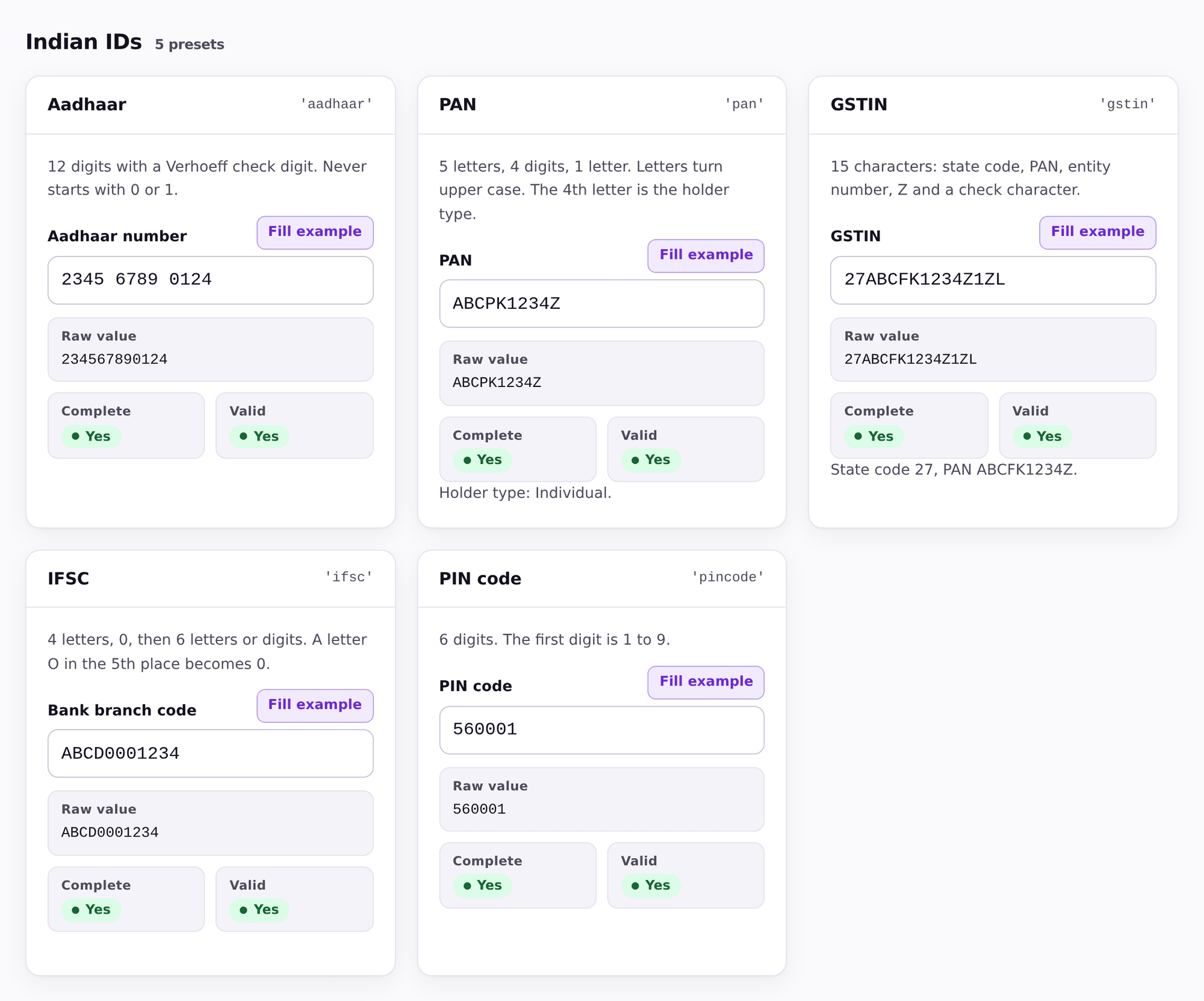
Ready-made masks for Indian IDs: Aadhaar, PAN, GSTIN, IFSC and PIN code, each with its own check:
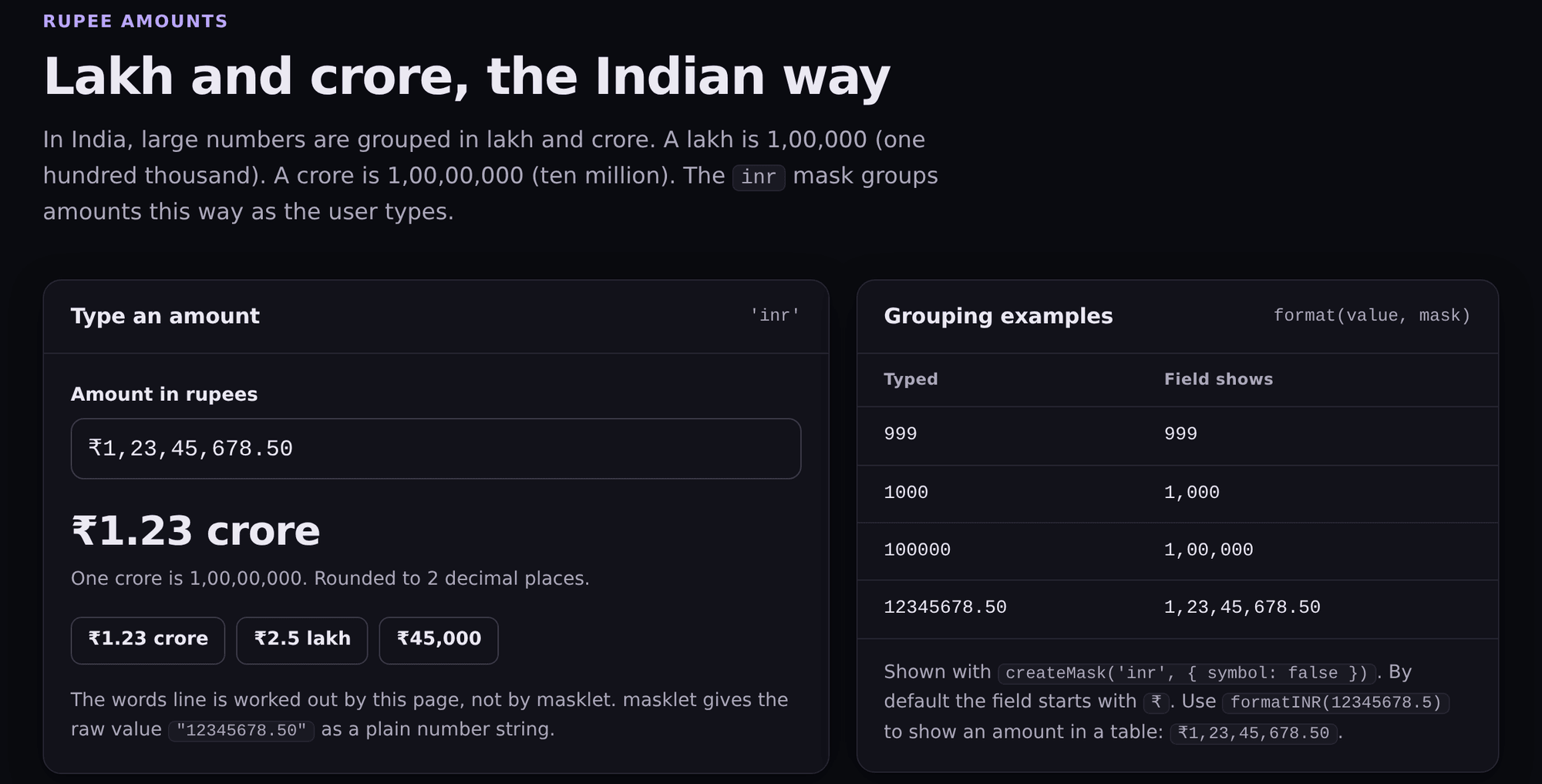
Rupee amounts grouped in lakh and crore, shown here in dark mode:
On a phone, the Aadhaar field opens the number keypad:
All values in the screenshots are fake. Try them yourself in the live demo.
Features
- Indian formats built in. Aadhaar, PAN, GSTIN, IFSC, PIN code, Indian mobile numbers and rupee amounts.
- Real checks. The Aadhaar Verhoeff checksum, the official GSTIN check character, the card Luhn check, real dates with leap years, and card expiry dates in the future.
- Rupees the Indian way. Amounts are grouped in lakh and crore:
₹1,23,45,678.50. - The caret stays in the right place. The caret is the blinking cursor in the field. It stays where the user expects when they type in the middle, delete, replace a selection or paste.
- Pasting just works. Paste
+91 98765 43210,919876543210or09876543210, and the field shows+91 98765 43210. - Phone keyboards. Sets the
inputmodeattribute, so phones show a number pad for digits. Also setsautocompletefor browser autofill, where a standard hint exists. - Many keyboards. Digits typed in Indian scripts (like
२३४५) and full-width digits from Chinese and Japanese keyboards are read as2345. Text typed with an IME is formatted when the user finishes the word. - React 18 and 19. A hook and a component. No
findDOMNode. Works with server rendering and Next.js. - Small and simple. No other packages needed. ESM and CommonJS. TypeScript types included. About 8 KB (compressed).
Installation
If your project uses npm:
npm install maskletOr with another package manager:
pnpm add masklet
yarn add masklet
bun add masklet
React is optional. You need it only for masklet/react.
Quick start
Get started in 3 steps
Step 1. Install it (see Installation).
Step 2. Add a mask to your field.
In plain JavaScript:
<input id="aadhaar" type="text">

<script type="module">
  import { attachMask } from 'masklet'

  attachMask(document.querySelector('#aadhaar'), 'aadhaar', {
    onChange: (raw, formatted, complete) => {
      console.log(raw)        // '234567890124'
      console.log(formatted)  // '2345 6789 0124'
      console.log(complete)   // true when all 12 digits are there
    },
  })
</script>
In React:
import { MaskedInput } from 'masklet/react'

function AadhaarField() {
  return (
    <MaskedInput
      mask="aadhaar"
      name="aadhaar"
      onValueChange={(raw, formatted, complete) => console.log(raw, formatted, complete)}
    />
  )
}
Step 3. Check the value when the form is sent.
import { isValidAadhaar } from 'masklet'

isValidAadhaar('2345 6789 0124')   // => true
isValidAadhaar('2345 6789 0125')   // => false (wrong check digit)
That's it. The user sees 2345 6789 0124 while typing. Your code gets the raw value 234567890124. The raw value is only the characters the user typed, without the spaces and other characters the mask adds.
Table of contents
Usage
Mask an Aadhaar field
An Aadhaar number has 12 digits. It never starts with 0 or 1. Its last digit is a Verhoeff checksum: a check digit worked out from the other 11 digits. If the user mistypes one digit, or swaps two digits next to each other, the check fails.
import { attachMask, format, unformat, validate } from 'masklet'

attachMask(document.querySelector('#aadhaar'), 'aadhaar')

format('234567890124', 'aadhaar')      // => '2345 6789 0124'
unformat('2345 6789 0124', 'aadhaar')  // => '234567890124'
validate('2345 6789 0124', 'aadhaar')  // => true
validate('2345 6789 0125', 'aadhaar')  // => false
While typing, a 0 or 1 as the first digit is ignored, because no Aadhaar number starts with them.
A valid checksum only means the number is well formed. It does not mean the number was issued, or that it belongs to the user.
Mask a PAN, IFSC or GSTIN field
These masks turn letters upper case as the user types. They also set autocapitalize="characters", so phones start with capital letters.
format('abcpk1234z', 'pan')           // => 'ABCPK1234Z'
format('abcd0001234', 'ifsc')         // => 'ABCD0001234'
format('27abcfk1234z1zl', 'gstin')    // => '27ABCFK1234Z1ZL'

validate('ABCPK1234Z', 'pan')         // => true
validate('ABCDE1234F', 'pan')         // => false (D is not a holder type)
validate('27ABCFK1234Z1ZL', 'gstin')  // => true
What each check means:
- PAN (Permanent Account Number): 5 letters, 4 digits, 1 letter. The 4th letter tells what kind of holder it is:
P(individual),C(company),H(Hindu undivided family),F(firm or LLP),A(association of persons),T(trust),B(body of individuals),L(local authority),J(artificial juridical person) orG(government). The list is inPAN_HOLDER_TYPES. - IFSC (bank branch code): 4 letters, then
0, then 6 letters or digits. If the user types the letterOin the 5th place, it becomes the digit0. - GSTIN (GST number): 15 characters. A state code (
01to38,97or99), a PAN, an entity number (1to9orAtoZ), the letterZ, and a check character. The check character is worked out from the first 14 characters with the official GSTIN algorithm.
Mask phone numbers
format('9876543210', 'phone-in')        // => '+91 98765 43210'
format('919876543210', 'phone-in')      // => '+91 98765 43210'
format('09876543210', 'phone-in')       // => '+91 98765 43210'
unformat('+91 98765 43210', 'phone-in') // => '9876543210'

format('2015550123', 'phone-us') // => '(201) 555-0123'phone-inshows+91by itself. The raw value is the 10-digit mobile number. A leading0,91or+91in pasted text is removed. The first digit must be 6, 7, 8 or 9, so other first digits are ignored while typing.phone-usshows(201) 555-0123. A leading1or+1in pasted text is removed. The area code and the next part must start with 2 to 9.
Both set inputmode="tel", so phones show a phone keypad.
Mask dates and times
format('25122026', 'date-dmy')       // => '25/12/2026'
validate('29/02/2024', 'date-dmy')   // => true (2024 is a leap year)
validate('29/02/2023', 'date-dmy')   // => false
validate('31/04/2026', 'date-dmy')   // => false (April has 30 days)

format('12252026', 'date-mdy')       // => '12/25/2026'
format('0930', 'time')               // => '09:30'
validate('24:00', 'time') // => falsedate-dmyisDD/MM/YYYY, as used in India.date-mdyisMM/DD/YYYY, as used in the US.timeisHH:MMin 24-hour time, from00:00to23:59.
The raw value of a date is the 8 digits, like '25122026'. Digits that can never be right are ignored while typing. For example, a day cannot start with 4, and a month cannot start with 2.
Mask a card number, expiry date and CVV
import { detectCardType, format, validate, createMask } from 'masklet'

format('4111111111111111', 'card')    // => '4111 1111 1111 1111'
format('378282246310005', 'card')     // => '3782 822463 10005'
validate('4111 1111 1111 1111', 'card')  // => true

detectCardType('3782 8224')           // => 'amex'

format('1227', 'card-expiry')         // => '12/27'
format('12/2027', 'card-expiry')      // => '12/27'

const amexCvv = createMask('cvv', { cardType: 'amex' })
amexCvv.validate('123')               // => false (American Express needs 4 digits)
amexCvv.validate('1234') // => truecardfinds the card network from the first digits and groups the number to match. American Express is grouped 4-6-5 (3782 822463 10005). Most others are grouped in fours.validateruns the Luhn check. The Luhn check is a simple sum over the digits that catches most typing mistakes. It also checks that the length fits the network.card-expiryisMM/YY.validatechecks that the month is 01 to 12 and that the date is not in the past. Passnowto compare with another date.cvvis the 3 or 4 digit security code. WithoutcardType, both 3 and 4 digits pass. WithcardType, American Express needs exactly 4 and the others exactly 3.
Keep the CVV in step with the card number in your own code:
const cardType = detectCardType(cardRaw)
const cvvMask = createMask('cvv', { cardType })
The networks masklet knows:
| Network | Starts with | Lengths | Grouping | |---|---|---|---| | Visa | 4 | 13, 16, 19 | 4-4-4-4-3 | | Mastercard | 51 to 55, 2221 to 2720 | 16 | 4-4-4-4 | | American Express | 34, 37 | 15 | 4-6-5 | | RuPay | 60 (but not 6011), 81, 82, 508 | 16 | 4-4-4-4 | | Discover | 6011, 644 to 649, 65 | 16 to 19 | 4-4-4-4-3 | | Diners Club | 300 to 305, 3095, 36, 38, 39 | 14 to 19 | 4-6-rest |
Cards from other networks still work. They are grouped in fours, and they pass validate with 12 to 19 digits and a correct Luhn check. detectCardType returns null for them. See Notes and limitations about RuPay cards that start with 65.
Mask rupee amounts
The inr mask formats amounts with Indian grouping. In India, large numbers are grouped as lakh and crore. A lakh is 1,00,000 (one hundred thousand). A crore is 1,00,00,000 (ten million). So 12345678.5 is written 1,23,45,678.50.
import { createMask, format, unformat, formatINR } from 'masklet'

format('1234567.5', 'inr')            // => '₹12,34,567.5'
unformat('₹12,34,567.50', 'inr')      // => '1234567.50'

const wholeRupees = createMask('inr', { decimals: 0, symbol: false })
wholeRupees.format('150000')          // => '1,50,000'

formatINR(1234567.5)                  // => '₹12,34,567.50'
formatINR(1234567.5, { decimals: 0 }) // => '₹12,34,568'
formatINR(-2500, { symbol: 'Rs. ' }) // => '-Rs. 2,500.00'unformatreturns a plain number string. Pass it toNumber()or to your decimal library.- The user may type up to 2 digits after the decimal point. Change this with
decimals. symbol: falsehides₹. A string, like'Rs. ', shows that text instead.- A minus sign is ignored unless you set
allowNegative: true. minandmaxset the range thatvalidateaccepts.- When the field loses focus, extra zeros and a trailing decimal point are removed (
₹007.becomes₹7).
Use formatINR to show an amount, for example in a table. It always shows the decimals and rounds half away from zero. It accepts numbers, numeric strings and bigints.
Make your own pattern
Pass a pattern instead of a preset name. These characters are tokens: each one is a place where the user types one character.
| Token | Accepts |
|---|---|
| 0 or 9 | A digit |
| a | A letter |
| A | A letter, made upper case |
| * | A letter or digit |
| X | A letter or digit, letters made upper case |
| \ | Makes the next character fixed, even if it is a token |
Every other character is fixed: the mask adds it by itself.
format('mh12ab1234', 'AA 00 AA 0000')   // => 'MH 12 AB 1234' (a vehicle number)
format('9876543210', '+\\91 00000-00000') // => '+91 98765-43210'
In the second example, \\9 in JavaScript is \9 in the pattern, so the 9 is fixed and not a digit token.
Add your own tokens with tokens:
const hex = createMask('#### ####', {
  tokens: { '#': { pattern: /[0-9a-f]/i, transform: 'upper' } },
})
hex.format('deadbeef')   // => 'DEAD BEEF'
Add your own check with validate. It gets the raw value:
const evenOnly = createMask('00', { validate: (raw) => Number(raw) % 2 === 0 })
evenOnly.validate('12')   // => true
evenOnly.validate('13')   // => false
A preset name always wins. To use a pattern that looks like a preset name, escape one character, like '\\pan'.
Validate on submit
A mask helps while typing. When the form is sent, check the value again. Each mask has validate, and each Indian format also has its own function:
import { isValidAadhaar, isValidPAN, isValidGSTIN, isValidIFSC, isValidPincode, luhn } from 'masklet'

form.addEventListener('submit', (event) => {
  const data = new FormData(form)
  if (!isValidPAN(String(data.get('pan')))) {
    event.preventDefault()
    showError('Please enter a valid PAN.')
  }
})
These functions accept formatted or raw values. They ignore spaces and hyphens, and accept lower case letters.
Check again on your server. Anyone can send any value to your server without using your form. The validators have no browser code, so you can import them in Node.js and other server code too.
Use it in React: controlled and uncontrolled
Import from masklet/react. It works with React 18 and 19.
Uncontrolled. The field keeps its own value. Give a starting value with defaultValue:
import { MaskedInput } from 'masklet/react'

<MaskedInput mask="phone-in" defaultValue="9876543210" name="phone" />
Controlled. You keep the value in state. value can be raw or formatted:
import { useState } from 'react'
import { MaskedInput } from 'masklet/react'

function PanField() {
  const [pan, setPan] = useState('')
  return (
    <>
      <MaskedInput mask="pan" value={pan} onValueChange={(raw) => setPan(raw)} />
      <button onClick={() => setPan('')}>Clear</button>
    </>
  )
}
onValueChange gets three values: the raw value, the formatted value, and complete (true when every required character is there).
MaskedInput accepts every normal <input> prop, like name, placeholder, className, onBlur and onChange. Your onChange gets the event as usual, with the formatted value in event.target.value. ref gives you the <input> element.
Your own input. Use the useMask hook and spread inputProps on any input, including inputs from a component library that pass ref on:
import { useMask } from 'masklet/react'

function AmountField() {
  const { inputProps, raw, complete } = useMask('inr')
  return (
    <label>
      Amount
      <input {...inputProps} />
      {complete && <small>You entered {raw} rupees.</small>}
    </label>
  )
}
If you pass a mask made with createMask, you can create it inside your component. masklet compares the settings, not the object, so it does not set the field up again on every render.
Use it with React Hook Form
Use Controller so the form stores the raw value:
import { Controller, useForm } from 'react-hook-form'
import { MaskedInput } from 'masklet/react'
import { isValidPAN } from 'masklet'

function KycForm() {
  const { control, handleSubmit } = useForm({ defaultValues: { pan: '' } })
  return (
    <form onSubmit={handleSubmit((data) => console.log(data.pan))}>
      <Controller
        name="pan"
        control={control}
        rules={{ validate: (value) => isValidPAN(value) || 'Please enter a valid PAN.' }}
        render={({ field }) => (
          <MaskedInput
            mask="pan"
            name={field.name}
            value={field.value}
            onValueChange={(raw) => field.onChange(raw)}
            onBlur={field.onBlur}
            ref={field.ref}
          />
        )}
      />
      <button type="submit">Save</button>
    </form>
  )
}
register also works: <MaskedInput mask="pan" {...register('pan')} />. The form then stores the formatted value, like 'ABCPK1234Z' or '+91 98765 43210'.
Use it with Next.js
The files in masklet/react start with "use client". You can use MaskedInput in a Server Component page without writing "use client" yourself. The core functions in masklet work on the server, so you can check the value in a Server Action:
// app/kyc/page.tsx
import { isValidAadhaar } from 'masklet'
import { MaskedInput } from 'masklet/react'

async function save(formData: FormData) {
  'use server'
  const aadhaar = String(formData.get('aadhaar'))
  if (!isValidAadhaar(aadhaar)) throw new Error('Invalid Aadhaar number')
  // save it
}

export default function Page() {
  return (
    <form action={save}>
      <MaskedInput mask="aadhaar" name="aadhaar" required />
      <button type="submit">Save</button>
    </form>
  )
}
The form sends the formatted value, like '2345 6789 0124'. isValidAadhaar ignores the spaces. To get the raw value, use unformat(value, 'aadhaar').
Presets
Pass the name as the mask: format(value, 'pincode'), attachMask(input, 'pincode'), <MaskedInput mask="pincode" />.
| Name | Example output | What validate checks | inputmode | autocomplete |
|---|---|---|---|---|
| aadhaar | 2345 6789 0124 | 12 digits, does not start with 0 or 1, Verhoeff checksum | numeric | |
| pan | ABCPK1234Z | 5 letters, 4 digits, 1 letter; 4th letter is a holder type | text | |
| pincode | 560001 | 6 digits, first digit 1 to 9 | numeric | postal-code |
| ifsc | ABCD0001234 | 4 letters, 0, 6 letters or digits | text | |
| gstin | 27ABCFK1234Z1ZL | State code, PAN, entity number, Z, check character | text | |
| phone-in | +91 98765 43210 | 10 digits, first digit 6 to 9 | tel | tel |
| phone-us | (201) 555-0123 | 10 digits, area code and next part start with 2 to 9 | tel | tel-national |
| date-dmy | 29/02/2024 | A real date (DD/MM/YYYY), leap years included | numeric | |
| date-mdy | 02/29/2024 | A real date (MM/DD/YYYY), leap years included | numeric | |
| time | 23:59 | 00:00 to 23:59 | numeric | |
| card | 3782 822463 10005 | Luhn check, length fits the network | numeric | cc-number |
| card-expiry | 12/27 | Month 01 to 12, not in the past | numeric | cc-exp |
| cvv | 123 | 3 or 4 digits (exactly 4 for American Express with cardType) | numeric | cc-csc |
| inr | ₹1,23,45,678.50 | A number, inside min and max if set | decimal | |
PRESET_NAMES lists all names.
API
createMask(mask, options?)
function createMask(mask: PresetName | string, options?: MaskOptions): MaskCreates a mask from a preset name or a pattern. Throws a TypeError if the pattern is empty or has no tokens.
| Option | Type | Default | Used by | What it does |
|---|---|---|---|---|
| tokens | Record<string, RegExp \| TokenDefinition> | built-in tokens | patterns | Your own tokens. A TokenDefinition is { pattern, transform? }, where transform is 'upper', 'lower' or a function. |
| validate | (raw: string) => boolean | none | all | An extra check, run after the mask's own checks. |
| placeholder | string | per mask | all | Replaces the mask's placeholder text. |
| symbol | boolean \| string | true | inr | true shows ₹, false shows nothing, a string shows that text. |
| decimals | number | 2 | inr | Digits allowed after the decimal point. 0 turns decimals off. |
| allowNegative | boolean | false | inr | Lets the user type a minus sign at the start. |
| min, max | number | none | inr | The range validate accepts. |
| cardType | CardType \| null | none | cvv | The card network: 4 digits for 'amex', 3 for the others. |
| now | Date \| () => Date | today | card-expiry | The date to compare with. |
The Mask it returns:
| Member | Type | What it does |
|---|---|---|
| format(value) | string | Formats raw or formatted text. Characters that do not fit are dropped. |
| unformat(value) | string | The raw value. A number string for inr. |
| isComplete(value) | boolean | true when every required character is there. Does not run checksums. |
| validate(value) | boolean | true when the value is complete and passes the mask's checks. |
| placeholder | string | A hint for the field, like 'DD/MM/YYYY' or '0000 0000 0000'. masklet does not set it for you. |
| inputMode | string | 'numeric', 'decimal', 'tel' or 'text'. |
| autocomplete | string \| undefined | The autofill hint, if there is a standard one. |
| autocapitalize | string \| undefined | 'characters' for masks with upper case letters. |
| name, kind, key | string | The preset name or pattern, 'pattern' or 'number', and a text that is the same for masks with the same settings. |
format, unformat, isComplete, validate
function format(value: string | number | null | undefined, mask: MaskInput): string
function unformat(value: string | number | null | undefined, mask: MaskInput): string
function isComplete(value: string | number | null | undefined, mask: MaskInput): boolean
function validate(value: string | number | null | undefined, mask: MaskInput): boolean
The same as the Mask methods, in one call. mask is a preset name, a pattern, or a Mask. Masks made from names and patterns are cached, so calling these often is cheap. null and undefined count as an empty value.
attachMask(input, mask, options?)
function attachMask(input: HTMLInputElement, mask: MaskInput, options?: AttachMaskOptions): MaskHandleAdds a mask to an <input>. Formats the current value right away. Sets inputmode, autocomplete and autocapitalize if the input does not have them yet.
| Option | Type | Default | What it does |
|---|---|---|---|
| onChange | (raw, formatted, complete) => void | none | Runs after each change the user makes. |
| value | string | the input's value | The starting value, raw or formatted. |
It returns a function. Call it to remove the mask. The function also has:
| Member | Type | What it does |
|---|---|---|
| setValue(value) | nothing | Sets a new value, raw or formatted. Does not call onChange. |
| raw | string | The current raw value. |
| value | string | The current formatted value. |
| complete | boolean | true when every required character is there. |
| valid | boolean | true when the value passes the mask's checks. |
const detach = attachMask(input, 'pincode')
detach.setValue('560001')
detach.valid   // => true
detach()       // removes the mask; the value stays
useMask(mask, options?) (from masklet/react)
function useMask(mask: MaskInput, options?: UseMaskOptions): UseMaskResult| Option | Type | What it does |
|---|---|---|
| value | string | Controlled value, raw or formatted. |
| defaultValue | string | Starting value for an uncontrolled field. |
| onValueChange | (raw, formatted, complete) => void | Runs after each change the user makes. |
| Result | Type | What it is |
|---|---|---|
| inputProps | object | ref, defaultValue, inputMode, and autoComplete and autoCapitalize when the mask has them. Spread it on an <input>. |
| ref | (element) => void | The same ref as in inputProps, if you want to pass it yourself. |
| value | string | The formatted value. |
| raw | string | The raw value. |
| complete | boolean | true when every required character is there. |
| valid | boolean | true when the value passes the mask's checks. |
| setValue(value) | function | Sets a new value. Does not call onValueChange. |
| mask | Mask | The mask in use. |
MaskedInput (from masklet/react)
<MaskedInput mask="aadhaar" value={value} onValueChange={(raw, formatted, complete) => {}} />| Prop | Type | What it does |
|---|---|---|
| mask | MaskInput | A preset name, a pattern, or a Mask. Required. |
| value | string | Controlled value, raw or formatted. |
| defaultValue | string | Starting value for an uncontrolled field. |
| onValueChange | (raw, formatted, complete) => void | Runs after each change the user makes. |
| ref | Ref<HTMLInputElement> | The <input> element. Works in React 18 and 19. |
| type | string | Default 'text'. Use 'text' or 'tel'. |
| any other prop | | Passed to the <input>. Your props win over masklet's hints. |
Validators
All of these accept formatted or raw text. They ignore spaces and hyphens, and accept lower case letters and digits from Indian scripts.
| Function | Returns | What it does |
|---|---|---|
| isValidAadhaar(value) | boolean | 12 digits, not starting with 0 or 1, Verhoeff checksum. |
| isValidPAN(value) | boolean | 5 letters, 4 digits, 1 letter; 4th letter in PAN_HOLDER_TYPES. |
| isValidGSTIN(value) | boolean | State code, PAN, entity number, Z and check character. |
| isValidIFSC(value) | boolean | 4 letters, 0, 6 letters or digits. |
| isValidPincode(value) | boolean | 6 digits, first digit 1 to 9. |
| isValidCardNumber(value) | boolean | Luhn check, and a length that fits the network (12 to 19 for unknown networks). |
| luhn(value) | boolean | Only the Luhn check. |
| verhoeff(value) | boolean | Only the Verhoeff checksum. |
| verhoeffCheckDigit(value) | string | The Verhoeff check digit for a number. verhoeffCheckDigit('236') is '3'. |
| gstinCheckChar(first14) | string | The GSTIN check character for the first 14 characters. |
| detectCardType(value) | CardType \| null | 'visa', 'mastercard', 'amex', 'rupay', 'discover', 'diners' or null. Works with the first few digits. |
| isLeapYear(year) | boolean | true for leap years. |
| isRealDate(year, month, day) | boolean | true if the date exists. month is 1 to 12. |
CARD_TYPES has the name, number prefixes, lengths, grouping and CVV length of each network. PAN_HOLDER_TYPES maps each 4th letter of a PAN to its meaning.
formatINR(value, options?)
function formatINR(value: number | string | bigint, options?: FormatINROptions): string| Option | Type | Default | What it does |
|---|---|---|---|
| symbol | boolean \| string | true | true adds ₹, false adds nothing, a string adds that text. |
| decimals | number | 2 | Digits after the decimal point, from 0 to 20. |
Throws a TypeError for NaN, Infinity or text that is not a number. groupIndian('12345678') gives only the grouping: '1,23,45,678'.
Types
TypeScript types are included. From masklet: Mask, MaskInput, MaskOptions, PresetName, PresetOptions, InputMode, TokenDefinition, Tokens, CardType, CardTypeInfo, FormatINROptions, NumberMaskOptions, AttachMaskOptions, MaskHandle, MaskChangeHandler. From masklet/react: UseMaskOptions, UseMaskResult, MaskInputProps, MaskedInputProps, ValueChangeHandler.
Comparison
| | react-input-mask | imask | cleave.js | masklet |
|---|---|---|---|---|
| Works without React | No | Yes | Yes | Yes |
| React component in the same package | Yes | No | Yes | Yes |
| Does not use findDOMNode (removed in React 19) | No | Yes | Yes | Yes |
| No other packages needed | No | No | Yes | Yes |
| TypeScript types included | No | Yes | No | Yes |
| ES module build | No | Yes | Yes | Yes |
| Your own patterns | Yes | Yes | Yes | Yes |
| Phone formats for many countries | No | No | Yes | No |
| Finds the card network | No | No | Yes | Yes |
| Finds RuPay cards | No | No | No | Yes |
| Luhn check for card numbers | No | No | No | Yes |
| Checks for real dates | No | Yes | Yes | Yes |
| Indian grouping (lakh, crore) | No | No | Yes | Yes |
| Aadhaar, PAN, GSTIN and IFSC checks | No | No | No | Yes |
Checked against react-input-mask 2.0.4 (released in September 2018), imask 7.6.1 and cleave.js 1.6.0 (released in May 2020). The imask React component is in a separate package, react-imask, and the findDOMNode row is about that package. cleave.js corrects impossible days while the user types, instead of reporting them.
Migrating from react-input-mask
Before:
import InputMask from 'react-input-mask'

<InputMask
  mask="9999 9999 9999"
  maskChar={null}
  value={value}
  onChange={(event) => setValue(event.target.value)}
/>
After:
import { MaskedInput } from 'masklet/react'

<MaskedInput
  mask="aadhaar"
  value={value}
  onValueChange={(raw) => setValue(raw)}
/>
| react-input-mask | masklet |
|---|---|
| mask="99/99/9999" | The same pattern works: 9 is a digit, a a letter, * a letter or digit. Or use a preset like 'date-dmy'. |
| 0, A or X as fixed characters in mask | They are tokens in masklet. Escape them: \\0. |
| formatChars | tokens in createMask(pattern, { tokens }) |
| maskChar | Not needed. masklet never puts placeholder characters in the value, like maskChar={null}. |
| alwaysShowMask | Use the placeholder attribute, for example placeholder={mask.placeholder}. |
| inputRef | ref |
| beforeMaskedValueChange | Use your own tokens or validate. |
| children (render prop for another input) | useMask() and spread inputProps on that input. |
| onChange with event.target.value | Still works and gives the formatted value. onValueChange gives the raw value. |
Notes and limitations
- Masks help users type. They do not keep bad data out. Anyone can send any value to your server. Always check the value again on the server, for example with
isValidAadhaarorisValidGSTIN. - Checksums prove the form, not the person. A number that passes the Verhoeff or GSTIN check may still not exist, or may belong to someone else. Use an official verification service when you need to know more.
- GSTIN checks cover regular registrations. Special registrations, like those for UN bodies, non-resident online services or tax deduction (TDS), have other formats and do not pass
isValidGSTIN. - RuPay and Discover share numbers that start with 65. masklet reports these as Discover. Some co-branded RuPay cards (with JCB, starting with 353 or 356) are not recognised. They still format, and they still pass
validatewhen the Luhn check passes. - Card networks change. The table above lists only well-documented number ranges. Treat
detectCardTypeas a hint for the card logo, not as proof. - Expiry dates are checked against the user's clock. masklet does not check how far in the future a date is.
type="number"fields do not work. Browsers do not let scripts move the caret in them. Usetype="text"ortype="tel". masklet setsinputmode, so phones still show a number pad.- Undo (Ctrl+Z) depends on the browser. Because masklet changes the value from code, some browsers undo less than you expect.
- Characters that do not fit are dropped. When the user deletes in the middle, the characters after it move left. A character that does not fit its new place (for example a digit moving into a letter place in a PAN) is removed.
- Server rendering. Importing
maskletandmasklet/reacton the server is safe.attachMaskneeds a browser. - Browsers. Current Chrome, Edge, Firefox and Safari, on desktop and phones.
Requirements
- Any modern browser to use the masks.
- Node.js 20 or newer for server code, tests and build tools.
- React 18 or newer, only for
masklet/react. Tested with React 19. - Works with
importandrequire. TypeScript types included. No other packages needed.
License
MIT