
mastermind-md
v0.2.1
Published
Review Markdown with your coding agent — local-first, CriticMarkup review loop, bilingual, the file is the protocol

Maintainers
 courierkd
Readme
█▀▄▀█ ▄▀█ █▀ ▀█▀ █▀▀ █▀█ █▀▄▀█ █ █▄░█ █▀▄
█░▀░█ █▀█ ▄█ ░█░ ██▄ █▀▄ █░▀░█ █ █░▀█ █▄▀
Review markdown with your coding agent — local-first, the file is the only channel.
An agent writes a plan or doc as .md; you read and mark it up in the browser with
CriticMarkup; you hand it back; the agent
re-reads the same file. No database, no accounts, no cloud — just localhost and the file on disk.
Mastermind also renders any doc bilingually: your agent translates it into your two reading
languages, toggled live.
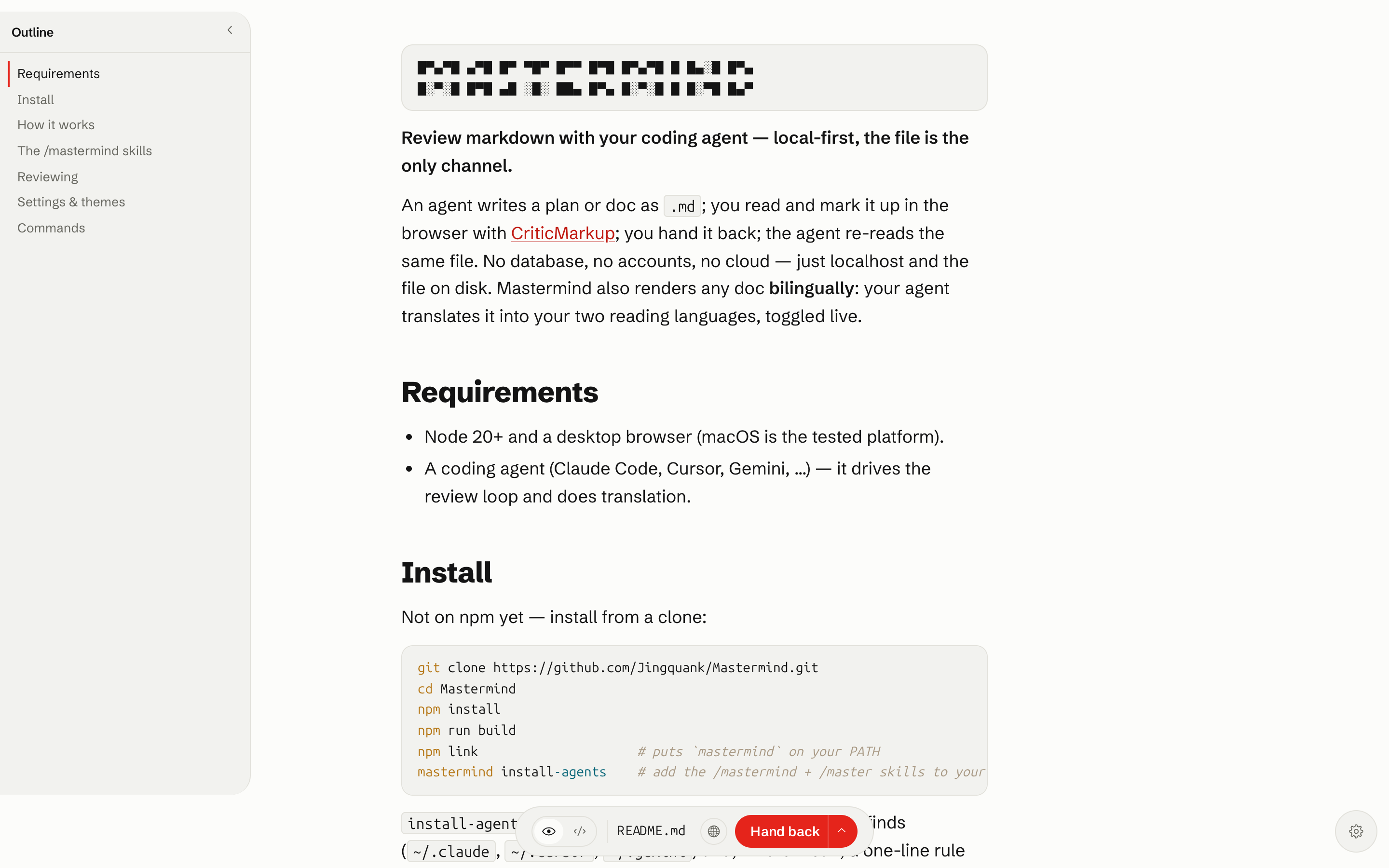
The Reading view — rendered Markdown with the heading outline on the left.
Requirements
- Node 20+ and a desktop browser (macOS is the tested platform).
- A coding agent (Claude Code, Cursor, Gemini, …) — it drives the review loop and does translation.
Install
npm i -g mastermind-md && mastermind install-agentsThe first half installs the mastermind command; install-agents adds the /mastermind +
/master skills to every coding agent it finds.
git clone https://github.com/Jingquank/Mastermind.git
cd Mastermind
npm install
npm run build
npm link                      # puts `mastermind` on your PATH
mastermind install-agents
install-agents writes the skills for every coding agent it finds (~/.claude, ~/.cursor,
~/.gemini) and, where it can, a one-line rule so finished plans open in Mastermind automatically.
Undo any time with mastermind uninstall-agents.
How it works
- The file is the protocol. Open a
.mdand Mastermind serves it at127.0.0.1:5173. Your edits, comments, and accept/reject decisions round-trip through that one file as CriticMarkup — nothing else, nowhere else. - The review loop. An agent writes a plan → you review and mark it up → Save & hand back → the agent re-reads the file and revises. Repeat until you approve. Suggestions flow one direction only (the agent proposes, you accept); nothing reaches disk until you do.
- Bilingual, no API key. Your coding agent is the translator. Mastermind shows the doc in your
Preferred and Secondary languages (default English ⇄ 简体中文), toggled live, cached on disk
(
.mastermind/translations/) so the toggle is instant and keeps working offline once warmed.
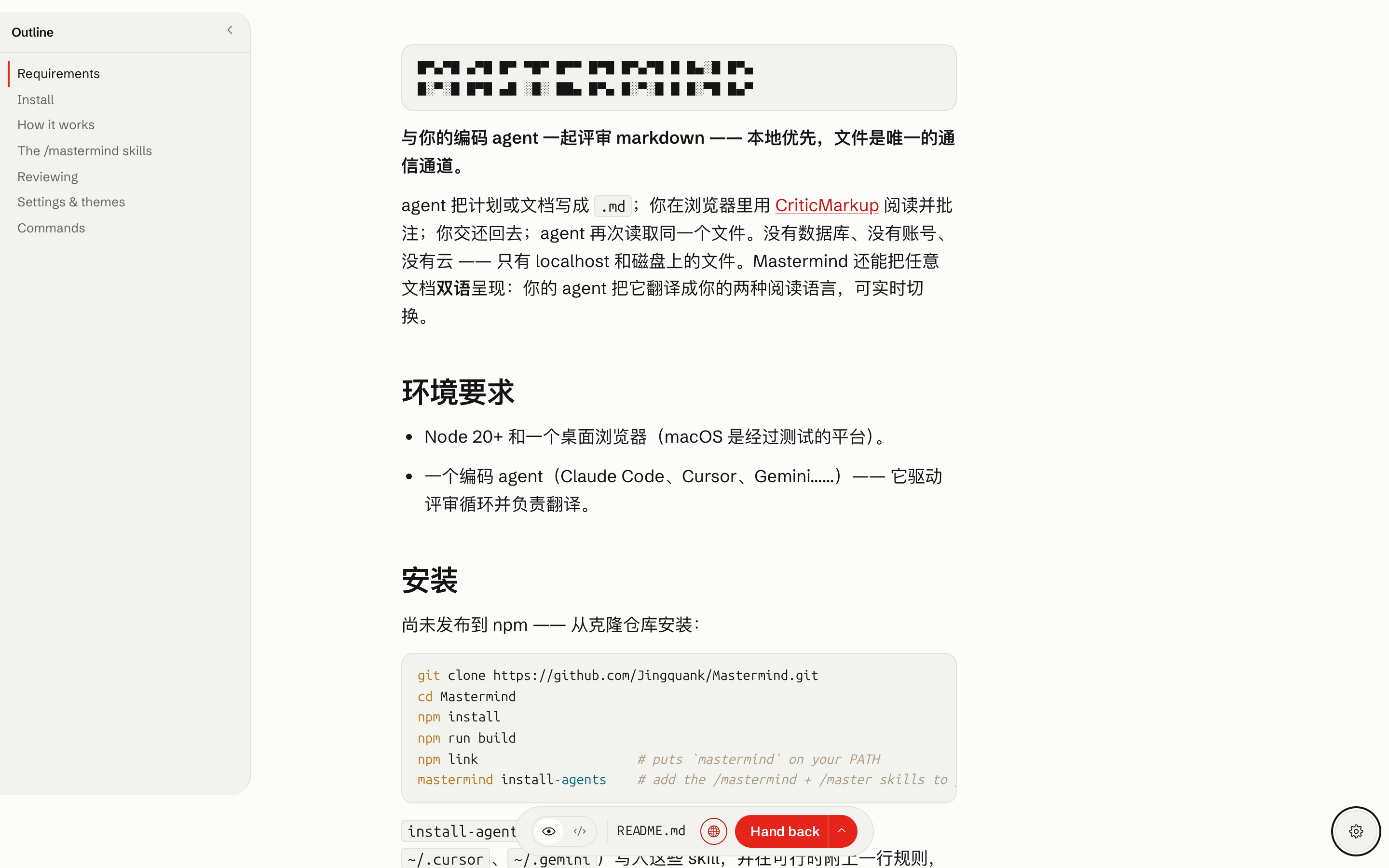
One click flips the whole doc to your second language; code and inline literals stay put.
The /mastermind skills
After install-agents, type these in your agent:
| Command | What it does |
| --- | --- |
| /mastermind setup | Pick your two reading languages, preferred browser, and color / font theme. |
| /mastermind demo | Open a bilingual demo doc — see the marks and the language toggle in action. |
| /mastermind <file> | Translate any .md into both languages and open it. Bare /mastermind uses the most recent .md from the chat. |
| /master <file> | Shorthand for /mastermind <file>. |
Every open translates first, so the language toggle is warm the instant the page loads. With the
global rule installed, finished plans (in plan mode) open in Mastermind automatically, in both
languages. Routine translation and localization are sent as one batch to the coding agent's
current fast, affordable model tier when available (sonnet in Claude Code); an existing
same-vendor CLI and then the active agent provide non-blocking fallbacks. Planning and review
interpretation stay with the primary agent.
Reviewing
Three views over the same file (Cmd+E cycles, Cmd+S saves):
- Reading — rendered markdown with CriticMarkup as a visual diff: green insertions, struck
deletions, paired substitutions, gold highlights, and comment threads in a margin rail. Select
text → Comment / Suggest deletion / Highlight. Hover a suggestion → Accept / Reject (
Cmd+Zundoes review actions). Task-list checkboxes are live. - Editing — WYSIWYG; opening a file and saving it unchanged produces a byte-identical file.
- Source — raw markdown with CriticMarkup highlighting.
All five marks work inline anywhere: {++ins++}, {--del--}, {~~old~>new~~}, {==highlight==},
{>>comment<<}. A highlight directly followed by a comment anchors it to that span; consecutive
comments form a thread; comments carry @author: tags.
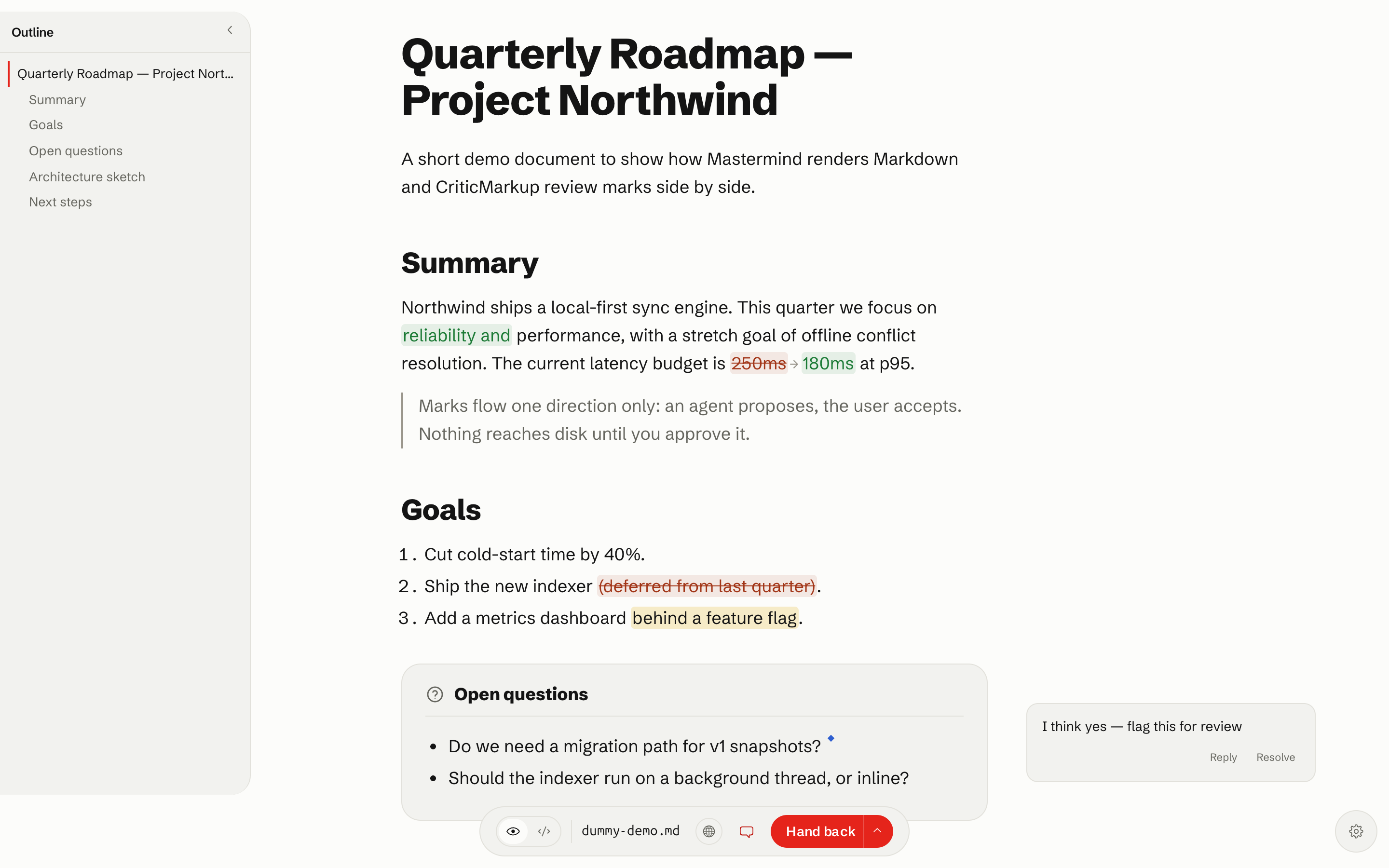
An insertion, a substitution, a struck deletion, a highlight, and a margin comment — all CriticMarkup.
The language toggle (top bar) flips the whole document between your two languages, block by
block. Cmd+F is a mark-aware find (filter by comments / edits / highlights); Cmd+P prints
ink-on-white with comments as numbered footnotes. Reviews are multi-round: when the agent
rewrites the open file, a banner offers a reload so you pick up the new version in place.
Settings & themes
Open Settings (the gear, bottom-right) to choose your color theme (seven ship — Grid, the
Swiss-red default, plus Mint, Sepia, Carbon, Slate, Cobalt, Rose), typeface and code font, an
optional code-color scheme, your reading languages (Preferred + Secondary), and the
browser Mastermind opens in. Everything persists to ~/.config/mastermind/config.json and is
scriptable:
mastermind config set langPair.a=English langPair.b=Japanese theme=sepia browser="Google Chrome"Themes are just data — drop a themes/<id>/{theme.json,tokens.css} folder in and it shows up in Settings.
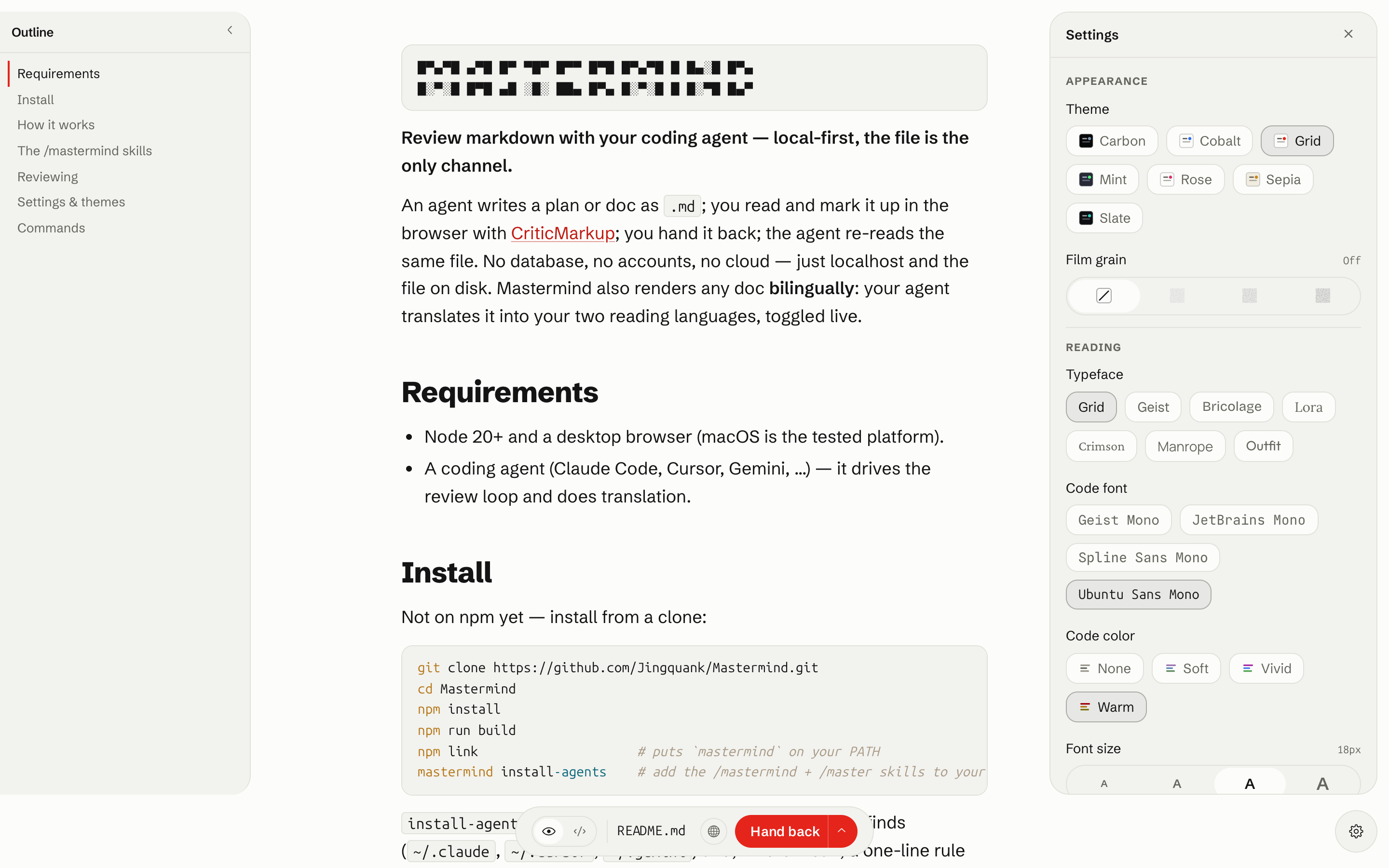
Themes, typeface, code font, code-color scheme, and your two reading languages — all in Settings.
Commands
mastermind open <file>             # open a file for review
mastermind open --wait <file>      # block until "Save & hand back" (the agent loop)
mastermind new                     # start a blank draft
mastermind workspace .             # browse a directory as a file tree (alias: ws)
mastermind config get | set …      # read / write preferences
mastermind translate-blocks <file> # pre-translate a doc into both languages (the skills use this)
mastermind install-agents          # install the skills + global rule (undo: uninstall-agents)
mastermind status | stop           # daemon status / shutdown
More: AGENT_SETUP.md — the agent protocol, assist channel, and exit-code contract.