
mawy-react
v1.10.0
Published
A Markdown editor that also does the reading — write in WYSIWYG or in the source, switch freely, and show the finished document through a read-only viewer.

Maintainers
 jooy2
Readme
Mawy for React



mawy.cdget.com
Guides and the full API. This README is the quick start.
Write a Markdown document, and read it, in the same place.
Mawy is a Markdown editor and a Markdown viewer standing on one parser and one renderer. It reads CommonMark and GitHub's additions itself, then turns the result into React elements rather than a string of HTML — a document arrives as a tree your page can style, not as markup it has to trust. An author writes in the drawn document or in the source and moves between the two without losing anything on the way. A reader gets that document as it was written, with the typeface, the text size, the line height, the column width and the palette under their own hand.
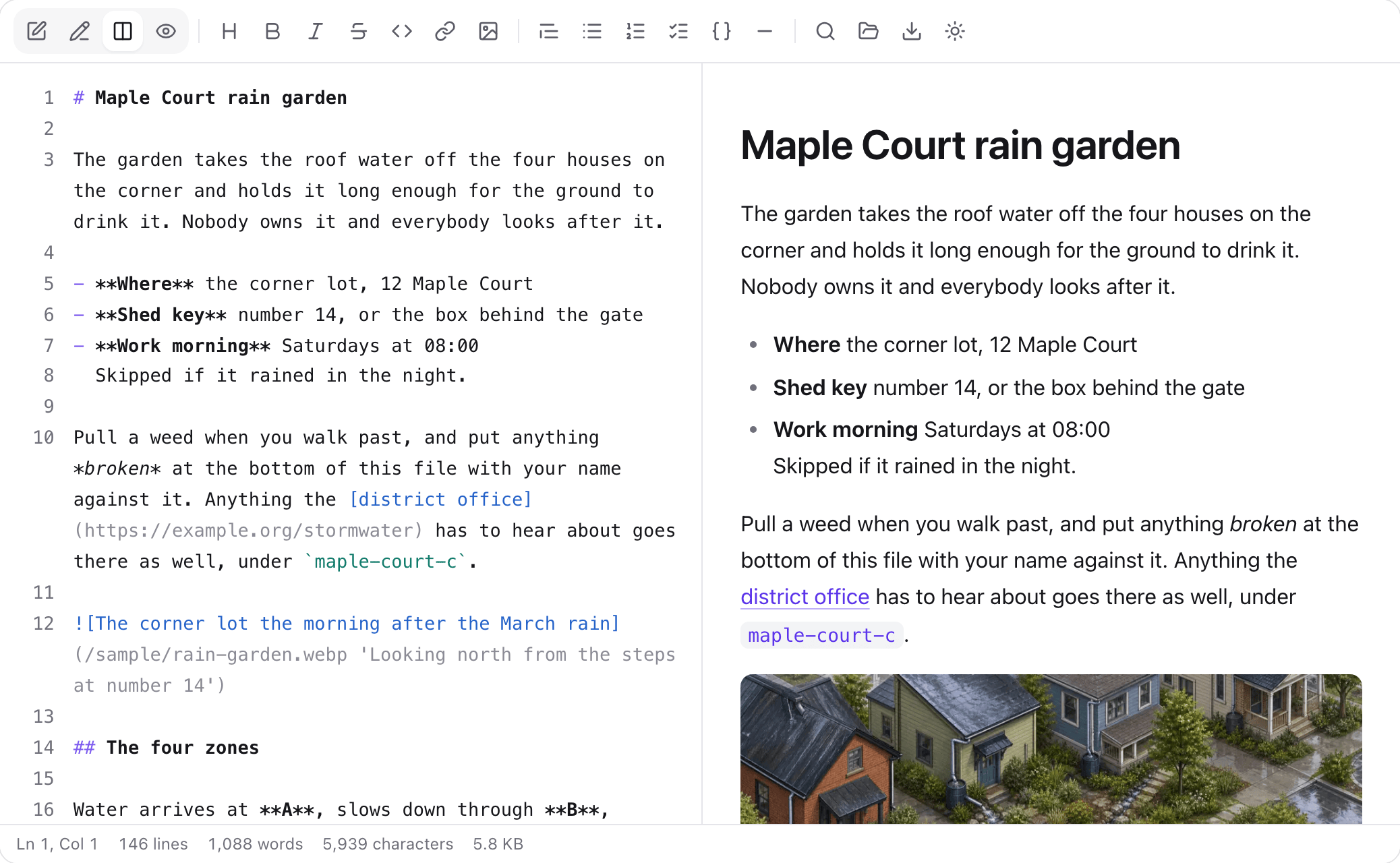
- Editor and viewer are the same library. They share the parser and the renderer, so what was typed is what a reader sees, not what a second renderer makes of it.
- WYSIWYG and source are two views of one value. Toggling does not round-trip through another implementation, so nothing is lost that the other view could not express.
- Nothing is injected. There is no
innerHTMLon the path from Markdown to the page, so there is nothing to escape, and every URL is checked against a scheme allowlist whatever else a document contains. - One runtime dependency, the toolbar's icon set. A test in the suite fails the build if a source file imports anything undeclared, and anything added later has to be permissively licensed.
- ESM only, with TypeScript declarations included. The exported names are under semantic versioning: one that goes away or changes shape waits for a major version.
Install
npm install mawy-reactreact and react-dom are peer dependencies, and React 18 or 19 is supported. Building needs Node.js 20.19 or later.
Setup
Add one line to your app's CSS entry point:
@import 'mawy-react/styles.css';The stylesheet is finished CSS. Everything the library draws goes through --mawy-* custom properties, so you theme it by redeclaring a token instead of competing on selector specificity. Tokens cascade, so one declaration on a wrapping element reaches every Mawy surface inside it.
Usage
import { MawyEditor } from 'mawy-react';

export function Write() {
  return <MawyEditor defaultValue="# Hello" onChange={save} />;
}
You get the Markdown source with its syntax coloured, a live preview beside it, a formatting toolbar whose every command is also a keyboard shortcut, and a status bar that counts lines, words and characters. The source surface is a real <textarea> under a coloured copy of its own text, which keeps the IME and the mobile keyboard working.
And the read-only half:
import { MawyViewer } from 'mawy-react';

export function Page({ document }: { document: string }) {
  return <MawyViewer value={document} />;
}
That gives you a finished reader: the rendered document, and a toolbar for the typeface, text size, line height, letter spacing, column width, light or dark theme, and an outline of the headings. None of it changes the document.
value is optional. With nothing to show, the viewer becomes a file picker: drop a .md file on it, or choose one.
<MawyViewer onValueChange={(markdown, file) => save(file?.name, markdown)} />Pick what the toolbar has, and in what order:
<MawyViewer value={document} toolbar={['fontSize', 'colorScheme']} />Typefaces
By default the typeface menu offers three roles, sans, serif and mono, drawn with whatever the reader's machine already has, and nothing is fetched. A catalogue of thirteen open-licensed families (all SIL OFL, five of them Korean) ships with the package and has to be opted into, because opening a connection to a font CDN is the embedding page's decision rather than a component's:
import { MAWY_SYSTEM_FONTS, MAWY_WEB_FONTS, MawyViewer } from 'mawy-react';

<MawyViewer value={document} fonts={[...MAWY_SYSTEM_FONTS, ...MAWY_WEB_FONTS]} />;
Your own fonts go in the same list: { id, label, stack, href }.
Supported syntax
CommonMark, at 640 of the specification's 652 examples, which the test suite checks on every change. On top of that come GitHub's additions: tables with per-column alignment, task lists, ~~strikethrough~~, bare URLs, footnotes, and the five alert kinds. Definition lists are also read, which GitHub does not do. Link reference definitions resolve wherever in the file they are written. Code blocks are coloured by whatever highlight is given, and mawy-react/highlight is one such highlighter, in a separate entry point, fetched only when a document turns out to have a language on a fence.
Directives
A document can carry a construct this package has never heard of, written in the document rather than in HTML:
:::callout[Careful]{kind=warning} Blocks, parsed as blocks. :::directives says what each name becomes, as in <MawyViewer directives={{ callout: Callout }} />. A component is handed the name, the attributes and the pieces already drawn, so it composes elements rather than markup. An unregistered name is shown as the characters it was written with. ::name{…} on a line of its own and :name[…] inside a sentence are the other two shapes.
Safety
Raw HTML inside a document is shown as text unless you ask otherwise (html="sanitize" or html="raw"), and every URL is checked whichever you choose. [click](javascript:…) is Markdown rather than HTML, so the scheme allowlist is not part of that option and is not switched off with it. A refused destination is drawn as the words the author wrote, with no link around them.
Other entry points
| Import | What it is |
| --- | --- |
| mawy-react/markdown | The parser alone — parseMarkdown, slugify and the node types. No React, no DOM. |
| mawy-react/highlight | mawyHighlighter, the syntax colouring, loaded only when a document needs it. |
| mawy-react/server | MawyDocument, which draws a document on a server and ships no JavaScript for it. |
| mawy-react/types | Every exported type, so a prop can be named without importing a component. |
| mawy-react/styles.css | The stylesheet, above. |
The full reference is at mawy.cdget.com/api/, one page per component, type and function.
Development
Everything is run from this folder; there is no install at the repository root.
npm install
npm run lint         # ESLint
npm run typecheck    # tsc, source and tests
npm test             # Vitest, in a real browser
npm run build        # dist/
The suite drives Playwright, so the first run needs a browser:
npx playwright install --with-deps chromiumIt runs in a real browser rather than a DOM emulator on purpose. Selection ranges, contenteditable and beforeinput are what this library is built on, and jsdom implements none of them faithfully enough for a passing test to mean anything. test/environment.test.tsx records that and fails first if the harness is wrong. Locally the suite runs in Chromium alone, and CI runs it across Chromium, Firefox and WebKit on Linux, Windows and macOS. Set VITEST_BROWSER to pick another engine yourself.
The live previews are on the documentation site. cd ../../docs && npm install && npm run dev renders the real components from src/ through a Vite alias, so an edit appears on screen without a rebuild.
CONTRIBUTING.md has the rest.