
mc-gitpulse
v1.0.7
Published
The ultimate Git UI - CLI + Web interface with advanced repository insights

Maintainers
 mohanchinnappan
Readme
⚡ GitPulse - The Ultimate Git UI
The best Git UI - A powerful combination of CLI and web interface that provides deep insights into your Git repositories.
🚀 Features
🌳 Git Graph Visualization (NEW!)
- Visual commit history - See your Git tree like never before
- Branch relationships - Understand merges and branch points visually
- Color-coded display - Beautiful, easy-to-read graph
- Configurable depth - View 50 to 500 commits
📝 Monaco Editor Integration (NEW!)
- Professional code viewer - VS Code's editor in your browser
- 30+ languages - Automatic syntax highlighting
- File exploration - Click any file to view its contents
- Dark theme - Matches GitPulse's beautiful design
📊 Comprehensive Repository Analysis
- Real-time statistics - Total commits, contributors, branches, and repository size
- Activity tracking - See commits by day, week, and month
- Contributor insights - Top contributors with commit counts
- Health scoring - Repository health assessment with actionable suggestions
🌳 Advanced Git Tree Visualization
- File tree browser - Navigate your repository structure
- Commit history - Beautiful commit log with author and date information
- Branch management - View all branches with current branch highlighting
- Status monitoring - Real-time working directory status
📈 Statistical Analysis
- Temporal patterns - Commits by day of week and hour of day
- Activity trends - Average commits per day
- Visual charts - Beautiful Chart.js visualizations
🔧 Repository Optimization
- Garbage collection analysis - Detect when GC is needed
- Storage insights - Loose objects, pack files, and sizes
- One-click optimization - Run git gc directly from the UI
- Health recommendations - Actionable suggestions to improve repo performance
🎨 Beautiful Dark Theme UI
- Modern Tailwind CSS design - Responsive and beautiful
- Dark theme - Easy on the eyes for long sessions
- Real-time updates - WebSocket-powered live data
- Smooth animations - Professional transitions and effects
Demo
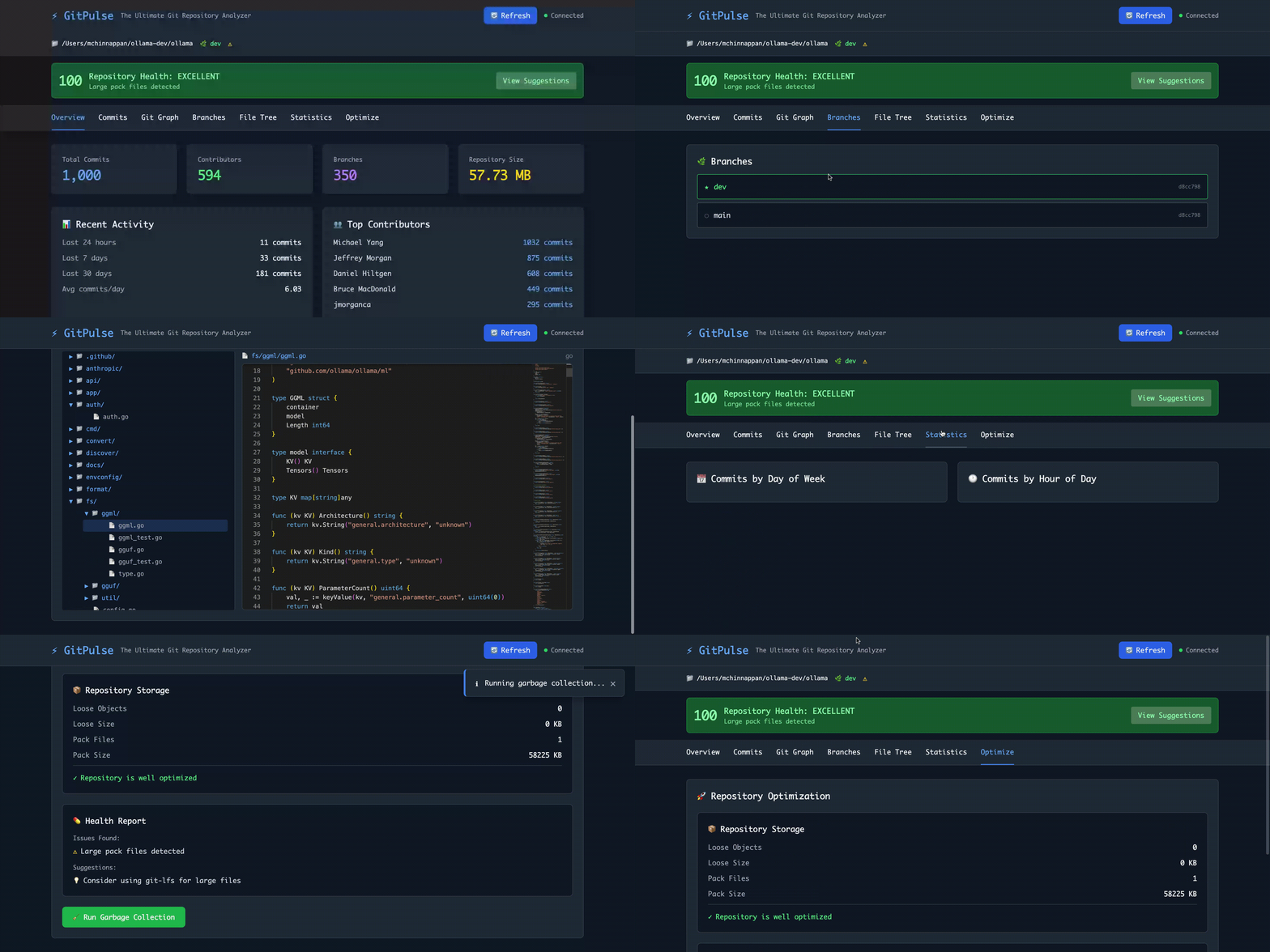
Screenshot
📦 Installation
npm install -g mc-gitpulsePrerequisites
- Node.js (v14 or higher)
- Git installed on your system
- A Git repository to analyze
🎯 Usage
Basic Usage
# Or specify a different repository
gitpulse -g /path/to/repo
Command Line Options
# Specify git repository path
gitpulse --git-folder /path/to/repo

# or URL for the git repo

gitpulse -g git-repo-url


# Specify custom port
gitpulse --port 8080 --git-folder /path/to/repo


# Combine options
gitpulse -g /path/to/repo -p 8080 --no-browser
🖥️ Web Interface
Once started, GitPulse opens a beautiful web interface with seven main tabs:
1. Overview
- Quick stats dashboard
- Recent activity summary
- Top contributors
- Repository health score
2. Commits
- Last 50 commits
- Author information
- Commit messages and hashes
- Timestamps
3. Git Graph ⭐ NEW
- Visual commit tree
- Branch relationships
- Merge patterns
- Configurable history depth
4. Branches
- All local branches
- Current branch highlighted
- Commit hashes
- Easy navigation
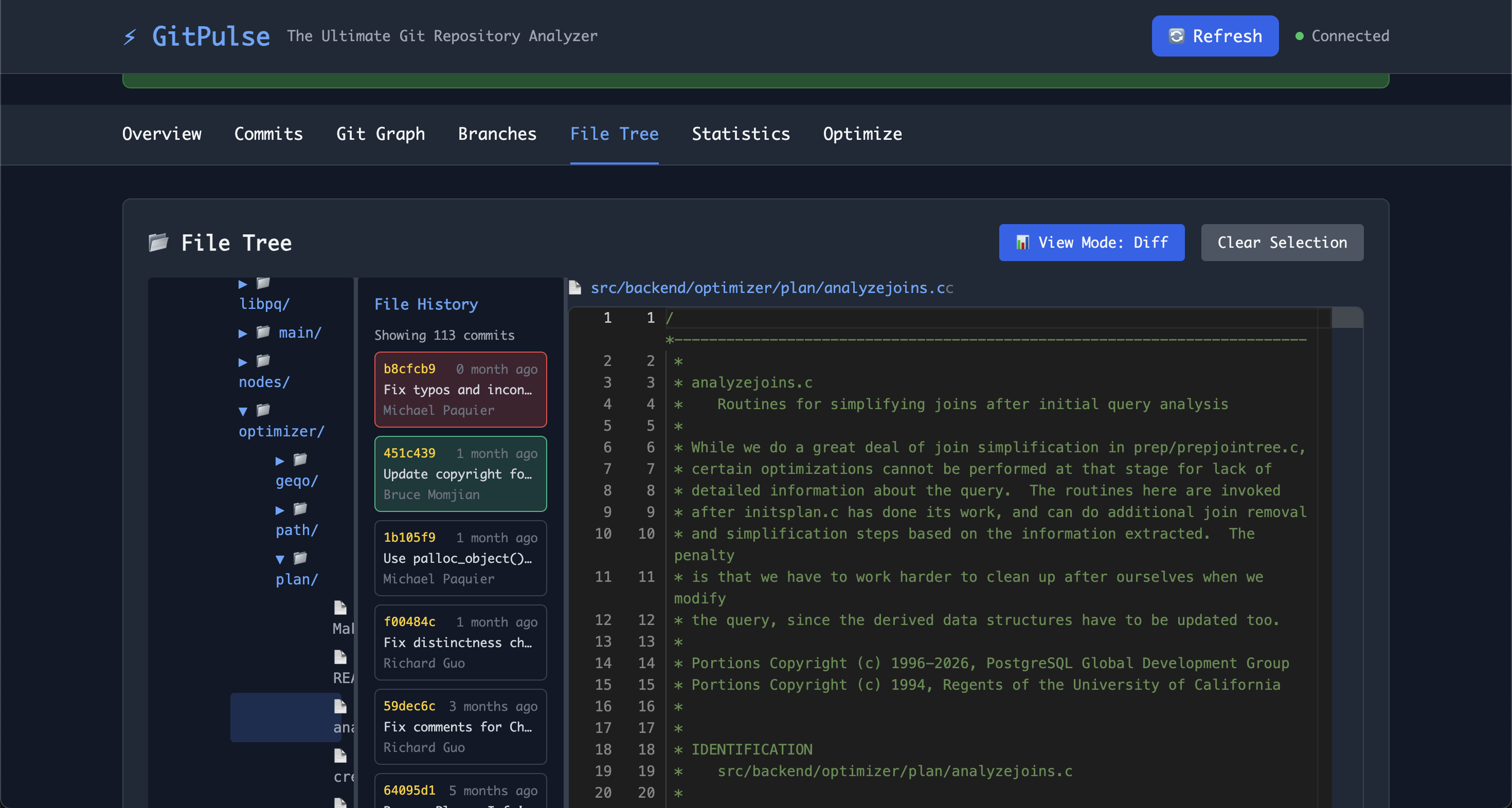
5. File Tree ⭐ ENHANCED
- Complete repository structure
- Expandable/collapsible folders
- Click files to view in Monaco Editor
- Split-pane layout
- Syntax-highlighted code viewing
6. Statistics
- Commits by day of week chart
- Commits by hour of day chart
- Activity patterns
- Visual insights
7. Optimize
- Repository storage analysis
- Garbage collection recommendations
- Health report with issues
- One-click optimization
🔥 Key Features Explained
Health Scoring System
GitPulse analyzes your repository and provides a health score (0-100):
- Excellent (90-100): Repository is in great shape
- Good (70-89): Minor improvements possible
- Needs Attention (50-69): Several issues to address
- Poor (0-49): Requires immediate attention
Health checks include:
- Recent commit activity
- Garbage collection needs
- Pack file optimization
- Large file detection
Garbage Collection Analysis
GitPulse helps you understand when to run garbage collection:
- Loose objects count - Files not yet packed
- Loose size - Space used by loose objects
- Pack count - Number of pack files
- Pack size - Space used by packs
Automatic recommendations when:
- More than 1000 loose objects exist
- Loose objects exceed 10 MB
Real-time Updates
WebSocket connection provides:
- Live repository status
- Instant refresh capability
- Connection status indicator
- Automatic reconnection
🛠️ Technology Stack
- Backend: Node.js + Express
- Git Integration: simple-git
- Frontend: HTML5 + Tailwind CSS
- Code Editor: Monaco Editor (VS Code's editor)
- Charts: Chart.js
- Real-time: WebSocket (ws)
- CLI: Commander + Chalk + Ora
📋 API Endpoints
GitPulse exposes several API endpoints:
GET /api/analyze- Complete repository analysisGET /api/tree- File tree structureGET /api/graph?limit=100- Commit graphGET /api/file/:ref/*- File content at specific refPOST /api/gc- Run garbage collection
🎨 Customization
Port Configuration
# Use custom port
gitpulse --port 3001
Analysis Depth
Edit analyzer.js to customize:
- Number of commits to analyze
- Health check thresholds
- Garbage collection recommendations
🐛 Troubleshooting
"Not a git repository"
Make sure you're running GitPulse in a directory with a .git folder.
Port already in use
Use the --port option to specify a different port:
gitpulse --port 3001WebSocket connection failed
Check your firewall settings and ensure the port is accessible.
🚀 Performance Tips
- Large repositories: GitPulse analyzes up to 1000 commits by default
- Run GC regularly: Use the Optimize tab to keep your repo lean
- Monitor health score: Address issues as they appear
📄 License
MIT License (c) Mohan Chinnappan
🌟 Why GitPulse?
- Fast: Analyzes repositories quickly
- Comprehensive: More insights than SourceTree
- Beautiful: Modern, dark-themed interface
- Smart: Health scoring and recommendations
- Free: Open source, no subscriptions
- Cross-platform: Works on Mac, Linux, Windows
🎯 Roadmap
Future enhancements could include:
- Commit graph visualization
- Diff viewer
- Branch comparison
- Merge conflict detection
- Performance profiling
- Custom themes
- Plugin system
Made with ⚡ for developers who love Git
"The only Git UI that Linus might actually use?"