
mc-icon-gen
v1.0.3
Published
CLI tool to generate icons with text for multiple sizes and Mac .icns files

Maintainers
 mohanchinnappan
Readme
🎨 Icon Generator CLI
A powerful command-line tool to generate beautiful app icons with custom text or colorful emojis for multiple sizes, including Mac .icns format.
Perfect for developers who need quick, professional-looking icons for their applications, browser extensions, Electron apps, or any project that needs icons in multiple sizes.
✨ Features
- 🎯 Text or Emoji Support - Create icons with custom text (1-3 characters) or colorful emojis
- 🖼️ Multiple Sizes - Generates icons in 8 standard sizes (16×16 to 1024×1024)
- 🍎 Mac .icns Support - Automatic .icns file generation for macOS applications
- 🎨 Full Customization - Choose colors, fonts, and corner radius
- 🌈 Colorful Emojis - Uses Twitter's Twemoji for consistent, beautiful emoji rendering
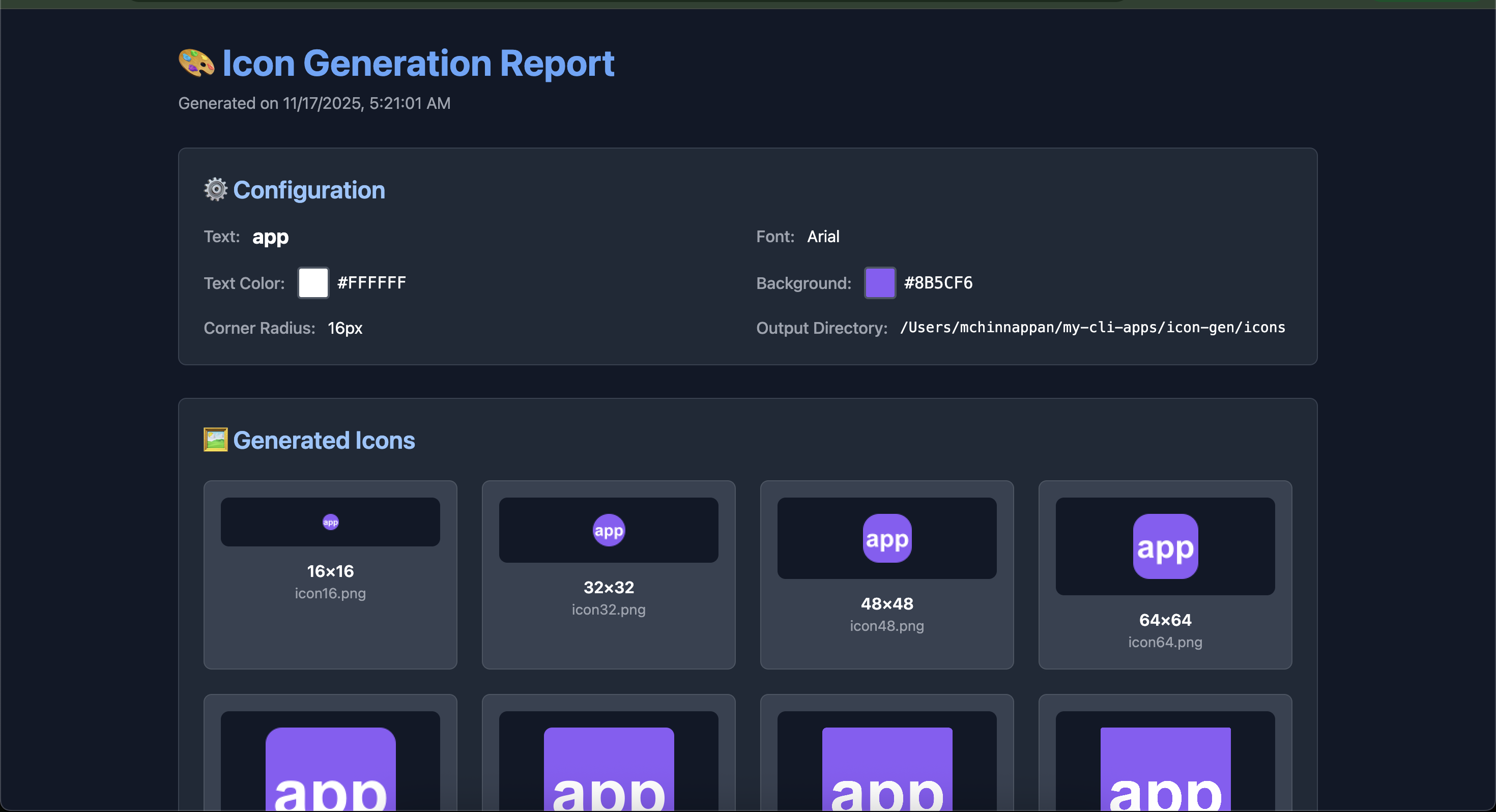
- 📊 Beautiful HTML Report - Dark-themed report with preview of all generated icons
- ⚡ Zero System Dependencies - Pure Node.js solution using Sharp
- 🚀 Fast & Easy - Generate complete icon sets in seconds
Screenshot
📦 Installation
Global Installation (Recommended)
npm install -g mc-icon-genThen use it anywhere:
mc-icon-gen -w ABCLocal Installation
npm install mc-icon-genUse with npx:
npx mc-icon-gen -w ABC🚀 Quick Start
Text Icons
# Simple text icon with default colors
mc-icon-gen -w ABC

# Custom colors and font
mc-icon-gen -w JD -f Helvetica -b "#3B82F6" -c "#FFFFFF"

# Rounded corners
mc-icon-gen -w APP -b "#8B5CF6" -r 16
Emoji Icons
# Rocket emoji
mc-icon-gen -e "🚀" -b "#1E293B"

# Fire emoji with rounded corners
mc-icon-gen -e "🔥" -b "#FF6B6B" -r 12
📖 Usage
mc-icon-gen [options]Options
| Option | Alias | Description | Default | Required |
|--------|-------|-------------|---------|----------|
| --word <text> | -w | Text to display (1-3 characters) | - | * |
| --emoji <emoji> | -e | Emoji to display (single emoji) | - | * |
| --font <font> | -f | Font family (text mode only) | Arial | |
| --background <color> | -b | Background color (hex format) | #2463EB | |
| --color <color> | -c | Text color (hex format) | #FFFFFF | |
| --radius <pixels> | -r | Corner radius in pixels (0-50) | 4 | |
| --output <directory> | -o | Output directory | ./icons | |
| --no-icns | | Skip .icns generation | false | |
| --version | -V | Output version number | | |
| --help | -h | Display help | | |
Note: Either --word or --emoji is required (but not both).
🎯 Examples
For Apps & Extensions
# Tech startup logo
mc-icon-gen -w TS -f "Helvetica" -b "#0EA5E9" -c "#FFFFFF" -r 8

# E-commerce app
mc-icon-gen -e "🛒" -b "#10B981" -r 16

# Music player
mc-icon-gen -e "🎵" -b "#8B5CF6" -r 20

# Chat application
mc-icon-gen -e "💬" -b "#3B82F6" -r 12
For Development Tools
# Code editor
mc-icon-gen -e "💻" -b "#1F2937" -r 8

# Database tool
mc-icon-gen -e "🗄️" -b "#059669" -r 10

# API testing tool
mc-icon-gen -e "⚡" -b "#FBBF24" -r 12
Brand & Identity
# Company initials
mc-icon-gen -w MC -f "Arial" -b "#DC2626" -c "#FFFFFF" -r 6

# Personal brand
mc-icon-gen -w JD -f "Georgia" -b "#7C3AED" -c "#FFFFFF" -r 10
📁 Output
The tool generates:
./icons/
├── icon16.png      # 16×16 pixels
├── icon32.png      # 32×32 pixels
├── icon48.png      # 48×48 pixels
├── icon64.png      # 64×64 pixels
├── icon128.png     # 128×128 pixels
├── icon256.png     # 256×256 pixels
├── icon512.png     # 512×512 pixels
├── icon1024.png    # 1024×1024 pixels
├── icon.icns       # macOS icon file (Mac only)
└── report.html     # Beautiful preview report
HTML Report
Every generation includes a beautiful dark-themed HTML report with:
- ✅ Configuration summary with color swatches
- ✅ Preview grid of all generated icons
- ✅ File list with status indicators
- ✅ Responsive design for viewing on any device
🎨 Color Customization
Popular Color Schemes
# Blue & White (Professional)
mc-icon-gen -w APP -b "#2463EB" -c "#FFFFFF"

# Dark Mode
mc-icon-gen -w DM -b "#1F2937" -c "#F9FAFB"

# Vibrant Gradient Feel
mc-icon-gen -w VG -b "#8B5CF6" -c "#FFFFFF"

# Success Green
mc-icon-gen -w OK -b "#10B981" -c "#FFFFFF"

# Warning Orange
mc-icon-gen -w WRN -b "#F59E0B" -c "#FFFFFF"

# Error Red
mc-icon-gen -w ERR -b "#EF4444" -c "#FFFFFF"
Hex Color Format
Colors must be in 6-digit hex format with # prefix:
- ✅ Valid:
#2463EB,#FFFFFF,#000000 - ❌ Invalid:
2463EB,#246,blue
🍎 Mac .icns Generation
On macOS, the tool automatically generates a .icns file with all required sizes and @2x retina variants for perfect display across all Mac applications.
Requirements:
- macOS operating system
iconutilcommand-line tool (comes with Xcode Command Line Tools)
Skip .icns generation:
mc-icon-gen -w APP --no-icns😀 Emoji Support
The tool uses Twitter's Twemoji library for consistent, colorful emoji rendering across all platforms. This means your emoji icons will look the same on Windows, Mac, Linux, iOS, and Android.
Popular Emoji Choices
- 🚀 Rocket - Perfect for launch/deploy tools
- 🎨 Art Palette - Design & creative apps
- 💡 Light Bulb - Idea & innovation apps
- 🔥 Fire - Trending/hot content
- ⚡ Lightning - Fast/performance tools
- 💻 Laptop - Developer tools
- 📱 Mobile Phone - Mobile apps
- 🎵 Music Note - Music/audio apps
- 📊 Chart - Analytics & data
- 🔒 Lock - Security apps
- 🌟 Star - Favorites/premium
- ❤️ Heart - Social/health apps
🎯 Use Cases
- Electron Apps - Generate icon sets for cross-platform desktop apps
- Browser Extensions - Create icons for Chrome, Firefox, Safari extensions
- Mobile Apps - Generate app icons for React Native, Flutter, Ionic
- Web Apps - Create favicons and PWA icons
- macOS Apps - Generate .icns files for native Mac applications
- Quick Prototyping - Fast icon generation for mockups and demos
- Personal Branding - Create unique icons with your initials
💡 Tips & Best Practices
Text Icons
- Use 1-2 characters for best legibility (e.g., "AB", "X")
- Choose high-contrast colors for readability
- Sans-serif fonts work best for small sizes
Emoji Icons
- Single emojis work best
- Consider how the emoji looks at small sizes (16×16)
- Simple emojis are more recognizable than complex ones
Colors
- Ensure good contrast between background and text
- Test at smallest size (16×16) to verify readability
- Consider both light and dark themes
Corner Radius
- 0px = Square (traditional app icons)
- 4-8px = Slightly rounded (modern, subtle)
- 12-20px = Very rounded (friendly, approachable)
- 50%+ = Circular icons
🛠️ Troubleshooting
Installation Issues
Emoji Issues
Problem: Emoji not rendering or appears black & white
- ✅ Ensure you have internet connection (fetches from Twemoji CDN)
- ✅ Try a different emoji
- ✅ Check the console output for error messages
Problem: .icns generation fails
- ✅ Verify you're on macOS
- ✅ Install Xcode Command Line Tools:
xcode-select --install - ✅ Or use
--no-icnsflag to skip .icns generation
Color Issues
Problem: Invalid color format error
# Wrong
mc-icon-gen -w ABC -b "blue"
mc-icon-gen -w ABC -b "2463EB"
mc-icon-gen -w ABC -b "#246"

# Correct
mc-icon-gen -w ABC -b "#2463EB"
🔧 Requirements
- Node.js 14.15.0 or higher
- macOS (optional, for .icns generation only)
- Internet connection (for emoji support)
📝 License
MIT © Mohan Chinnappan
Made with ❤️ for developers