
mc-json-diff-cli
v1.0.5
Published
A powerful CLI tool to compare JSON files using Monaco Editor with jq query support
Downloads
38

Maintainers
 mohanchinnappan
Readme
🔍 JSON Diff CLI





A powerful CLI tool to compare JSON files with Monaco Editor and jq querying
VS Code's diff engine meets jq's powerful JSON processing
Features • Installation • Usage • jq Examples • Documentation
🎯 Why JSON Diff CLI?
JSON comparison shouldn't be limited to basic text diffs. When you need to compare API responses, configuration files, or data dumps, you need intelligent querying and professional visualization.
JSON Diff CLI combines:
- ✨ Monaco Editor - VS Code's powerful diff engine
- 🔍 jq Integration - Filter, transform, and query JSON on the fly
- 🎨 Beautiful Interface - Dark-themed, responsive design
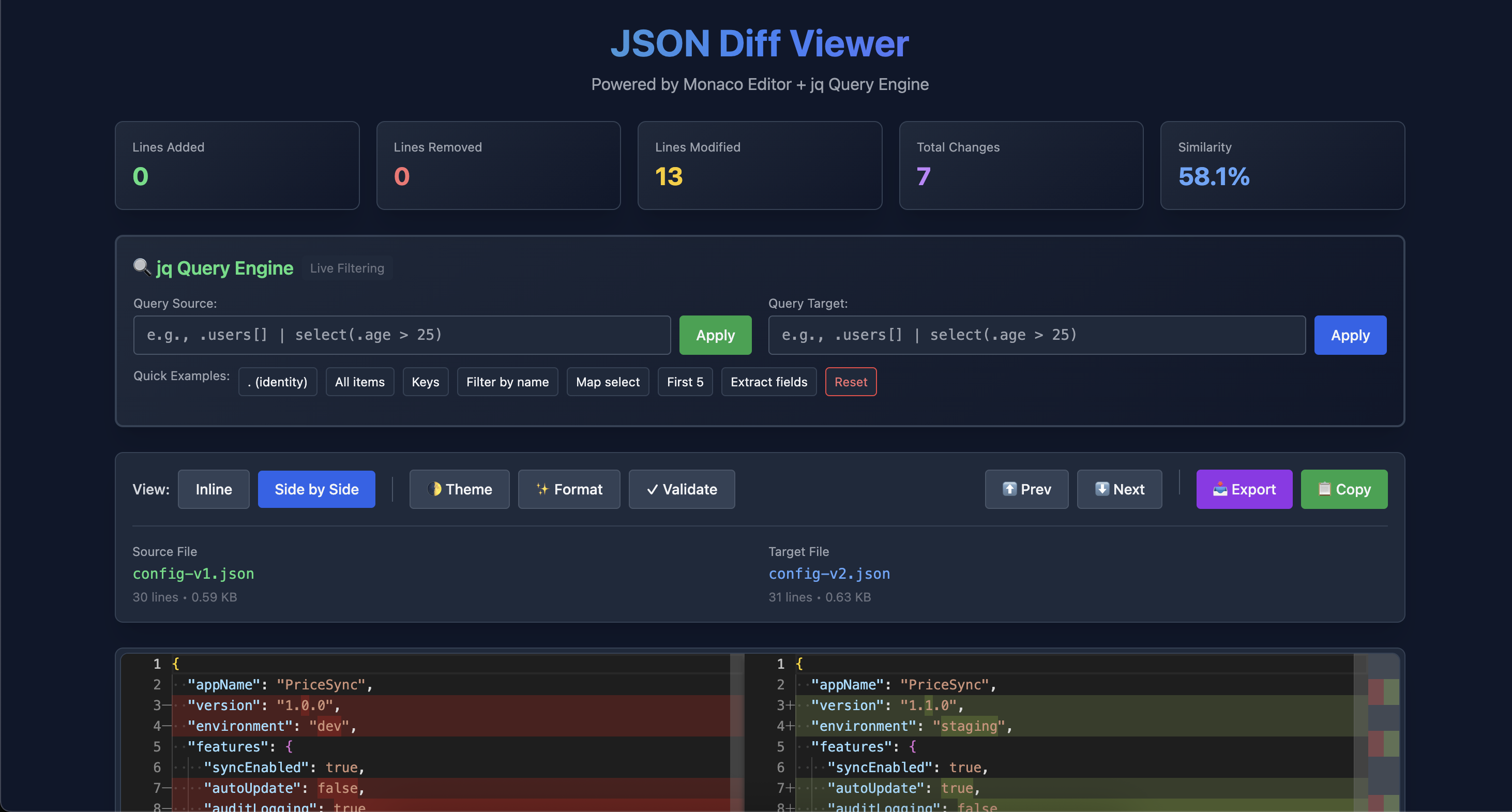
- 📊 Smart Statistics - Instant insights into what changed
- ⚡ Real-time Queries - Apply jq filters and see diffs update live
✨ Features
🔬 Monaco Editor + jq = Superpower
🎯 Professional Diff Engine
- VS Code-quality comparison
- Character-level differences
- Syntax highlighting
- Smart scrolling
🔍 jq Query Integration
- Filter large JSON files
- Extract specific fields
- Transform data structure
- Real-time query application
🔍 jq Query Engine Features
- Live Filtering - Apply jq queries to source and target independently
- Quick Examples - One-click common jq patterns
- Query Results - See what queries were applied
- Reset Anytime - Go back to original JSON instantly
- Separate Queries - Different queries for source and target files
🎨 Dual View Modes
| Side-by-Side | Inline | |------------------|------------| | Compare structure visually | Unified diff view | | Perfect for nested objects | Compact for line reviews | | Synchronized scrolling | Clear +/- indicators |
📊 Live Statistics
- Lines Added - New content in target
- Lines Removed - Deleted content
- Lines Modified - Changed content
- Total Changes - Number of change blocks
- Similarity Score - Percentage match
🛠️ Productivity Features
- ✨ Auto-Format - Pretty-print JSON with one click
- ✓ Validate - Check JSON syntax validity
- 🔍 Navigate Diffs - Jump between changes
- 📥 Export Report - Generate JSON diff reports
- 📋 Copy to Clipboard - Quick content copying
- 🌓 Theme Toggle - Dark/Light mode
🚀 Installation
Prerequisites
Required:
- Node.js 14.0.0 or higher
- npm or yarn
Optional (for jq queries):
- jq - JSON processor
Install jq
macOS:
brew install jqUbuntu/Debian:
sudo apt-get install jqWindows:
# Using Chocolatey
choco install jq

# Or download from: https://stedolan.github.io/jq/download/
Global Installation
# Install globally
npm install -g mc-json-diff-cli
Use from anywhere
json-diff -s data-old.json -t data-new.json💻 Usage
Basic Syntax
json-diff -s <source-file> -t <target-file> [options]Command Options
Required:
  -s, --source <file>    Source JSON file
  -t, --target <file>    Target JSON file

Optional:
  -p, --port <number>    Server port (default: 3000)
  -q, --query <jq>       Initial jq query to apply
  -h, --help             Display help
  -V, --version          Display version
Examples
Basic comparison:
json-diff -s api-response-v1.json -t api-response-v2.jsonWith initial jq query:
json-diff -s data.json -t data-new.json -q '.users[]'Compare API responses:
json-diff -s expected.json -t actual.jsonCompare configuration files:
json-diff -s config-prod.json -t config-staging.jsonCustom port:
json-diff -s file1.json -t file2.json -p 8080Filter large files:
json-diff -s large-data.json -t large-data-new.json -q '.results[0:10]'🔍 jq Query Examples
Quick Start Queries
Identity (show as-is):
.Get all items in array:
.[]Get all keys:
keysFilter by condition:
.[] | select(.age > 25)Extract specific fields:
.[] | {name, email}First 5 items:
.[0:5]Map and select:
map(select(.active == true))Real-World jq Examples
Compare only users:
json-diff -s data1.json -t data2.json -q '.users'Compare specific user:
json-diff -s data1.json -t data2.json -q '.users[] | select(.id == 123)'Compare nested data:
json-diff -s data1.json -t data2.json -q '.config.database.settings'Filter by date:
json-diff -s logs1.json -t logs2.json -q '.[] | select(.date > "2024-01-01")'Extract and transform:
json-diff -s api1.json -t api2.json -q '.results | map({id, status, created: .createdAt})'Group by field:
json-diff -s data1.json -t data2.json -q 'group_by(.category)'Count occurrences:
json-diff -s data1.json -t data2.json -q '[.[] | .status] | group_by(.) | map({status: .[0], count: length})'jq Filter Patterns
Array Operations:
.[]              # All elements
.[0]             # First element
.[-1]            # Last element
.[2:5]           # Slice (index 2-4)
length           # Array length
Object Operations:
.key             # Get value
.key.nested      # Nested access
keys             # All keys
values           # All values
has("key")       # Check if key exists
Selection:
select(.age > 18)              # Filter condition
select(.name == "John")        # Exact match
select(.tags | contains(["a"])) # Array contains
Transformation:
map(.price * 1.1)              # Transform values
{name, age}                    # Extract fields
{fullName: .name, years: .age} # Rename fields
Advanced:
group_by(.category)            # Group elements
sort_by(.date)                 # Sort
unique                         # Remove duplicates
flatten                        # Flatten arrays
📖 Documentation
Interface Overview
┌─────────────────────────────────────────────────────────────┐
│                    JSON Diff Viewer                          │
│           Powered by Monaco Editor + jq                      │
├─────────────────────────────────────────────────────────────┤
│  📊 Statistics                                               │
│  [+15] [-8] [~12] [Total: 35] [Match: 92.3%]               │
├─────────────────────────────────────────────────────────────┤
│  🔍 jq Query Engine                                         │
│  Source: [.users[] | select(.active)]  [Apply]             │
│  Target: [.users[] | select(.active)]  [Apply]             │
│  Quick: [.] [.[]] [keys] [Filter] [Map] [Reset]           │
├─────────────────────────────────────────────────────────────┤
│  Controls: [Side-by-Side] [Inline] [Theme] [Format]        │
│           [⬆Prev] [⬇Next] [Export] [Copy] [Validate]      │
├─────────────────────────────────────────────────────────────┤
│  Source (old.json)      │    Target (new.json)              │
│ ┌───────────────────────┼───────────────────────┐          │
│ │ {                     │ {                     │          │
│ │   "users": [       🔴 │   "users": [       🟢 │          │
│ │     {                 │     {                 │          │
│ │       "name": "John"  │       "name": "Jane"  │          │
│ │     }                 │     }                 │          │
│ │   ]                   │   ]                   │          │
│ │ }                     │ }                     │          │
│ └───────────────────────┴───────────────────────┘          │
└─────────────────────────────────────────────────────────────┘
jq Query Workflow
- Load Files - JSON files are parsed and displayed
- Write Query - Enter jq expression in query box
- Apply - Click "Apply" to filter the data
- Compare - Monaco shows diff of filtered results
- Reset - Return to original data anytime
Understanding the Diff
| Color | Meaning | Description | |-------|---------|-------------| | 🟢 Green | Added | New content in target | | 🔴 Red | Removed | Content removed from source | | 🔵 Blue | Modified | Changed between versions | | 🟣 Purple | Character-level | Specific character changes |
Statistics Explained
Lines Added → New lines in target not in source
Lines Removed → Lines in source missing from target
Lines Modified → Lines that changed
Total Changes → Number of change regions
Similarity → Match percentage (100% = identical)
🎯 Use Cases
🔬 API Testing
Compare expected vs actual responses:
# Compare full response
json-diff -s expected-response.json -t actual-response.json

# Compare only specific data
json-diff -s expected.json -t actual.json -q '.data.results'
🔧 Configuration Management
Review config changes before deployment:
json-diff -s config-prod.json -t config-staging.json

# Compare specific sections
json-diff -s config1.json -t config2.json -q '.database'
📊 Data Analysis
Compare datasets:
# Compare subsets
json-diff -s data-jan.json -t data-feb.json -q '.transactions[] | select(.amount > 1000)'

# Compare aggregations
json-diff -s data1.json -t data2.json -q 'group_by(.category) | map({category: .[0].category, count: length})'
🧪 Testing & Validation
Validate data transformations:
# Before/after ETL
json-diff -s input.json -t output.json

# Compare specific records
json-diff -s before.json -t after.json -q '.records[] | select(.id == 123)'
📦 Package Management
Compare package files:
json-diff -s package-lock-old.json -t package-lock.json -q '.dependencies'🔍 Log Analysis
Compare log files:
json-diff -s logs-yesterday.json -t logs-today.json -q '.[] | select(.level == "error")'⌨️ Keyboard Shortcuts
All Monaco Editor shortcuts work:
| Shortcut | Action |
|----------|--------|
| Ctrl/Cmd + F | Find |
| Ctrl/Cmd + H | Find & Replace |
| Ctrl/Cmd + D | Select next occurrence |
| Ctrl/Cmd + / | Toggle comment |
| Alt + ↑/↓ | Move line |
| F1 | Command palette |
| Ctrl/Cmd + Shift + O | Go to symbol |
| Ctrl/Cmd + P | Quick open |
🔧 Advanced Usage
Complex jq Queries
Nested filtering:
json-diff -s data1.json -t data2.json -q '
  .users[] |
  select(.age > 25) |
  {name, email, orders: .orders | length}
'
Multiple transformations:
json-diff -s data1.json -t data2.json -q '
  .items |
  map(select(.active)) |
  sort_by(.price) |
  .[0:10]
'
Aggregations:
json-diff -s sales1.json -t sales2.json -q '
  group_by(.category) |
  map({
    category: .[0].category,
    total: map(.amount) | add,
    count: length
  })
'
Working with Large Files
Filter before comparing:
# Only compare first 100 items
json-diff -s large1.json -t large2.json -q '.[0:100]'

# Only specific fields
json-diff -s large1.json -t large2.json -q 'map({id, status})'
Increase memory for huge files:
node --max-old-space-size=8192 index.js -s huge1.json -t huge2.jsonIntegration with APIs
Compare API responses:
# Fetch and compare
curl https://api.example.com/v1/data > api-v1.json
curl https://api.example.com/v2/data > api-v2.json
json-diff -s api-v1.json -t api-v2.json
Git Integration
# Compare with previous commit
git show HEAD~1:config.json > old-config.json
json-diff -s old-config.json -t config.json

# Compare branches
git show main:data.json > main-data.json
git show develop:data.json > develop-data.json
json-diff -s main-data.json -t develop-data.json
🚦 Troubleshooting
Common Issues
❌ "jq not found"
# Install jq first
# macOS: brew install jq
# Ubuntu: sudo apt-get install jq
# Windows: choco install jq
❌ "Invalid JSON"
- Validate JSON with
jq . file.json - Check for trailing commas
- Ensure proper UTF-8 encoding
❌ "jq query error"
- Test query separately:
jq '.your.query' file.json - Check jq syntax: https://stedolan.github.io/jq/manual/
- Start simple and build complexity
❌ "Port already in use"
json-diff -s file1.json -t file2.json -p 8080❌ "Large file performance"
# Use jq to filter first
jq '.[0:1000]' large.json > filtered.json
json-diff -s filtered.json -t filtered2.json
🆚 Comparison
| Feature | json-diff-cli | jq alone | diff | jd | JSON Diff | |---------|---------------|----------|------|----|-----------| | Monaco Editor | ✅ | ❌ | ❌ | ❌ | ❌ | | jq Integration | ✅ | ✅ | ❌ | ❌ | ❌ | | GUI | ✅ | ❌ | ❌ | ❌ | ✅ | | CLI | ✅ | ✅ | ✅ | ✅ | ❌ | | Live Queries | ✅ | ❌ | ❌ | ❌ | ❌ | | Statistics | ✅ | ❌ | ❌ | ❌ | ✅ | | Format JSON | ✅ | ✅ | ❌ | ❌ | ✅ | | Export | ✅ | ✅ | ✅ | ✅ | ❌ | | Free | ✅ | ✅ | ✅ | ✅ | ✅ |
📝 Best Practices
1. Pretty-Print Before Comparing
# Format JSON first for better diffs
jq . input.json > formatted.json
json-diff -s formatted1.json -t formatted2.json
2. Use Descriptive Filenames
# Good ✅
json-diff -s api-response-2024-01-15.json -t api-response-2024-01-16.json

# Not ideal ❌
json-diff -s file1.json -t file2.json
3. Start with Simple Queries
# Start simple
json-diff -s data1.json -t data2.json -q '.'

# Then add complexity
json-diff -s data1.json -t data2.json -q '.users'
json-diff -s data1.json -t data2.json -q '.users[] | select(.active)'
4. Test jq Queries Separately
# Test query first
jq '.users[] | select(.age > 25)' data.json

# Then use in diff
json-diff -s data1.json -t data2.json -q '.users[] | select(.age > 25)'
5. Save Query Results
Export filtered comparisons for documentation.
🔐 Security & Privacy
- ✅ Local Processing - All data stays on your machine
- ✅ No Tracking - Zero analytics or data collection
- ✅ No Upload - Files never leave your computer
- ✅ Read-Only - Original files unchanged
- ⚠️ CDN Dependencies - Monaco/Tailwind from CDN
📄 License
MIT License (c) Mohan Chinnappan
📚 Resources
🌟 Made with ❤️ for JSON Developers
Happy JSON Diffing! 🚀