
mc-whisper-ui
v1.0.5
Published
CLI to transcribe video with Whisper and show a Tailwind + Monaco UI
Downloads
84


Readme
🎧 Whisper UI CLI
Transcribe any video file using OpenAI Whisper and instantly open an interactive web UI to view and edit the transcript alongside the video — powered by Tailwind CSS + Monaco Editor.




🚀 Overview
whisper-ui is a Node.js command-line tool that:
Runs the Whisper CLI to transcribe a video (
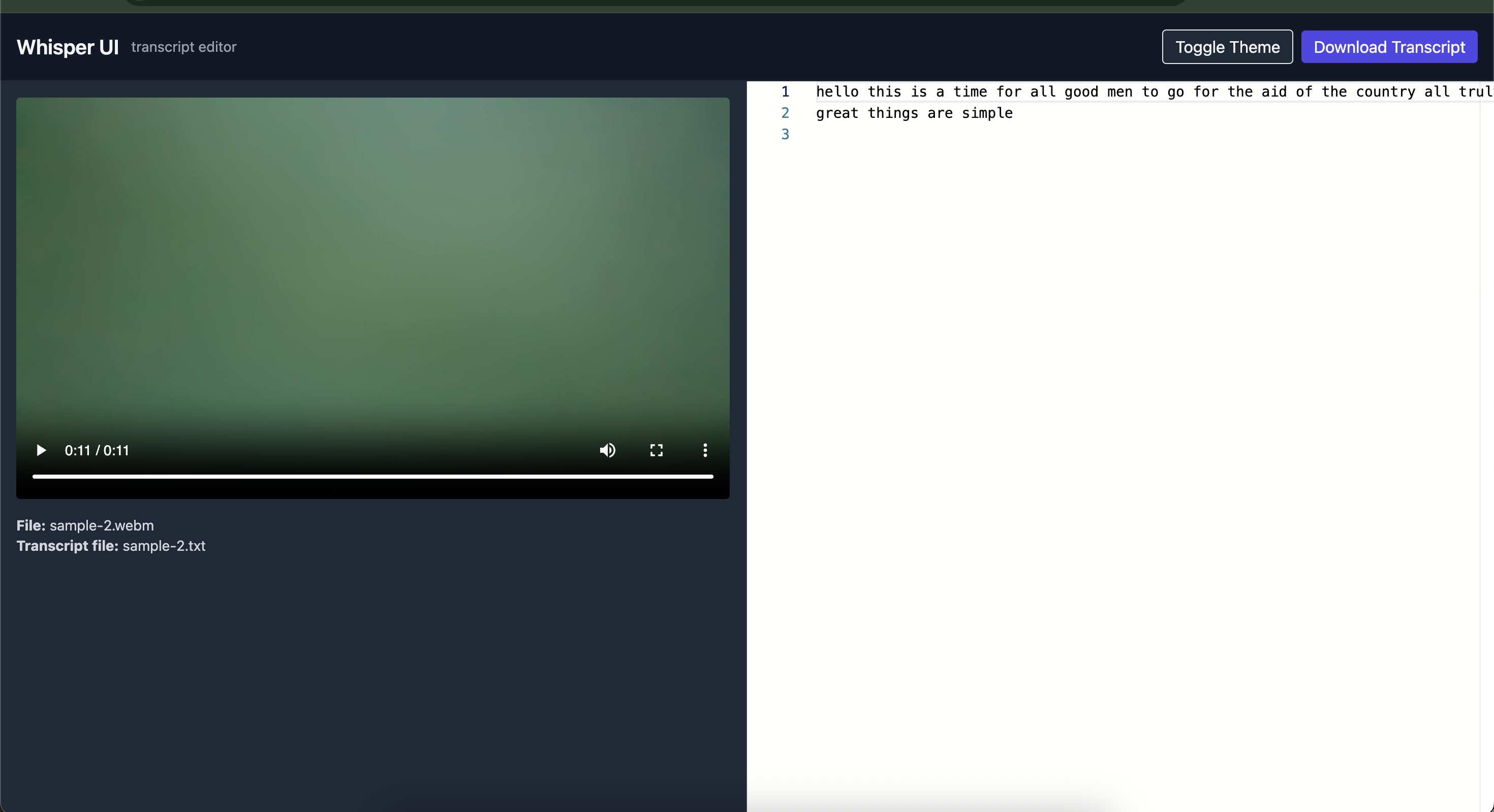
.mp4,.webm, etc.).Generates a beautiful local web UI to:
- Watch the video
- View and edit the transcript using Monaco Editor
- Toggle between dark/light mode
- Download the transcript as
.txt
Spins up a local Express server and opens your browser automatically.
Full Wokflow for Video Based Coaching
🧩 Features
- 🎤 Transcribe video/audio using OpenAI Whisper
- 🧠 Choose your model:
base,small,medium,large-v3, etc. - 🌍 Optional language specification
- 💻 Built-in Tailwind + Monaco-based transcript editor
- ☁️ One-command local web server
- 🌓 Dark & light mode toggle
- 💾 Download your edited transcript instantly
🛠️ Installation
1. Prerequisites
Node.js ≥ 18
OpenAI Whisper installed and available in your
$PATHpip install -U openai-whisperFFmpeg installed (required by Whisper)
brew install ffmpeg
2. Install the CLI
npm install -g mc-whisper-uiThen run:
whisper-ui --help💡 Usage
Basic Example
whisper-ui -v demo.mp4This will:
- Run Whisper with the
large-v3model (default) - Save transcript + UI in
./whisper-out - Launch a browser window at http://localhost:3000
Options
| Flag | Description | Default |
| -------------------- | ----------------------------------------------------- | --------------- |
| -v, --video <path> | Path to video file (.mp4, .webm, etc.) | (required) |
| -m, --model <name> | Whisper model (base, small, medium, large-v3) | large-v3 |
| -o, --out <dir> | Output directory for transcript and UI | whisper-out |
| -p, --port | Port to run the UI server on (default: "3000") | 3000 |
| --lang <lang> | Language code (e.g. en, fr, es) | (auto-detect) |
Example with custom model and language
whisper-ui -v lecture.mp4 -m small -o transcripts --lang en📂 Output Structure
After running, you’ll see:
whisper-out/
├── demo.mp4
├── demo.txt
├── index.html
└── server.jsdemo.txt→ Whisper-generated transcriptindex.html→ Tailwind + Monaco UIserver.js→ Simple Express static server (auto-generated if missing)
🖥️ UI Preview
| -------------------------------------------------------------------------------------------------- | ------------------------------------------------------------------------------------------- |
|  |
|
⚙️ Local Server
If you stop the auto-launched server, you can restart it manually:
node server.js whisper-outThen open http://localhost:3000
🧑💻 Developer Notes
The HTML UI is auto-generated with:
- Tailwind CDN
- Monaco Editor via JSDelivr
All files are self-contained — no external build steps needed.
You can customize
server.jsfor your needs.
🧾 Example Workflow
# 1. Transcribe a video
whisper-ui -v interview.mp4 -m small

# 2. Edit transcript in your browser
# (auto-opens http://localhost:3000)

# 3. Download your edited transcript
# (click "Download Transcript" in the UI)
🧠 Troubleshooting
| Issue | Fix |
| ---------------------------- | ---------------------------------------------------- |
| whisper: command not found | Install Whisper via pip install -U openai-whisper |
| Failed to start server | Ensure port 3000 is free or edit server.js |
| No transcript generated | Check Whisper logs; try a smaller model like small |
| Browser doesn’t open | Manually visit http://localhost:3000 |
📜 License
MIT © Mohan Chinnappan