
mcp-dyno
v0.2.1
Published
Put your MCP server on the dyno — holistic, LLM-driven analysis of efficiency, cost, context-bloat, correctness, and reliability, with rigorous before/after error bars.

Maintainers
 rafaelsztutman
Readme
mcp-dyno


Put your MCP server on the dyno.
mcp-dyno is an open-source CLI that measures how good your Model Context
Protocol server is when an LLM actually drives it — with Claude,
GPT, Gemini, or any OpenAI-compatible model — across five perspectives in a single run:
- Efficiency — tokens/task, tool-call & round-trip counts, latency
- Cost — $/task at real model prices
- Context-bloat — how much of the window your tool definitions, args, and results actually eat
- Correctness — task success (LLM-judged)
- Reliability —
pass^kconsistency, hallucinated-tool rate, schema adherence, error recovery - Server ergonomics — grades your design, not the model: per-tool result-payload weight (what to paginate) and first-call affordance (which descriptions/schemas the model keeps mis-reading) → a fix-list
Then it lets you prove an optimization worked with rigorous before/after paired statistics — not vibes.
Why
Research benchmarks rank models. Protocol testers check compliance. Eval frameworks make you
assemble everything yourself. None of them answer the question an MCP author actually has: "how good
is my server under an LLM, and did my change make it better?" That's the gap mcp-dyno fills.
Demo
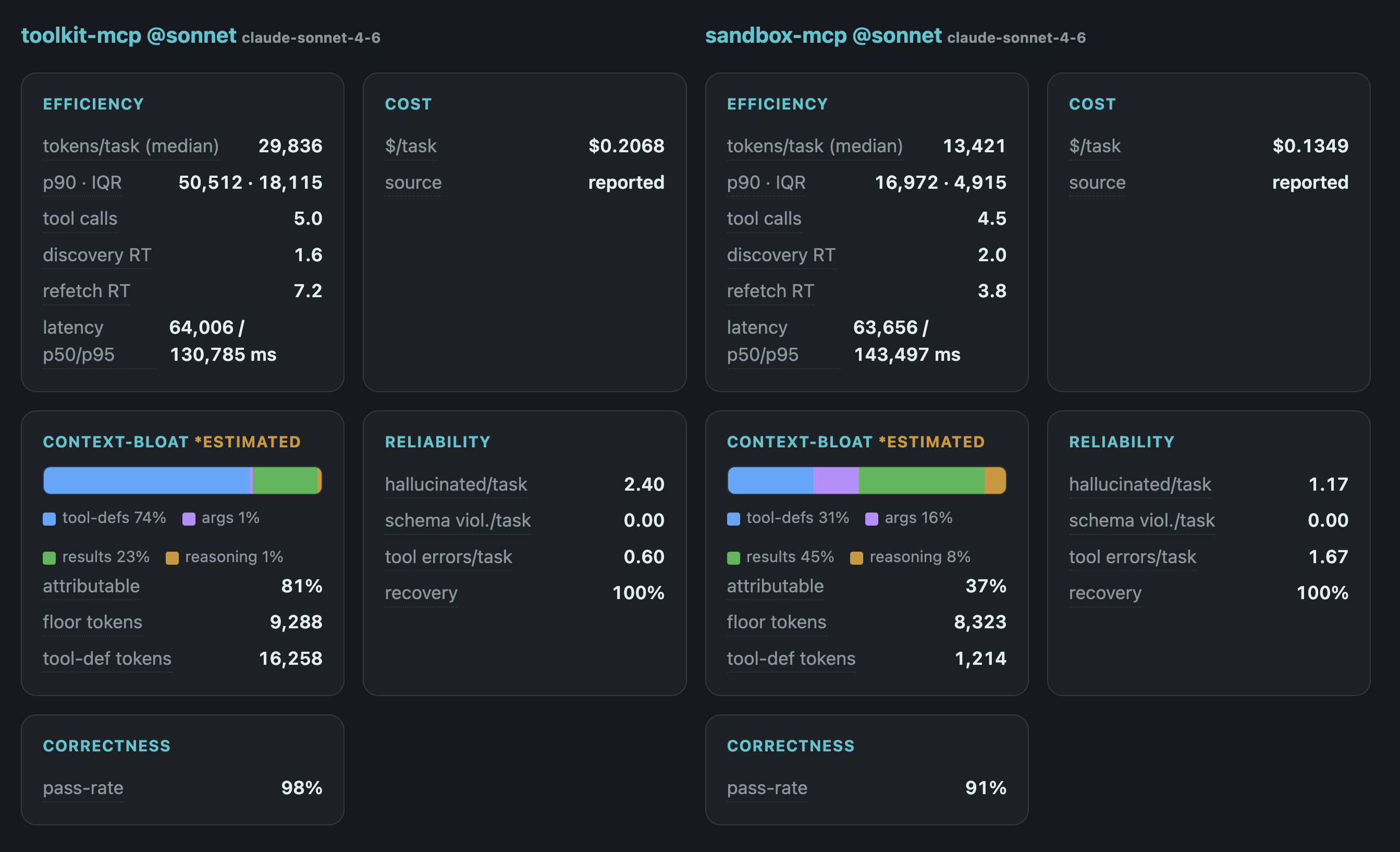
See demo/ for a real run you can explore
without any setup (anonymized) — including the finding that a "cheaper, faster" server was simply doing
less: it degraded from 98% correct on a strong driver to 23% on a weak one, while a code-execution
server stayed usable on both.
Quick start
# Analyze a local stdio server (auto-generates a task suite from its tools)
npx mcp-dyno analyze --server "node ./build/index.js"

# Bring your own tasks, and score correctness with an LLM judge
npx mcp-dyno analyze --server "node ./build/index.js" --tasks ./dyno-tasks.yaml --judge

# Use a built-in, versioned task corpus (comparable across servers)
npx mcp-dyno analyze --server "node ./build/index.js" --corpus filesystem@1 --judge

# Grade a run (per-pillar) and emit a committable badge
npx mcp-dyno scorecard --badge mcp-dyno-badge.json

# Prove an optimization: before vs after (paired stats)
npx mcp-dyno compare \
  --base "node ./build/index.js"      \
  --head "node ./build-optimized/index.js"

# Explore every run in a local dashboard
npx mcp-dyno view        # → http://localhost:4000
Use it as a CI gate
# Fail the build if a budget is breached…
npx mcp-dyno assert --config dyno.config.json --summary-md "$GITHUB_STEP_SUMMARY"
# …or if the PR resolvably regresses vs the base (noise never fails):
npx mcp-dyno compare --base "…" --head "…" --tasks tasks.yaml --fail-on-regression
Both exit non-zero only on real signal. See docs/ci.md for a ready-to-copy
GitHub Actions workflow.
Models & auth
Pick the driver model with --model. A bare id (e.g. claude-sonnet-4-6) is Claude; otherwise use
<provider>/<id>:
npx mcp-dyno analyze --server "…" --model openai/gpt-4o-mini      # needs OPENAI_API_KEY
npx mcp-dyno analyze --server "…" --model google/gemini-2.5-flash # needs GEMINI_API_KEY
npx mcp-dyno analyze --server "…" --model openrouter/meta-llama/llama-3.1-70b-instruct
Providers: anthropic (default), openai, google, openrouter, groq, together, plus any
OpenAI-compatible endpoint via <PROVIDER>_BASE_URL. Run the same task set under several models and
compare them in the model matrix (dyno view) for a cross-model robustness read.
For Claude specifically, two auth paths trade cost for fidelity:
--auth cli(subscription): drives via your existingclaudeCLI sign-in — no Anthropic API spend. Tool definitions are still measured exactly, but Claude Code's own system-prompt inflates the billable floor, so context-bloat is labeled estimated.--auth api(default): our own agent loop over the Anthropic Messages API (ANTHROPIC_API_KEY). Exact token accounting, minimal floor.
Non-Claude providers always drive over their API (no subscription path) with exact usage accounting.
The LLM judge (--judge, off by default) and task auto-generation can run on any provider — point
--judge-model at a different family (e.g. drive Claude, judge openai/gpt-4o) for cross-family grading.
Config
dyno init scaffolds a dyno.config.json. It can hold a single server block (for analyze), base
and head blocks for compare — each with its own env/headers, so you can compare two servers
with different secrets/auth — plus defaults (model, epochs, tasks, prices, …). Point at it with
--config dyno.config.json; explicit CLI flags always win.
Status
Early development. See docs/DESIGN.md for the architecture and roadmap.
Metrics
The five pillars and every metric are described in docs/DESIGN.md, and each metric in
the dashboard has a hover tooltip with its definition.
Acknowledgements
mcp-dyno was informed by prior work on LLM evaluation. These methods and ideas are credited below;
they were implemented independently (no third-party code is bundled):
- Anthropic — "Adding Error Bars to Evals" — the paired-difference
test, minimum-detectable-effect, and required-n power analysis used in
compare. - τ-bench — the
pass^kreliability framing. - The function-calling / tool-use benchmark line (e.g. BFCL, ToolBench) and the emerging MCP-evaluation landscape, which shaped the metric set.
- The normal quantile uses Acklam's algorithm; the regularized incomplete beta is evaluated via the modified Lentz continued fraction (public-domain mathematics).
Built on the Model Context Protocol SDK and the Anthropic SDK.
License
MIT