
mcp-inspector-atom8n-vscode
v1.9.0
Published
MCP Inspector Atom8n for VS Code

Maintainers
 atom8n-user
Readme
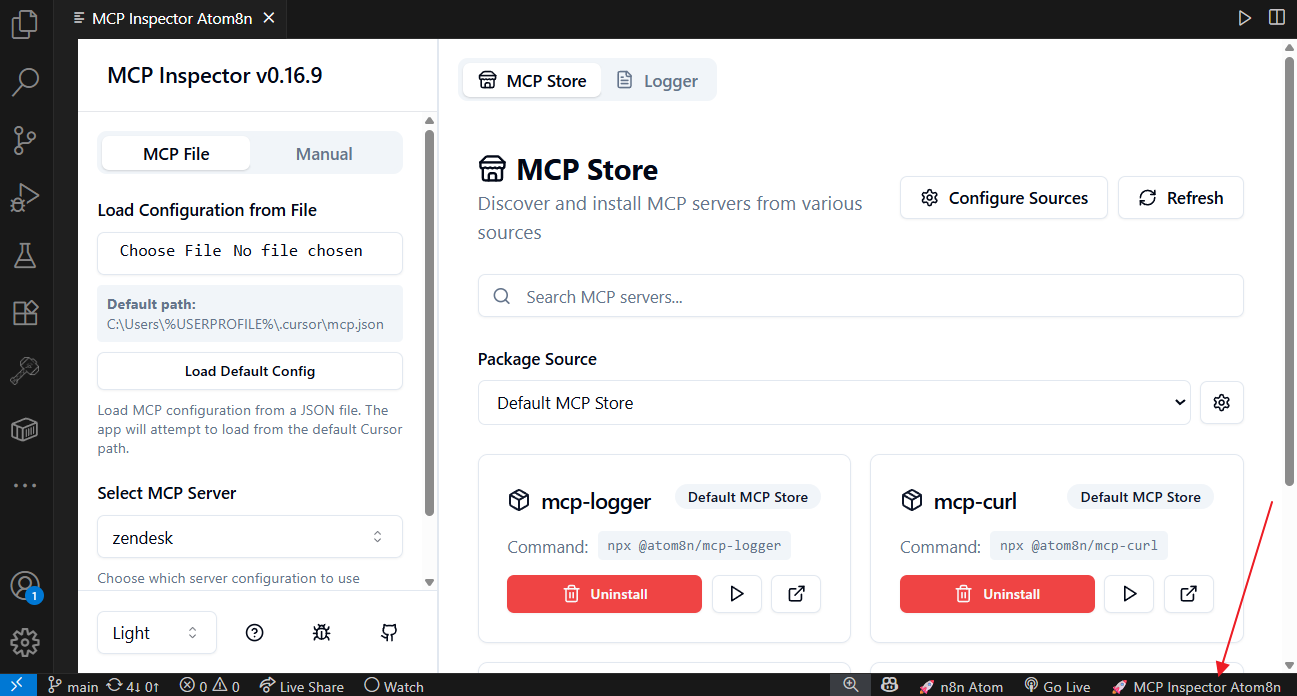
🚀 MCP Inspector Atom8n is a comprehensive VS Code extension that brings the full power of the Model Context Protocol (MCP) Inspector directly into your development environment. Test, debug, and manage MCP servers with an intuitive interface embedded within VS Code.
What is MCP Inspector?
MCP Inspector is a powerful testing and debugging platform for Model Context Protocol (MCP) servers. It provides a comprehensive interface for:
- Testing MCP Tools: Execute and debug MCP tools with dynamic form generation
- Resource Management: Browse, read, and subscribe to MCP resources
- Prompt Testing: Test and validate MCP prompts with custom arguments
- Server Discovery: Discover and install MCP servers from external sources
- Real-time Monitoring: Live logging and request/response tracking
- Multi-Transport Support: STDIO, SSE, and Streamable HTTP connections
Features
🔧 Integrated Development Environment
- Webview Integration: Full MCP Inspector interface embedded within VS Code
- Auto-start Server: Automatically starts the MCP Inspector server when opening the panel
- Seamless Workflow: Test MCP servers without leaving your editor
🚀 Server Management
- One-Click Operations: Start, stop, and restart the MCP Inspector server
- Health Monitoring: Real-time server status and connection monitoring
- Process Management: Automatic server lifecycle management
- Configuration: Customizable server settings and ports
🛠️ MCP Testing Capabilities
- Dynamic Tool Testing: Auto-generated forms based on MCP tool schemas
- Resource Browser: Explore and interact with MCP resources
- Prompt Validation: Test MCP prompts with various arguments
- Real-time Results: Live execution results and error handling
📊 Advanced Features
- MCP Store Integration: Discover and install MCP servers from external sources
- Multi-Transport Support: STDIO, SSE, and Streamable HTTP connections
- Authentication: OAuth 2.0 and custom header authentication
- Comprehensive Logging: Real-time log viewing with file rotation
- Configuration Management: Persistent settings with session/ephemeral configs
Installation
Install from VS Code Marketplace
- Search for "MCP Inspector Atom8n" in the Extensions view
- Click Install
System Requirements
- VS Code 1.74.0 or higher
- Node.js 18 or higher
- npm/npx for package management
Automatic Setup
- The extension automatically handles MCP Inspector package installation
- No manual configuration required for basic usage
Quick Start
1. Open the Extension
- Click the 🚀 MCP Inspector Atom8n status bar item, or
- Use Command Palette:
Ctrl+Shift+P→ "MCP Inspector Atom8n: Open"
2. Server Auto-Start
- The MCP Inspector server starts automatically (if enabled in settings)
- Monitor startup progress in the integrated webview
- View detailed logs in the VS Code output panel
3. Start Testing MCP Servers
- Load Configuration: Import your MCP configuration file (
~/.cursor/mcp.json) - Select Server: Choose from available MCP servers
- Test Tools: Execute MCP tools with dynamic form generation
- Browse Resources: Explore MCP resources and content
- Monitor Logs: View real-time execution logs
Commands
| Command | Description |
|---------|-------------|
| mcp-inspector-atom8n.open | Open the MCP Inspector panel |
| mcp-inspector-atom8n.startServer | Start the MCP Inspector server |
| mcp-inspector-atom8n.stopServer | Stop the MCP Inspector server |
| mcp-inspector-atom8n.restartServer | Restart the MCP Inspector server |
| mcp-inspector-atom8n.showLogs | Show extension logs in output panel |
Configuration
VS Code Settings
{
  "mcp-inspector-atom8n.serverPort": 6274,
  "mcp-inspector-atom8n.autoStartServer": true,
  "mcp-inspector-atom8n.packageVersion": "latest"
}
MCP Configuration
The extension automatically reads your MCP configuration from ~/.cursor/mcp.json:
{
  "mcpServers": {
    "my-server": {
      "command": "node",
      "args": ["path/to/server.js"],
      "env": {
        "NODE_ENV": "development"
      }
    }
  }
}
Supported MCP Features
✅ Core MCP Protocol
- Tools: Execute and test MCP tools with schema validation
- Resources: Browse, read, and subscribe to MCP resources
- Prompts: Test MCP prompts with custom arguments
- Completions: Auto-completion for resource and prompt references
- Sampling: Handle sampling requests from MCP servers
- Elicitation: Process elicitation requests
✅ Transport Types
- STDIO: Standard input/output communication
- SSE: Server-Sent Events for real-time communication
- Streamable HTTP: Modern HTTP-based transport
✅ Authentication
- OAuth 2.0: Full OAuth flow support
- Custom Headers: Arbitrary authentication headers
- Bearer Tokens: Token-based authentication
Architecture
The extension consists of four main components:
┌─────────────────┐    ┌──────────────────┐
│   VS Code       │    │   MCP Inspector  │
│   Extension     │◄──►│   Server         │
│   (Webview)     │    │   (Express)      │
└─────────────────┘    └─────────┬────────┘
                                 │
                    ┌─────────────▼─────────────┐
                    │   MCP Servers             │
                    │   (STDIO/SSE/HTTP)        │
                    └───────────────────────────┘
Component Details
- Extension: VS Code integration with webview management
- Server: Express.js proxy server with MCP protocol handling
- Client: React-based web interface with real-time updates
- CLI: Command-line interface for headless operations
Troubleshooting
Common Issues
Server Won't Start
# Check Node.js installation
node --version

# Check if port is available
netstat -an | grep 6274

# View detailed logs
# Use Command Palette → "MCP Inspector Atom8n: Show Logs"
MCP Server Connection Issues
- Verify MCP server is running and accessible
- Check MCP configuration file format
- Ensure proper authentication credentials
- Review server logs for detailed error messages
Package Installation Issues
# Manual package installation
npm install -g @atom8n/inspector

# Clear npm cache
npm cache clean --force

# Check npm permissions
npm config get prefix
Debug Steps
Check Extension Logs
- Command Palette → "MCP Inspector Atom8n: Show Logs"
- Look for error messages and stack traces
Verify System Requirements
- Node.js version 18+
- VS Code version 1.74.0+
- Available port 6274
Test MCP Configuration
- Validate JSON format in
~/.cursor/mcp.json - Test MCP server independently
- Check authentication settings
- Validate JSON format in
Development
Building from Source
# Clone repository
git clone <repository-url>
cd mcp-inspector-atom8n-vscode

# Install dependencies
npm install

# Compile TypeScript
npm run compile

# Package extension
npm run package
Project Structure
src/
├── extension.ts      # Main extension entry point
├── server.ts         # Server management and process handling
├── webview.ts        # Webview panel and UI management
└── logger.ts         # Logging utilities

out/                  # Compiled JavaScript output
package.json          # Extension manifest
tsconfig.json         # TypeScript configuration
Contributing
- Fork the repository
- Create a feature branch
- Make your changes
- Add tests if applicable
- Submit a pull request
Advanced Usage
Custom MCP Servers
The extension supports various MCP server configurations:
{
  "mcpServers": {
    "stdio-server": {
      "command": "node",
      "args": ["server.js"],
      "env": { "DEBUG": "true" }
    },
    "sse-server": {
      "type": "sse",
      "url": "http://localhost:3001/sse"
    },
    "http-server": {
      "type": "streamable-http",
      "url": "http://localhost:3001/mcp"
    }
  }
}
Authentication Setup
For servers requiring authentication:
{
  "mcpServers": {
    "authenticated-server": {
      "command": "node",
      "args": ["server.js"],
      "env": {
        "API_KEY": "your-api-key",
        "AUTH_TOKEN": "your-auth-token"
      }
    }
  }
}
License
This extension is licensed under the MIT License.
Support
- Issues: GitHub Issues
- Documentation: MCP Inspector Docs
- Community: MCP Discord
Happy MCP Testing! 🚀
Built with ❤️ for the Model Context Protocol community