
mcp-mongo-server
v3.0.1
Published
A Model Context Protocol server for MongoDB connections

Maintainers
 kiliczsh
Readme
MCP MongoDB Server



A Model Context Protocol (MCP) server that lets AI assistants work with your MongoDB databases. It exposes your collections, infers their schemas, and runs queries, aggregations, and writes through a standard interface — so tools like Claude Desktop and Cursor can read and reason about your data.
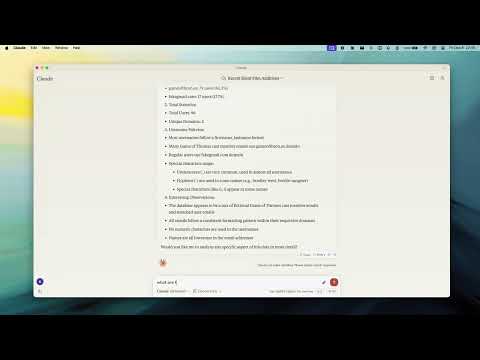
Demo
Why use it
- Talk to your database in plain language — the assistant discovers your collections and their shape automatically.
- Safe by default — turn on read-only mode to let an assistant explore without any risk of changing data.
- Works everywhere — connects to standalone, replica set, sharded, and Atlas deployments, over plain or TLS connections.
Key Features
- Read-Only Mode — blocks every write path (insert, update, index creation, and aggregation stages like
$out/$mergethat could modify data). - Smart ObjectId Handling — configurable
auto/none/forceconversion of 24-character hex strings to ObjectIds. - Schema Inference — automatic collection schema detection from document samples.
- Query & Aggregation — full query and aggregation pipeline support, with optional
explainplans. - Write Operations — insert, update, and index creation (when read-only mode is off).
- Time Conversion — a
convertTimehelper turns Unix timestamps and date strings into UTC/GMT/ISO, so date queries stay unambiguous across timezones. - Progress & Cancellation — long operations report progress and can be cancelled mid-flight.
- Two Transports — run locally over stdio, or expose an HTTP endpoint for remote access.
Requirements
- Node.js 20 or newer
Quick Start
Point the server at your database — no install step needed:
npx -y mcp-mongo-server mongodb://localhost:27017/mydatabaseExplore safely, without any chance of changing data:
npx -y mcp-mongo-server mongodb://localhost:27017/mydatabase --read-onlyUsage
Local (stdio)
This is the default, used by Claude Desktop, Cursor, and other local clients:
npx -y mcp-mongo-server "mongodb://user:pass@localhost:27017/mydatabase"Remote (HTTP)
Expose an HTTP endpoint at /mcp for remote or multi-client access:
npx -y mcp-mongo-server "mongodb://user:pass@localhost:27017/mydatabase" --transport http --port 3001By default, only requests without a browser Origin (CLIs, IDEs) and requests
from localhost are accepted; everything else is rejected with 403 to guard
against DNS-rebinding attacks. Allow specific browser origins with
--allowed-origins:
npx -y mcp-mongo-server "mongodb://..." --transport http --port 3001 --allowed-origins "https://app.example.com"Options
| Flag | Description |
|------|-------------|
| --read-only, -r | Block all write operations |
| --allow-cross-db | Allow aggregation $out/$merge/$lookup to target other databases (off by default) |
| --allow-server-js | Allow server-side JavaScript operators $function/$where/$accumulator (off by default) |
| --transport, -t | stdio (default) or http |
| --port, -p | HTTP port (default 3001) |
| --allowed-origins | Comma-separated browser origins to allow in HTTP mode |
| --json-limit | Max HTTP request body size (default 10mb) |
| --auth-token | Require Authorization: Bearer <token> on the HTTP endpoint |
Environment Variables
| Variable | Description |
|----------|-------------|
| MCP_MONGODB_URI | MongoDB connection URI (alternative to the argument) |
| MCP_MONGODB_READONLY | Enable read-only mode ("true") |
| MCP_MONGODB_ALLOW_CROSS_DB | Allow cross-database aggregation stages ("true") |
| MCP_MONGODB_ALLOW_SERVER_JS | Allow server-side JavaScript operators ("true") |
| MCP_PORT | HTTP port |
| MCP_HTTP_ALLOWED_ORIGINS | Comma-separated browser origins to allow in HTTP mode |
| MCP_HTTP_JSON_LIMIT | Max HTTP request body size (default 10mb) |
| MCP_HTTP_AUTH_TOKEN | Bearer token required to access the HTTP endpoint |
Security
Database scope. The server operates on the database in your connection
string. Aggregation stages that reach another database ($out, $merge,
$lookup with an explicit db) are rejected by default, so a pipeline can't
quietly read from or write to databases you didn't point it at. Enable them
with --allow-cross-db if you need them.
Server-side JavaScript. The aggregation operators $function, $where,
and $accumulator run arbitrary JavaScript on the MongoDB server. They are
rejected by default; enable them with --allow-server-js if you trust the
pipelines being run.
Read-only mode blocks every write path, including aggregation stages that
write or run server-side JavaScript ($out, $merge, $function, $where,
$accumulator).
Least privilege. Application-level checks only go so far — the strongest guarantee comes from the database. Connect with a MongoDB user scoped to just the database you need, with read-only permissions when the assistant only needs to explore. That way the database itself enforces the boundary, as defense in depth.
Documentation
- Integration Guide — Claude Desktop, Windsurf, Cursor, Docker
- Available Tools — query, aggregate, update, insert, and more
- Development — setup, scripts, and debugging
- Contributing
License
MIT — see LICENSE for details.